Enterprise: TreeGrid: Selects incorrect child row
Describe the bug
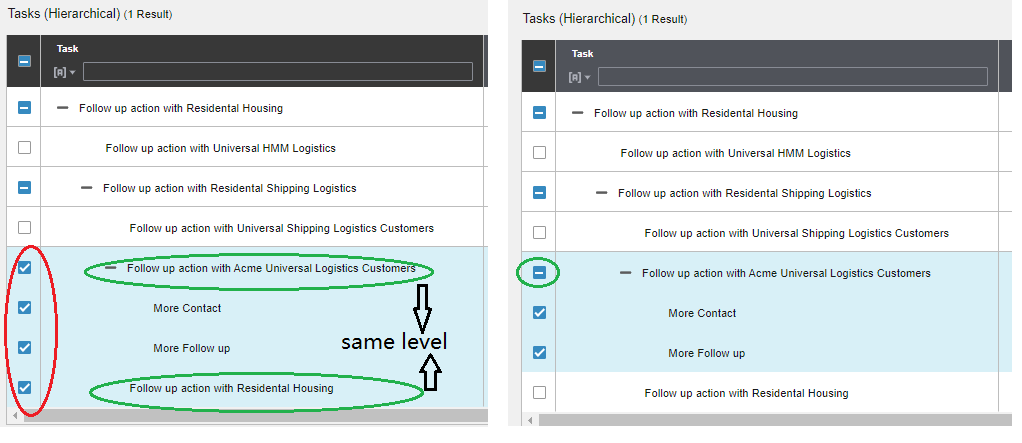
The Datagrid have an issue in selection scop for the secondary tree node which has children and same level item
To Reproduce
Steps to reproduce the behavior:
- Create a treegrid and make it multiple select
- set the data as below, make the id5 is the sendonary tree node and only have 2 children id6 and id7. Also, create the same level item id8 with id5:
this._data = [{
        id: 1, escalated: 0, depth: 1, expanded: true, taskName: 'Follow up action with Residental Housing', desc: 'Contact sales representative with the updated purchase order.', comments: 2, time: '22:10 PM', children: [
          { id: 2, escalated: 0, depth: 2, taskName: 'Follow up action with Universal HMM Logistics', desc: 'Contact sales representative.', comments: 2, time: '22:10 PM' },
          {
            id: 3, escalated: 0, depth: 2, expanded: true, taskName: 'Follow up action with Residental Shipping Logistics ', desc: 'Contact sales representative.', comments: 2, time: '7:04 AM', children: [
              { id: 4, escalated: 0, depth: 3, taskName: 'Follow up action with Universal Shipping Logistics Customers', desc: 'Contact sales representative.', comments: 2, time: '14:10 PM' },
              {
                id: 5, escalated: 0, depth: 3, expanded: true, taskName: 'Follow up action with Acme Universal Logistics Customers', desc: 'Contact sales representative.', comments: 2, time: '7:04 AM', children: [
                  { id: 6, escalated: 0, depth: 4, taskName: 'More Contact', desc: 'Contact sales representative.', comments: 2, time: '14:10 PM' },
                  { id: 7, escalated: 0, depth: 4, taskName: 'More Follow up', desc: 'Contact sales representative.', comments: 2, time: '7:04 AM' },
                ]
              },
              { id: 8, escalated: 0, depth: 3, taskName: 'Follow up action with Residental Housing', desc: 'Contact sales representative with the updated purchase order.', comments: 2, time: '18:10 PM' }
            ]
          }
        ]
      }];
    }
- select the item id5
Expected behavior
The id5, id6 and id7 should be selected and id8 should be unselected
Version
- ids-enterprise: [^5.5.2]
Screenshots
 carerer2
All 5 comments
@deep7102 do you think when you get a chance you can test the data on https://github.com/infor-design/enterprise/pull/2990 and see if this actually fixes that as well?
 tmcconechy
on 17 Oct 2019
tmcconechy
on 17 Oct 2019
One more case: If change the id5's expand = false. I expect the id5's tree icon should be "+" and the children id6, id7 should be hidden. But the existing behavior is even the id5's tree icon is "+", the id6 and id7 still can display.
carerer2
on 18 Oct 2019
Will Move to QA Failed.
Steps:
- Goto http://master-enterprise.demo.design.infor.com/components/datagrid/test-tree-select-multiple.html
- Click '+' in Id 5
- Select Id 6
- Close the tree and click '-' in Id 5
- Reopen Id 5 and click '+' then select Id 7
Expected :
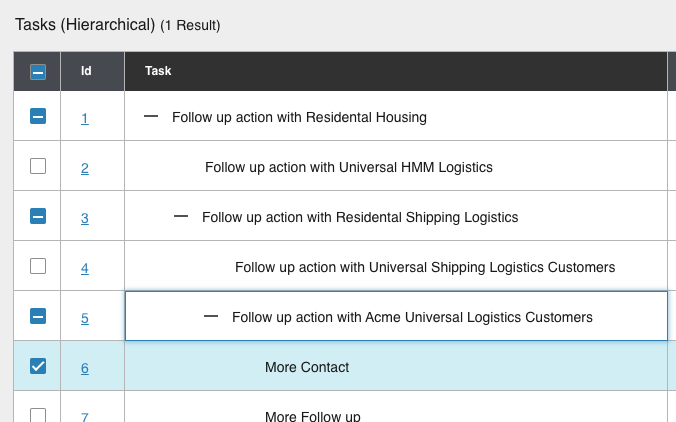
Id 5 should be 'Checked' and not be Partial
 janahintal
on 23 Oct 2019
janahintal
on 23 Oct 2019
@janahintal im not able to reproduce this. Can you clarify step 4? After i open it again it is partial as expected.
tmcconechy
on 23 Oct 2019
@janahintal in order to Id 5 should be 'Checked' and not be Partial, all three rows with id 5, 6 and 7 must be selected, but in your steps only selecting 6 and 7 and did not selecting id 5 so in that case Id 5 should be Partial as expected.
 deep7102
on 23 Oct 2019
deep7102
on 23 Oct 2019
Related issues
 pwpatton
·
3Comments
pwpatton
·
3Comments
 EdwardCoyle
·
4Comments
EdwardCoyle
·
4Comments
 fitzorama
·
3Comments
fitzorama
·
3Comments
 CindyMercadoReyes
·
3Comments
CindyMercadoReyes
·
3Comments
 jbrcna
·
3Comments
jbrcna
·
3Comments