Enterprise: Menu Component: Tooltip cut off on Mobile
Describe the bug
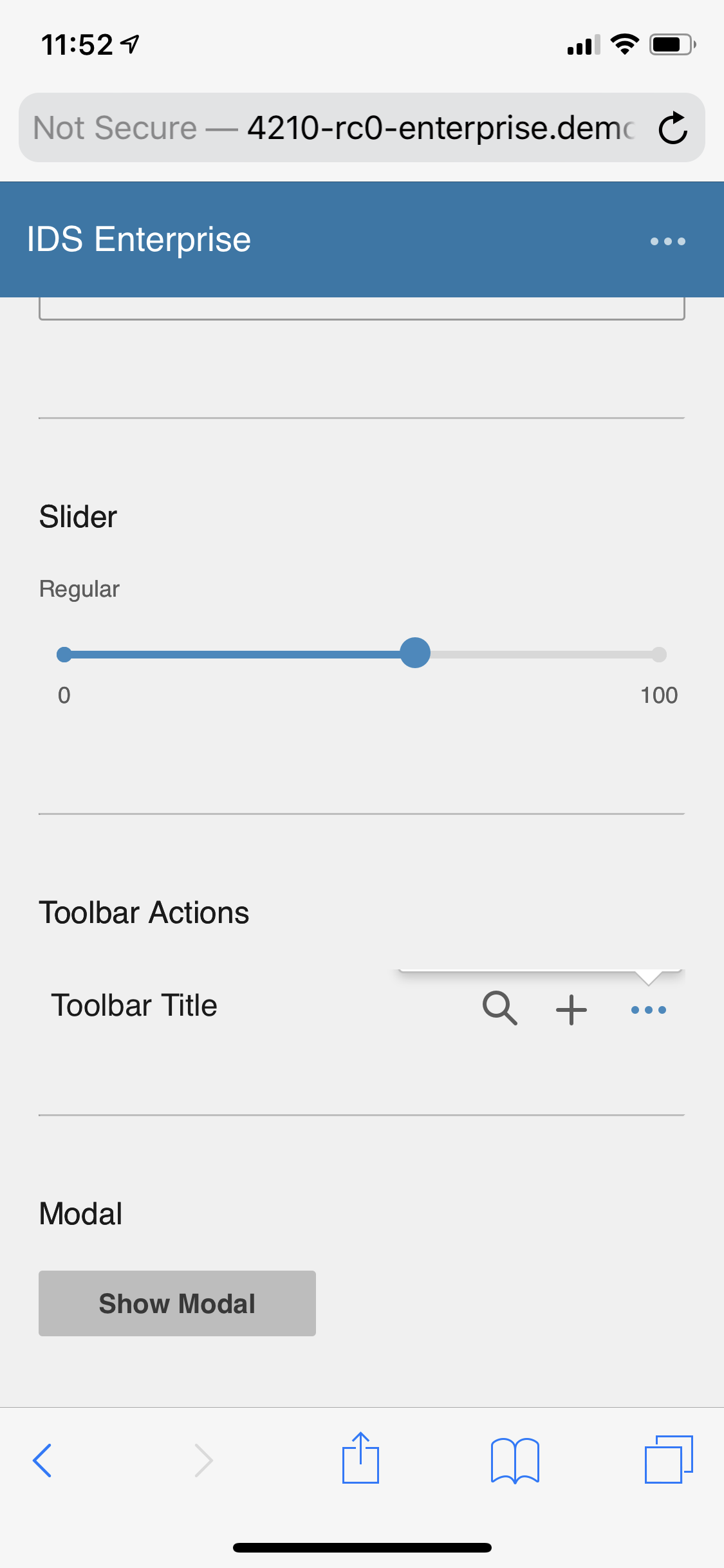
Menu Button Component: On the sink page all the drop down menu's are cut off or not appearing
To Reproduce
Steps to reproduce the behavior:
- Go to url: http://4210-rc0-enterprise.demo.design.infor.com/components/toolbar/example-inside-form-tag.html
- Press down on the three button "More" icon
- The tooltip is cut off
- Please see screen shot attached.
- try both the menu on the header at the top and on the toolbar. they are both doing it
Expected behavior
The tooltip/drop down menu should appear when the user clicks on the more icon on their device
Version
- ids-enterprise: [e.g. v4.20.0 ]
Screenshots

Platform
- Device (if applicable) [e.g. iPhone XS 12]
Additional context
Add any other context about the problem here.
None
 CindyMercadoReyes
All 6 comments
One idea for this is to make that popup use attachToBody setting. This may work?
 tmcconechy
on 2 Oct 2019
tmcconechy
on 2 Oct 2019
Looks like here https://github.com/infor-design/enterprise/blob/master/src/components/toolbar/toolbar.js#L245
- we could add
attachToBody: trueto solve but only on condition of(env.os.name === 'ios'to be safer.
tmcconechy
on 3 Oct 2019
Per a chat with @pwpatton, I'd like to make a bit more of a comprehensive fix for this problem. It seems that there's really no better way to handle this than to just default attachToBody: true in an iOS setting. This should probably be done on all Popupmenus, instead of at the Toolbar level. FX @ericangeles's change is great, but it doesn't work for Flex Toolbars. I'd like to take this fix and push it down to the Popupmenu level instead.
 EdwardCoyle
on 14 Oct 2019
EdwardCoyle
on 14 Oct 2019
tested on http://master-enterprise.demo.design.infor.com/components/toolbar/example-inside-form-tag.html
Test PASSED
 johnbarcena
on 16 Oct 2019
johnbarcena
on 16 Oct 2019
However, menus' for more actions are not working and the color sub menu is not available.
see ticket #2986
johnbarcena
on 16 Oct 2019
We'll take a look at #2986
tmcconechy
on 16 Oct 2019
Related issues
CindyMercadoReyes
·
3Comments
 jbrcna
·
3Comments
jbrcna
·
3Comments
 pwpatton
·
3Comments
pwpatton
·
3Comments
 awbuboltz
·
3Comments
awbuboltz
·
3Comments
 dubde
·
4Comments
dubde
·
4Comments