Enterprise: Bar: When name is used 2 times, the chart displays data in one row even when isStacked is set to false
Describe the bug
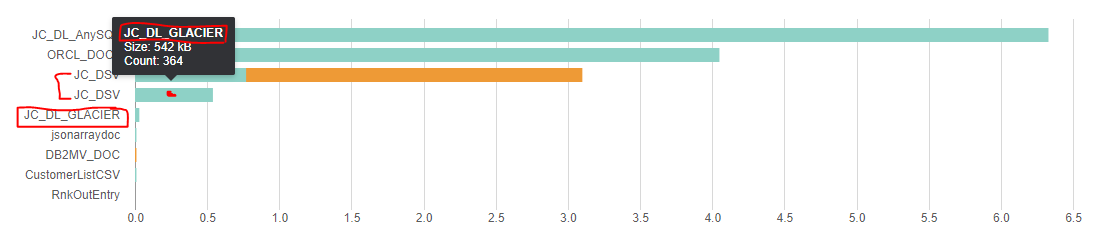
When name is used 2 times, the chart displays data in one row (like in stacked bar chart) even when isStacked is set to false. Then it breaks the labels below. Probably because: ERROR TypeError: Cannot set property 'textContent' of undefined in console. As seen on the screenshot, the 2nd 'JC_DSV' should be named 'JC_DL_GLACIER' and also there are just 9 rows, while the dataset contains 10 items.
To Reproduce
Steps to reproduce the behavior:
- Use same name for dataset items
- Observe the chart behavior
Expected behavior
The label should be able to use more than once
Screenshots
 hohnzy
All 8 comments
Can you attach your data and settings. I think that this might be very difficult to fix as it uses the names as part of the way it tries to stack the data up. Does i work if you remove the duplicate data point?
 tmcconechy
on 16 Sep 2019
tmcconechy
on 16 Sep 2019
If there are no duplicate names, it works just fine. Duplicate names could happen in our use case where data are of different types and in chart they are recognized by different colors. The names are user defined.
[{name: "JC_DL_AnySQL", value: 6.33, color: "#8ED1C6", tooltip: "<strong>JC_DL_AnySQL</strong><br>Size: 6.33 MB<br>Count: 827"},
{name: "ORCL_DOC1", value: 4.2, color: "#8ED1C6", tooltip: "<strong>ORCL_DOC1</strong><br>Size: 4.2 MB<br>Count: 21076"},
{name: "JC_DSV", value: 3.1, color: "#EE9A36", tooltip: "<strong>JC_DSV</strong><br>Size: 3.1 MB<br>Count: 2"},
{name: "JC_DSV", value: 0.77, color: "#8ED1C6", tooltip: "<strong>JC_DSV</strong><br>Size: 765.7 kB<br>Count: 100"},
{name: "JC_DL_GLACIER", value: 0.66, color: "#8ED1C6", tooltip: "<strong>JC_DL_GLACIER</strong><br>Size: 655.16 kB<br>Count: 440"},
{name: "jsonarraydoc", value: 0.03, color: "#8ED1C6", tooltip: "<strong>jsonarraydoc</strong><br>Size: 34.98 kB<br>Count: 24"},
{name: "DB2MV_DOC", value: 0.01, color: "#8ED1C6", tooltip: "<strong>DB2MV_DOC</strong><br>Size: 9.74 kB<br>Count: 1"},
{name: "RnkOutEntry", value: 0.01, color: "#8ED1C6", tooltip: "<strong>RnkOutEntry</strong><br>Size: 9.71 kB<br>Count: 9"},
{name: "CustomerListCSV", value: 0.01, color: "#EE9A36", tooltip: "<strong>CustomerListCSV</strong><br>Size: 7.1 kB<br>Count: 4"},
{name: "iotdata_Skoda", value: 0.01, color: "#8ED1C6", tooltip: "<strong>iotdata_Skoda</strong><br>Size: 6.65 kB<br>Count: 6"}]
Great, thanks. I will have a look at this. From your side would it be an option if we "auto rename" the duplicate entries? "JC_DSV 1" and "JC_DSV 2" if we have to for a solution?
tmcconechy
on 17 Sep 2019
Hi, maybe internally? We don't want to rename labels as those should be references to be found in other views.
hohnzy
on 21 Jan 2020
OK, we can see. It does use that data in the sort so this could be tricky to fix.
tmcconechy
on 21 Jan 2020
Descoping some older issues
tmcconechy
on 25 Feb 2021
Hello, @tmcconechy this is still an issue for us too, does it mean that it will never be fixed?
 Fruko
on 25 Feb 2021
Fruko
on 25 Feb 2021
I'm thinking that it will "go away" in the new version as we port these over to web components. I'll test it when that work is done.
tmcconechy
on 25 Feb 2021
Related issues
 swetteinfor
·
3Comments
swetteinfor
·
3Comments
 jbrcna
·
3Comments
jbrcna
·
3Comments
 SofiK
·
3Comments
jbrcna
·
3Comments
SofiK
·
3Comments
jbrcna
·
3Comments
 pwpatton
·
3Comments
pwpatton
·
3Comments