Enterprise: Homepage: chart y axis description is not visible when widget width is 1 unit
Describe the bug
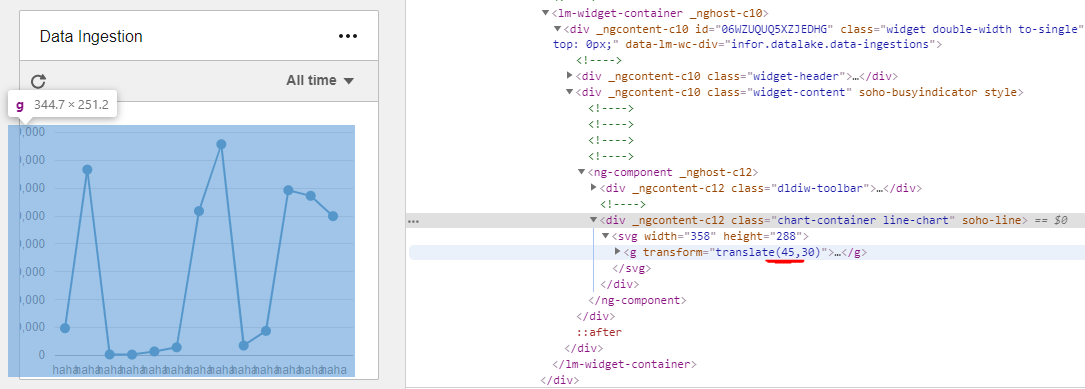
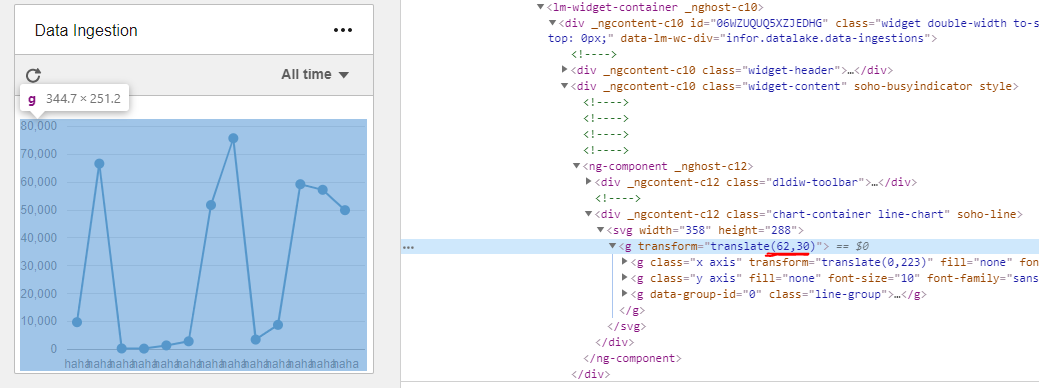
Chart y axis description is not visible when widget width is 1 unit (360px). See screenshots. Something wrong in transform: translate(), like 62 for x translate seems more accurate.
To Reproduce
Steps to reproduce the behavior:
- Enter longer strings for y axis values in https://design.infor.com/code/ids-enterprise/latest/demo/components/homepage/example-filled
Expected behavior
Should be aligned properly and y axis labels should be visible
Version
4.20.0
Screenshots
 hohnzy
All 15 comments
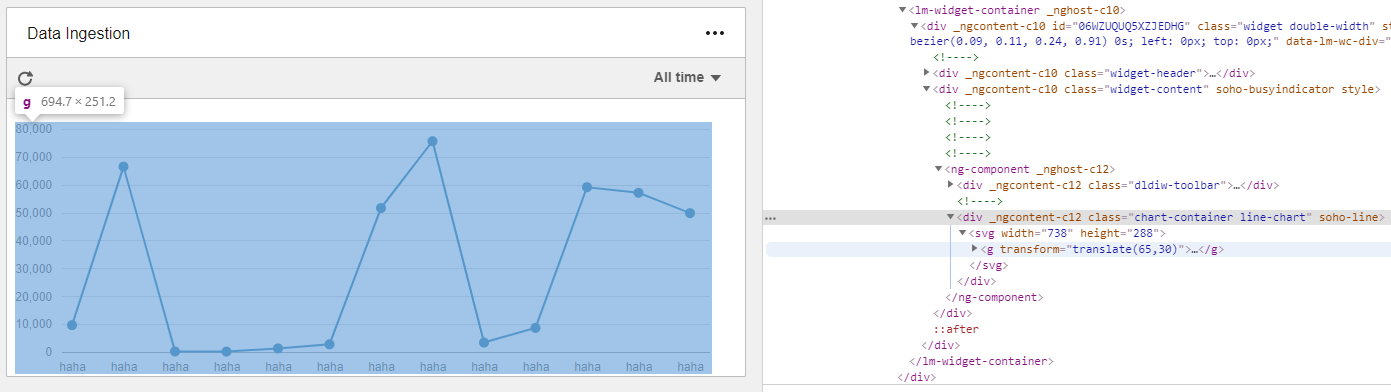
Also when the widget is wider its a bit off, but at least visible:
hohnzy
on 21 Aug 2019
For this case you will have to set the number of ticks https://github.com/infor-design/enterprise/blob/master/app/views/components/line/test-axis-y-formate-integer.html#L47 or the tick format https://github.com/infor-design/enterprise/blob/master/app/views/components/line/test-axis-y-formate-shortened.html#L39
If it doesnt fit - it wont fit automatically. You can just set the number of ticks to less so less values show or use shorter labels.
 tmcconechy
on 21 Aug 2019
tmcconechy
on 21 Aug 2019
Might eventually just close this issue as wont fix but i think we can adjust the height of the widget a bit better. Your other choice is to use a 2 width chart section for this chart
tmcconechy
on 21 Aug 2019
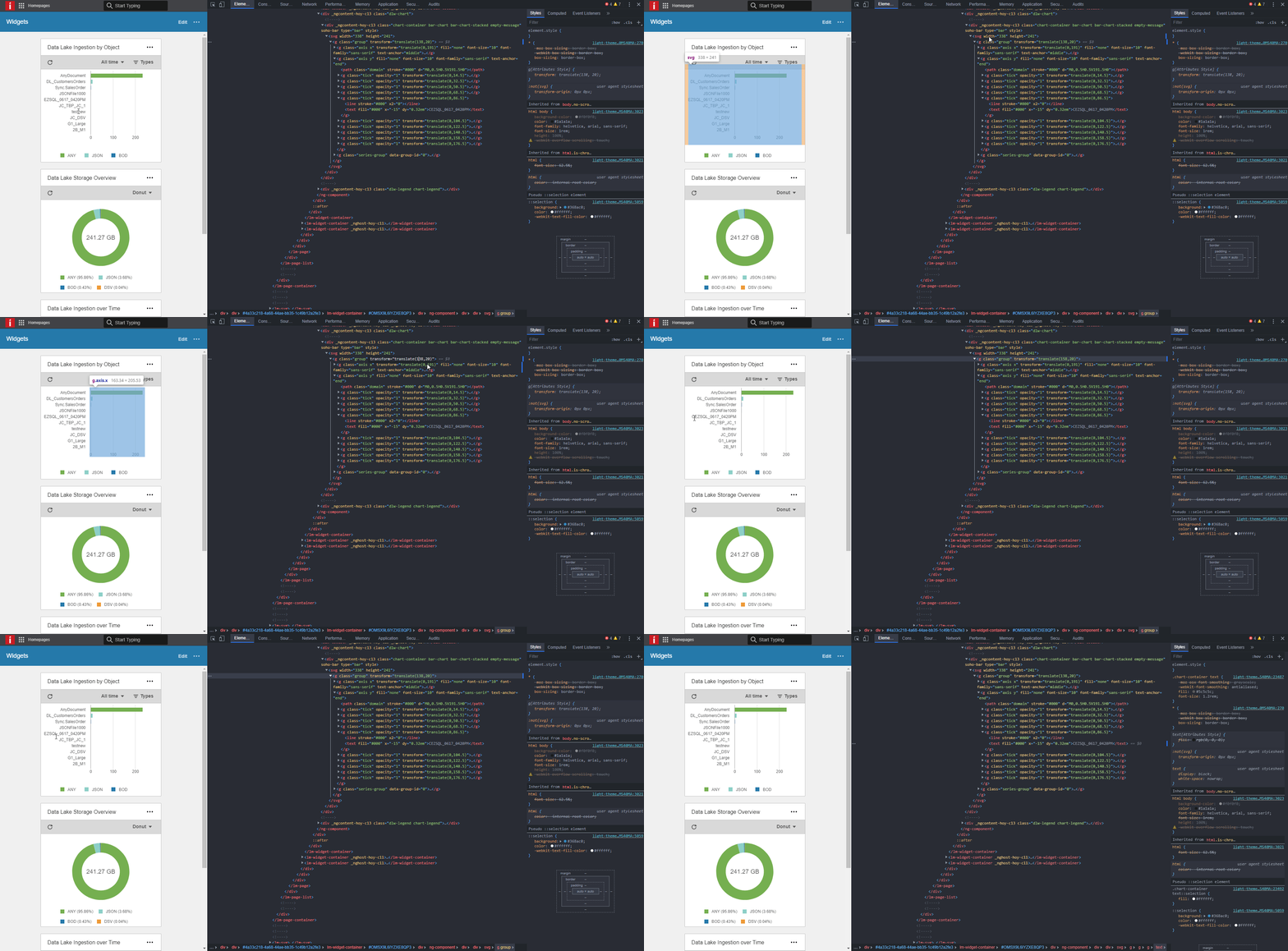
I think this is just bug with wrong translate value on the first <g> under <svg> element...
Can't show less values as it is top 10 chart, also can't use shorter labels in this use case.
hohnzy
on 21 Jan 2020
Do you see something you can prepare a Pull Request for?
tmcconechy
on 21 Jan 2020
Not really... :( i dont understand how the constant 6 was computed. That means that the average character is 6 pixels wide?
https://github.com/infor-design/enterprise/blob/e76e0c17490022c8cf7ebabdca81127bb7a1db3c/src/components/bar/bar.js#L240
Looks like this line is always triggered when the component is used by angular SohoBarComponent as it does not have longText defined in SohoBarOptions interface in soho-bar.d.ts :(
Also I dont understand where is innerWidth set, so the small, medium, large viewport can be set?
https://github.com/infor-design/enterprise/blob/e76e0c17490022c8cf7ebabdca81127bb7a1db3c/src/components/bar/bar.js#L141
hohnzy
on 21 Jan 2020
Ok this may be a little easier than I thought tho. @deep7102 can you answer those questions? I think the six was maybe approx size of a character? But we can schedule for next sprint and review further
tmcconechy
on 21 Jan 2020
Yes, its
6is approximate character size.innerWidthis global window variable set by browser it is most of the time written aswindow.innerWidth.
 deep7102
on 22 Jan 2020
deep7102
on 22 Jan 2020
QA Passed. Will now move to Done. Thanks
Verified in https://master-enterprise.demo.design.infor.com/components/homepage/test-linechart-x-axis.html
 janahintal
on 26 Mar 2020
janahintal
on 26 Mar 2020
just read the description :( how can this pass through QA?
hohnzy
on 2 Apr 2020
The super long Y axis wasnt entirely clear to me - sorry. When i reread the original post it shows values like 50,000 which worked ok in our example.
Please Try and make a new issue for that case and i'll escalate it. Can you put the data in that you used and the actual widget size. Again not sure there is a fix? I guess we would have to truncate your data for you on the left to a max? Also your welcome to test the PR when you see it being added to the issue.
This issue looked entirely like we were talking about the mushed data on the bottom to me.
tmcconechy
on 2 Apr 2020
I dont think new issue is needed. This just shouldn't be closed. Its described clearly and the title is y axis
and you can see in https://github.com/infor-design/enterprise/issues/2674#issuecomment-576842631 picture where the bug is.
hohnzy
on 2 Apr 2020
OK it got missed. sorry. But i disagree with you.
I need a new issue to make sure its clearer. I will make it then. If you read the first part of the issue that comment wasnt mentioned at all (very clearly anyways). So thats probably why this got missed. That was buried in there. Also i want to discuss how we might fix it as im not sure how. Clearly you cant just put unlimited long y axis labels in there and expect it to fit in a 1x1 widget. So for those reasons will make a new issue.
Can you tell me the data and options you put in that or do we need to make it up?
tmcconechy
on 2 Apr 2020
you can reproduce in ng demo, file bar.demo.ts change the barData
 public barData = [{
    data: [{
      name: 'Category AAAAAAAAAAAAAAAAAAAAAAAAAAAAAAAAAAAAA',
      value: 373,
      url: 'test'
      }, {
        name: 'Category B',
        value: 372
      }, {
        name: 'Category C',
        value: 236.35
    }],
    name: ''
  }];
and observe here http://localhost:4200/ids-enterprise-ng-demo/bar
hohnzy
on 2 Apr 2020
And another thing - the original issue is a line chart this is a bar chart now? Anyways here is the new issue. https://github.com/infor-design/enterprise/issues/3702 Can we discuss the details of that over there - especially worth discussing what a good fix for that would be.
Again: I feel like the original issue was unclear about this point. But sorry for missing that point.
New Issue i tried to make the point abundantly clear. Now we need to discuss over there what a reasonable fix would be. I made a suggestion there and CC you.
tmcconechy
on 2 Apr 2020
Related issues
 jbrcna
·
3Comments
janahintal
·
3Comments
jbrcna
·
3Comments
janahintal
·
3Comments
 CindyMercadoReyes
·
3Comments
jbrcna
·
3Comments
CindyMercadoReyes
·
3Comments
jbrcna
·
3Comments
 pwpatton
·
3Comments
pwpatton
·
3Comments