Enterprise: Tabs module search field clear button doesn't work when focused outside before clicking 'x' in responsive view
Describe the bug
Tabs module search field clear button doesn't work when focused outside before clicking 'x'
To Reproduce
Steps to reproduce the behavior:
- Go to 'https://4200-beta1-enterprise.demo.design.infor.com/components/tabs-module/example-category-searchfield-go-button-home.html
- Minimize the screen
- In the search field type 'Test'
- click or focus outside the search field
- click and focus again in the search field and try to click 'x' close
- Noticed that the 'x' or close button is not clickable.
Expected behavior
Clear button should work
Version
Beta 4.20
Screenshots
NA
Platform
All Browsers & OS
Additional context
No any additional context
 janahintal
All 11 comments
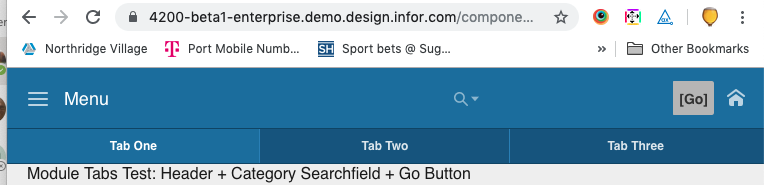
Also the search field is missing a fill so it looks out of place. Not sure if this is a regression as the servers are down.
 tmcconechy
on 1 Aug 2019
tmcconechy
on 1 Aug 2019
@tmcconechy I think the absence of a background-color (if this is what you mean by fill?) is intentional to indicate a nonactive state...thoughts?
 davidcarlsonberg
on 1 Aug 2019
davidcarlsonberg
on 1 Aug 2019
i mean this....The icon is not "connected"
tmcconechy
on 1 Aug 2019
It should look more like it does on desktop? E.g.:

davidcarlsonberg
on 1 Aug 2019
yeah i would say so as you resize at a certain point it goes that way and looses the background. That seems to look better.
tmcconechy
on 1 Aug 2019
I was looking at this for a bit too... it seems this is a bit more than just the "x" button not being clickable and the state not looking right. The entire "responsive" view of the Toolbar Searchfield is no longer working.
On the "responsive" view, the Searchfield's supposed to take over the entire width of the header.
I can't seem to find a working version in-tact on our demo sites, which suggests this hasn't worked in a long time. It's been broken since at least this version: https://4170-enterprise.demo.design.infor.com/components/header/test-header-gauntlet.html (shrink the viewport down to a smaller size and use the searchfield.
We could maybe try swapping the Toolbar in that example out for the Flex Toolbar, since it's full-width Searchfield seems to be working as expected: http://localhost:4000/components/header/example-flex-toolbar.html
 EdwardCoyle
on 1 Aug 2019
EdwardCoyle
on 1 Aug 2019
I can load a few more versions back... Deploying now. I also see wierd things like the search isnt next to the button and there is a un needed overflow. I think flex toolbar may help
tmcconechy
on 1 Aug 2019
Honestly anyone implementing this from scratch at this point should be using Flex Toolbar anyway
EdwardCoyle
on 1 Aug 2019
I'll put in Flex Toolbar.
davidcarlsonberg
on 1 Aug 2019
Implementing flex-toolbar as per the discussion above causes issues when adding in the categories element on searchfield. There will also be more conflicts that arise between the use of flex-toolbar and searchfield. That said, I'm going to punt changing this over to flex-toolbar in favor of turning that into another issue or issues to address implementation of flex-toolbar on example pages that use normal toolbar with searchfield. I will fix the small QA issue that is the original reason for this QA issue.
davidcarlsonberg
on 1 Aug 2019
QA Passed.
Tested in https://4200-rc0-enterprise.demo.design.infor.com/components/tabs-module/example-category-searchfield-go-button-home.html across all OS, Browser and devices.
janahintal
on 5 Aug 2019
Related issues
 CindyMercadoReyes
·
3Comments
CindyMercadoReyes
·
3Comments
 SasiPalanati
·
3Comments
SasiPalanati
·
3Comments
 jbrcna
·
3Comments
CindyMercadoReyes
·
3Comments
jbrcna
·
3Comments
CindyMercadoReyes
·
3Comments
 brianjuan
·
3Comments
brianjuan
·
3Comments
Most helpful comment
I was looking at this for a bit too... it seems this is a bit more than just the "x" button not being clickable and the state not looking right. The entire "responsive" view of the Toolbar Searchfield is no longer working.
On the "responsive" view, the Searchfield's supposed to take over the entire width of the header.
I can't seem to find a working version in-tact on our demo sites, which suggests this hasn't worked in a long time. It's been broken since at least this version: https://4170-enterprise.demo.design.infor.com/components/header/test-header-gauntlet.html (shrink the viewport down to a smaller size and use the searchfield.
We could maybe try swapping the Toolbar in that example out for the Flex Toolbar, since it's full-width Searchfield seems to be working as expected: http://localhost:4000/components/header/example-flex-toolbar.html