Enterprise: Tabs: Add tab is being duplicated after adding and removing
Describe the bug
Tabs: Add tab is being duplicated after adding and removing
To Reproduce
Steps to reproduce the behavior:
- Go to http://4190-beta2-enterprise.demo.design.infor.com/components/tabs/example-add-tab-button.html
- Add a Tab and click '+' button twice
- Remove 'New Tab 0'
- Click '+' to add another tab again
- Click 'New Tab 1'
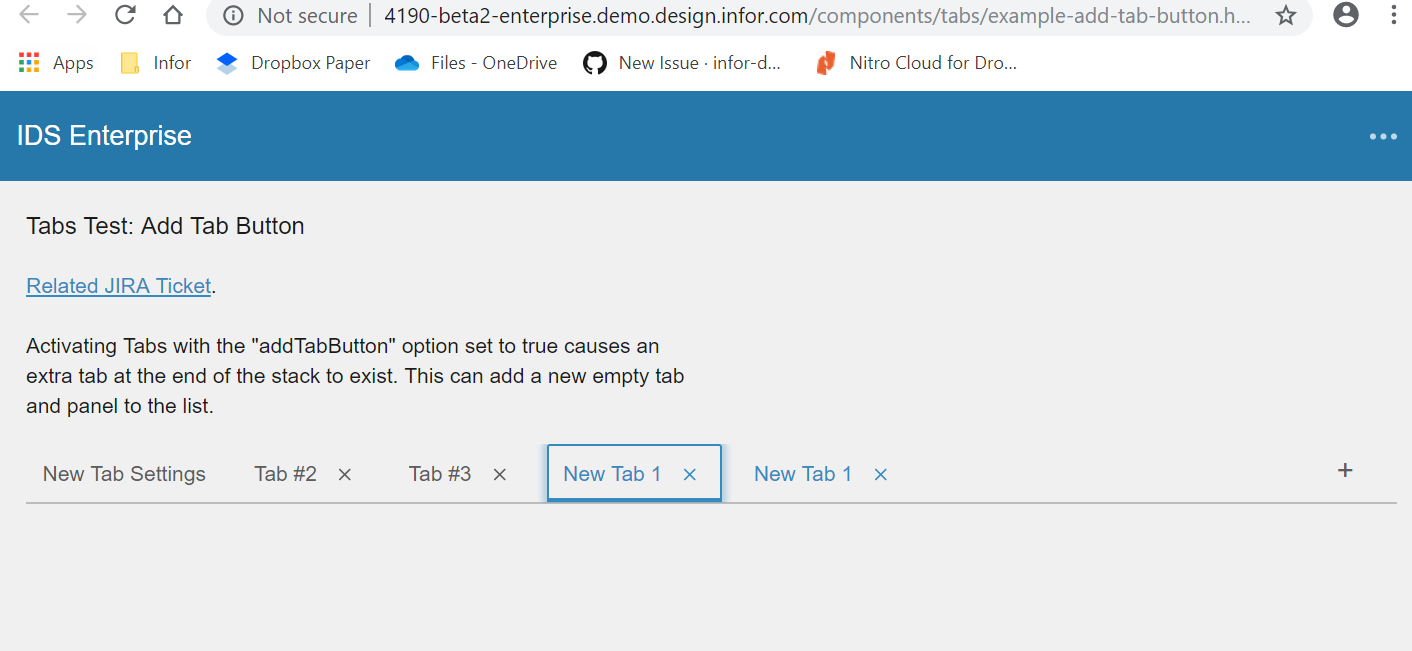
Notice that the New tab is duplicated and both of them were active when you click it.
Expected behavior
One tab should be active and tab should not be duplicated
Version
v4.19.0 beta2
Screenshots
Platform
All device, OS and browsers.
Additional context
No additional context
 janahintal
All 5 comments
Most likely, this is an issue with the sample page, which has a counter that handles this
 EdwardCoyle
on 10 Jun 2019
EdwardCoyle
on 10 Jun 2019
Yeah I think to fix this we should just make sure that there is unit test coverage and either remove this example or label it a test. It seems to generate too many issues because of the possibilities in the demo app.
Also related:
https://github.com/infor-design/enterprise/issues/2350
https://github.com/infor-design/enterprise/issues/2347
https://github.com/infor-design/enterprise/issues/2346
 tmcconechy
on 10 Jun 2019
tmcconechy
on 10 Jun 2019
@tmcconechy I'm still looking through these, but I'm not certain they're all demo app bugs. Specifically #2346 could be a regression because it used to work, but I'm not sure how long it's been that way (read: not sure we caused it with changes in 4.19.x).
EdwardCoyle
on 10 Jun 2019
OK sounds good. I'll leave those 3 to you
tmcconechy
on 10 Jun 2019
QA Passed. Moving to Done.
Tested in http://master-enterprise.demo.design.infor.com/components/tabs/example-add-tab-button.html across all OS, browsers, and devices.
janahintal
on 15 Jul 2019
Related issues
 dubde
·
4Comments
dubde
·
4Comments
 CindyMercadoReyes
·
3Comments
CindyMercadoReyes
·
3Comments
 SasiPalanati
·
3Comments
SasiPalanati
·
3Comments
 pwpatton
·
3Comments
pwpatton
·
3Comments
 brianjuan
·
3Comments
brianjuan
·
3Comments