Enterprise: Soho-dropdown not working with soho-popdown
Describe the bug
The dropdown control is not working with the popdown feature. When I click on the dropdown that is under a popdown area, the options are not showing up
To Reproduce
Steps to reproduce the behavior:
- Go to https://github.com/infor-design/enterprise-ng.git to get sample controls
- Go to popdown.html (attached code to include simple soho dropdown on soho popdown
- Attached gif of issue
Expected behavior
soho dropdown will show options on soho popdown area
Version
- ids-enterprise-ng: v5.2.0 or v5.2.1
Platform
- Windows 10
- Chrome
- Version 74.0.3729.131
Additional context
You may contact me at marclouisgene.[email protected] for other questions
dropdown and popdown issue.zip
 marclouisgenedeguzman
All 11 comments
@clepore let move the to EP I was able to reproduce it by just adding a dropdown to the pop down example in EP. this combination has never been attempted and it seems they close each other when used together. So we’ll have to fix there first
 tmcconechy
on 3 May 2019
tmcconechy
on 3 May 2019
Just noting here that the Popdown component referenced here has been deprecated for some time, and is feature-comparable with the IDS Popover component. @marclouisgenedeguzman, If at all possible, you should switch to this component in your project, as it's better supported.
The other part of this is: The fact that these two components aren't working in this manner is mostly due to the UX not being preferable. It's not necessarily good practice to be temporarily popping open a window that internally also temporarily pops open a window. I'd recommend implementing a modal or some other separate "screen" if the work you're doing inside of this popup area is complex enough to need a dropdown.
 EdwardCoyle
on 14 May 2019
EdwardCoyle
on 14 May 2019
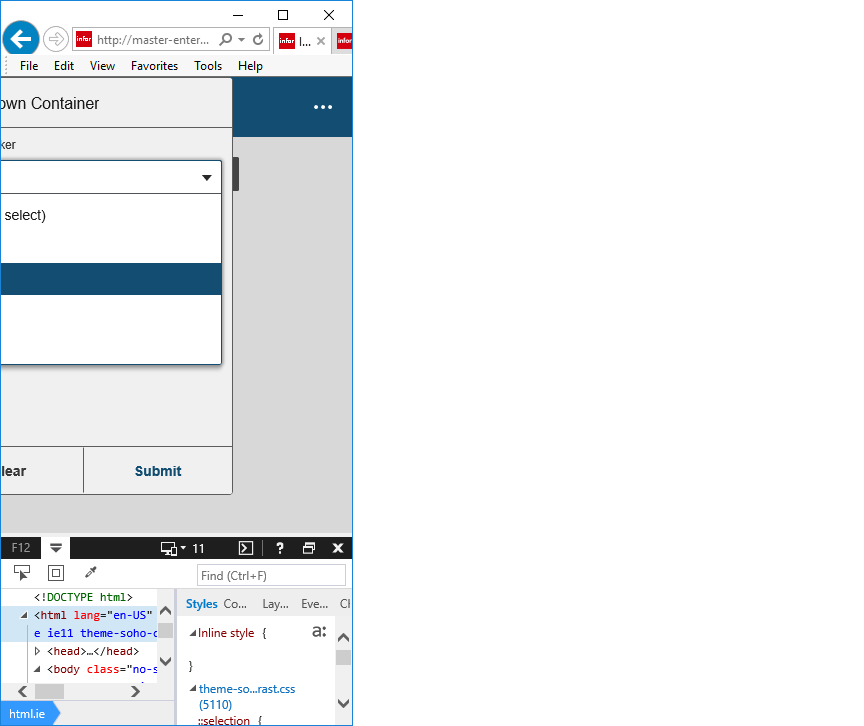
This issue failed QA, due to the pop down being cut off on responsive view for Win 10 IE11.
1.On Win 10 IE 11
- Open http://master-enterprise.demo.design.infor.com/components/popdown/test-contains-dropdown.html
- Click the "Choose an Option" button to open the Popdown
- Click the Dropdown List to open it.
- Ensure that the Popdown hasn't closed.
- Make the page responsive and repeat steps 3-5.
- The pop down is cut off. Please see screen shot attached.
 CindyMercadoReyes
on 2 Jul 2019
CindyMercadoReyes
on 2 Jul 2019
@CindyMercadoReyes I think we need to make a new issue for that one. The original ask was to just get the Popdown to work with the Dropdown, and this component is technically deprecated.
@tmcconechy @clepore thoughts?
EdwardCoyle
on 3 Jul 2019
I agree and also i think its not very important that the page works responsively on IE as thats for mobile. There is one related issue https://github.com/infor-design/enterprise/issues/431 thats going to require some changes so that the dropdown is positioned relative to the input and not absolutely that will change how this works so maybe even just note it on that one?
tmcconechy
on 3 Jul 2019
The specific use case that failed this one is also pretty unlikely, IMO.
EdwardCoyle
on 3 Jul 2019
Agreed in fact i dont think its really important that they QA windows like its a responsive mobile device. Although i can see them resizing the window smaller for fitting more windows around on the page. So punt on this one?
tmcconechy
on 3 Jul 2019
Really the Popdown's functionality is duplicated by the Popover at this point, so I'd rather we focus on deprecating Popdown and eventually removing it in favor of Popover.
EdwardCoyle
on 3 Jul 2019
Ok @CindyMercadoReyes we decided not to fix this issue you meantioned. So moving back for further QA excluding that point. If its done then please move to done.
tmcconechy
on 3 Jul 2019
Re-raised the Popover deprecation issue #2468
EdwardCoyle
on 3 Jul 2019
Will Move to Done. Dropdown is now working in http://master-enterprise.demo.design.infor.com/components/popdown/test-contains-dropdown.html across all browser. However, the Popdown is not responsive. Ticket already created #2468
 janahintal
on 4 Jul 2019
janahintal
on 4 Jul 2019
Related issues
janahintal
·
3Comments
 jbrcna
·
3Comments
jbrcna
·
3Comments
 swetteinfor
·
3Comments
swetteinfor
·
3Comments
 pwpatton
·
3Comments
pwpatton
·
3Comments
 SofiK
·
3Comments
SofiK
·
3Comments
Most helpful comment
I agree and also i think its not very important that the page works responsively on IE as thats for mobile. There is one related issue https://github.com/infor-design/enterprise/issues/431 thats going to require some changes so that the dropdown is positioned relative to the input and not absolutely that will change how this works so maybe even just note it on that one?