Enterprise: Trailing Zeros are being ignored when displaying thousands values in German Locale
Description:
Let's say we have a value 145000, which gets displayed as 145,000 in US locale ( with comma as separator, as expected ).
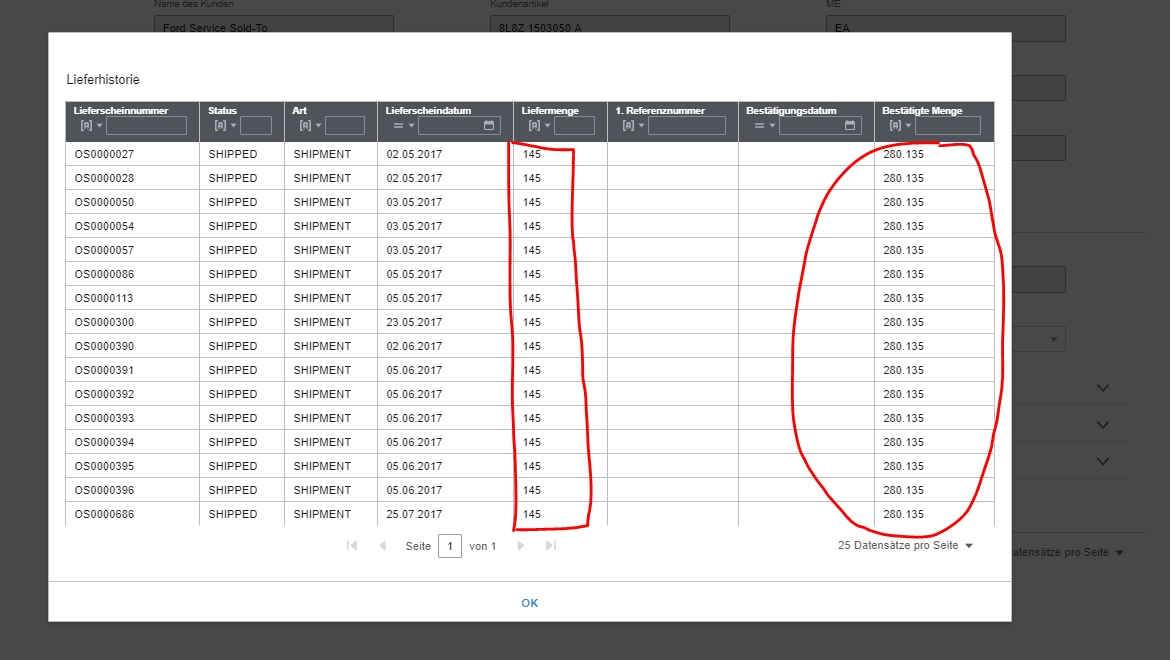
But in german locale, the same value should be displayed as 145.000 ( because dot is thousands separator in german locale ) , but it gets displayed as just 145 ( no dot at the end ). We tested this in 4.3.3 and in 5.1.1 as well
However, if the value doesn't end with zeros, lets say the value is 145135, in german locale it gets displayed as expected 145.135 ( where dot is thousands separator as per german locale )
To Reproduce
Steps to reproduce the behavior:
- Create a datagrid with one of the columns displaying numbers - lets say Column "Quantity" - Assign the values greater than 100,000. Let's say 145000
- Have a custom formatter that displays values in german locale on column "Quantity"
- Now, you should be seeing just 145 in the column, but not 145.000 as dot is the thousands separator in german locale
- See error
Expected behavior
In german locale, we expect that, whenever a value is >= 100,000 , trailing zeros should not be ignored, instead those need to be displayed with thousands separator
Version
Tested in 4.3.3 as well as 5.1.1 , so assuming this is issue since 4.3.3
Screenshots
Platform
- Desktop
- Windows 10
- Chrome, IE, Edge, Firefox
Additional context: None
 satyaachantavenkata
All 6 comments
@clepore This is an EP issue, could you move it please?
 tmcconechy
on 22 Mar 2019
tmcconechy
on 22 Mar 2019
The easiest way to reproduce this is in this attached example. You will see that if the number has three zeros at the end its cut off changing the number. Drop this in and run, and notice what the Integer column is doing.
tmcconechy
on 22 Mar 2019
Marking as high as it totally changes numbers around, but this is not a regression.
tmcconechy
on 22 Mar 2019
As a workaround using the decimal formatter with minimumFractionDigits and maxFractionDigits will work.
columns.push({ id: 'quantity', name: 'Integer', field: 'quantity', formatter: Formatters.Decimal, numberFormat: { minimumFractionDigits: 0, maxFractionDigits: 0}});
Put this one in the current sprint in hopes that we can get to this one and pulled one out.
tmcconechy
on 25 Mar 2019
QA Passed. Moving to Done.
Tested in: http://localhost:4000/components/datagrid/test-custom-number-formats.html?locale=de-DE in all OS Browsers & Devices.
 janahintal
on 10 Apr 2019
janahintal
on 10 Apr 2019
Related issues
janahintal
·
3Comments
 jbrcna
·
3Comments
jbrcna
·
3Comments
 CindyMercadoReyes
·
3Comments
jbrcna
·
3Comments
CindyMercadoReyes
·
3Comments
jbrcna
·
3Comments
 SofiK
·
3Comments
SofiK
·
3Comments