Enterprise: Dropdown error icon not removed when using .removeError()
Describe the bug
After adding an error message (non-inline) to a dropdown using addError(), then calling removeError(), the error icon is not removed.
To Reproduce
Steps to reproduce the behavior:
- On any sample page with a dropdown, use $('select.dropdown').removeError().addError({ message: 'Dropdown error.', inline: false });
- Call $('select.dropdown').removeError();
Expected behavior
Dropdown error message and icon are removed.
Version
- ids-enterprise: master
Screenshots
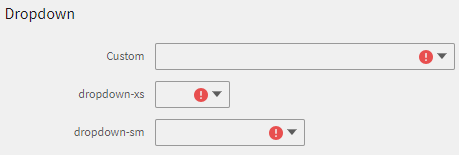
Additional Info
This has caused a customer incident, links to LSF-40959.
 awbuboltz
All 10 comments
Do you know if this regressed from one version to another?
 tmcconechy
on 28 Jan 2019
tmcconechy
on 28 Jan 2019
It worked in our July release, but that's about all I know. We were pre-4.11 at that time, but we didn't update until around September. So I'm not really positive where it broke.
awbuboltz
on 28 Jan 2019
Ok, I also tried to see if this regressed but noticed i cannot reproduce. Go to any of these pages:
https://master-enterprise.demo.design.infor.com/components/validation/test-legacy-tooltip.html
https://4140-enterprise.demo.design.infor.com/components/validation/test-legacy-tooltip.html
https://4130-enterprise.demo.design.infor.com/components/validation/test-legacy-tooltip.html
https://4120-enterprise.demo.design.infor.com/components/validation/test-legacy-tooltip.html
https://4110-enterprise.demo.design.infor.com/components/validation/test-legacy-tooltip.html
- open console
- paste
$('select.dropdown').removeError().addError({ message: 'Dropdown error.', inline: false }); - then
$('select.dropdown').removeError();
Then it does seem to work ok in all those versions?
tmcconechy
on 28 Jan 2019
It looks like it's reproducible here: https://master-enterprise.demo.design.infor.com/components/validation/example-multiple-errors.html
The difference between those two pages appears to be data-error-type="tooltip" on the select.
awbuboltz
on 28 Jan 2019
Ok, Thanks. I tested this from 490-4140 it its not removing. The item - so issue accepted.
tmcconechy
on 28 Jan 2019
I looks like this was broken with revision 58d0c6a.
I think that line 1018 of validator.js should be reading field.attr(data-${rule.type}-type), not loc.attr(data-${rule.type}-type), since that data attribute gets applied to the generated field, not the original element.
awbuboltz
on 29 Jan 2019
@tmcconechy Can this be prioritized? We have a couple customers reporting this issue.
 jake-harrington
on 31 Jan 2019
jake-harrington
on 31 Jan 2019
Here is a fix - seems like just as you said @awbuboltz https://github.com/infor-design/enterprise/pull/1584
tmcconechy
on 31 Jan 2019
Looks good Tim, thanks!
awbuboltz
on 1 Feb 2019
http://localhost:4000/components/validation/example-multiple-errors.html
Passed QA testing on all browsers, moving to Done.
 brianjuan
on 11 Feb 2019
brianjuan
on 11 Feb 2019
Related issues
awbuboltz
·
3Comments
 SasiPalanati
·
3Comments
SasiPalanati
·
3Comments
 EdwardCoyle
·
4Comments
EdwardCoyle
·
4Comments
 CindyMercadoReyes
·
3Comments
CindyMercadoReyes
·
3Comments
CindyMercadoReyes
·
3Comments
CindyMercadoReyes
·
3Comments