Enterprise: datagrid should not require an "id" field for the tree expand/collapse to work
Describe the bug
if the dataset has no field called "id" then the tree expand/collapse icon does not work, even if the data is correctly structured as parent/child hierarchy.
To Reproduce
- This data is taken out of the example, but had the "id" values taken out:
var temp1 = [
    {
        "escalated": 2,
        "depth": 1,
        "expanded": true,
        "taskName": "Follow up action with HMM Global",
        "desc": "",
        "comments": null,
        "orderDate": "2015-01-08T05:00:00.000Z",
        "time": "",
        "children": [
            {
                "escalated": 1,
                "depth": 2,
                "taskName": "Quotes due to expire",
                "desc": "Update pending quotes and send out again to customers.",
                "comments": 3,
                "orderDate": "2015-08-03T04:00:00.000Z",
                "time": "7:10 AM"
            },
            {
                "escalated": 0,
                "depth": 2,
                "taskName": "Follow up action with Universal Shipping Logistics Customers",
                "desc": "Contact sales representative with the updated purchase order.",
                "comments": 2,
                "orderDate": "2014-07-03T04:00:00.000Z",
                "time": "9:10 AM"
            },
            {
                "escalated": 0,
                "depth": 2,
                "taskName": "Follow up action with Acme Trucking",
                "desc": "Contact sales representative with the updated purchase order.",
                "comments": 2,
                "orderDate": "2015-04-04T04:00:00.000Z",
                "time": "14:10 PM"
            }
        ]
    }
];
- Go to "http://usalvwaldevd16:4000/components/datagrid/example-tree.html"
- Run the script to load this data into datagrid (notice the id column is commented out)
   var columns = [];
columns.push({ id: 'taskName', name: 'Task', field: 'taskName', expanded: 'expanded', formatter: Formatters.Tree});
            //columns.push({ id: 'id', name: 'Id', field: 'id'});
            columns.push({ id: 'desc', name: 'Description', field: 'desc'});
            columns.push({ id: 'comments', name: 'Comments', field: 'comments',  formatter: Formatters.Hyperlink});
            columns.push({ id: 'time', name: 'Time', field: 'time'});
$('#datagrid').datagrid({
                columns: columns,
                dataset: temp1,
                treeGrid: true,
                toolbar: {title: 'Tasks (Hierarchical)', results: true, personalize: true, actions: true, rowHeight: true}
                });
Error
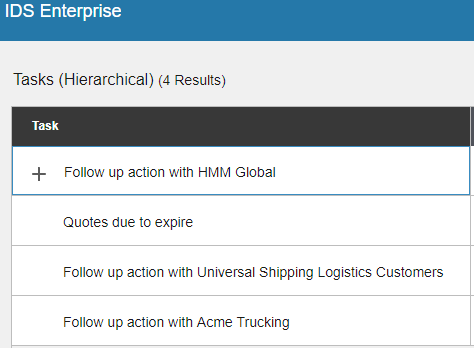
The tree icon changes but the child rows don't hide/show.
Expected behavior
The tree icon collapse the tree to show only one row
Version
v4.12.1
Platform
- Browser Name : IE and Chrome
Screen shot
 asui4tong
All 11 comments
The JSON included in copied from the datagrid data in "http://usalvwaldevd16:4000/components/datagrid/example-tree.html". I removed the other rows of data just to keep one parent and 3 child rows, then take the "id" field out.
The reason I report this is that it took me a long while to figure out why my grid does not behave --- I make sense to require the dataset to have an "id" field if you want to edit the data and post back, but it should be affect the "showing". The tree node expand/collapse should always work with/without the id field.
asui4tong
on 7 Dec 2018
I think that the ID is need for it to function correctly. Whats the objection to having one?
 tmcconechy
on 7 Dec 2018
tmcconechy
on 7 Dec 2018
The older version (4.3) doe not have this requirement, so it definitely can function without it. When we upgraded to 4.12 I scratch my head so hard (already bald)...
asui4tong
on 7 Dec 2018
I think we had to change it to use id to make some functionality work better, can track it down with more investigation. But at least there’s a workaround 👍
tmcconechy
on 7 Dec 2018
How about throw an exception when there is no "id" field in the dataset? Also put the requirement of "id" field in the example and documentation.
asui4tong
on 10 Dec 2018
Yeah to reduce the lead time on this i think..
- double check if ID is needed for sure
- if it is document in the Docs.
- could try to generate an ID as well (uniqueID function)
But i'd go with the workaround as might be a while before we can get to this one. Unless you would like to contribute a PR?
tmcconechy
on 10 Dec 2018
What is a PR? I had it working in my system by supplying ids.
asui4tong
on 10 Dec 2018
PR = Pull Request - meaning you have a fix to submit in our code.
https://help.github.com/articles/about-pull-requests/
tmcconechy
on 10 Dec 2018
Fixed with other issue #405
 deep7102
on 27 Dec 2018
deep7102
on 27 Dec 2018
Added this to the sprint because deepak addressed this so we can test it out.
tmcconechy
on 8 Jan 2019
http://localhost:4000/components/datagrid/test-tree-update-row.html
Tested along with issue #405 , passed QA testing on all browsers.
 brianjuan
on 18 Jan 2019
brianjuan
on 18 Jan 2019
Related issues
 SasiPalanati
·
3Comments
SasiPalanati
·
3Comments
 pwpatton
·
3Comments
pwpatton
·
3Comments
 janahintal
·
3Comments
janahintal
·
3Comments
 awbuboltz
·
3Comments
awbuboltz
·
3Comments
 guoliang
·
3Comments
guoliang
·
3Comments