Enterprise-ng: Breadcrumb: component breaks template interpolation
Describe the bug
Adding string interpolation to an element inside a breadcrumb does not work when using soho-breadcrumb.
For example:
html
<nav soho-breadcrumb>
    <li>
      <span>{{someData}}</span>
    </li>
</nav>
Does not display updates to the someData property. Changing to use simple markup does:
<nav class="breadcrumb">
  <ol class="breadcrumb-list">
    <li>
      <span>{{someData}}</span>
     </li>
   </ol>
 </nav>
 <button soho-button (click)="increment()">Increment</button>
private _i = 1;

public get someData() {
  return this._i;
}

public increment() {
  console.log(`Incrementing ${this._i++}`);
}
To Reproduce
Steps to reproduce the behavior:
- Check out the latest repo for
ids-enterprise-ng. - Apply the attached GIT patch breadcrumb.patch.zip
- Build (
npm run build) - Run (
npm run start) - Navigate (
http://localhost:4200/ids-enterprise-ng-demo/breadcrumb)
Clicking the "Increment" button does not update the first breadcrumb but does the second.
Expected behavior
Both breadcrumbs should be updated.
Version
- ids-enterprise-ng: 8.0.2
Screenshots
If applicable, add screenshots to help explain your problem.
Platform
- Device (if applicable) Desktop
- OS Version: Windows 10 and macOS 10.15.7
- Browser Name: Edge Chromium and Safari
- Browser Version: Latest
Additional context
I believe this is due to underlying widget adding a button under the nav element.
Also, I tried adding a soho-breadcrumb-list component which sets the class for the order list to make sure the markup is HTML compliant. This did not fix the issue, so assume it might be related to the button.
Using the component without these calls in the AfterViewInit resolved the issue:
ngAfterViewInit() {
    this.ngZone.runOutsideAngular(() => {
      this.jQueryElement = jQuery(this.element.nativeElement);
      // this.jQueryElement.breadcrumb(this.options);
      //  this.breadcrumbAPI = this.jQueryElement.data('breadcrumb');
    });
  }
This leads me to believe there is something occurring in the underlying widget which is breaking angular links to the page elements.
 bthharper
All 17 comments
Also - the EP widget seems to be converting all the list item's content into anchors, e.g.
<span>{{someData}}</span>
is becoming
<a id="" class="hyperlink hide-focus" tabindex="0">1</a>
It looks like angular is loosing track of its templates as the EP widget is deleting the generated markup,
// If breadcrumbs are present, they are processed for settings and removed.
bthharper
on 19 Oct 2020
So is the suggest to just update our examples to use the full markup approach?
 tmcconechy
on 19 Oct 2020
tmcconechy
on 19 Oct 2020
@tmcconechy - not sure - effectively there are two problems:
- The soho-breadcrumb does not integrate with angular due to the dynamic creation of the html (which angular does not see) - similar to the problems we had with data grid and custom editors and formatters not working with angular concepts.
2.The EP widget turns all list items into hyper links when some are not.
In my application at the moment, I have reverted to the standard markup without any component or EP widget integration. I wonder if there is a case leave the original HTML in place (if it exists) and just manipulate it rather than generating breadcrumb models?
bthharper
on 19 Oct 2020
I think perhaps for the angular case we just need to
a) let the original markup work
b) let a full expanded markup work (as this wont "correct" the DOM)
Probably an issue for @EdwardCoyle when he can get to it
tmcconechy
on 19 Oct 2020
For now I am using the following markup:
<soho-toolbar-flex-section [isTitle]="true">
  <nav class="breadcrumb">
    <ol class="breadcrumb-list">
      <li class="breadcrumb-item">
        <a soho-hyperlink (click)="navigateToUsers($event)">{{'UserFormUsersNavigationLabel' | sohoTranslate}}</a>
      </li>
      <li class="breadcrumb-item current">
        <a soho-hyperlink id="new-user-breadcrumb">{{name}}</a>
      </li>
    </ol>
  </nav>
</soho-toolbar-flex-section>
This mostly works okay, and gives the same styling as the breadcrumb widget.
Is there an option to have a non hyperlink with the same text styling but without the hover? the disabled option looks too greyed out.
bthharper
on 20 Oct 2020
Yes, just replace the <a> tag with a <span> and it will work.
tmcconechy
on 20 Oct 2020
If I do that the styling is all out.
bthharper
on 20 Oct 2020
Works in EP when i try it.
tmcconechy
on 20 Oct 2020
Ummmm .... same in NG (as in it works in NG). Must be some quirky styling in our app. Let me check it out.
bthharper
on 20 Oct 2020
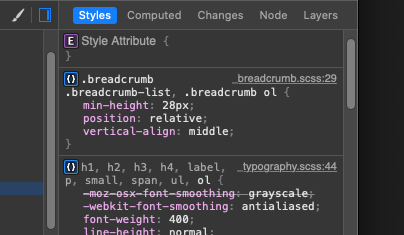
Maybe it's the flex-toolbar, but a min-height is being added:
bthharper
on 20 Oct 2020
Which causes:

bthharper
on 20 Oct 2020
Using a hyperlink I get:

bthharper
on 20 Oct 2020
Ok, i bet the layout bug is to do with it being in a toolbar with spans moving around there. Might need some css to counter it when its in a toolbar
tmcconechy
on 20 Oct 2020
Yeah - maybe a flex-toolbar thing.
bthharper
on 20 Oct 2020
Will try and get to it next sprint
tmcconechy
on 21 Oct 2020
This issue is now resolved.
 CindyMercadoReyes
on 30 Nov 2020
CindyMercadoReyes
on 30 Nov 2020
Related issues
 ahnpnl
·
7Comments
ahnpnl
·
7Comments
 edgarinfor
·
7Comments
edgarinfor
·
7Comments
 volante007
·
3Comments
volante007
·
3Comments
 anhallbe
·
5Comments
anhallbe
·
5Comments
 swuendri
·
7Comments
swuendri
·
7Comments