Elfinder: Some questions - bind, quicklook, json messages
I don't know if you can see my replies in previous closed thread so I'm writing a new one with some questions:
When is in 'bind' command a variable $result['changed']? I thought it's after rename file but I see it's 'removed' & 'added', not 'changed'
Is this possible to see upload transfer? Not only uploadbar but also speed?
How to do something before upload? I guess something like "upload.preupload" because I need to check before every upload if that files which someone is uploading do not exceed the disk space so I need to abort upload if yes.
How to write JSON messages from connector after some errors or successful commands for things as in the third point above? For example "Files uploaded fine" or "You can't upload those files because it exceed the disk space" etc.?
Is this possible to do quicklook video/audio files with Videojs? (version 5.x)
Is this possible to turn this "subtitles" on by default not by clicking in the icon after right button mouse

?I turned on plugin "sanitizer" with option
'targets' => array('\\', '/', ':', '*', '?', '"', '<', '>', '|', '\'', '$', '[', ']', '%', '!', '^', '&', '#', '(', ')', '+', ';', ',', '~', '')` - but it also (or not this plugin?) changed my filename from 01_filename.mp4 to C1_filename.mp4 ? Why? Why it can't be 01_ and it's C1_?
Regards :)
 ShinJii89
All 10 comments
@ShinJii89
- Like the file system, elFinder also treats renames as item movements.
- Can't it currently. see #1357, #1667.
- You can use a deregate point
upload.presavelike this.
'bind' => [
    'upload.presave' => [
        function($thash, $name, $src, $elfinder, $volume) {
            $isFull = true; // or false
            if ($isFull) {
                unlink($src); // It will be triggered an warning error.
                // customized error message
                $GLOBALS['my_elfinder_upload_error'] = 'You can\'t upload those files because it exceed the disk space';
            }
        }
    ],
    'upload' => [
        function($cmd, &$result, $args, $elfinder, $volume) {
            if (!empty($GLOBALS['my_elfinder_upload_error'])) {
                $result['warning'][] = $GLOBALS['my_elfinder_upload_error'];
                unset($GLOBALS['my_elfinder_upload_error']);
            }
            // Show toast message (elFinder >= 2.1.41 or nightly build)
            if ($result && $result['added']) {
                if (!isset($result['toasts']) || !is_array($result['toasts'])) {
                    $result['toasts'] = array();
                }
                $result['toasts'][] = ['msg' => 'Files uploaded fine'];
            }
        }
    ],
]
- see (3.).
- Yes. but it need customize of quickllook plugin. see - https://github.com/Studio-42/elFinder/blob/master/js/commands/quicklook.plugins.js
- See uiOptions.toolbarExtra.displayTextLabel.
- It probably will not matter Sanitizer Plugin. I think that some other setting is affecting. But i don't know.
 nao-pon
on 18 Jul 2018
nao-pon
on 18 Jul 2018
Thanks for reply!
In point 3 - how to check filesize of uploaded files? and after uploading with error it's uploaded with 0 bytes on the disk... not deleted at all.. why?
ShinJii89
on 18 Jul 2018
@ShinJii89 $src is a path to uploaded temporary file. So you can check file size with filesize($src). And there are problems on elFinder <= 2.1.40 to this issue. Please try with the nightly build.
nao-pon
on 18 Jul 2018
Yeah now it works! Really thank you!! Elfinder is the best filemanager <3
ShinJii89
on 18 Jul 2018
Thanks! 👍
nao-pon
on 18 Jul 2018
Ouch - last question - how to show by default all filenames in folder? not shorted. For example "98fds8f8df8s8fds.mp4" not "98fds8f8d"
ShinJii89
on 18 Jul 2018
@ShinJii89 Would you explain with some screenshots?
nao-pon
on 18 Jul 2018
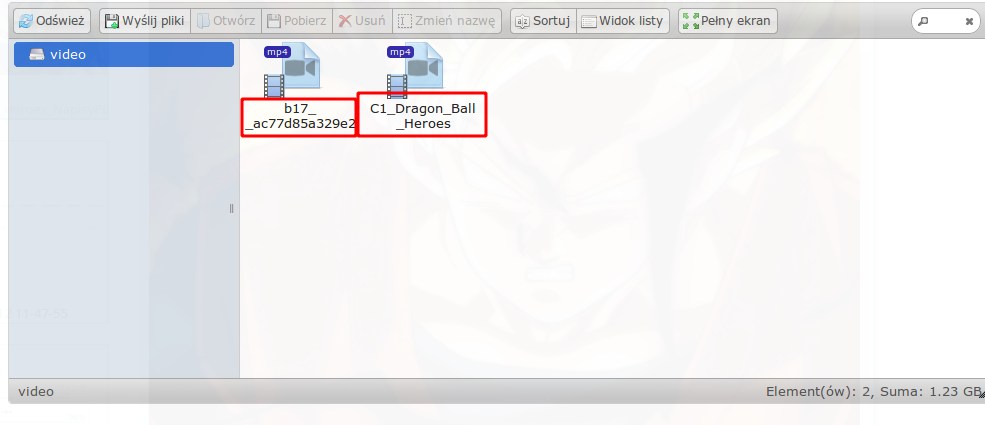
For example here :) it's not full filename, I want to show full filename by default, you know what I mean? it's now shorted, only when I click "rename" it show full filename.
ShinJii89
on 18 Jul 2018
Long filenames are omitted because it is displayed in limited space. You can adjust CSS and show it all, but that will be bad results. Is not it a mouse over tool tip?
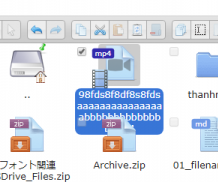
Or, if you maximize the size of the icon, the number of characters displayed will increase.
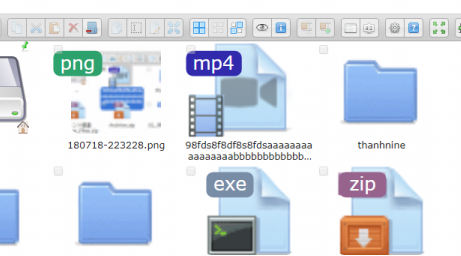
nao-pon
on 18 Jul 2018
Ok I understand, thanks :)
ShinJii89
on 18 Jul 2018
Related issues
 flack
·
13Comments
flack
·
13Comments
 ghigio2000
·
12Comments
ghigio2000
·
12Comments
 lab21gr
·
24Comments
lab21gr
·
24Comments
 CodeLyokoXtEAM
·
10Comments
CodeLyokoXtEAM
·
10Comments
 gadangmadhulika
·
16Comments
gadangmadhulika
·
16Comments