Element-android: Two elements in the task switcher
Describe the bug
To Reproduce
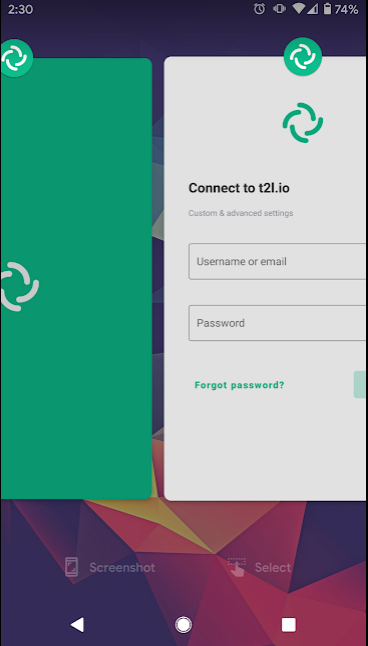
Unclear - I opened the app to log in and noticed there were two elements in the task/app switcher. The green one (left) just redirects me to the second (right).
Expected behavior
Only one element.
Screenshots
See above.
Smartphone (please complete the following information):
- Device: Pixel 2
- OS: Android 11
Additional context
- App version and store: 1.0.9 playstore
- Homeserver: t2l.io
 turt2live
All 6 comments
I can create new instances of the application, if I have one already running, and after that I share something from another app.
The sharing will create a new instance, and will leave it in the recents.
 T-bond
on 28 Oct 2020
T-bond
on 28 Oct 2020
I can easily get multiple instances of Element running, but neither of them ask me to login, so I don't think it's tied to logins. I'm on android 7.0.1 by the way. And I think this is also really messing up alerts for Element on my phone too.
 BloodyIron
on 29 Oct 2020
BloodyIron
on 29 Oct 2020
Calling, or using PIN code will also create new instance.
 notramo
on 29 Oct 2020
notramo
on 29 Oct 2020
This doesn't seem quite fixed yet. I still get multiple elements in recents when sharing things to element and others have reported the same happens when opening it from a notification.
 Bubu
on 13 Nov 2020
Bubu
on 13 Nov 2020
Yeah I still get multiple instances of Element on Android too. Please re-open @bmarty
BloodyIron
on 13 Nov 2020
Note that this still seems to be a problem: https://github.com/vector-im/element-android/issues/2569
 anoadragon453
on 4 Jan 2021
anoadragon453
on 4 Jan 2021
Related issues
 steef435
·
3Comments
steef435
·
3Comments
 532910
·
3Comments
532910
·
3Comments
 jtagcat
·
3Comments
Bubu
·
3Comments
Bubu
·
3Comments
jtagcat
·
3Comments
Bubu
·
3Comments
Bubu
·
3Comments
Most helpful comment
This doesn't seem quite fixed yet. I still get multiple elements in recents when sharing things to element and others have reported the same happens when opening it from a notification.