Element-android: Composer decoration: shields
 BillCarsonFr
All 6 comments
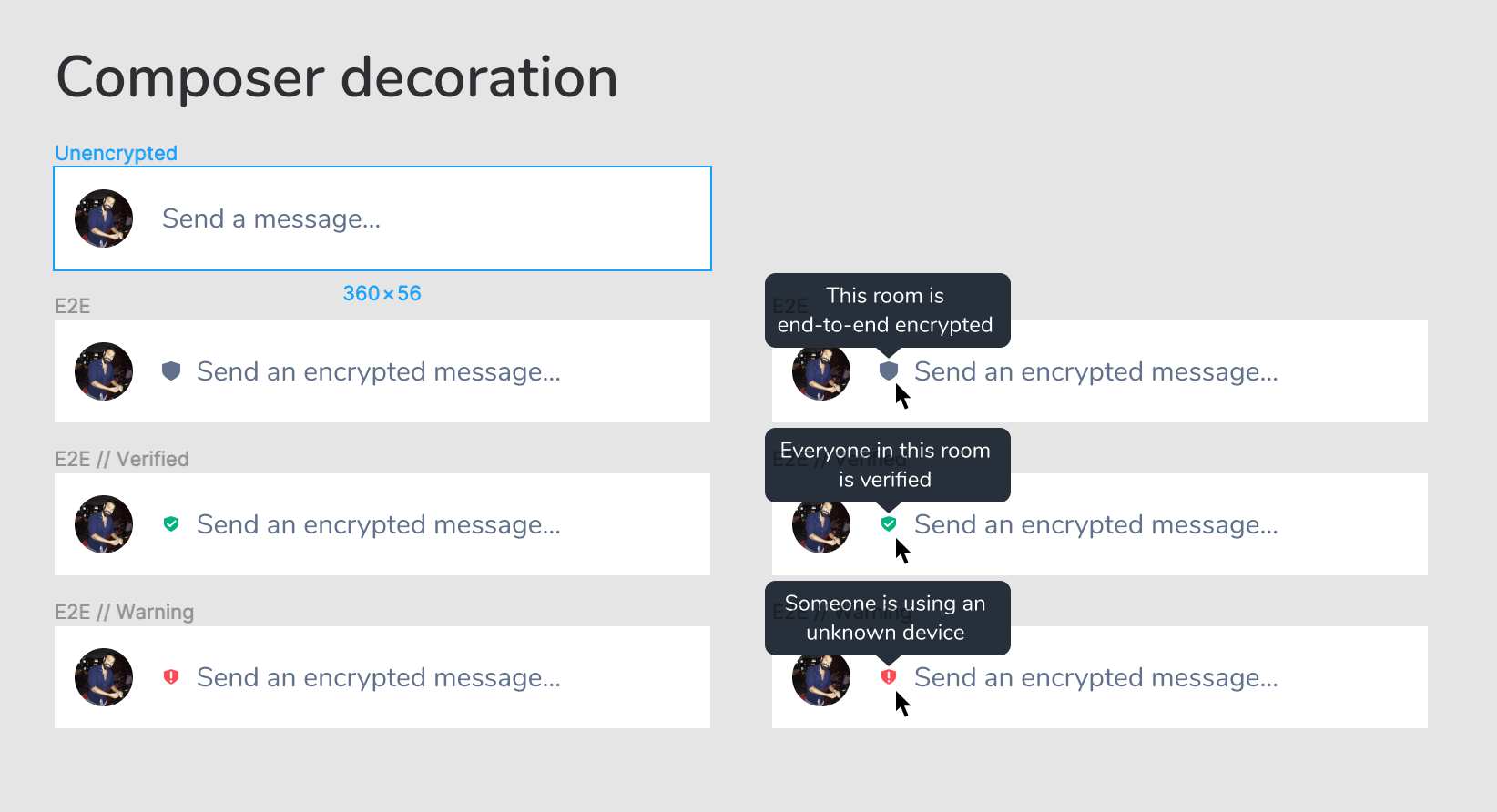
Maybe take the opportunity to iterate on the hint too... They are too long (so displayed on 2 lines on small device, which is very ugly), and not correct from UX point of view.
I propose to use "Type message" and "Type secret message"
 bmarty
on 26 Feb 2020
bmarty
on 26 Feb 2020
Or secure instead secret.
 bahur142
on 26 Feb 2020
bahur142
on 26 Feb 2020
Will the shields disappear once the user starts typing? Otherwise I fear it would be a little bit of wasted message space in 90% of the cases, because we can already see the security in the top bar and in the hint text. Maybe the same effect would be achieved by putting the shield on top of the send message button like with the avatars? Or maybe remove the avatar of the sender and put the shield there?
 steef435
on 27 Feb 2020
steef435
on 27 Feb 2020
Maybe you could locally/temporarily toggle encryption by tapping it, so you could send a quick plaintext message in an otherwise encrypted room.
 barudaret
on 28 Feb 2020
barudaret
on 28 Feb 2020
Maybe take the opportunity to iterate on the hint too... They are too long (so displayed on 2 lines on small device, which is very ugly), and not correct from UX point of view.
I propose to use "Type message" and "Type secret message"
As per discussion with nad, we will just put 'message' now
BillCarsonFr
on 28 Feb 2020
Will the shields disappear once the user starts typing? Otherwise I fear it would be a little bit of wasted message space in 90% of the cases, because we can already see the security in the top bar and in the hint text. Maybe the same effect would be achieved by putting the shield on top of the send message button like with the avatars? Or maybe remove the avatar of the sender and put the shield there?
Yes this is web design, will be adapted for mobile constraints
BillCarsonFr
on 28 Feb 2020
Related issues
 Yajo
·
3Comments
steef435
·
3Comments
Yajo
·
3Comments
steef435
·
3Comments
 2011
·
3Comments
bmarty
·
3Comments
2011
·
3Comments
bmarty
·
3Comments
 commagray
·
3Comments
commagray
·
3Comments
Most helpful comment
Maybe take the opportunity to iterate on the hint too... They are too long (so displayed on 2 lines on small device, which is very ugly), and not correct from UX point of view.
I propose to use "Type message" and "Type secret message"