Electron-vue: App not running when I build de electron-vue project
I have been working in this proyect for a few weeks now and when I tried to build the proyect to test if the added code worked correctly in production mode, all I got was a blank screen. Can someone please explain me why is this happening.
 juandozuna
All 20 comments
@juandozuna, can be many things,
Please tell about your env, node & Electron version, yarn or npm too. You are using Electron-builder or packager for build?
 AlexVFornazieri
on 10 Apr 2018
AlexVFornazieri
on 10 Apr 2018
I'm using node version 9.0.0 with NPM and Electron version 1.7.5 with electronBuilder v19.19.1
I can run my code perfectly in debug mode, but when I build the project to test it, all I get is a blank screen
juandozuna
on 11 Apr 2018
This issue look like is the same in #580,
Looking at more information I finded out that it seems to be related to a temporary failure in electron reported at electron/electron#11326 and #515.
The last ref above presents a provisional solution, just that is in Chinese, in my translation and interpretation I understood: comment the line below in webpack.renderer.config.js:
... Object.keys (dependencies || {}) .filter (d =>! WhiteListedModules.includes (d))
But it not been able to solve for me, maybe I misunderstood, try it, you can have a better luck.
An interesting observation is that i create a new electron-vue project with Electron-builder, from scratch, everything works perfectly.
Do not forget to tell if you have been able to solve it (and how)
AlexVFornazieri
on 13 Apr 2018
@juandozuna also try to make a copy of your project without the "node_modules" folder and install the dependencies with yarn, after trying "yarn run build"
AlexVFornazieri
on 13 Apr 2018
@AlexVFornazieri Same problem - sucks to have the project nearly complete and then building doesn't work ...
 therealwolf42
on 13 Apr 2018
therealwolf42
on 13 Apr 2018
I've been looking around into the Docs of Electron-Forge and found out they have a template for Vue.js. I'll be copying my proyect into an electron-forge proyect to build it and see if it works. If it does I'll let you know.
juandozuna
on 13 Apr 2018
@juandozuna @AlexVFornazieri
I created a new project via cli and then copied my code over - that worked!
therealwolf42
on 13 Apr 2018
@therealwolf42 I fear that I will have to do the same, I would really like to find out what is happening without having to transfer all my project to one from scratch, since it has several screens (not only renderer), but since it does not return any errors I believe it will be inevitable .
Interesting point is that in my trying to fix the problem it ended up causing this same problem with "run dev" :(
AlexVFornazieri
on 13 Apr 2018
@AlexVFornazieri I've got several screens to, but basically I only had to copy down the code, the only difference is the file system but it solved my problem and it became much easier for me to run a node server alongside my app, because I wanted to make the software controls available to users connected in the same network. Though it would be great if you know of some other tools I could use to access my electron app remotly
juandozuna
on 14 Apr 2018
@juandozuna and @therealwolf42, I copied my code to a new (from scratch), but still blanck the screen :(, did several revisions and nothing, could you pass me details of your environment, which version of electron, node and builder, is using Yarn or Npm direct?
AlexVFornazieri
on 14 Apr 2018
@AlexVFornazieri
1.) Updated vue-cli and generated new project.
2.) Ran yarn and then yarn add all needed packages - some of my previus ones weren't needed anymore so I cleaned that up as well.
3.) Yarn run dev and Yarn run build to check if everything works.
4.) Creating new folders and files & copied over code.
therealwolf42
on 14 Apr 2018
My issue conclusion: when you have more that one renderer process you need add they dist folder to build.files[] in package.json like in picture
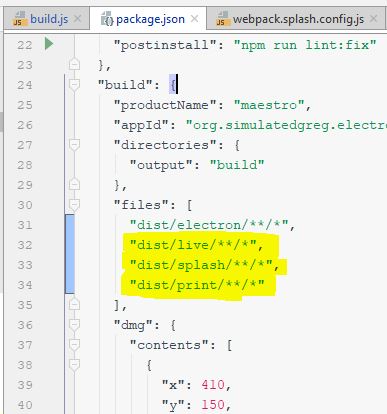
@juandozuna, about tools that you could use to access electron app remotly, sorry, i don't know, I am relatively new to the world of Electron and Node.
If nobody has any more questions regarding the damn "blank screen" I believe we can close this issue.
Thanks to all
AlexVFornazieri
on 16 Apr 2018
@AlexVFornazieri
What do you mean with that? I've worked on my project more and same problem arose again - blank screen.
therealwolf42
on 17 Apr 2018
@therealwolf42
Sorry, I thought your problem was solved by creating a new project and overwriting the code.
In my case, as I described in #580, after many test, I saw that the original "renderer proccess" of the Electron-vue was working normally, only the other renderings for additional screens like in my case a splash screen that appears before actually opening the program was getting blank.
So I got the idea of unpacking the app.asar file and I noticed that the splash folder is not inside the compressed one, so that's when I remembered that code inside package.json which indical to the Electron-builder which folders should compose the app.asar file was only adding the other dist folders that make up my project and everything came back perfectly to normal.
But your case may be another, if you can share the code so that I can analyze it would be great.
AlexVFornazieri
on 17 Apr 2018
@AlexVFornazieri
All good. Alright, so I've investigated a bit further and it seems that blank screens always appear in case of internal errors - the problem here is the missing error message.
In my case: I was missing a directory - ./db/file.json the db folder was missing and after I added the code which created the directory automatically - the blank screen was gone.
Problem: error is happening on startup of already built application - but isn't detected while building.
Solution: dev console option for built version
therealwolf42
on 17 Apr 2018
@AlexVFornazieri @juandozuna
Found the solution in one of the older issues:
Add mainWindow.webContents.openDevTools() in main/index.js below mainWindow.loadURL(winURL)
This will open the dev console in build mode - so you're able to see the error.
therealwolf42
on 20 Apr 2018
@AlexVFornazieri adding my files helped.
I'm using [email protected] with [email protected]
Having changed my output in angular.json to build/ instead of dist/ and adding:
    "*.js",
      "build", //Where angular is placed
      "node_modules", // Not sure if I need this?
      "auth" // A folder with auth utils
Worked for me.
 peturh
on 16 May 2018
peturh
on 16 May 2018
I had similar problem, our application was showing only blank white screen and there was an error on console that says; " Failed to load resource: net::ERR_FILE_NOT_FOUND' renderer.js:1"
Then I extract app.asar and checked the renderer.js file. Electron was looking wrong place (...asar/dist/electron/index.html/renderer.js) to import renderer.js. This was because of the '/' character at the end of the production Url of window. To solve this issue, I reverted back production url to initial status: 'file://${__dirname}/index.html'
 ahmetceylan
on 9 Oct 2018
ahmetceylan
on 9 Oct 2018
hello, i got error like this..
css:1 Failed to load resource: net::ERR_NOT_IMPLEMENTED
internal/process/warning.js:23 (node:28815)
DevTools failed to parse SourceMap: app://./js/chunk-vendors.98ad4631.js.map
everything work fine in npm run electron:serve , and i try to build it .. it comes error something like that, any advice ?
 lulumalik
on 28 Jun 2019
lulumalik
on 28 Jun 2019
hello, i got error like this..
css:1 Failed to load resource: net::ERR_NOT_IMPLEMENTED
internal/process/warning.js:23 (node:28815)DevTools failed to parse SourceMap: app://./js/chunk-vendors.98ad4631.js.map
everything work fine in
npm run electron:serve, and i try to build it .. it comes error something like that, any advice ?
are u found solution?
 ibalaji777
on 28 Nov 2020
ibalaji777
on 28 Nov 2020
Related issues
 kinoli
·
3Comments
kinoli
·
3Comments
 oscar-g
·
3Comments
oscar-g
·
3Comments
 simdax
·
3Comments
simdax
·
3Comments
 pansila
·
3Comments
pansila
·
3Comments
 Quadriphobs1
·
3Comments
Quadriphobs1
·
3Comments
Most helpful comment
@AlexVFornazieri @juandozuna
Found the solution in one of the older issues:
Add
mainWindow.webContents.openDevTools()in main/index.js belowmainWindow.loadURL(winURL)This will open the dev console in build mode - so you're able to see the error.