Electron-vue: Running Server in Browser Issue
Found an issue or bug? Tell me all about!
How could I run the application in the browser?
Describe the issue / bug.
# Could not run the application in browser with - http://localhost:9080
I am making an application which should work on Web browser and also need to have Mac Desktop application. This is very huge application. I would be pleased of you could assist me with this Eletron-Vue.
How can I reproduce this problem?
# followed by the all steps that you have defined
- vue init simulatedgreg/electron-vue electron-vue
- cd electron-vue
- npm install
- npm run dev
If visual, provide a screenshot.
#

Tell me about your development environment.
- Node version: v6.9.2
- NPM version: 3.10.9
- vue-cli version: (if necessary)
- Operating System: MacOS Sierra 10.12.4 (16E195)
If you are looking to suggest an enhancement or feature, then feel free to remove everything above.
 jrvaja
All 18 comments
@jrvaja
The require problem is because the webpack target is set to electron-renderer and needs to be web. electron-vue does not support a webpack-dev-server for web during the development process, but does provide a strong base for outputting to web.
 SimulatedGREG
on 27 Apr 2017
SimulatedGREG
on 27 Apr 2017
I also assumed that electron-vue would be capable of running in a browser during development—the same as vue-cli's webpack template provides. I was hoping that using this would be a buy-one-get-one-free type of thing. As is, it's made it super easy to make an electron app, but now I have to choose.
Is this feature in consideration?
 aminimalanimal
on 19 Jan 2018
aminimalanimal
on 19 Jan 2018
I read #85 and couldn't reproduce his steps. I see there are three files of webpack:
- webpack.main.config.js
- webpack.renderer.config.js
- webpack.web.config.js
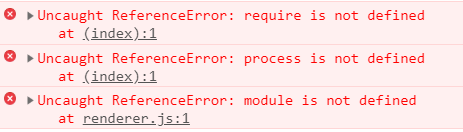
I changed target from electron-renderer to web in webpack.renderer.config.js, and run yarn run dev, I check on the browser with http://localhost:9080/ and I don't see the application loaded, the error in console shows Uncaught ReferenceError: require is not defined, Uncaught ReferenceError: process is not defined, and Uncaught ReferenceError: module is not defined
Is there anything else I need to do to get my app run in the browser?
 sophyawei
on 5 Apr 2018
sophyawei
on 5 Apr 2018
I found the solution, I spent some time reading the documentation and found what I missed.
so I don't need to change any three of those webpack files, I simply need to run npm run build:web and then I see the web app folder under dist folder, cd to the web app folder and then use php -S 127.0.0.1:8080 on my terminal to open a simple server to test the web app, it works like a charm!
sophyawei
on 9 Apr 2018
@sophyawei no. Links does not work and there are many not defined console errors on inspector.
 cpxPratik
on 10 Apr 2018
cpxPratik
on 10 Apr 2018
@cpxPratik you are correct, I saw the app showing on localhost was too happy and forgot to check the console. However, I still can open the link from my project though, I'm not so sure what is the cause that my project link works but not electron-vue's sample.
I could not solve all the errors, I solved process not defined by adding a little script and then another error require is not defined came up, I add require.js and then another error came up like never end. I did some research that Slack actually build their web app first and then apply Electron later. Node.js doesn't run in the browser and it would take some effort to overcome the problem, and to do so we miss the purpose of using electron-vue this library.
I guess if the web app is your higher priority then you might need to do the same approach like Slack, build the web app and then apply Electron. Vue code will be the same so there won't be too much trouble.
sophyawei
on 10 Apr 2018
@cpxPratik I've spent some time, downloaded the Vue, and compared two index.html files between electron-vue web app and Vue app.
I did a little experiment and there's no more error show up, here's what I did:
in LandingPage.Vue, remove this
this.$electron.shell.openExternal(link)and replace with thiswindow.location.href = link
Theshellapi is an electron only api that you can use to shell execute a file at a given path, which will use the OS default application to open the file. If not removing it, the browser console will complain about it,window.location.href = 'link_string'works for Vue.npm run build:webremove this
<script>if (process.env.NODE_ENV !== 'development') window.__static = require('path').join(__dirname, '/static').replace(/\\/g, '\\\\')</script>from the index.html in electron-vue web. This code is not in Vue's index.html. There's nothing in static folder so I guess it's fine to remove it. If you need to read something from static folder, you can use Vue way to import file.
All these steps should fix the electron-vue web app sample. At least it works for me.
By this experiment, I think it's really cool to be able to build web app and desktop app at the same time, just a little adjustment of removing one line code for the web app and it is not too much effort. electron-vue is a really great library!!
sophyawei
on 11 Apr 2018
Another way you can "solve" this problem is by going to index.ejs and surrounding the offending development/static loading lines template exclusion code.
    <% if (process.env.NODE_ENV !== 'production') { %>
    <script>
      if (process.env.NODE_ENV !== 'development') window.__static = require('path').join(__dirname, '/static').replace(/\\/g, '\\\\')
    </script>
    <% } %>
I'm checking to see if this has any adverse side-effects, but with this line, the base example was served fine from the folder with no modifications, and the electron app was served over dev with no issues. Will try bundling a production instance of the base example to make sure that still works as well.
 ignisphaseone
on 4 May 2018
ignisphaseone
on 4 May 2018
@ignisphaseone this fix helped me. Thank you a lot!
 kroegen
on 5 Sep 2018
kroegen
on 5 Sep 2018
After following all above steps unable to view app in browser. Getting white screen.
Any changes required?
 ghost
on 23 Oct 2018
ghost
on 23 Oct 2018
@Ozees you can try Vue CLI 3 with electron plugin https://github.com/nklayman/vue-cli-plugin-electron-builder
cpxPratik
on 23 Oct 2018
Thanks @cpxPratik but my project is in cli2 so can you suggest any other solution for it?
ghost
on 24 Oct 2018
@Ozees Well it is fairly easy to migrate to cli3 app, just search for migration guide.
cpxPratik
on 24 Oct 2018
Another way you can "solve" this problem is by going to
index.ejsand surrounding the offending development/static loading lines template exclusion code.<% if (process.env.NODE_ENV !== 'production') { %> <script> if (process.env.NODE_ENV !== 'development') window.__static = require('path').join(__dirname, '/static').replace(/\\/g, '\\\\') </script> <% } %>I'm checking to see if this has any adverse side-effects, but with this line, the base example was served fine from the folder with no modifications, and the electron app was served over dev with no issues. Will try bundling a production instance of the base example to make sure that still works as well.
After these changes npm run dev will work or need to use some other command?
ghost
on 25 Oct 2018
Hi guys,
I have the same question. I come from here: https://github.com/SimulatedGREG/electron-vue/issues/856
Actually, there not exist a way to develope from web without build each time?
 50l3r
on 19 Apr 2019
50l3r
on 19 Apr 2019
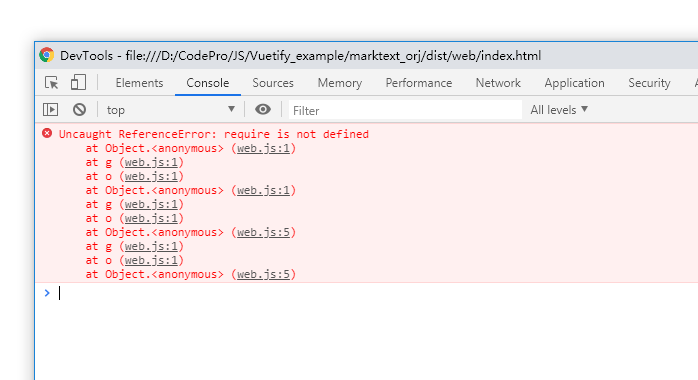
The same.
 625781186
on 22 May 2019
625781186
on 22 May 2019
Same here

 thrazu
on 24 Nov 2019
thrazu
on 24 Nov 2019
hi, guys, i fix this problem by the steps as follows:
- npm i @babel/plugin-transform-runtime @babel/preset-env @vue/cli-plugin-babel @vue/cli-service --save-dev
- npm i core-js --save
- config the .babelrc in the root dir (cause vue-cli-service use babel 7 but electron-vue use babel 6 so the config maybe look a little confused)
- add
"vue:serve": "BABEL_ENV=vue-web IS_WEB=true vue-cli-service serve"to the scripts in package.json - add file vue.config.js to the root dir
- npm run vue:serve
Content of .babelrc
{
  "comments": false,
  "env": {
    "test": {
      "presets": [
        ["env", {
          "targets": { "node": 7 }
        }],
        "stage-0",
        { "modules": false }
      ],
      "plugins": ["istanbul"]
    },
    "main": {
      "presets": [
        ["env", {
          "targets": { "node": 7 }
        }],
        "stage-0"
      ],
      "plugins": ["transform-runtime"]
    },
    "renderer": {
      "presets": [
        ["env", {
          "modules": false
        }],
        "stage-0"
      ],
      "plugins": ["transform-runtime"]
    },
    "web": {
      "presets": [
        ["env", {
          "modules": false
        }],
        "stage-0"
      ],
      "plugins": ["transform-runtime"]
    },
    "vue-web": {
      "presets": [
        [
          "@vue/cli-plugin-babel/preset",
          {
            "useBuiltIns": "usage"
          }
        ]
      ],
      "plugins": ["@babel/plugin-transform-runtime"]
    }
  },
  "plugins": [[
    "component",
    {
      "libraryName": "element-ui",
      "styleLibraryName": "theme-chalk"
    }
  ]]
}
Content of vue.config.js
const path = require('path');

function resolve(dir) {
  return path.join(__dirname, dir);
}
module.exports = {
  publicPath: '/',
  outputDir: 'dist',
  assetsDir: 'static',
  lintOnSave: process.env.NODE_ENV === 'development',
  productionSourceMap: false,
  devServer: {
    port: 8080,
    open: true,
    overlay: {
      warnings: false,
      errors: true,
    },
    proxy: {
      // detail: https://cli.vuejs.org/config/#devserver-proxy
      [process.env.VUE_APP_BASE_API]: {
        target: 'http://127.0.0.1:8888',
        changeOrigin: true,
        pathRewrite: { // 修改路径数据
          [`^${process.env.VUE_APP_BASE_API}`]: '',
        },
      },
    },
  },
  configureWebpack: {
    resolve: {
      alias: {
        '@': resolve('src/renderer'),
        vue$: 'vue/dist/vue.esm.js',
      },
    },
  },
  chainWebpack(config) {
    // set preserveWhitespace
    config.module
      .rule('vue')
      .use('vue-loader')
      .loader('vue-loader')
      .tap((options) => {
        options.compilerOptions.preserveWhitespace = true;
        return options;
      })
      .end();
    config
    // https://webpack.js.org/configuration/devtool/#development
      .when(
        process.env.NODE_ENV === 'development',
        (config) => {
          config.entry('app').clear().add('./src/renderer/main.js');
          config.devtool('cheap-source-map');

          config.plugin('define').tap((args) => {
            args[0]['process.env'].IS_WEB = true;
            return args;
          });
        },
      );

    config
      .when(
        process.env.NODE_ENV !== 'development',
        (config) => {
          config
            .plugin('ScriptExtHtmlWebpackPlugin')
            .after('html')
            .use('script-ext-html-webpack-plugin', [{
              // `runtime` must same as runtimeChunk name. default is `runtime`
              inline: /single\..*\.js$/,
            }])
            .end();
          config
            .optimization.splitChunks({
              chunks: 'all',
              cacheGroups: {
                libs: {
                  name: 'chunk-libs',
                  test: /[\\/]node_modules[\\/]/,
                  priority: 10,
                  chunks: 'initial', // only package third parties that are initially dependent
                },
                elementUI: {
                  name: 'chunk-elementUI', // split elementUI into a single package
                  priority: 20, // the weight needs to be larger than libs and app or it will be packaged into libs or app
                  test: /[\\/]node_modules[\\/]_?element-ui(.*)/, // in order to adapt to cnpm
                },
                commons: {
                  name: 'chunk-commons',
                  test: resolve('src/renderer'), // can customize your rules
                  minChunks: 3, //  minimum common number
                  priority: 5,
                  reuseExistingChunk: true,
                },
              },
            });
          config.optimization.runtimeChunk('single');
        },
      );
  },
};
 live106
on 11 Dec 2020
live106
on 11 Dec 2020
Related issues
 blackw212
·
3Comments
blackw212
·
3Comments
 jt-wang
·
3Comments
jt-wang
·
3Comments
 pansila
·
3Comments
pansila
·
3Comments
 Oriol-GG
·
3Comments
Oriol-GG
·
3Comments
 imomaliev
·
3Comments
imomaliev
·
3Comments
Most helpful comment
Another way you can "solve" this problem is by going to
index.ejsand surrounding the offending development/static loading lines template exclusion code.I'm checking to see if this has any adverse side-effects, but with this line, the base example was served fine from the folder with no modifications, and the electron app was served over dev with no issues. Will try bundling a production instance of the base example to make sure that still works as well.