Elasticsuite: Optimizer Rule - Special Price treated as String versus Number, like Price
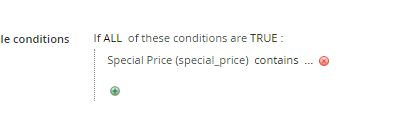
When attempting to create a new optimizer, I was trying to move items with a special price to the bottom of a category. When I selected "Special Price", the value is treated as a string, rather than a numerical value.
Preconditions
Magento Version : 2.3.1
ElasticSuite Version : 2.8
Environment : Production
Steps to reproduce
- Create a new Optimizer
- Select Category Product View
- Apply to any category with any boost value
- Apply a rule utilizing Special Price
Expected result
- Special Price should function as a numerical value, like Price (is, greater than, less than, etc)
Actual result
- Special price options are "Contains" and "Does Not Contain"
 KholdenSP
All 5 comments
Hello @KholdenSP
if you plan to boost (or bury) products that are actually discounted, you'd rather use the "Only discounted product" sub-rule.
That being said, I have the same issue as yours with special price being treated as a string BUT the "Special Price" should not be used (and available) in any cases here because it is simply not indexed into the Elasticsearch server : we only have a "price" field containing either the base price, or the special price if there is one. And we have a flag "is_discount" which is set either to true or false depending the fact that a special price is existing or not.
So, if you plan to do a rule like "target all products having a special price", use the "Only discounted product" condition.
If you plan to do a rule like "target all products having a special price under 50$", use a rule on Price like "Price is less than 50" (Price attribute should be treated as a numeric).
Regards
 romainruaud
on 31 Oct 2019
romainruaud
on 31 Oct 2019
Hello @KholdenSP
[...]
If you plan to do a rule like "target all products having a special price under 50$", use a rule on Price like "Price is less than 50" (Price attribute should be treated as a numeric).That is, use an "AND" combination ("ALL those rules ...") with both a rule on "Only discounted products" and a rule "Price is less than 50".
 rbayet
on 31 Oct 2019
rbayet
on 31 Oct 2019
Makes a ton of sense. If the attribute is not indexed, what's the point of keeping it in the optimizer selection? Are any others in the list not actually indexed?
KholdenSP
on 31 Oct 2019
Nope, if an attribute is shown here, it's indexed and available for rules.
Only price & special_price do have this kind of "strange" things embedded.
Regards
romainruaud
on 31 Oct 2019
Thanks a lot.
KholdenSP
on 31 Oct 2019
Related issues
 ShirishRam
·
3Comments
ShirishRam
·
3Comments
 shamoon
·
3Comments
shamoon
·
3Comments
 lingwooc
·
5Comments
lingwooc
·
5Comments
 JonathanBBD
·
3Comments
JonathanBBD
·
3Comments
 sdasun
·
4Comments
sdasun
·
4Comments
Most helpful comment