Ejabberd: Failed c2s EXTERNAL authentication user xyz Failed to get peer certificate
Environment
- ejabberd version: 20.4.0
- Erlang version:
Erlang/OTP 22 [erts-10.5] [source] [64-bit] - OS: Linux (Alpine)
- Installed from: docker
Configuration
listen:
  -
    port: 5222
    ip: "::"
    module: ejabberd_c2s
    max_stanza_size: 262144
    shaper: c2s_shaper
    access: c2s
    starttls_required: true
    cafile: /home/ejabberd/conf/cafile
    tls_verify: true...

# HTTP auth setting

auth_method: http
auth_opts:
  host: "http://authserver
  connection_pool_size: 10
  connection_opts: []
  basic_auth: ""
  path_prefix: "/"
Errors from error.log/crash.log
Failed c2s EXTERNAL authentication for abc@hosst from ::ffff:172.17.0.1: Failed to get peer certificate
Bug description
I am trying to authenticate client against base on SASL EXTERNAL with Certificates https://xmpp.org/extensions/xep-0178.html but user try to connect even with client certificate got the above warning.
Same error if no certificate provided and also client still able able to connect.
What I am expecting is
- If no certificate provided client should not able to connect while Ejabberd just bypass the
starttls_requiredandtls_verifyflag - Is there a way to not allow connection if certificate is not valid?
- Can I use just only client certificate authentication or should I use certificate along with http-auth?
Relevant commit is https://github.com/processone/ejabberd/commit/8b29af62 but it does not help
 onelab72
All 43 comments
With your configuration, authentication is first tried with the client certificate. If it fails, it fallback to the http backend. If you want to use only client certificate authentication, your have to remove the HTTP auth setting.
 jsautret
on 24 Jul 2020
jsautret
on 24 Jul 2020
Thanks for the response @jsautret, here is my update setting
listen:
  -
    port: 5222
    ip: "::"
    module: ejabberd_c2s
    max_stanza_size: 262144
    shaper: c2s_shaper
    access: c2s
    starttls_required: true
    cafile: /home/ejabberd/conf/cafile
    tls_verify: true
I removed the http auth. but when I tried to connect client with client certificate I got below error.
2020-07-24 13:41:43.284703+00:00 [warning] (tls|<0.616.0>) Failed c2s EXTERNAL authentication for user@host from ::ffff:172.17.0.1: Failed to get peer certificate
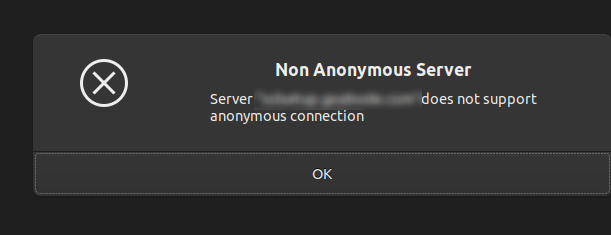
Gajim is the client for testing https://gajim.org/
So then should I enable anonymous authentication? if yes I do not want a client to connect with out certificate and I expected client should not able to connect if certificate is not valid.
would be great if provide example config for Ejabberd that base on the following XEP https://xmpp.org/extensions/xep-0178.html
onelab72
on 24 Jul 2020
According to the message, the client is not sending its certificate, so it's likely a client side issue.
jsautret
on 24 Jul 2020
Okay let assume client not sending certificate then I am expecting Ejabberd should not allow connection but client can still able to create connection if not certificate provided?
onelab72
on 24 Jul 2020
Also when I pass certificate properly from client side then it ask for password? If its certificate base authentication should client ask the password?
onelab72
on 24 Jul 2020
As @jsautret already explained:
- If you configure a second fallback authentication, the client certificate auth fails and then ejabberd uses as configured the password authentication.
- Your client certificate authentication does not seem to work. It may not be properly implemented in that client.
Again, from the comment you provide, there is no evidence that the server is not behaving properly. As such, your client is probably not doing the right thing.
 mremond
on 29 Jul 2020
mremond
on 29 Jul 2020
@mremond thanks for the explanation, just one final question as I did not find any thing in documentation
So the Ejabberd will not allow user to login without client certificate with below config?
    port: 5222
    ip: "::"
    module: ejabberd_c2s
    max_stanza_size: 262144
    shaper: c2s_shaper
    access: c2s
    starttls_required: true
    cafile: /home/ejabberd/conf/cafile
    tls_verify: true
It won't, if you do not have fallback authentication defined.
mremond
on 29 Jul 2020
Thanks its really helpful @mremond
So I am using https://apkgk.com/org.atalk.android as a client it has support for client certificate and I am no longer getting Failed to get peer certificate this error.
From client page
- SSL Certificate authentication, DNSSEC and DANE Security implementation for enhanced secure Connection Establishment
But during connection it ask for password even certificate verified, do have any suggestion why the client still asking for password and if its expected where I should define these password in ACL?
Thanks
onelab72
on 29 Jul 2020
The password is not defined in the certificate itself. The certificate must have been signed be a trusted CA. If that CA is not defined in the default OS CA root, then you need to pass it through the cafile listener option.
See: https://docs.ejabberd.im/admin/configuration/listen-options/#cafile
mremond
on 29 Jul 2020
How did you generate those certificates used by client? Did you sign them with cert that you you use in ejabberd cacert/c2s_cacert options? You also need to make sure that certificate that user uses has that user jid present in subjectAltName of that certificate.
 prefiks
on 29 Jul 2020
prefiks
on 29 Jul 2020
@mremond yes I pass the CA and Ejabberd seems working, with out CA its throw Waring like below
[warning] Invalid certificate in /home/ejabberd/conf/server.pem: at line 37: certificate is signed by unknown CA
but this disappear once I specify CA in the Ejabberd config.
onelab72
on 12 Aug 2020
@prefiks I generate in pkcs12 format as the client accept pkcs12 formate, I use below command to generate the certificate for client
openssl pkcs12 -export -in my.bundle.pem -inkey mykey.com.key -out mydomain.p12 -name *.domain.com -passin pass:myPass -passout pass:myPass
The above command does not include root CA, should so this include root CA as well?
onelab72
on 12 Aug 2020
Hello,
But why you are using this certificate on server, if you want to use it for client authentication, your client is supposed to send it to server when it's opening connection?
prefiks
on 12 Aug 2020
Hi @prefiks thanks for quick response.
Why you are using this certificate on server
On server side we are using this for TLS, as we are trying to implement SASL EXTERNAL with Certificates https://xmpp.org/extensions/xep-0178.html this extension of xmpp.
Your client is supposed to send it to server when it's opening connection
Yes, this is my understanding, might be I am wrong, which certificate client should sent then if I want to implement https://xmpp.org/extensions/xep-0178.html in Ejabberd?
onelab72
on 12 Aug 2020
So server is supposed to send certificate that in subject has domain name used by it, ideally signed by known cert authority (using external auth with cert doesn't change anything here, you just follow step as usual for xmpp server to make it support tls).
But if you want to use xmpp certs for client authentication, then you must make client send cert that have xmppAddr for jid that account is uses in altSubj field of that cert, it also needs to be signed by root cert that you pass in cafile in ejabberd config.
prefiks
on 12 Aug 2020
You can see how our test generate cert that is used for testing this feature: Cert must have this in altSubject https://github.com/processone/ejabberd/blob/master/test/ejabberd_SUITE_data/openssl.cnf#L224 you can also see how openssl is called in https://github.com/processone/ejabberd/blob/master/test/ejabberd_SUITE_data/gencerts.sh - it uses that .cnf file, cert.pem is what is then used by client
prefiks
on 12 Aug 2020
you just follow step as usual for xmpp server to make it support tls
Yes, I can verify TLS is configured on Ejabberd side and that seem working
But if you want to use xmpp certs for client authentication, then you must make client send cert that have xmppAddr for jid that account is uses in altSubj field of that cert, it also needs to be signed by root cert that you pass in cafile in ejabberd config.
I see, I missed signed by root cert and altSubj field.
Let me check the link and try with, will update you back.
Thanks for the help.
onelab72
on 12 Aug 2020
@prefiks Thanks for the help, it's really helpful. Generating client certificate with root CA I am able to make connection, but as I am not able to edit AltSubj field for existing certificate according to this post
With out Altsubject Field I am getting this error
[warning] (tls|<0.685.0>) Failed c2s EXTERNAL authentication from ::ffff:x.x.6.79: Certificate JID mismatch
I am still confuse regarding client certs so asking few question for more clarification
some background "Server using certificate that issued by Alpha SSL and using CA from here", so far so good and able to create client certificate using that key and pem file provided by Alpha SSL. so my questions are
- Do I need same Alpha key and PEM file to generate client certs?
- Or can I generate client certs by only using CA? or should I get new certs from Alpha?
- All client can use single certs? or every client will use own certs with subjectaltname like
[email protected], [email protected]for JID?
FYI I use this command to generate clients certs
openssl pkcs12 -export -out mysslname.pfx -inkey mydomain.com.key -in mydomain.bundle.pem -certfile ca.pem
And use mysslname.pfx this on client side which throw error as subjectalt name is missing and not able to update that. Please suggest.
onelab72
on 18 Aug 2020
You should create you own ca cert that you control, and use it, you probably won't be even able to use public CA, as i doubt you will make them sign cert with xmppAddr (and also would need to make them sign cert for each user). Using self signed cert in this case shouldn't be a problem anyway, those cert shouldn't be publicly visible, only your server and client will ever see them.
prefiks
on 19 Aug 2020
@prefiks thanks for the details. So you suggest sign certs for each user base on their JID.
I was able to configure and run with self signed certificate, now client able to make connection but Ejabberd throw below warning
[warning] (tls|<0.628.0>) Failed c2s EXTERNAL authentication from ::ffff:x.x.178.146: self signed certificate
Seems like I need to allow ejabberd to work with self signed certificate?
onelab72
on 19 Aug 2020
Did you pass path to a cert that was used to sign that in cacert option?
prefiks
on 19 Aug 2020
@prefiks yes. the config is same as with alpha SSL certs, I just change name of certs.
certfiles:
  - /home/ejabberd/conf/myserver.pem

ca_file: "/home/ejabberd/conf/rootca.pem"
and listener config
listen:
  -
    port: 5222
    ip: "::"
    module: ejabberd_c2s
    max_stanza_size: 262144
    shaper: c2s_shaper
    access: c2s
    starttls_required: true
    cafile: /home/ejabberd/conf/rootca.pem
    tls_verify: true
Did you sign client cert with private key associated to rootca?
prefiks
on 19 Aug 2020
@prefiks yes, I double check again, but seems like you doubt about client certs?
onelab72
on 19 Aug 2020
So i just tested this on my local instalation, and having cafile in listener and using client cert that was signed by key associated with cert from cafile works without ok there, i am guessing your client cert isn't correctly signed.
I didn't also answer to your question about multiple jids in single cert, you can have single cert with multiple altSubject for moultiple jids, and as it should work in ejabberd, but in that case you must pass base64 encoded jid inside
prefiks
on 19 Aug 2020
I see, so I thought the issue is on my side but tried different approach and the error still exist.
Here is my complete ejabberd.yml might be some other thing that create conflict
###
###              ejabberd configuration file
###
hosts:
  - "mydns.com"

loglevel: 4
log_rotate_size: 30485760
log_rotate_count: 10


certfiles:
  - /home/ejabberd/conf/server.pem

ca_file: "/home/ejabberd/conf/ca.crt"

listen:
  -
    port: 5222
    ip: "::"
    module: ejabberd_c2s
    max_stanza_size: 262144
    shaper: c2s_shaper
    access: c2s
    starttls_required: true
    tls_verify: true
    cafile: "/home/ejabberd/conf/ca.crt"

  -
    port: 5269
    ip: "::"
    module: ejabberd_s2s_in
    max_stanza_size: 524288
  -
    port: 5443
    ip: "::"
    module: ejabberd_http
    tls: true
    request_handlers:
      "/admin": ejabberd_web_admin
      "/api": mod_http_api
      "/ws": ejabberd_http_ws
  -
    port: 5280
    ip: "::"
    module: ejabberd_http
    request_handlers:
      "/admin": ejabberd_web_admin

s2s_use_starttls: optional

acl:

  admin:
    user:
      - "[email protected]"

access_rules:
  local:
    allow: local
  c2s:
    deny: blocked
    allow: all
  announce:
    allow: admin
  configure:
    allow: admin
  muc_create:
    allow: local
  pubsub_createnode:
    allow: local
  trusted_network:
    allow: loopback

api_permissions:
  "console commands":
    from:
      - ejabberd_ctl
    who: all
    what: "*"
  "admin access":
    who:
      access:
        allow:
          acl: loopback
          acl: admin
      oauth:
        scope: "ejabberd:admin"
        access:
          allow:
            acl: loopback
            acl: admin
    what:
      - "*"
      - "!stop"
      - "!start"
  "public commands":
    who:
      ip: 127.0.0.1/8
    what:
      - status
      - connected_users_number

shaper:
  normal: 1000
  fast: 50000

shaper_rules:
  max_user_sessions: 10
  max_user_offline_messages:
    - 5000: admin
    - 50000: security_admin
    - 100
  2s_shaper:
    - fast

max_fsm_queue: 10000

modules:
  mod_adhoc: {}
  mod_admin_extra: {}
  mod_announce:
    access: announce
  mod_http_api: {}
  mod_ping: {}
  mod_privacy: {}
  # mod_private: {}

  mod_roster:
    versioning: true
  mod_sip: {}
  mod_s2s_dialback: {}
  mod_shared_roster: {}
  mod_stream_mgmt: {}
  mod_version: {}
and Here is the script to generate certs for server and client device
openssl genrsa -out ca.key 4096
openssl req -new -x509 -days 100 -key ca.key -out ca.crt     -subj "/C=US/ST=Acme State/L=Acme City/O=Acme Inc./CN=*.mydns.com"


openssl genrsa -out client.key 4096
openssl req -new -key client.key -out client.csr -subj "/C=US/ST=Acme State/L=Acme City/O=Acme Inc./CN=*.mydns.com" \
    -reqexts SAN \
    -config <(cat /etc/ssl/openssl.cnf <(printf "\n[SAN]\nsubjectAltName=DNS:[email protected]"))

### client certs

openssl x509 -req -days 365 -in client.csr -CA ca.crt -CAkey ca.key -set_serial 01 -out client.crt


### Generate Server certs

openssl genrsa -out server_key.key 4096
openssl req -new \
    -key server_key.key \
    -out server.csr \
    -subj "/C=US/ST=Acme State/L=Acme City/O=Acme Inc./CN=*.mydns.com"


openssl x509 -req -days 1460 -in server.csr \
    -CA ca.crt -CAkey ca.key \
    -CAcreateserial -out server.pem
echo "adding bundle"
cat server_key.key >> server.pem

#### Generate for device

openssl pkcs12 -export -clcerts -in client.crt -inkey client.key -out client.p12

openssl pkcs12 -in client.p12 -out client.pem -clcerts
@prefiks please look into this and let me know if there is any thing that I am missing.
thanks, appreciated.
onelab72
on 21 Aug 2020
I am not sure if those openssl pkcs12 calls are correct, you operate on pem files there, just doing cat client.crt client.key > client.pem should give you correct pem file there.
prefiks
on 21 Aug 2020
I see, but the client that I am using can only operator on pfx or p12
I can test against two client swift base on window and atalk base on andriod.
Any other client that you would recommend for testing?
onelab72
on 21 Aug 2020
@prefiks also the more strange part is both client when try to connect, ejabberd show different error
In case of window
[warning] (tls|<0.625.0>) Failed c2s EXTERNAL authentication from ::ffff:111.119.187.60: self signed certificate
and in case of Android client
[warning] (tls|<0.624.0>) Failed c2s EXTERNAL authentication from ::ffff:111.119.187.60: Failed to get peer certificate
You can use openssl command to test that as well:
(echo "<stream:stream xmlns:stream='http://etherx.jabber.org/streams' xmlns='jabber:client' to='my.server.com' version='1.0'><auth xmlns='urn:ietf:params:xml:ns:xmpp-sasl' mechanism='EXTERNAL'/>";sleep 5) | openssl s_client -debug -connect localhost:5222 -starttls xmpp -xmpphost my.server.com -cert "/path/to/client.pem"
Just substitute my.server.com with your domain and pass correct path to pem file.
prefiks
on 21 Aug 2020
First one seems to send wrong cert and second one doesn't send one at all?
prefiks
on 21 Aug 2020
Not sure about the android client as not able to see the logs, where window client pick certs from window certs(after installation of pfx) so might be issue pfx creation, but I pasted that command as well.
onelab72
on 21 Aug 2020
@prefiks thanks for the handy command, I tried to create pem cat client.crt client.key > client.pem and run the below command
(echo "<stream:stream xmlns:stream='http://etherx.jabber.org/streams' xmlns='jabber:client' to='test.mydns.com' version='1.0'><auth xmlns='urn:ietf:params:xml:ns:xmpp-sasl' mechanism='EXTERNAL'/>";sleep 5) | openssl s_client -debug -connect test.mydns.com:5222 -starttls xmpp -xmpphost test.mydns.com -cert "/path_to_file/client.pem"
Throw same error
<failure xmlns='urn:ietf:params:xml:ns:xmpp-sasl'><not-authorized/><text xml:lang='en'>self signed certificate</text></failure>
on server side
[warning] (tls|<0.650.0>) Failed c2s EXTERNAL authentication from ::ffff:X.x.40.50: self signed certificate
And yes the command is really helpful to test the functionality. thanks
onelab72
on 21 Aug 2020
I just did
openssl genrsa -out client.key 4096
openssl req -new -key client.key -out client.csr -subj "/C=US/ST=Acme State/L=Acme City/O=Acme Inc./CN=*.mydns.com" \
    -reqexts SAN \
    -config <(cat openssl.cnf <(printf "\n[SAN]\nsubjectAltName=DNS:[email protected]"))
openssl x509 -req -days 365 -in client.csr -CA ca.pem -CAkey ca.key -set_serial 01 -out client.crt
cat client.crt client.key >client.pem
and using that client.pem i got this working, maybe issue with content openssl.cnf, i just used config from test/ejabberd_SUITE_data/openssl.cnf from ejabberd repo for that (to make it add xmppAddr in altSubject)
prefiks
on 21 Aug 2020
Here is some more logs from openssl command
depth=0 C = US, ST = Acme State, L = Acme City, O = Acme Inc., CN = *.mydns.com
verify error:num=18:self signed certificate
verify return:1
depth=0 C = US, ST = Acme State, L = Acme City, O = Acme Inc., CN = *.mydns.com
verify return:1
read from 0x5600b95633f0 [0x5600b95730c3] (5 bytes => 5 (0x5))
0000 - 17 03 03 02 19                                    .....
read from 0x5600b95633f0 [0x5600b95730c8] (537 bytes => 537 (0x219))
.
.
.
.
Acceptable client certificate CA names
C = US, ST = Acme State, L = Acme City, O = Acme Inc., CN = *.mydns.com
Requested Signature Algorithms: *****
Peer signing digest: SHA256
Peer signature type: RSA-PSS
Server Temp Key: X25519, 253 bits
---
SSL handshake has read 2699 bytes and written 2495 bytes
Verification error: self signed certificate
---
New, TLSv1.3, Cipher is TLS_AES_256_GCM_SHA384
Server public key is 4096 bit
Secure Renegotiation IS NOT supported
Compression: NONE
Expansion: NONE
No ALPN negotiated
Early data was not sent
Verify return code: 18 (self signed certificate)
.
.
.
Post-Handshake New Session Ticket arrived:
SSL-Session:
    Protocol  : TLSv1.3
    Cipher    : TLS_AES_256_GCM_SHA384
    Session-ID: ***
    Session-ID-ctx:
    Resumption PSK: ***
    PSK identity: None
    PSK identity hint: None
    SRP username: None
    TLS session ticket lifetime hint: 7200 (seconds)
    TLS session ticket:***

    Start Time: 1598004272
    Timeout   : 7200 (sec)
    Verify return code: 18 (self signed certificate)
    Extended master secret: no
    Max Early Data: 0
.
`
`
<?xml version='1.0'?><stream:stream id='10974570088357126463' version='1.0' xml:lang='en' xmlns:stream='http://etherx.jabber.org/streams' from='mydns.com' xmlns='jabber:client'>read from 0x5600b95633f0 [0x5600b95730c3] (5 bytes => 5 (0x5))
I just did
openssl genrsa -out client.key 4096
openssl req -new -key client.key -out client.csr -subj "/C=US/ST=Acme State/L=Acme City/O=Acme Inc./CN=*.mydns.com" \
    -reqexts SAN \
    -config <(cat openssl.cnf <(printf "\n[SAN]\nsubjectAltName=DNS:[email protected]"))
openssl x509 -req -days 365 -in client.csr -CA ca.pem -CAkey ca.key -set_serial 01 -out client.crt
cat client.crt client.key >client.pem
and using that client.pem i got this working, maybe issue with content openssl.cnf, i just used config from test/ejabberd_SUITE_data/openssl.cnf from ejabberd repo for that (to make it add xmppAddr in altSubject)
I see, I tried to create certs using the script that I mentioned in earlier comment
Btw in the above case what will be the value of certfiles in ejabberd yml, as it clear for that script generate client certs, but what about the server certs? any idea thanks.
certfiles:
  - /home/ejabberd/conf/server.pem
Or I just need ca_file? mean it will work with out server certs?
But I removed server certs config, it throw following error
[warning] (tls|<0.604.0>) Failed to secure c2s connection: TLS failed: Failed to find a certificate matching the domain in SNI extension: error:1422E0EA:SSL routines:final_server_name:callback failed
Thanks
onelab72
on 21 Aug 2020
You don't need to generate server cert that way, you can use any server cert, those things are independent, you just need to make sure that ca_file point to cert that client certs are signed with.
prefiks
on 21 Aug 2020
One more issue with you cert generation, resulting cert didn't have altSubjectName in it, here is a version which should generate cert with it:
openssl req -new -key client.key -out client.csr -subj "/C=US/ST=Acme State/L=Acme City/O=Acme Inc./CN=*.mydns.com"

openssl x509 -req -days 365 -in client.csr -CA ca.pem -CAkey ca.key -set_serial 01 -out client.crt -extensions SAN -extfile <(printf '\n[SAN]\nbasicConstraints=CA:FALSE\nkeyUsage=nonRepudiation,digitalSignature,keyEncipherment\nextendedKeyUsage=clientAuth\nsubjectAltName=otherName:1.3.6.1.5.5.7.8.5;UTF8:"[email protected]"')

cat client.crt client.key >client.pem
You don't need to generate server cert that way, you can use any server cert, those things are independent, you just need to make sure that ca_file point to cert that client certs are signed with.
Thanks, it was confusing from the config as and I was passing CA to certs as well, which throw error
certfiles:
  - /home/ejabberd/conf/server.pem

ca_file: "/home/ejabberd/conf/ca.crt"
So i have to remove ca_file
certfiles:
  - /home/ejabberd/conf/server.pem
So certfile tells server what certificate/private key it should use for encryption of communication with clients, ca_file tells what certificate should be used for validate certificates that clients send. So if you want to have certificate authentication you need both, but you don't need to use certificate generate with openssl in certfile generally you should use here one that was signed by real certificate authority.
prefiks
on 21 Aug 2020
One more issue with you cert generation, resulting cert didn't have altSubjectName in it, here is a version which should generate cert with it:
openssl req -new -key client.key -out client.csr -subj "/C=US/ST=Acme State/L=Acme City/O=Acme Inc./CN=*.mydns.com"

openssl x509 -req -days 365 -in client.csr -CA ca.pem -CAkey ca.key -set_serial 01 -out client.crt -extensions SAN -extfile <(printf '\n[SAN]\nbasicConstraints=CA:FALSE\nkeyUsage=nonRepudiation,digitalSignature,keyEncipherment\nextendedKeyUsage=clientAuth\nsubjectAltName=otherName:1.3.6.1.5.5.7.8.5;UTF8:"[email protected]"')

cat client.crt client.key >client.pem
Thanks you so much. Finally it worked. I used below command to generate certs for client device.
openssl pkcs12 -export -out Cert.p12 -in client.crt -inkey client.key -passin pass:1234 -passout pass:1234
Also the client that worked in my case is gajim for linux.
the server success log was
2020-08-21 17:59:10.574987+00:00 [info] (<0.732.0>) Accepted connection [::ffff:X.X.X.104]:52536 -> [::ffff:172.17.0.3]:5222
2020-08-21 17:59:12.222371+00:00 [info] (tls|<0.732.0>) Accepted c2s EXTERNAL authentication for [email protected] by pkix backend from ::ffff:X.X.X.104
Once again thanks for the support @prefiks , it was not possible with out your support.
onelab72
on 21 Aug 2020
Related issues
 andrew-vant
·
4Comments
andrew-vant
·
4Comments
 irvingwa
·
3Comments
irvingwa
·
3Comments
 sujankumar4593
·
4Comments
sujankumar4593
·
4Comments
 ThomasLeister
·
4Comments
ThomasLeister
·
4Comments
 lgg
·
4Comments
lgg
·
4Comments
Most helpful comment
So
certfiletells server what certificate/private key it should use for encryption of communication with clients,ca_filetells what certificate should be used for validate certificates that clients send. So if you want to have certificate authentication you need both, but you don't need to use certificate generate with openssl incertfilegenerally you should use here one that was signed by real certificate authority.