- Node Version: 10.8.0
- Egg Version: 1.14.1
- Platform: mac
客户端用 Vue, 服务端在另一个端口,所以是在跨域的情况下,
- 已经指定相关配置,相应的 plugins.js 也都开启了 enable
config.security = {
    csrf: false,
    domainWhiteList:['http://localhost:8080']
  };

  config.cors = {
    credentials: true,
  };
- 在 controller 里面代码如下:
    ctx.cookies.set('token', token, {
      maxAge: 1000*60*60
    });

    return ctx.helper.success(token);
代码运行无报错,客户能收到接口返回的 token, 但就是 cookie 没有设置,通过 debug 是能看到走到 this.ctx.set(header) 那里,然而客户端 cookie 就是没有设置,不知道还有什么可能会导致这个问题。
 littledu
All 17 comments
Translation of this issue:
post request can't set cookie
- Node Version: 10.8.0
- Egg Version: 1.14.1
- Platform: mac
The client uses Vue, the server is on another port, so it is in the case of cross-domain,
- The relevant configuration has been specified, and the corresponding plugins.js are also enabled.
Config.security = {
Csrf: false,
domainWhiteList:['http://localhost:8080']
};
Config.cors = {
Credentials: true,
};
- The code inside the controller is as follows:
Ctx.cookies.set('token', token, {
maxAge: 1000*60*60
});
Return ctx.helper.success(token);
The code runs without error, the client can receive the token returned by the interface, but the cookie is not set. Through the debug, it can be seen to go to this.ctx.set(header), but the client cookie is not set, I don’t know. What could cause this problem.
 egg-bot
on 19 Aug 2018
egg-bot
on 19 Aug 2018
前端设 credentials 了吗
 popomore
on 19 Aug 2018
popomore
on 19 Aug 2018
设了,理论来讲,这个是请求能带上 cookie,跟设置无关,但我还是设了,在请求头能看到相应字段。
littledu
on 19 Aug 2018
https://segmentfault.com/q/1010000008636959
提供下可重现的 demo
popomore
on 19 Aug 2018
明天我搞搞
littledu
on 19 Aug 2018
找了大半天,不小心解决了。。。。。。。如下:
1. 客户端: http://localhost:8080    接口是 http://127.0.0.1:7001/login      不行
2. 客户端: http://127.0.0.1:8080     接口是 http://127.0.0.1:7001/login       行
3. 客户端: http://localhost:8080    接口是 http://localhost:7001/login    不行
4. 客户端: http://127.0.0.1:8080     接口是 http://localhost:7001/login     行
当有问题的时候,客户端请求还有如下表现:
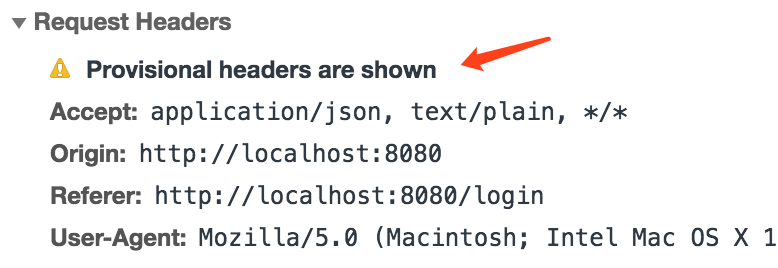
找了半天如上截图的错,能找到的解决方案都不适合。
最后不知道自己哪根筋错了把浏览器的 localhost 改为 127.0.0.1 ,然后就好了。。。。。就好了。。。。。[此处应有黑人问号]
不知道为什么的结论: 本地开发时,浏览器访问的地址要为 127.0.0.1,别问我为什么,我也不知道。
顺便把 Provisional headers are shown 这个关键警告打出来,方便后人搜索相关关键字能到这里来。
good luck!
littledu
on 20 Aug 2018
请保持域名和请求的一致
 dead-horse
on 20 Aug 2018
dead-horse
on 20 Aug 2018
老哥可以的 我这swagger设置的localhost vue项目设置的127.0.0.1,只用了swagger试,试了半天没有cookie 这下解决了
 XavierShi
on 15 Jan 2019
XavierShi
on 15 Jan 2019
ctx.cookies.set(key,value)
value 竟然不能为中文??中文直接报参数错误 。什么鬼
 shen-lan
on 15 Mar 2019
shen-lan
on 15 Mar 2019
因为这是 Web 规范来着,https://tools.ietf.org/html/rfc7230#section-3.2.6
有需要自己 encode
 atian25
on 15 Mar 2019
atian25
on 15 Mar 2019
因为这是 Web 规范来着,https://tools.ietf.org/html/rfc7230#section-3.2.6
有需要自己 encode
emm 好吧 谢谢解答
shen-lan
on 15 Mar 2019
老哥可以的 我这swagger设置的localhost vue项目设置的127.0.0.1,只用了swagger试,试了半天没有cookie 这下解决了
突然收到这个 issues 的通知,来看一下发现我之前留下的关键字还是有帮助到人的,开心。
littledu
on 15 Mar 2019
老哥可以的 我这swagger设置的localhost vue项目设置的127.0.0.1,只用了swagger试,试了半天没有cookie 这下解决了
突然收到这个 issues 的通知,来看一下发现我之前留下的关键字还是有帮助到人的,开心。
^_^ 这就是我们一直提倡的:基于 GitHub Issue 的异步协作交流模式,所有的交流都是异步的、硬盘化的,后来人很清晰的就能知道一件事的前因后果。
atian25
on 15 Mar 2019
老哥可以的 我这swagger设置的localhost vue项目设置的127.0.0.1,只用了swagger试,试了半天没有cookie 这下解决了
突然收到这个 issues 的通知,来看一下发现我之前留下的关键字还是有帮助到人的,开心。
^_^ 这就是我们一直提倡的:基于 GitHub Issue 的异步协作交流模式,所有的交流都是异步的、硬盘化的,后来人很清晰的就能知道一件事的前因后果。
优秀,一切都有章可循
littledu
on 15 Mar 2019
前端 xhr 設定 withCredentials,就可以在跨域的情況下拿到 Cookie。
https://developer.mozilla.org/zh-TW/docs/Web/API/XMLHttpRequest/withCredentials
 trylovetom
on 23 Apr 2019
trylovetom
on 23 Apr 2019
我也是一样的问题,可是我咋全部改成127.0.0.1就不行勒
 nightmareT
on 26 Jul 2019
nightmareT
on 26 Jul 2019
@littledu 老哥,多谢了,这问题折腾到怀疑人生了,代码检查了好多遍,一点问题都没有,改为127.0.0.1就OK了,愿后面的小伙伴不要掉这坑里了。
- 客户端: http://localhost:8080 接口是 http://127.0.0.1:7001/login 不行
- 客户端: http://127.0.0.1:8080 接口是 http://127.0.0.1:7001/login 行
- 客户端: http://localhost:8080 接口是 http://localhost:7001/login 不行
- 客户端: http://127.0.0.1:8080 接口是 http://localhost:7001/login 行
 lucaswangdev
on 8 Sep 2019
lucaswangdev
on 8 Sep 2019
Related issues
 Leungkingman
·
3Comments
Leungkingman
·
3Comments
 lvgg3271
·
3Comments
lvgg3271
·
3Comments
 kylezhang
·
3Comments
kylezhang
·
3Comments
 Ailein
·
3Comments
Ailein
·
3Comments
 dizhifeng
·
3Comments
dizhifeng
·
3Comments
Most helpful comment
找了大半天,不小心解决了。。。。。。。如下:
当有问题的时候,客户端请求还有如下表现:

找了半天如上截图的错,能找到的解决方案都不适合。
最后不知道自己哪根筋错了把浏览器的
localhost改为127.0.0.1,然后就好了。。。。。就好了。。。。。[此处应有黑人问号]不知道为什么的结论: 本地开发时,浏览器访问的地址要为
127.0.0.1,别问我为什么,我也不知道。顺便把 Provisional headers are shown 这个关键警告打出来,方便后人搜索相关关键字能到这里来。
good luck!