Ef6: Long running Code First Migration throws RemotingException: "Object has been disconnected from the server"
A code first migration of about 20 minutes causes the following exception when the Update-Database command is executed:
It appears to be something related to a timeout of the migration
In my case the migration was adding a column to a table with about 11 million records, the operation takes time but it does work when the command SQL is directly executed on the database manager
There are other people having the same issue here and here
System.Runtime.Remoting.RemotingException: Object '/7ba26d1b_81f4_4f58_8bf3_92a9b8a3a3fa/zq28jcy6udmgdh9278mbbwoy_163.rem' has been disconnected or does not exist at the server.
   at System.Data.Entity.Migrations.Design.ToolingFacade.ToolLogger.Verbose(String sql)
   at System.Data.Entity.Migrations.Infrastructure.MigratorLoggingDecorator.ExecuteSql(MigrationStatement migrationStatement, DbConnection connection, DbTransaction transaction, DbInterceptionContext interceptionContext)
   at System.Data.Entity.Migrations.DbMigrator.ExecuteStatementsInternal(IEnumerable`1 migrationStatements, DbConnection connection, DbTransaction transaction, DbInterceptionContext interceptionContext)
   at System.Data.Entity.Migrations.DbMigrator.ExecuteStatementsWithinTransaction(IEnumerable`1 migrationStatements, DbTransaction transaction, DbInterceptionContext interceptionContext)
   at System.Data.Entity.Migrations.DbMigrator.ExecuteStatementsWithinNewTransaction(IEnumerable`1 migrationStatements, DbConnection connection, DbInterceptionContext interceptionContext)
  at System.Data.Entity.Migrations.DbMigrator.ExecuteStatementsInternal(IEnumerable`1 migrationStatements, DbConnection connection, DbInterceptionContext interceptionContext)
   at System.Data.Entity.Migrations.DbMigrator.ExecuteStatementsInternal(IEnumerable`1 migrationStatements, DbConnection connection)
   at System.Data.Entity.Migrations.DbMigrator.<>c__DisplayClass30.<ExecuteStatements>b__2e()
   at System.Data.Entity.Infrastructure.DefaultExecutionStrategy.Execute(Action operation)
   at System.Data.Entity.Migrations.DbMigrator.ExecuteStatements(IEnumerable`1 migrationStatements, DbTransaction existingTransaction)
   at System.Data.Entity.Migrations.DbMigrator.ExecuteStatements(IEnumerable`1 migrationStatements)
   at System.Data.Entity.Migrations.Infrastructure.MigratorBase.ExecuteStatements(IEnumerable`1 migrationStatements)
   at System.Data.Entity.Migrations.DbMigrator.ExecuteOperations(String migrationId, VersionedModel targetModel, IEnumerable`1 operations, IEnumerable`1 systemOperations, Boolean downgrading, Boolean auto)
   at System.Data.Entity.Migrations.DbMigrator.ApplyMigration(DbMigration migration, DbMigration lastMigration)
   at System.Data.Entity.Migrations.Infrastructure.MigratorLoggingDecorator.ApplyMigration(DbMigration migration, DbMigration lastMigration)
   at System.Data.Entity.Migrations.DbMigrator.Upgrade(IEnumerable`1 pendingMigrations, String targetMigrationId, String lastMigrationId)
   at System.Data.Entity.Migrations.Infrastructure.MigratorLoggingDecorator.Upgrade(IEnumerable`1 pendingMigrations, String targetMigrationId, String lastMigrationId)
   at System.Data.Entity.Migrations.DbMigrator.UpdateInternal(String targetMigration)
   at System.Data.Entity.Migrations.DbMigrator.<>c__DisplayClassc.<Update>b__b()
   at System.Data.Entity.Migrations.DbMigrator.EnsureDatabaseExists(Action mustSucceedToKeepDatabase)
   at System.Data.Entity.Migrations.Infrastructure.MigratorBase.EnsureDatabaseExists(Action mustSucceedToKeepDatabase)
   at System.Data.Entity.Migrations.DbMigrator.Update(String targetMigration)
   at System.Data.Entity.Migrations.Infrastructure.MigratorBase.Update(String targetMigration)
   at System.Data.Entity.Migrations.Design.ToolingFacade.UpdateRunner.Run()
   at System.AppDomain.DoCallBack(CrossAppDomainDelegate callBackDelegate)
   at System.AppDomain.DoCallBack(CrossAppDomainDelegate callBackDelegate)
   at System.Data.Entity.Migrations.Design.ToolingFacade.Run(BaseRunner runner)
   at System.Data.Entity.Migrations.Design.ToolingFacade.Update(String targetMigration, Boolean force)
   at System.Data.Entity.Migrations.UpdateDatabaseCommand.<>c__DisplayClass2.<.ctor>b__0()
   at System.Data.Entity.Migrations.MigrationsDomainCommand.Execute(Action command)
Object '/7ba26d1b_81f4_4f58_8bf3_92a9b8a3a3fa/zq28jcy6udmgdh9278mbbwoy_163.rem' has been disconnected or does not exist at the server.
 RafaelSalguero
All 39 comments
+1 Already after 5 Minutes.
 fru
on 10 Jan 2017
fru
on 10 Jan 2017
Apparently this was sitting on my plate to look for a repro. There is a repro in one of the StackOverflow.com links in the original report. The most interesting part of it is:
C#
public override void Up()
{
    System.Threading.Thread.Sleep(1320000);
}
So, clearing up milestone for re-triage.
 divega
on 19 Jan 2017
divega
on 19 Jan 2017
We'll see if there is an easy fix to implement.
A workaround in the meantime is to create a SQL script and then apply that.
 rowanmiller
on 20 Jan 2017
rowanmiller
on 20 Jan 2017
The issue is that the ToolLogger lease lifetime (base class MigrationsLogger is a MarshalByRefObject) is at the default (5 minutes). The ToolingFacade creates the logger, which lives in the main program's app domain. The migrations run in a different app domain. If a migration takes longer than 5 minutes, the attempt to log any further information results in this error. A solution would be to increase the lease lifetime in the main program. So... in the main program, prior to creating the ToolingFacade, set the lease lifetime to a longer time period:
using System.Runtime.Remoting.Lifetime;
...
LifetimeServices.LeaseTime = TimeSpan.FromHours(1);
Migrations in this case can then take as long as 1 hour before this issue presents itself.
 WaltGordon
on 28 Mar 2017
WaltGordon
on 28 Mar 2017
@divega to investigate workaround.
 ajcvickers
on 1 May 2017
ajcvickers
on 1 May 2017
I have the same problem with Add-Migration command.
If I execute Add-Migration SomeMigration command after about 5 minutes I get:
System.Runtime.Remoting.RemotingException: Object '/39b61e18_bd3c_4176_a4a3_161f0873748e/t3dmkh_7yui7h3rtpclm6h5s_8.rem' has been disconnected or does not exist at the server.
   at System.Data.Entity.Migrations.Utilities.DomainDispatcher.WriteLine(String text)
   at System.Data.Entity.Migrations.MigrationsDomainCommand.WriteLine(String message)
   at System.Data.Entity.Migrations.AddMigrationCommand.Execute(String name, Boolean force, Boolean ignoreChanges)
   at System.Data.Entity.Migrations.AddMigrationCommand.<>c__DisplayClass2.<.ctor>b__0()
   at System.Data.Entity.Migrations.MigrationsDomainCommand.Execute(Action command)
Object '/39b61e18_bd3c_4176_a4a3_161f0873748e/t3dmkh_7yui7h3rtpclm6h5s_8.rem' has been disconnected or does not exist at the server.
I also tried to use -Force and -IgnoreChanges switches but they didn't help.
Any solutions?
Btw. I'm using EF 6.2.0, VS2017, SQL Server 2016, my model have about 650 class/tables and I'm also using Table per Concrete Type inheritance mapping strategy (maybe it would be helpful).
 plenartowicz
on 10 Dec 2017
plenartowicz
on 10 Dec 2017
Ping - Any new work here? Problem still occurs in Migrate.exe with EF 6.2.61023 as of 7/27/2018.
 HowardHoffman
on 30 Jul 2018
HowardHoffman
on 30 Jul 2018
Has anyone seen this happen non-deterministically. We're running a migration in a VSTS release pipeline, and it is occasionally hitting this error.
We thought that scaling up the database was allowing the migration to run quick enough to avoid this issue, but we just saw it again on a database scaled up to a level that our testing showed should work.
 rikkiprince
on 18 Oct 2018
rikkiprince
on 18 Oct 2018
Have a very large schema change migration for a very large db that times out and errors with this. Any other workarounds besides running the generated script? #8240 is EFCore, and #258 just refers back to this issue.
 pseabury
on 24 Oct 2018
pseabury
on 24 Oct 2018
Also encountered this problem. The scenario where I encountered this was adding an index to an existing large DB that took longer than the default 5 minute timeout.
 lloydjatkinson
on 12 Dec 2018
lloydjatkinson
on 12 Dec 2018
Any fix for this in EF 6.1.3? We can't upgrade due to stability problems, but this is insane that CommandTimeout doesn't work, and we're effectively limited to having migrations that run in under 5 minutes, which is impossible when applying indexes to large tables.
 triynko
on 22 Jan 2019
triynko
on 22 Jan 2019
I'm running into this as well when I'm adding an index to a large table.
We use Shard-dbs and we have 100+ dbs. Running a script is not an option.
 pmeems
on 18 Mar 2019
pmeems
on 18 Mar 2019
Any progress on this? As stated in the referenced issue #873 this issue exists for years now and it seems that all that is needed is to increase the internal time-out of the Marshalled logging. Preferable using the CommandTimeout property.
I'm still running into this several times a month.
pmeems
on 26 Jun 2019
@pmeems If you know what needs to be fixed, then would you consider sending a pull request with that fix?
ajcvickers
on 26 Jun 2019
@ajcvickers I'm just repeating what others are saying ;)
If I would know how to solve this technically I would have sent a pull request years ago.
pmeems
on 27 Jun 2019
This may be fixed in 6.3.0-preview8--this area of the code was changed significantly while adding support for .NET Core
 bricelam
on 29 Jul 2019
bricelam
on 29 Jul 2019
I upgraded EF to the 6.3.0-preview version and started my migration, but as before, I get an error after 20 minutes of RemotingException "_Object '/xxxx/xxxx.rem' has been disconnected or does not exist at the server_" (the required time to execute the script is 30 minutes).
i used commands:
this.CommandTimeout = 60 * 60 * 60;
LifetimeServices.LeaseTime = TimeSpan.FromHours(1);
 GebekovAS
on 21 Sep 2019
GebekovAS
on 21 Sep 2019
@GebekovAS Please post a runnable project/solution that demonstrates the behavior you are seeing so that we can investigate.
ajcvickers
on 10 Oct 2019
I don't have a repro for you, but I just hit the same issue in 6.3. And yes, I call LifetimeServices.LeaseTime = TimeSpan.FromHours(1); at the top of the migration.
As this has been our workaround for this long standing bug for years, it seems that 6.3 may have broken the workaround.
 edswangren
on 31 Oct 2019
edswangren
on 31 Oct 2019
Repro:
public override void Up()
{
    LifetimeServices.LeaseTime = TimeSpan.FromHours(1);
    System.Threading.Thread.Sleep(TimeSpan.FromMinutes(6));
}
Exception has been thrown by the target of an invocation. ---> System.Runtime.Remoting.RemotingException: Object '/d4e5d53f_bd1b_4f72_8737_4f821d0bc8ce/mymzkjhqjk4pj1kkdybbfzhc_4.rem' has been disconnected or does not exist at the server.
Any update on this? Migrations are literally unusable for anything non-trivial. It's just crazy to me that this is even a problem and has been for three years.
edswangren
on 7 Nov 2019
@GebekovAS Where did the suggestion come from to use LifetimeServices.LeaseTime = TimeSpan.FromHours(1);? Do you know why it would fix this issue?
ajcvickers
on 8 Nov 2019
@ajcvickers I have met offers to use LifetimeServices.LeaseTime on several forums, including this thread (https://github.com/aspnet/EntityFramework6/issues/96#issuecomment-289782427). Migration had to execute a script that segments the table. The table contains ~ 4,000,000 records. The segmentation script is invoked as follows:
public override void Up ()
{
      Sql (File.ReadAllText (<script file name>));
}
When you run the script from the studio, it successfully exits in 25 minutes. But if you run it through a migrator, it is interrupted by the following error: Object has been disconnected from the server
GebekovAS
on 11 Nov 2019
@ajcvickers I think you can try to repeat the mistake. To do this, create a table with data of ~5,000,000 rows. After that, generate a segmentation script in the studio for a table of 7 files (in my case, these are days of the week). Try to run this script through migration.
GebekovAS
on 11 Nov 2019
@bricelam So, is it true to say from our discussion last week that the comment here is likely a bogus solution to this issue?
ajcvickers
on 11 Nov 2019
@bricelam So, is it true to say from our discussion last week that the comment here is likely a bogus solution to this issue?
It's a solution that we have used for a couple of years to work around this bug. Upon updating to 6.3 we started seeing failed migrations.
To be fair, I didn't add this to the code base myself (it was before I started), and I haven't reverted back a version to see if I could still duplicate the issue. What I do know is that A) I can't have a migration that lasts longer than 5 mins, which is currently costing me time, and B) migrations which used to succeed (taking > 5 mins) no longer do.
edswangren
on 11 Nov 2019
Hate to be a bother, but is there any update on this? Is a fix on the roadmap? It's causing a lot of grief for us and I just can't believe that such a silly bug would be allowed to linger for so long.
edswangren
on 21 Nov 2019
We have also used this workaround in the past for several years by increasing the LeaseTime in our Configuration.cs file.
But as @edswangren already mentioned, it no longer works.
However, i have other information for you:
We have been using version 6.2 since its release. The workaround described (LeaseTime > 5min) has definitely worked with it in the past. We don't have many long running migrations, but we have one this week and it suddenly stops working. So I do not think that the reason for this is an update to 6.3., because we still use 6.2 and it worked before! The reason must be something else.
Today I spent all day to get our migration running somehow.
My migration file to reproduce the issue:
public partial class Longrunningmigration : DbMigration
{
    public override void Up()
    {
        LifetimeServices.LeaseTime = TimeSpan.FromHours(1);
        System.Threading.Thread.Sleep(TimeSpan.FromMinutes(6));
    }

    public override void Down()
    {
    }
}
I have tried all versions from 6.1.3 to 6.4
- EF 6.1.3
- EF 6.2
Error Message from migrate.exe:
PM> Update-Database -ProjectName "XXX.Common" -StartUpProjectName "XXX.Common" -ConnectionStringName "XXXDbContext" -Verbose
Using StartUp project 'XXX.Common'.
Specify the '-Verbose' flag to view the SQL statements being applied to the target database.
Target database is: 'XXX' (DataSource: localhost,2433, Provider: System.Data.SqlClient, Origin: Explicit).
Applying explicit migrations: [202001161545394_Long running migration].
Applying explicit migration: 202001161545394_Long running migration.
after 5 minutes of waiting ....
System.Runtime.Remoting.RemotingException: Object '/9b12b632_a813_4f1f_ad7d_8965295def39/zfjvhghlcvw931bbghtfgxls_4774.rem' has been disconnected or does not exist at the server.
   at System.Data.Entity.Migrations.Design.ToolingFacade.ToolLogger.Verbose(String sql)
   at System.Data.Entity.Migrations.Infrastructure.MigratorLoggingDecorator.ExecuteSql(MigrationStatement migrationStatement, DbConnection connection, DbTransaction transaction, DbInterceptionContext interceptionContext)
   at System.Data.Entity.Migrations.DbMigrator.ExecuteStatementsInternal(IEnumerable`1 migrationStatements, DbConnection connection, DbTransaction transaction, DbInterceptionContext interceptionContext)
   at System.Data.Entity.Migrations.DbMigrator.ExecuteStatementsWithinTransaction(IEnumerable`1 migrationStatements, DbTransaction transaction, DbInterceptionContext interceptionContext)
   at System.Data.Entity.Migrations.DbMigrator.ExecuteStatementsWithinNewTransaction(IEnumerable`1 migrationStatements, DbConnection connection, DbInterceptionContext interceptionContext)
   at System.Data.Entity.Migrations.DbMigrator.ExecuteStatementsInternal(IEnumerable`1 migrationStatements, DbConnection connection, DbInterceptionContext interceptionContext)
   at System.Data.Entity.Migrations.DbMigrator.ExecuteStatementsInternal(IEnumerable`1 migrationStatements, DbConnection connection)
   at System.Data.Entity.Migrations.DbMigrator.<>c__DisplayClass30.<ExecuteStatements>b__2e()
   at System.Data.Entity.SqlServer.DefaultSqlExecutionStrategy.<>c__DisplayClass1.<Execute>b__0()
   at System.Data.Entity.SqlServer.DefaultSqlExecutionStrategy.Execute[TResult](Func`1 operation)
   at System.Data.Entity.SqlServer.DefaultSqlExecutionStrategy.Execute(Action operation)
   at System.Data.Entity.Migrations.DbMigrator.ExecuteStatements(IEnumerable`1 migrationStatements, DbTransaction existingTransaction)
   at System.Data.Entity.Migrations.DbMigrator.ExecuteStatements(IEnumerable`1 migrationStatements)
   at System.Data.Entity.Migrations.Infrastructure.MigratorBase.ExecuteStatements(IEnumerable`1 migrationStatements)
   at System.Data.Entity.Migrations.DbMigrator.ExecuteOperations(String migrationId, VersionedModel targetModel, IEnumerable`1 operations, IEnumerable`1 systemOperations, Boolean downgrading, Boolean auto)
   at System.Data.Entity.Migrations.DbMigrator.ApplyMigration(DbMigration migration, DbMigration lastMigration)
   at System.Data.Entity.Migrations.Infrastructure.MigratorLoggingDecorator.ApplyMigration(DbMigration migration, DbMigration lastMigration)
   at System.Data.Entity.Migrations.DbMigrator.Upgrade(IEnumerable`1 pendingMigrations, String targetMigrationId, String lastMigrationId)
   at System.Data.Entity.Migrations.Infrastructure.MigratorLoggingDecorator.Upgrade(IEnumerable`1 pendingMigrations, String targetMigrationId, String lastMigrationId)
   at System.Data.Entity.Migrations.DbMigrator.UpdateInternal(String targetMigration)
   at System.Data.Entity.Migrations.DbMigrator.<>c__DisplayClassc.<Update>b__b()
   at System.Data.Entity.Migrations.DbMigrator.EnsureDatabaseExists(Action mustSucceedToKeepDatabase)
   at System.Data.Entity.Migrations.Infrastructure.MigratorBase.EnsureDatabaseExists(Action mustSucceedToKeepDatabase)
   at System.Data.Entity.Migrations.DbMigrator.Update(String targetMigration)
   at System.Data.Entity.Migrations.Infrastructure.MigratorBase.Update(String targetMigration)
   at System.Data.Entity.Migrations.Design.ToolingFacade.UpdateRunner.Run()
   at System.AppDomain.DoCallBack(CrossAppDomainDelegate callBackDelegate)
   at System.AppDomain.DoCallBack(CrossAppDomainDelegate callBackDelegate)
   at System.Data.Entity.Migrations.Design.ToolingFacade.Run(BaseRunner runner)
   at System.Data.Entity.Migrations.Design.ToolingFacade.Update(String targetMigration, Boolean force)
   at System.Data.Entity.Migrations.UpdateDatabaseCommand.<>c__DisplayClass2.<.ctor>b__0()
   at System.Data.Entity.Migrations.MigrationsDomainCommand.Execute(Action command)
Object '/9b12b632_a813_4f1f_ad7d_8965295def39/zfjvhghlcvw931bbghtfgxls_4774.rem' has been disconnected or does not exist at the server.
- EF 6.3
- EF 6.4
Error Message from ef6.exe:
C:\Users\XXX\source\repos\XXX\packages\EntityFramework.6.4.0\tools\net45\any>ef6.exe database update --connection-string-name XXXDbContext --verbose --no-color --prefix-output --assembly C:\Users\XXX\source\repos\XXX\Common\src\XXX.Common\bin\Release\XXX.Common.dll --project-dir C:\Users\XXX\source\repos\XXX\Common\src\XXX.Common\ --language C# --root-namespace XXX.Common --config C:\Users\XXX\source\repos\XXX\Common\src\XXX.Common\App.config
info:    Specify the '-Verbose' flag to view the SQL statements being applied to the target database.
verbose: Target database is: 'XXX' (DataSource: XXX, Provider: System.Data.SqlClient, Origin: Explicit).
info:    Applying explicit migrations: [202001161545394_Long running migration].
info:    Applying explicit migration: 202001161545394_Long running migration.
after 5 minutes of waiting ....
info:    System.Reflection.TargetInvocationException: Exception has been thrown by the target of an invocation. ---> System.Runtime.Remoting.RemotingException: Cannot load type 'System.Data.Entity.Infrastructure.Design.IResultHandler2, EntityFramework, Version=6.0.0.0, Culture=neutral, PublicKeyToken=b77a5c561934e089'.
info:
info:    Server stack trace:
info:       at System.Runtime.Remoting.Messaging.MethodCall.ResolveMethod(Boolean bThrowIfNotResolved)
info:       at System.Runtime.Remoting.Messaging.MethodCall..ctor(SmuggledMethodCallMessage smuggledMsg, ArrayList deserializedArgs)
info:       at System.Runtime.Remoting.Channels.CrossAppDomainSink.DoDispatch(Byte[] reqStmBuff, SmuggledMethodCallMessage smuggledMcm, SmuggledMethodReturnMessage& smuggledMrm)
info:       at System.Runtime.Remoting.Channels.CrossAppDomainSink.DoTransitionDispatchCallback(Object[] args)
info:
info:    Exception rethrown at [0]:
info:       at System.Runtime.Remoting.Proxies.RealProxy.HandleReturnMessage(IMessage reqMsg, IMessage retMsg)
info:       at System.Runtime.Remoting.Proxies.RealProxy.PrivateInvoke(MessageData& msgData, Int32 type)
info:       at System.Data.Entity.Infrastructure.Design.IResultHandler2.SetError(String type, String message, String stackTrace)
info:       at System.Data.Entity.Infrastructure.Design.WrappedResultHandler.SetError(String type, String message, String stackTrace)
info:       at System.Data.Entity.Infrastructure.Design.Executor.OperationBase.Execute(Action action)
info:       --- End of inner exception stack trace ---
info:       at System.RuntimeMethodHandle.InvokeMethod(Object target, Object[] arguments, Signature sig, Boolean constructor)
info:       at System.Reflection.RuntimeConstructorInfo.Invoke(BindingFlags invokeAttr, Binder binder, Object[] parameters, CultureInfo culture)
info:       at System.RuntimeType.CreateInstanceImpl(BindingFlags bindingAttr, Binder binder, Object[] args, CultureInfo culture, Object[] activationAttributes, StackCrawlMark& stackMark)
info:       at System.Activator.CreateInstance(Type type, BindingFlags bindingAttr, Binder binder, Object[] args, CultureInfo culture, Object[] activationAttributes)
info:       at System.Activator.CreateInstance(String assemblyString, String typeName, Boolean ignoreCase, BindingFlags bindingAttr, Binder binder, Object[] args, CultureInfo culture, Object[] activationAttributes, Evidence securityInfo, StackCrawlMark& stackMark)
info:       at System.Activator.CreateInstance(String assemblyName, String typeName, Boolean ignoreCase, BindingFlags bindingAttr, Binder binder, Object[] args, CultureInfo culture, Object[] activationAttributes)
info:       at System.AppDomain.CreateInstance(String assemblyName, String typeName, Boolean ignoreCase, BindingFlags bindingAttr, Binder binder, Object[] args, CultureInfo culture, Object[] activationAttributes)
info:       at System.AppDomain.CreateInstance(String assemblyName, String typeName, Boolean ignoreCase, BindingFlags bindingAttr, Binder binder, Object[] args, CultureInfo culture, Object[] activationAttributes)
info:       at System.Data.Entity.Tools.AppDomainExecutor.Execute(String operation, Object resultHandler, IDictionary args)
info:       at System.Dynamic.UpdateDelegates.UpdateAndExecuteVoid4[T0,T1,T2,T3](CallSite site, T0 arg0, T1 arg1, T2 arg2, T3 arg3)
info:       at System.Data.Entity.Tools.ExecutorBase.InvokeImpl(String operation, IDictionary args)
info:       at System.Data.Entity.Tools.ExecutorBase.Update(String targetMigration, Boolean force, String connectionStringName, String connectionString, String connectionProviderName, String migrationsConfigurationName)
info:       at System.Data.Entity.Tools.Commands.DatabaseUpdateCommand.Execute()
info:       at Microsoft.DotNet.Cli.CommandLine.CommandLineApplication.Execute(String[] args)
info:       at System.Data.Entity.Tools.Program.Main(String[] args)
error:   Exception has been thrown by the target of an invocation.
Unfortunately I have no solution either.
 MarcDrexler
on 17 Jan 2020
MarcDrexler
on 17 Jan 2020
We are also seeing this issue on 6.4. Anything running 5 minutes dies with the remoteing error. LifetimeServices.LeaseTime isn't having an effect. This is a pretty critical issue, this is the second issue in as many weeks I have hit with EF (the other being with datatypes being forced).
 RtypeStudios
on 13 Feb 2020
RtypeStudios
on 13 Feb 2020
Any updates?
 RomanHubyak
on 31 Mar 2020
RomanHubyak
on 31 Mar 2020
Do we have any updates on this issue? We are running into the same issue when migrating from EF 6.1.2 to 6.4 and this is currently a show-stopper. If there's a workaround, that would be awesome. Thanks!
 aslotte
on 17 Apr 2020
aslotte
on 17 Apr 2020
Thank you @WaltGordon (https://github.com/WaltGordon)
This worked for me: https://github.com/dotnet/ef6/issues/96#issuecomment-289782427
My exception was: System.Reflection.TargetInvocationException: Exception has been thrown by the target of an invocation. ---> System.Runtime.Remoting.RemotingException: Cannot load type 'System.Data.Entity.Infrastructure.Design.IResultHandler2, EntityFramework, Version=6.0.0.0, Culture=neutral, PublicKeyToken=b77a5c561934e089'
 Manikese
on 18 May 2020
Manikese
on 18 May 2020
@Manikese What is your EF version? How did you apply this workaround (where do you increase LeaseTime in code)? Could you please provide any details?
 romanryasne2
on 19 May 2020
romanryasne2
on 19 May 2020
@romanryasne2 , My EF version is 6.4.0 In my Data project I have a folder called Migrations. There is a Configuration.cs file in that folder. In the constructor I put: LifetimeServices.LeaseTime = TimeSpan.FromHours(10);
I can only use it when running "update-database" command in Package Management Console. When I run it from my Initializer project it runs the Configuration file for each migration and then I get an error saying that I can't set LifetimeServices.LeaseTime more than one in a running instance. So I comment it out when running from my Initializer console application. However I did put this in the app.config of that application:
Manikese
on 19 May 2020
Using EF 6.4.4 still gives the "Cannot load type..." error, so if this was fixed in 6.4.0, it's since regressed. We're getting
System.Reflection.TargetInvocationException: Exception has been thrown by the target of an invocation. ---> System.Runtime.Remoting.RemotingException: Cannot load type 'System.Data.Entity.Infrastructure.Design.IResultHandler2, EntityFramework, Version=6.0.0.0, Culture=neutral, PublicKeyToken=b77a5c561934e089'.

Server stack trace:
   at System.Runtime.Remoting.Messaging.MethodCall.ResolveMethod(Boolean bThrowIfNotResolved)
   at System.Runtime.Remoting.Messaging.MethodCall..ctor(SmuggledMethodCallMessage smuggledMsg, ArrayList deserializedArgs)
   at System.Runtime.Remoting.Channels.CrossAppDomainSink.DoDispatch(Byte[] reqStmBuff, SmuggledMethodCallMessage smuggledMcm, SmuggledMethodReturnMessage& smuggledMrm)
   at System.Runtime.Remoting.Channels.CrossAppDomainSink.DoTransitionDispatchCallback(Object[] args)

Exception rethrown at [0]:
   at System.Runtime.Remoting.Proxies.RealProxy.HandleReturnMessage(IMessage reqMsg, IMessage retMsg)
   at System.Runtime.Remoting.Proxies.RealProxy.PrivateInvoke(MessageData& msgData, Int32 type)
   at System.Data.Entity.Infrastructure.Design.IResultHandler2.SetError(String type, String message, String stackTrace)
   at System.Data.Entity.Infrastructure.Design.WrappedResultHandler.SetError(String type, String message, String stackTrace)
   at System.Data.Entity.Infrastructure.Design.Executor.OperationBase.Execute(Action action)
   --- End of inner exception stack trace ---
   at System.RuntimeMethodHandle.InvokeMethod(Object target, Object[] arguments, Signature sig, Boolean constructor)
   at System.Reflection.RuntimeConstructorInfo.Invoke(BindingFlags invokeAttr, Binder binder, Object[] parameters, CultureInfo culture)
   at System.RuntimeType.CreateInstanceImpl(BindingFlags bindingAttr, Binder binder, Object[] args, CultureInfo culture, Object[] activationAttributes, StackCrawlMark& stackMark)
   at System.Activator.CreateInstance(Type type, BindingFlags bindingAttr, Binder binder, Object[] args, CultureInfo culture, Object[] activationAttributes)
   at System.Activator.CreateInstance(String assemblyString, String typeName, Boolean ignoreCase, BindingFlags bindingAttr, Binder binder, Object[] args, CultureInfo culture, Object[] activationAttributes, Evidence securityInfo, StackCrawlMark& stackMark)
   at System.Activator.CreateInstance(String assemblyName, String typeName, Boolean ignoreCase, BindingFlags bindingAttr, Binder binder, Object[] args, CultureInfo culture, Object[] activationAttributes)
   at System.AppDomain.CreateInstance(String assemblyName, String typeName, Boolean ignoreCase, BindingFlags bindingAttr, Binder binder, Object[] args, CultureInfo culture, Object[] activationAttributes)
   at System.AppDomain.CreateInstance(String assemblyName, String typeName, Boolean ignoreCase, BindingFlags bindingAttr, Binder binder, Object[] args, CultureInfo culture, Object[] activationAttributes)
   at System.Data.Entity.Tools.AppDomainExecutor.Execute(String operation, Object resultHandler, IDictionary args)
   at System.Dynamic.UpdateDelegates.UpdateAndExecuteVoid4[T0,T1,T2,T3](CallSite site, T0 arg0, T1 arg1, T2 arg2, T3 arg3)
   at System.Data.Entity.Tools.ExecutorBase.InvokeImpl(String operation, IDictionary args)
   at System.Data.Entity.Tools.ExecutorBase.Update(String targetMigration, Boolean force, String connectionStringName, String connectionString, String connectionProviderName, String migrationsConfigurationName)
   at System.Data.Entity.Tools.Commands.DatabaseUpdateCommand.Execute()
   at Microsoft.DotNet.Cli.CommandLine.CommandLineApplication.Execute(String[] args)
   at System.Data.Entity.Tools.Program.Main(String[] args)
when running update-database from the PMC. Contents of the migration is a set of Sql(...) calls to do data conversion.
 msawczyn
on 13 Jul 2020
msawczyn
on 13 Jul 2020
I just encountered the same problem. After a bit of analysis I think this issue was introduced in https://github.com/dotnet/ef6/pull/1042
The problem is that in the following lines:
The resultHandler expires by default after 6 minutes. I think the correct behavior would be to expire the object when Execute returns.
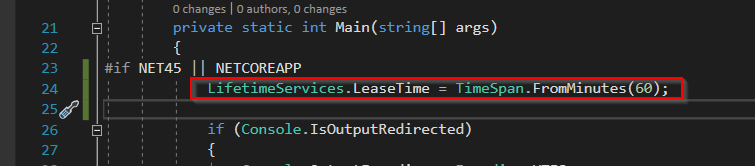
The only viable workaround is to NOT use ef6.exe at the moment (or compile your own version with LifetimeServices.LeaseTime = TimeSpan.FromHours(1); in main)
 matthid
on 11 Aug 2020
matthid
on 11 Aug 2020
The infuriating thing here is your migration will fully succeed, then error just before writing to __MigrationHistory table. For those that can't wait for a fix and need a workaround, I did the following:
- Run the migration somewhere it can finish in <5mins (maybe a test DB with less data)
- Use the row from that DB's
__MigrationHistorytable to generate the SQL necessary to correctly insert the varbinary Model value - http://sbytestream.pythonanywhere.com/blog/Copy-over-EF-migration-entries
** Warning: you cannot copy the string value for the Model column, you have to encode/decode per URL above - Let your migration run as long as necessary in production and fail
- Manually insert the row into your production
__MigrationHistory.
** Untested: you could even do this from aSql()call inside the migration - Go on to enjoy your life until the next EF6 black box bug bites you, haha
 andyraddatz
on 31 Aug 2020
andyraddatz
on 31 Aug 2020
Spent half a day trying different fixes for this. I tried adding the config below to config file of ef6.exe.config, app.config of --config arg, and to the machine.config - it simply doesn't read these settings.
 <system.runtime.remoting>
    <application>
      <lifetime leaseTime = "10M" sponsorshipTimeOut = "10M" renewOnCallTime = "15M" LeaseManagePollTime = "8s" />
    </application>
 </system.runtime.remoting>
The only solution is to download the source code of ef6 (https://github.com/dotnet/ef6.git), and mod program.cs;
 paul-green
on 2 Oct 2020
paul-green
on 2 Oct 2020
I got the same issue here with ef6.4.4.
# ef6.exe database update --assembly=...

System.Reflection.TargetInvocationException: Exception has been thrown by the target of an invocation. ---> System.Runtime.Remoting.RemotingException: Object '/a720ff16_ffe6_4c38_8bba_53d4e77c8df4/2bvjqptsa622lpg0hs9_j7xi_5.rem' has been disconnected or does not exist at the server.

Server stack trace:
   at System.Runtime.Remoting.Channels.ChannelServices.CheckDisconnectedOrCreateWellKnownObject(IMessage msg)
   at System.Runtime.Remoting.Channels.ChannelServices.SyncDispatchMessage(IMessage msg)

Exception rethrown at [0]:
   at System.Runtime.Remoting.Proxies.RealProxy.HandleReturnMessage(IMessage reqMsg, IMessage retMsg)
   at System.Runtime.Remoting.Proxies.RealProxy.PrivateInvoke(MessageData& msgData, Int32 type)
   at System.Data.Entity.Infrastructure.Design.IResultHandler2.SetError(String type, String message, String stackTrace)
   at System.Data.Entity.Infrastructure.Design.WrappedResultHandler.SetError(String type, String message, String stackTrace)
   at System.Data.Entity.Infrastructure.Design.Executor.OperationBase.Execute(Action action)
   --- End of inner exception stack trace ---
   at System.RuntimeMethodHandle.InvokeMethod(Object target, Object[] arguments, Signature sig, Boolean constructor)
   at System.Reflection.RuntimeConstructorInfo.Invoke(BindingFlags invokeAttr, Binder binder, Object[] parameters, CultureInfo culture)
   at System.RuntimeType.CreateInstanceImpl(BindingFlags bindingAttr, Binder binder, Object[] args, CultureInfo culture, Object[] activationAttributes, StackCrawlMark& stackMark)
   at System.Activator.CreateInstance(Type type, BindingFlags bindingAttr, Binder binder, Object[] args, CultureInfo culture, Object[] activationAttributes)
   at System.Activator.CreateInstance(String assemblyString, String typeName, Boolean ignoreCase, BindingFlags bindingAttr, Binder binder, Object[] args, CultureInfo culture, Object[] activationAttributes, Evidence securityInfo, StackCrawlMark& stackMark)
   at System.Activator.CreateInstance(String assemblyName, String typeName, Boolean ignoreCase, BindingFlags bindingAttr, Binder binder, Object[] args, CultureInfo culture, Object[] activationAttributes)
   at System.AppDomain.CreateInstance(String assemblyName, String typeName, Boolean ignoreCase, BindingFlags bindingAttr, Binder binder, Object[] args, CultureInfo culture, Object[] activationAttributes)
   at System.AppDomain.CreateInstance(String assemblyName, String typeName, Boolean ignoreCase, BindingFlags bindingAttr, Binder binder, Object[] args, CultureInfo culture, Object[] activationAttributes)
   at System.Data.Entity.Tools.AppDomainExecutor.Execute(String operation, Object resultHandler, IDictionary args)
   at System.Dynamic.UpdateDelegates.UpdateAndExecuteVoid4[T0,T1,T2,T3](CallSite site, T0 arg0, T1 arg1, T2 arg2, T3 arg3)
   at System.Data.Entity.Tools.ExecutorBase.InvokeImpl(String operation, IDictionary args)
   at System.Data.Entity.Tools.ExecutorBase.Update(String targetMigration, Boolean force, String connectionStringName, String connectionString, String connectionProviderName, String migrationsConfigurationName)
   at System.Data.Entity.Tools.Commands.DatabaseUpdateCommand.Execute()
   at Microsoft.DotNet.Cli.CommandLine.CommandLineApplication.Execute(String[] args)
   at System.Data.Entity.Tools.Program.Main(String[] args)
Exception has been thrown by the target of an invocation.
And I rolled back to ef 6.2.0 but got different error.
I built this one(https://github.com/dotnet/ef6/pull/1729) and works well for me.
(used built ef6.exe)
Thanks @matthid
 gshockim
on 17 Nov 2020
gshockim
on 17 Nov 2020
Related issues
 muhammadmubashirkhan
·
4Comments
muhammadmubashirkhan
·
4Comments
 Varorbc
·
6Comments
Varorbc
·
6Comments
 mistachkin
·
5Comments
divega
·
3Comments
mistachkin
·
5Comments
divega
·
3Comments
 Colorfulmoose
·
4Comments
Colorfulmoose
·
4Comments
Most helpful comment
The issue is that the ToolLogger lease lifetime (base class MigrationsLogger is a MarshalByRefObject) is at the default (5 minutes). The ToolingFacade creates the logger, which lives in the main program's app domain. The migrations run in a different app domain. If a migration takes longer than 5 minutes, the attempt to log any further information results in this error. A solution would be to increase the lease lifetime in the main program. So... in the main program, prior to creating the ToolingFacade, set the lease lifetime to a longer time period:
using System.Runtime.Remoting.Lifetime;...
LifetimeServices.LeaseTime = TimeSpan.FromHours(1);Migrations in this case can then take as long as 1 hour before this issue presents itself.