Exception message:System.Resources.MissingManifestResourceException: Could not find any resources appropriate for the specified culture or the neutral culture.  Make sure "ClassLibrary1.Migrations.Test.resources" was correctly embedded or linked into assembly "ClassLibrary1" at compile time, or that all the satellite assemblies required are loadable and fully signed.
Stack trace:
   at System.Resources.ManifestBasedResourceGroveler.HandleResourceStreamMissing(String fileName)
   at System.Resources.ManifestBasedResourceGroveler.GrovelForResourceSet(CultureInfo culture, Dictionary`2 localResourceSets, Boolean tryParents, Boolean createIfNotExists, StackCrawlMark& stackMark)
   at System.Resources.ResourceManager.InternalGetResourceSet(CultureInfo requestedCulture, Boolean createIfNotExists, Boolean tryParents, StackCrawlMark& stackMark)
   at System.Resources.ResourceManager.InternalGetResourceSet(CultureInfo culture, Boolean createIfNotExists, Boolean tryParents)
   at System.Resources.ResourceManager.GetString(String name, CultureInfo culture)
   at ClassLibrary1.Migrations.Test.System.Data.Entity.Migrations.Infrastructure.IMigrationMetadata.get_Target()
   at System.Data.Entity.Migrations.DbMigration.GetModel(Func`2 modelAccessor)
   at System.Data.Entity.Migrations.DbMigrator.ApplyMigration(DbMigration migration, DbMigration lastMigration)
   at System.Data.Entity.Migrations.Infrastructure.MigratorLoggingDecorator.ApplyMigration(DbMigration migration, DbMigration lastMigration)
   at System.Data.Entity.Migrations.DbMigrator.Upgrade(IEnumerable`1 pendingMigrations, String targetMigrationId, String lastMigrationId)
   at System.Data.Entity.Migrations.Infrastructure.MigratorLoggingDecorator.Upgrade(IEnumerable`1 pendingMigrations, String targetMigrationId, String lastMigrationId)
   at System.Data.Entity.Migrations.DbMigrator.UpdateInternal(String targetMigration)
   at System.Data.Entity.Migrations.DbMigrator.Update(String targetMigration)
   at System.Data.Entity.Migrations.Infrastructure.MigratorScriptingDecorator.ScriptUpdate(String sourceMigration, String targetMigration)
   at System.Data.Entity.Infrastructure.Design.Executor.ScriptUpdate.<>c__DisplayClass0_0.<.ctor>b__0()
   at System.Data.Entity.Infrastructure.Design.Executor.OperationBase.<>c__DisplayClass4_0`1.<Execute>b__0()
   at System.Data.Entity.Infrastructure.Design.Executor.OperationBase.Execute(Action action)
Further technical details
EF version: 6.3.0-preview9-19423-04
Database Provider: EntityFramework.SqlServer
Operating system: Windows 10
IDE: Visual Studio 2019 16.2.4
 Varorbc
All 6 comments
Possibly related to https://github.com/microsoft/msbuild/issues/4695. Could you give us a project that reproduces the issue?
 bricelam
on 12 Sep 2019
bricelam
on 12 Sep 2019
Execute update-database -script command in the package manager console
ClassLibrary1.zip
I also found another problem.
Project 'ClassLibrary1' targets framework '.NETStandard'. The Entity Framework Package Manager Console Tools don't support this framework.
Varorbc
on 13 Sep 2019
@Varorbc same issue here.
Getting the following error when running against EF 6.3 / .NET Core 3.0 Preview 9 from Visual Studio 2019 16.3.0 Preview 3.
Running from the Package Manager Console, getting the following error when targeting a newly-updated nestandard2.1 project:
PM> get-migrations
Project 'Libraries\World.NET.Data' targets framework '.NETStandard'. The Entity Framework Package Manager Console Tools don't support this framework.
ADDITIONAL PROBLEM:
The command doesn't seem to take the selected 'Default project' into account (nor the directory it is being issued from). So command is always running against wrong project.
 marchy
on 13 Sep 2019
marchy
on 13 Sep 2019
@Varorbc This is an issue with the SDK for .NET Framework projects. I've filed https://github.com/dotnet/sdk/issues/3639.
Workaround
You can work around the issue by adding this to your csproj:
<PropertyGroup>
  <EmbeddedResourceUseDependentUponConvention>true</EmbeddedResourceUseDependentUponConvention>
</PropertyGroup>
Unfortunately, in 3.0 Preview 9 you'll then hit https://github.com/microsoft/msbuild/issues/4695, but this should be fixed in the next release.
bricelam
on 13 Sep 2019
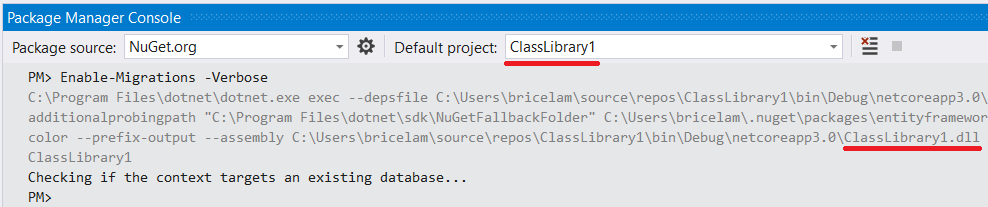
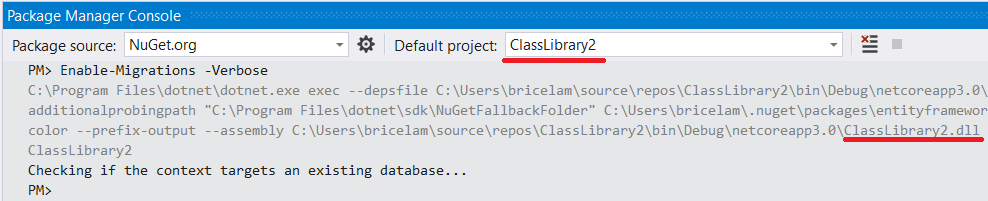
@marchy said:
The command doesn't seem to take the selected 'Default project' into account (nor the directory it is being issued from). So command is always running against wrong project.
I'm not able to repro this.
bricelam
on 13 Sep 2019
I'm targeting net461 and the workaround with setting EmbeddedResourceUseDependentUponConvention is not working.
Instead i'm using:
<ItemGroup>
    <EmbeddedResource Update="**\*.resx">
        <DependentUpon>$([System.String]::Copy('%(FileName)')).cs</DependentUpon>
    </EmbeddedResource>
</ItemGroup>
which seems to work just fine.
 mjamro
on 23 Jul 2021
mjamro
on 23 Jul 2021
Related issues
 divega
·
3Comments
divega
·
3Comments
 AmirGeorge
·
5Comments
AmirGeorge
·
5Comments
 AnReZa
·
4Comments
AnReZa
·
4Comments
 muhammadmubashirkhan
·
4Comments
muhammadmubashirkhan
·
4Comments
 hungdqht
·
3Comments
hungdqht
·
3Comments
Most helpful comment
@Varorbc This is an issue with the SDK for .NET Framework projects. I've filed https://github.com/dotnet/sdk/issues/3639.
Workaround
You can work around the issue by adding this to your csproj:
Unfortunately, in 3.0 Preview 9 you'll then hit https://github.com/microsoft/msbuild/issues/4695, but this should be fixed in the next release.