Edex-ui: Enforcing theme colors on zsh / terminal theme colours
My apologies upfront if this was asked somewhere else, but I couldn't find it.
I'm using iTerm (and regular Terminal) occasionally outside Edex-UI, where I use the "powerlevel10k" (lean style) theme with some colours specified in my .zshrc file.
However, it seems that my zshrc file has priority on my theme colours (in my case, Tron), so I get my regular Term colours inside my (otherwise very monochrome) Edex-UI Terminal.
So far, I'm using a workaround by using the "injectCSS" option with the value "#main_shell_innercontainer{filter: grayscale(100%);}" which works, but obviously makes it very grey, and have to adapt it for every theme.
So before I start creating a very specific theme for my purposes, I was wondering if there is an easier way? Can I disregard my Terminal colours somehow?
 TDarkShadow
All 29 comments
I think your zsh theme might be using 24-bit true color - which eDEX doesn't support very well, meaning the colors are displayed but not themed. I'm looking into it but I don't think there is a way to disable true color support in eDEX, so you'd have to force ZSH to only use the basic 16 colors, perhaps by setting TERM=xterm-16color.
 GitSquared
on 23 Oct 2019
GitSquared
on 23 Oct 2019
Thank you, that does indeed solve it for eDEX.
And not sure if I use 24-bit but I do use xterm-256color.
For now, I'll be sticking with InjectCSS (thank you for that option) because I rather keep the colours in my regular terminal.
TDarkShadow
on 23 Oct 2019
@TDarkShadow You can set the TERM through eDEX's settings env property so that other terminals aren't affected.
GitSquared
on 23 Oct 2019
My god, thank you! I'll be sure to buy you a coffee alright. Thank you so much!
So to be sure, I'll just have to add "env: [TERM="xterm-16color"], to my settings then?
Aside from some possible theme settings I have to alter.
TDarkShadow
on 23 Oct 2019
The syntax should be something like this, using JSON objects:
{
  "env": {
    "TERM": "xterm-16color"
  }
}
I just looked at the code that parses this to refresh my memory and unfortunately it seems like this currently won't work - some env properties, including TERM, are currently hardcoded over the user's settings.
If you're using the v3.0.0-pre (straight from github) version of eDEX I could push a fix for this right now, otherwise you're going to be stuck with your workaround for a little while.
If you give me your OS+Arch I might be able to send you a precompiled version with the fix so you don't have to make it yourself from the source code.
Also, one other thing I noticed is that eDEX sets the COLORTERM env var to truecolor, perhaps messing around with this could also work.
GitSquared
on 23 Oct 2019
Well, currently I'm trying eDEX out on my MacOS 10.15 i386 but I'm planning to also try it out on my Win10 system later this evening, where I have the same zsh theme running.
So I'll gladly wait until you have time to fix it. It isn't critical either, just a visual bug.
TDarkShadow
on 23 Oct 2019
It's really an easy fix, the issue is that I'm not going to make a new release before about 1 to 2 months.
Unfortunately I can't make macOS builds myself.
GitSquared
on 23 Oct 2019
I get that. That's fair.
If you manage to push it to the development, I'll build it probably tommorow.
Thanks again for the great support 👍
TDarkShadow
on 23 Oct 2019
FYI: By default, Powerlevel10k uses 256 colors but not truecolor. Unless you've manually changed some colors to #xxxxxx format, your prompt shouldn't have truecolor (24 bit color) in it.
 romkatv
on 24 Oct 2019
romkatv
on 24 Oct 2019
@romkatv I think any color outside of the 16-colors range isn't modified by eDEX theming. I'm going to look into addressing this.
GitSquared
on 24 Oct 2019
@romkatv I think any color outside of the 16-colors range isn't modified by eDEX theming. I'm going to look into addressing this.
That makes sense. It would be consistent with all terminal color schemes I've ever come across. I always considered it a feature: when I want to print something with a color from the current color scheme, I use one of the first 16 colors; when I want to print with a fixed color, I use color >= 16.
romkatv
on 24 Oct 2019
Huh, that's also a good solution. I only very recently started using ZSH and PowerLevel so not sure if I get to it, but that's maybe a better way until v3 of eDEX comes out. Thanks.
TDarkShadow
on 24 Oct 2019
...unfortunately it seems like this currently won't work - some env properties, including TERM, are currently hardcoded over the user's settings.
@TDarkShadow I pushed the fix for this, by the way.
GitSquared
on 24 Oct 2019
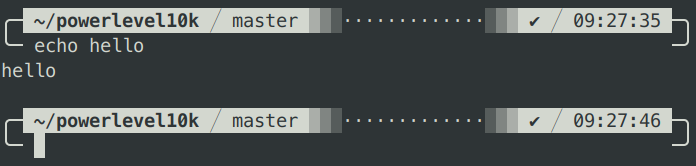
@TDarkShadow This might be useful: https://gist.github.com/romkatv/afdbb534051304ef0e2e85a46adb276f. This script turns the regular "Classic" powerlevel10k style into "Monochrome".
Here's how it looks with White on Black color scheme:

Tango Dark
Solarized Light

You can do something similar with "Lean" style. Or you can manually edit all colors in ~/.p10k.zsh to stay within the 16 color range.
romkatv
on 24 Oct 2019
I'll probably edit the colours because I want to keep color in my terminal(s) outside eDEX.
But thanks again for the tip. Might be useful in the future if I change my mind 😅
TDarkShadow
on 24 Oct 2019
@GitSquared I've build from source, but even with the above config you said to do, it appears to still use my original colour settings.
My settings.json;
{
    "shell": "zsh",
    "cwd": "/Users/tdarkshadow/Library/Application Support/eDEX-UI",
    "env": {
      "TERM": "xterm-16color"
    }
    "keyboard": "fr-FR",
    "theme": "custom-tron",
    "termFontSize": 15,
    "audio": true,
    "disableFeedbackAudio": false,
    "pingAddr": "1.1.1.1",
    "port": 3000,
    "clockHours": 24,
    "nointro": false,
    "nocursor": false,
    "allowWindowed": false,
    "excludeThreadsFromToplist": true,
    "hideDotfiles": false,
    "fsListView": true,
    "experimentalGlobeFeatures": true,
    "experimentalFeatures": false
}
My theme;
{
    "colors": {
        "r": 170,
        "g": 207,
        "b": 209,
        "black": "#000000",
        "light_black": "#05080d",
        "grey": "#262828"
    },
    "cssvars": {
        "font_main": "United Sans Medium",
        "font_main_light": "United Sans Light"
    },
    "terminal": {
        "fontFamily": "Fira Mono",
        "cursorStyle": "block",
        "foreground": "#aacfd1",
        "background": "#05080d",
        "cursor": "#aacfd1",
        "cursorAccent": "#aacfd1",
        "selection": "rgba(170,207,209,0.3)",
        "colorFilter": [
            "negate()",
            "rotate(180)",
            "saturate(0.5)",
            "mix(0.7)"
        ]
    },
    "globe": {
        "base": "#000000",
        "marker": "#aacfd1",
        "pin": "#aacfd1",
        "satellite": "#aacfd1"
    },
}
@TDarkShadow There's a missing , at line 6 in the settings.json you copy-pasted
Other than that, can you run env to confirm that the var isn't being applied?
GitSquared
on 24 Oct 2019
@GitSquared Pardon, there is a comma in my settings on line 6. Just didn't copy pasted correctly.
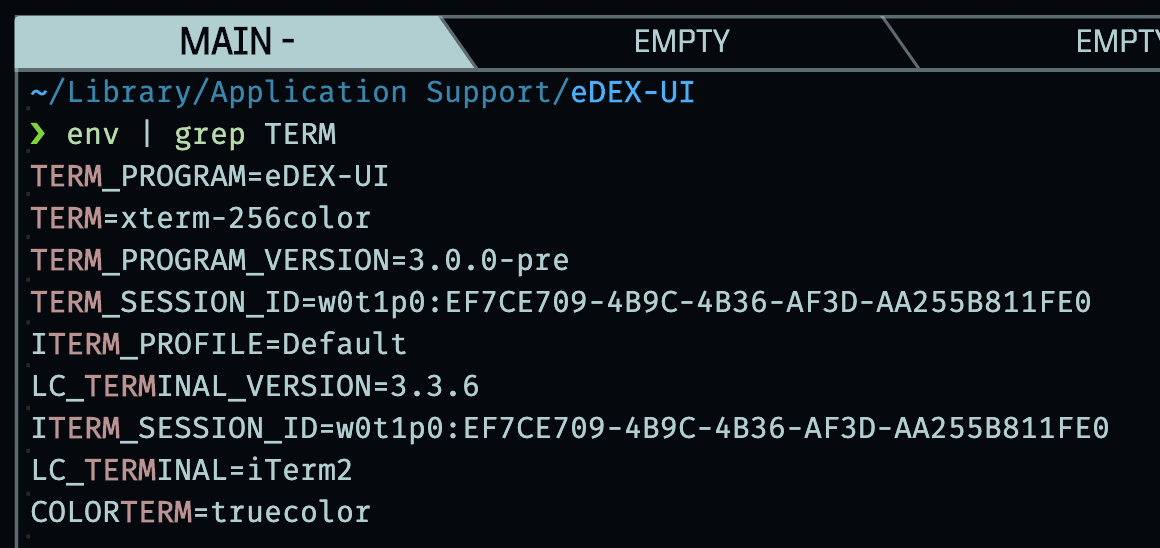
The var isn't being applied, the env command gives these (relevant) values;
TERM_PROGRAM=eDEX-UI
TERM=xterm-256color
COLORTERM=truecolor
@TDarkShadow My apologies, looks like I missed something in my previous commit. It should work now - and I tested it. Just git pull and build it again.
GitSquared
on 24 Oct 2019
@GitSquared I'm afraid it still doesn't work for me. Still appears with the colours in my theme.
Double-checked if I git-pulled, rebuild and ran the correct build.
TDarkShadow
on 25 Oct 2019
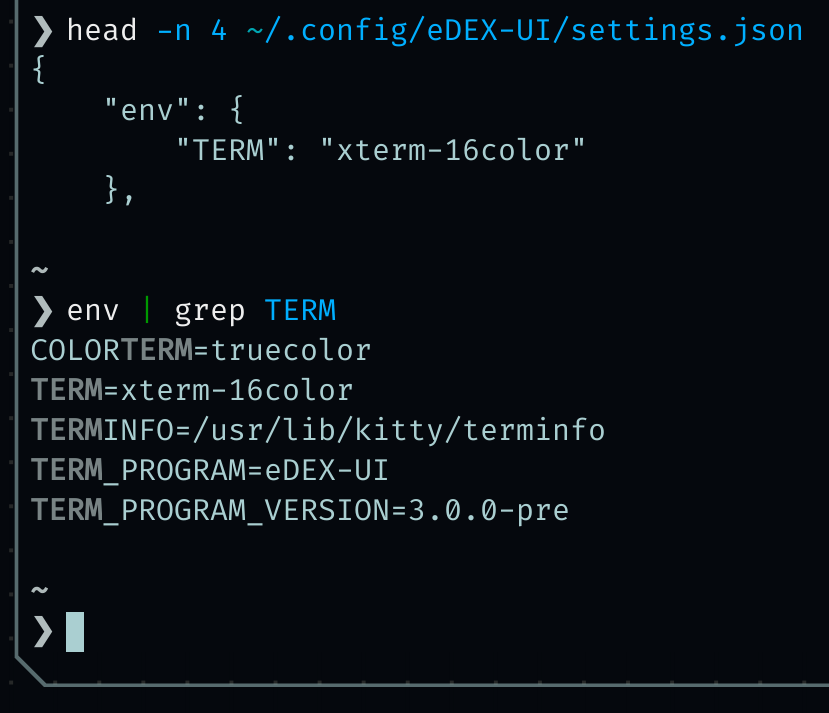
@TDarkShadow Did the env succesfully apply?
GitSquared
on 25 Oct 2019
@GitSquared Nope, still 256 colour.
{
    "shell": "zsh",
    "cwd": "/Users/tdarkshadow/Library/Application Support/eDEX-UI",
    "env": {
      "TERM": "xterm-16color"
    },
    "keyboard": "fr-FR",
    "theme": "custom-tron",
    "termFontSize": 15,
    "audio": true,
    "disableFeedbackAudio": false,
    "pingAddr": "1.1.1.1",
    "port": 3000,
    "clockHours": 24,
    "nointro": false,
    "nocursor": false,
    "allowWindowed": false,
    "excludeThreadsFromToplist": true,
    "hideDotfiles": false,
    "fsListView": true,
    "experimentalGlobeFeatures": true,
    "experimentalFeatures": false
}
😕 Either there's some OS-specific bug in node-pty or there's something wrong with your build.
Could you give me the output of running git log --oneline -n 1 in your clone? Just want to make sure you're really up to date.
GitSquared
on 25 Oct 2019
@GitSquared Possibly 😅 and ofcourse, thanks again for the troubleshooting.

TDarkShadow
on 25 Oct 2019
@TDarkShadow Looks fine. Could you delete the dist directory and build again, or simply run from source with npm start?
GitSquared
on 25 Oct 2019
@GitSquared Sorry for the slow answer. I deleted my dist and tried both the running command as the build command. Still have the same problem.
I don't expect this to be fixed soon because like you said, eDEX is built for the classic 16 colour terminal so I'm already grateful you looked into this matter at all.
TDarkShadow
on 28 Oct 2019
Hopefully the next release will have this addressed with the commits I pushed.
Either there's some OS-specific bug in node-pty or there's something wrong with your build.
I'll look into possible node-pty bugs in the meantime.
GitSquared
on 28 Oct 2019
@GitSquared My apologies for the ping, but I thought you maybe wanted an update on my status.
Today, I reinstalled my Xcode (cli tools only), rebuild eDEX-UI, and now it is working.
I think it was indeed a node-gyp bug that was caused by the Catalina upgrade.
Thanks again for the troubleshooting.
TDarkShadow
on 8 Nov 2019
@TDarkShadow Thanks for the update. Glad it worked out in the end!
GitSquared
on 8 Nov 2019
Related issues
 probonopd
·
4Comments
probonopd
·
4Comments
 bennettyuan18
·
5Comments
bennettyuan18
·
5Comments
 bdgza
·
3Comments
bdgza
·
3Comments
 wolfen351
·
5Comments
wolfen351
·
5Comments
 clragon
·
6Comments
clragon
·
6Comments
Most helpful comment
That makes sense. It would be consistent with all terminal color schemes I've ever come across. I always considered it a feature: when I want to print something with a color from the current color scheme, I use one of the first 16 colors; when I want to print with a fixed color, I use color >= 16.