Edex-ui: Cannot work if settings shell is "fish"
Technical information
Using version:
- [ ]
master(running from GitHub-published source code, currentlyv3.0.0-pre) - [x]
latest(latest release, currentlyv2.2.1) - [ ]
vX.X.X(specify other version)
Running on:
- [ ] Linux
- [ ] Windows
- [x] macOS
How comfortable you are with your system and/or IT in general:
- [ ] I'm kind of lost, honestly
- [ ] I know what's up, I could help you run some commands or checks
- [x] My machine is fully under my control, tell me what you need
- [ ] I attended Defcon last year
I change my shell settings with fish, and restart app.
The result is app cannot launch window (app is opened in dock).
I back to bash shell, everything is fine.
 bennettyuan18
All 5 comments
@bennettyuan18 Could you start a terminal and launch eDEX from there?
It should give more information on why it's failing to open a window.
 GitSquared
on 6 May 2019
GitSquared
on 6 May 2019
I'm having the same issue. However, when running from a terminal, eDEX starts fine and shows my fish prompt in its terminal. No extra messages logged when compared with bash start.
I tried starting the app using the icon, and kept an eye on the MacOS Console app. Bunch of different messages spewed, but the only difference I noticed was this message ~30s after start, when running the app with fish as the shell:
default 13:07:33.685427 -0700 eDEX-UI 27366555: RECEIVED OUT-OF-SEQUENCE NOTIFICATION: 483 vs 1381, 513, <private>
On a later attempt, got the same message ~25s after boot, different numbers:
default 13:16:15.524753 -0700 eDEX-UI 27366555: RECEIVED OUT-OF-SEQUENCE NOTIFICATION: 506 vs 1404, 512, <private>
 yozlet
on 6 May 2019
yozlet
on 6 May 2019
Confirmed this behavior. One temporary solution is to put the full path in your settings file (/usr/bin/local/fish if you've installed fish from homebrew).
I'm working on a fix.
GitSquared
on 11 May 2019
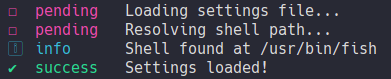
eDEX will now resolves the shell path internally to prevent this bug.
Shipping in the next release.
GitSquared
on 1 Jun 2019
Confirmed this behavior. One temporary solution is to put the full path in your settings file (
/usr/bin/local/fishif you've installed fish from homebrew).
Having the same issue, thanks for the workaround. It didn't work for me with that path, but this one worked:/usr/local/bin/fish
 flightcubs
on 10 Sep 2019
flightcubs
on 10 Sep 2019
Related issues
 mkbcaptain
·
3Comments
mkbcaptain
·
3Comments
 maggot99999
·
5Comments
maggot99999
·
5Comments
 Zireael07
·
5Comments
Zireael07
·
5Comments
 probonopd
·
4Comments
probonopd
·
4Comments
 Vhenrique05
·
3Comments
Vhenrique05
·
3Comments
Most helpful comment
eDEX will now resolves the shell path internally to prevent this bug.
Shipping in the next release.