Edex-ui: i3-wm application popup function
Hello, im new to edex-ui. In the i3-gap, application open window wont be broght to the front to be able to access to, i.e. zathura, chromium...
Is there any way of fixing?
The online statue of the earth turning plate is also shown as offline for all the time. I have checked the #503, but my network interface seems correct. Where should I procede?
Thanks!
 qqpp4130
All 12 comments
Hey there!
Just to clarify your problem: Are you trying to set up eDEX-UI in connection with i3-gaps? As far as I know, eDEX-UI is meant to be used in fullscreen only, as a result this is not a bug.
Without i3-gaps, windows should open as expected. The current approach to opening external files already uses the default method provided by Electron, to my mind this is either a bug in Electron or a problem of your system setup. However, if I understood you wrong, please correct my statement!
Your network map beingoffline seems to be a bug though. Could you provide some further information? System setup + Logs would be super cool. Thanks!
 niklas2810
on 11 Oct 2019
niklas2810
on 11 Oct 2019
Thank you for the reply contributor!
The problem on the global plugin seems to be solved [mysteriously], but after using it I found futher buggs on the screen size affect on the terminal window.
setting.json:
{
    "shell": "zsh",
    "cwd": "/home/jc/.config/eDEX-UI",
    "keyboard": "en-US",
    "theme": "tron-notype",
    "termFontSize": 17,
    "audio": true,
    "disableFeedbackAudio": false,
    "pingAddr": "1.1.1.1",
    "clockHours": 24,
    "port": 3000,
    "monitor": 0,
    "nointro": true,
    "nocursor": false,
    "iface": "wlp63s0",
    "allowWindowed": true,
    "excludeThreadsFromToplist": true,
    "hideDotfiles": false,
    "fsListView": false,
    "experimentalGlobeFeatures": true,
    "experimentalFeatures": true
}
Console output:
▶  start     Starting eDEX-UI v3.0.0-pre
ℹ  info      With Node 12.4.0 and Electron 6.0.11
ℹ  info      Renderer is Chrome 76.0.3809.146
▶  Startup   Initialized timer...
ℹ  info      Base config dir is /home/jc/.config/eDEX-UI
☐  pending   Mirroring internal assets...
☐  pending   Loading settings file...
☐  pending   Resolving shell path...
ℹ  info      Shell found at /usr/bin/zsh
✔  success   Settings loaded!
☐  pending   Creating new terminal process on port 3000
✔  success   Terminal back-end initialized!
☐  pending   Starting multithreaded calls controller...
✔  success   Multithreaded controller ready
ℹ  info      Creating window...
☒  complete  Frontend window created!
…  watching  Waiting for frontend connection...
ℹ  info      Multithread worker started at 11902
ℹ  info      Multithread worker started at 11903
ℹ  info      Multithread worker started at 11908
ℹ  info      Multithread worker started at 11905
ℹ  info      Multithread worker started at 11904
ℹ  info      Multithread worker started at 11906
ℹ  info      Multithread worker started at 11907
✔  success   Connected to frontend!
◼  Startup   Timer run for: 4.37s
ℹ  info      Resized TTY to  124 027
ℹ  info      UpdateChecker: Running an unreleased, development version.
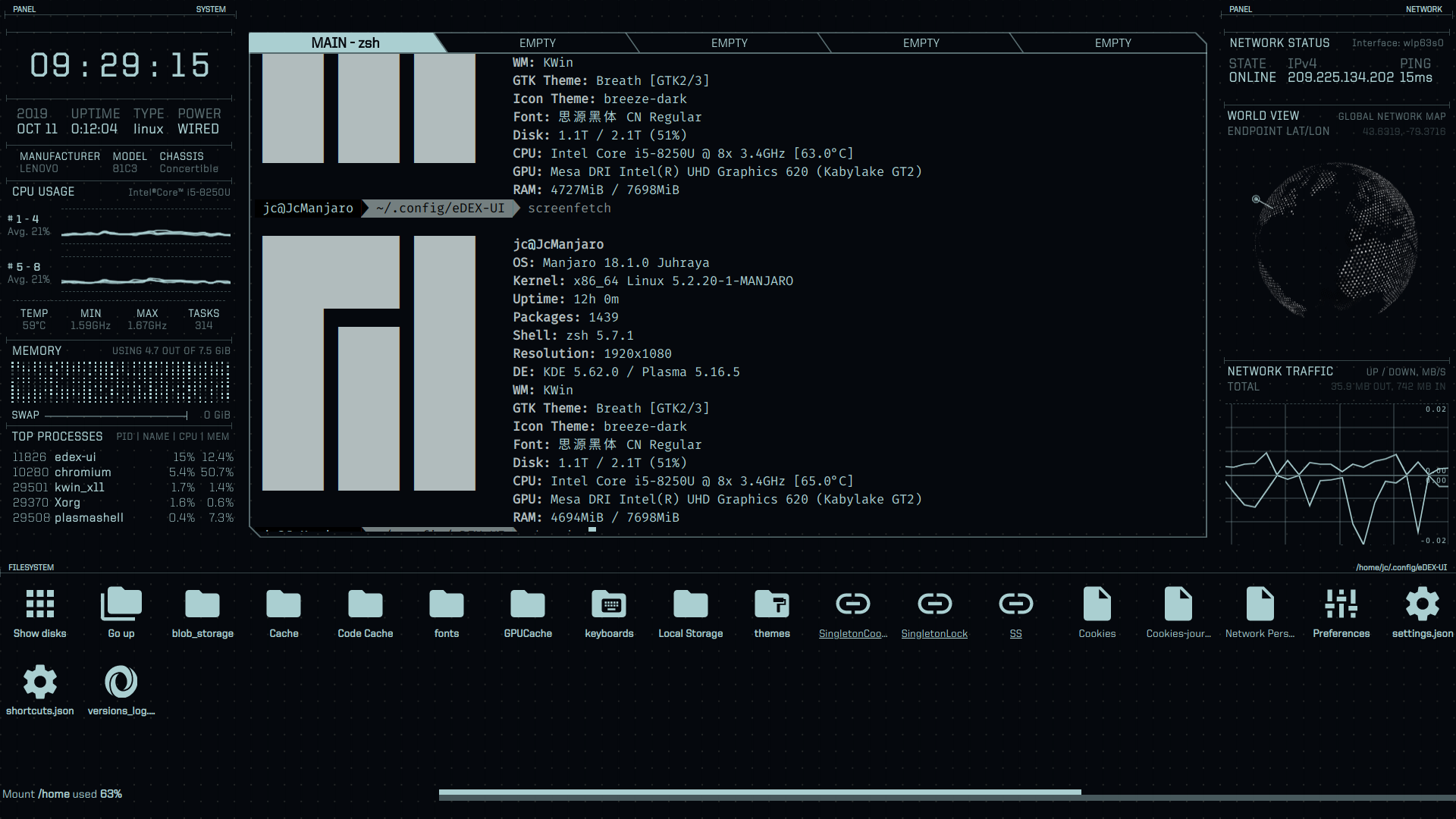
The terminal has incorrect in size, the last line could not be desplayed, also in applications like htop or vim
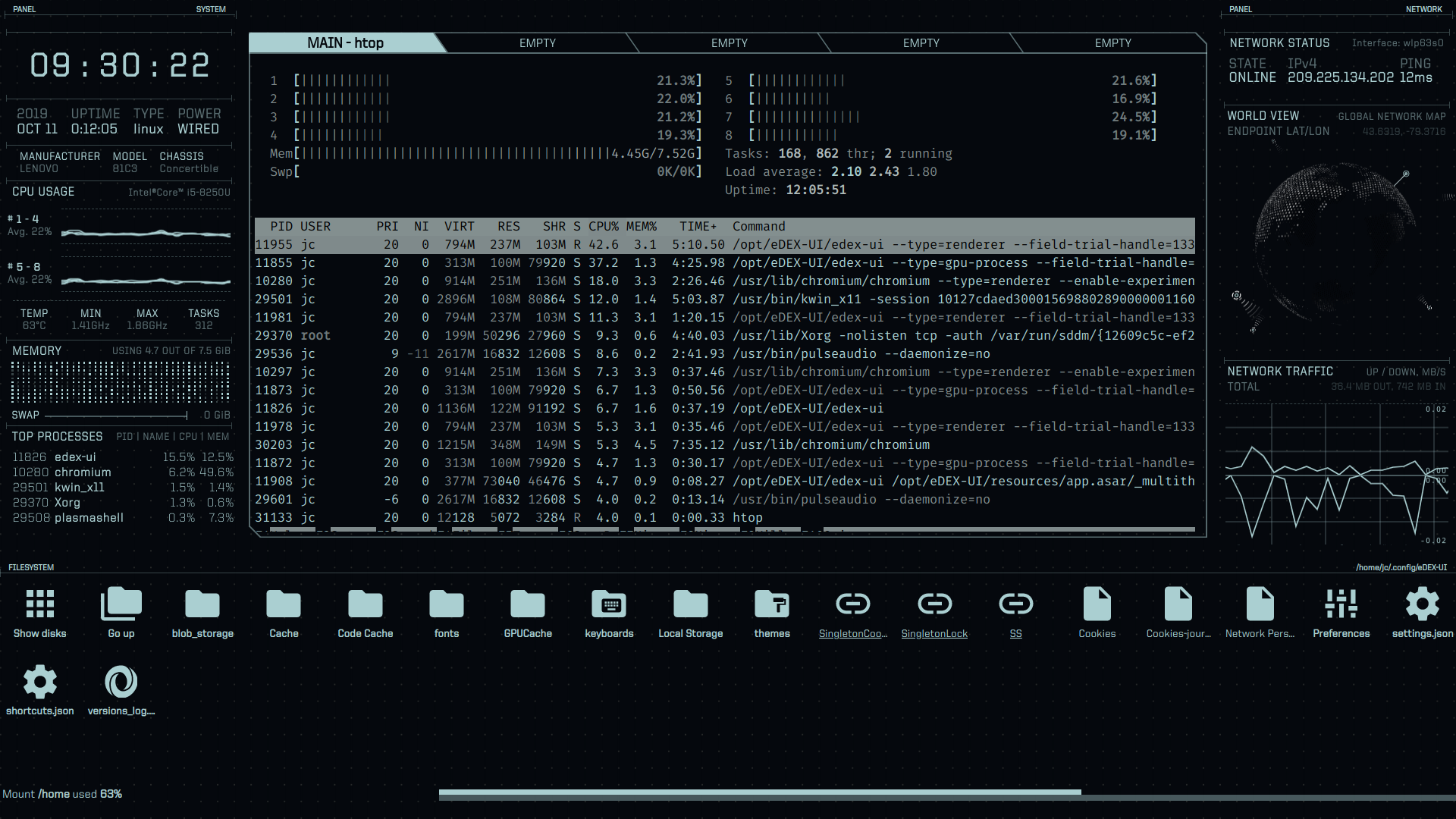
I few screenshot can clearify this problem.
qqpp4130
on 11 Oct 2019
@qqpp4130 I noticed you're running the development version. Latest commit should fix the incorrect terminal size bug.
As for your issue with using i3, as @Chromecube pointed out eDEX is meant to be used in fullscreen, but you can use the allowWindowed setting and press F11 to switch to windowed mode - which might make more sense in a tiling WM.
 GitSquared
on 11 Oct 2019
GitSquared
on 11 Oct 2019
Checked with new release, the building from npm falls on my device. The new console dialog is given below. During the running the error message is given when changing from fullscreen to window. The incorrectness of window size is still there. No difference whith using bash instead of zsh.
Edit: This app is running by excute appimage due to the failue of npm build()
▶ start Starting eDEX-UI v2.2.2
ℹ info With Node 10.11.0 and Electron 4.2.0
ℹ info Renderer is Chrome 69.0.3497.128
▶ Startup Initialized timer...
ℹ info Base config dir is /home/jc/.config/eDEX-UI
☐ pending Loading settings file...
✔ success Settings loaded!
☐ pending Creating new terminal process on port 3000
✔ success Terminal back-end initialized!
☐ pending Starting multithreaded calls controller...
✔ success Multithreaded controller ready
ℹ info Creating window...
ℹ info Multithread worker started at 4960
ℹ info Multithread worker started at 4958
ℹ info Multithread worker started at 4961
ℹ info Multithread worker started at 4956
ℹ info Multithread worker started at 4963
ℹ info Multithread worker started at 4965
ℹ info Multithread worker started at 4964
☒ complete Frontend window created!
… watching Waiting for frontend connection...
✔ success Connected to frontend!
◼ Startup Timer run for: 25.95s
ℹ info Resized TTY to 124 027
ℹ info UpdateChecker: Running latest version.
● note LocationGlobe: Error parsing data from ipinfo.now.sh
⬤ debug Error: SyntaxError: Unexpected token p in JSON at position 4
● note LocationGlobe: Error parsing data from ipinfo.now.sh
⬤ debug Error: SyntaxError: Unexpected token p in JSON at position 4
● note LocationGlobe: Error parsing data from ipinfo.now.sh
⬤ debug Error: SyntaxError: Unexpected token p in JSON at position 4
ℹ info Resized TTY to 124 026
ℹ info Resized TTY to 124 025
ℹ info Resized TTY to 124 027
● note LocationGlobe: Error parsing data from ipinfo.now.sh
⬤ debug Error: SyntaxError: Unexpected token p in JSON at position 4
● note LocationGlobe: Error parsing data from ipinfo.now.sh
⬤ debug Error: SyntaxError: Unexpected token p in JSON at position 4
● note LocationGlobe: Error parsing data from ipinfo.now.sh
⬤ debug Error: SyntaxError: Unexpected token p in JSON at position 4
ℹ info Resized TTY to 124 025
ℹ info Resized TTY to 061 013
● note LocationGlobe: Error parsing data from ipinfo.now.sh
⬤ debug Error: SyntaxError: Unexpected token p in JSON at position 4
● note LocationGlobe: Error parsing data from ipinfo.now.sh
⬤ debug Error: SyntaxError: Unexpected token p in JSON at position 4
● note LocationGlobe: Error parsing data from ipinfo.now.sh
⬤ debug Error: SyntaxError: Unexpected token p in JSON at position 4
ℹ info Resized TTY to 124 025
ℹ info Resized TTY to 124 027
● note LocationGlobe: Error parsing data from ipinfo.now.sh
⬤ debug Error: SyntaxError: Unexpected token p in JSON at position 4
● note LocationGlobe: Error parsing data from ipinfo.now.sh
⬤ debug Error: SyntaxError: Unexpected token p in JSON at position 4
● note LocationGlobe: Error parsing data from ipinfo.now.sh
⬤ debug Error: SyntaxError: Unexpected token p in JSON at position 4
● note LocationGlobe: Error parsing data from ipinfo.now.sh
⬤ debug Error: SyntaxError: Unexpected token p in JSON at position 4
● note LocationGlobe: Error parsing data from ipinfo.now.sh
⬤ debug Error: SyntaxError: Unexpected token p in JSON at position 4
● note LocationGlobe: Error parsing data from ipinfo.now.sh
⬤ debug Error: SyntaxError: Unexpected token p in JSON at position 4
● note LocationGlobe: Error parsing data from ipinfo.now.sh
⬤ debug Error: SyntaxError: Unexpected token p in JSON at position 4
● note LocationGlobe: Error parsing data from ipinfo.now.sh
⬤ debug Error: SyntaxError: Unexpected token p in JSON at position 4
● note LocationGlobe: Error parsing data from ipinfo.now.sh
⬤ debug Error: SyntaxError: Unexpected token p in JSON at position 4
● note LocationGlobe: Error parsing data from ipinfo.now.sh
⬤ debug Error: SyntaxError: Unexpected token p in JSON at position 4
● note LocationGlobe: Error parsing data from ipinfo.now.sh
⬤ debug Error: SyntaxError: Unexpected token p in JSON at position 4
● note LocationGlobe: Error parsing data from ipinfo.now.sh
⬤ debug Error: SyntaxError: Unexpected token p in JSON at position 4
● note LocationGlobe: Error parsing data from ipinfo.now.sh
⬤ debug Error: SyntaxError: Unexpected token p in JSON at position 4
● note LocationGlobe: Error parsing data from ipinfo.now.sh
⬤ debug Error: SyntaxError: Unexpected token p in JSON at position 4
● note LocationGlobe: Error parsing data from ipinfo.now.sh
⬤ debug Error: SyntaxError: Unexpected token p in JSON at position 4
☒ complete Terminal exited 1 0
☒ complete Shutting down...
qqpp4130
on 11 Oct 2019
@qqpp4130 No, stay on the development version as you did previously, that's where I pushed the fixes.
GitSquared
on 11 Oct 2019
The developement version which is build from the source gives no debug Error on JSON, but the problem of the resize becomes to another.
When I resize to hight 025, here is what happend:
ℹ  info      Resized TTY to  118 026
ℹ  info      Resized TTY to  118 025
or
ℹ  info      Resized TTY to  117 024
ℹ  info      Resized TTY to  117 025
The second variable of window size will change 1 pixle when reaches 025, so the window hight jump back and forward between 25-26, sometimes 24-25, which is eye hurting.
Edit:
There is no window size jumping happens when the size is not at 25, concidering maybe is the KDE dm window edge snap?
The bottom line of terminal window still remains 0.8 line less, cannot give complete command line in vim and htop.
qqpp4130
on 11 Oct 2019
@qqpp4130 It's trying to stay in a 16:9 aspect ratio to not break the UI. The bottom line bug still happens in normal fullscreen mode?
GitSquared
on 12 Oct 2019
Yes, it happens still. My computer is Yoga 720 Lenovo. This happens under KDE and also i3-gape. It happens in both wm so it is impossible to be the scaling of the windows.
On Oct 12, 2019, at 06:10, Gaby notifications@github.com wrote:
@qqpp4130https://github.com/qqpp4130 It's trying to stay in a 16:9 aspect ratio to not break the UI. The bottom line bug still happens in normal fullscreen mode?
—
You are receiving this because you were mentioned.
Reply to this email directly, view it on GitHubhttps://github.com/GitSquared/edex-ui/issues/594?email_source=notifications&email_token=AIXKFWGQID6XTXQPYOOK7DDQOGPCHA5CNFSM4I7Q5MX2YY3PNVWWK3TUL52HS4DFVREXG43VMVBW63LNMVXHJKTDN5WW2ZLOORPWSZGOEBB3Y6Q#issuecomment-541310074, or unsubscribehttps://github.com/notifications/unsubscribe-auth/AIXKFWCMU2RKURNG2FIYXK3QOGPCHANCNFSM4I7Q5MXQ.
qqpp4130
on 12 Oct 2019
@qqpp4130 Sorry for this little delay. Could you please try to pull the git repo and try again?
GitSquared
on 18 Oct 2019
problem fixed! Thanks!.
qqpp4130
on 21 Oct 2019
@qqpp4130 I pushed a new setting that you might be interested in: keepGeometry - set it to false to disable the aspect-ratio lock in windowed mode.
This should help integrate better with i3 & other tiling WMs - beware of broken UI in eDEX, though.
GitSquared
on 4 Nov 2019
That will be so helpful! Thank you!
qqpp4130
on 4 Nov 2019
Related issues
 maggot99999
·
5Comments
maggot99999
·
5Comments
 bdgza
·
3Comments
bdgza
·
3Comments
 dvdmuckle
·
6Comments
dvdmuckle
·
6Comments
 tandriamil
·
5Comments
tandriamil
·
5Comments
 clragon
·
6Comments
clragon
·
6Comments