Edex-ui: Filebrowser additions and manual location
Perceived idea awesomeness
- [ ] Wow, you don't have this yet???
- [ ] Would be super cool.
- [X] I'm not sure a lot of people would use it, but I'd love to have it.
- [ ] Kind of a gadget, honestly, but why not?
Perceived idea difficulty
- [ ] Quit your job first.
- [X] Would need some work, but nothing impossible.
- [ ] Shouldn't be too hard to make.
- [ ] Like, I could do it.
I just spotted your project today and It's exactly what I've been looking for.
I'm using it as a "desktop" on my Manjaro Linux with KDE (always open behind everything else).
I found a few things which I think would be really nice to have.
1) Opening files with default program:
I would like to open a file directly from the file browser (double-click maybe?) and use the default Program. Basically like xdg-open.
2) Copy and Paste Files:
I think copying files directly in the Filebrowser would be a nice addition too.
3) Manually setting Location
I can't see any connections on the globe and I think that's because https://ipinfo.now.sh gives me a 404? The Endpoint says "unknown" so I guess that's the problem. If it is, I would love the ability to restore that function by setting my location manually.
4) Execute script on startup
Starting a script inside the terminal on startup would be just nice to have for a bit more customization.
Thank you for this magnificent Interface!
Did anyone try using this at an Airport yet?
 acul009
All 22 comments
Referring to point 3: https://ipinfo.now.sh/ is hosted on ZEIT and seems to be offline.
 niklas2810
on 19 Aug 2019
niklas2810
on 19 Aug 2019
I've taken a bit of a break from open-source work in the last month or so. I'm starting to slowly start working on stuff again.
Point 1: Will look into this, I already know about an Electron API that essentially works like a cross-platform xdg-open.
Point 2: I'm not sure how you'd want this feature to work, UX-wise. eDEX's pointer selection is always kept focused on the terminal, and you can't 'select' stuff in the filebrowser to cut/copy/paste it. How exactly would you expect to do this?
Referring to point 3
eDEX used to work with a custom geoip API endpoint I wrote myself and hosted on ZEIT's Now - see GitSquared/ipapi.
Unfortunately do to recent changes on Now's platform functionality and pricing, I could not keep that endpoint running, so I switched eDEX to another free service - freegeoip.app in the 2.2.2 release.
On the master branch - v2.2.3-pre - the endpoint has been switched back to my ipinfo.now.sh API, as I made a new version that works on Now's new platform around the beginning of July.
Unfortunately, more people were using the source version of eDEX than I expected, the new version of the endpoint wasn't as optimized as I thought, and on top of all that I went on holidays leaving the thing running without any post-deployment monitoring setup.
Thanks to the wonders of technology I received a rather unexpected >$100 bill from ZEIT via satellite Wi-Fi on a long-duration flight. Needless to say I reached for my laptop and proceeded to shut down the endpoint. Hence why, the public IP address doesn't show on v2.2.3-pre and ipinfo.now.sh is unresponsive.
I thought about how I could solve this mess and I think the best solution would be to directly include the geoip database and everything needed inside eDEX, without the need of an external API.
I didn't do this initially because that comes at a cost of about 50mb of disk space, but I think it's a worthy trade-off for making the software independent, and ensuring it can still be used if I ever pull the plug on support.
(tl;dr: can't keep ipinfo.now.sh up anymore, future update will implement the feature offline-style)
Point 4: The shell option in the settings allows you to add arguments. I believe you could achieve what you're looking for using something like "shell": "bash -c ~/.edex_startup_script.sh".
 GitSquared
on 21 Aug 2019
GitSquared
on 21 Aug 2019
Thank you for your response and sorry about 4. I didn't realize I could do that.
The main reason for wanting a copy feature is that changing between mouse and keyboard is annoying. Depending on how much work you want to put into it I could think of a few things that could help:
1) On right click copy the path into clipboard for later use. That way I could just go into the directory I want to copy to and use something like copy <paste> ./something
2) Add custom shortcuts for commands and the ability to paste a full path in the terminal with right-click (needs to work for folders too). Now I just need to set 2 shortcuts: read copyFrom and copy $copyFrom `basename $copyfrom | echo /$copyFrom`
3) Allow selection in the Browser and implement classic copying with Strg+c and Strg+v.
I think 2 would be really nice and still quite doable. With a command you can basically do everything. If I want more complicated actions I just start a script or program with it.
Edit: formatting
acul009
on 22 Aug 2019
eDEX is primarily designed for touchscreens, and as a laptop user using the touchpad is much less annoying than reaching for a mouse, so I never really thought about it. I can see the usefulness of such a feature for desktop setups now that you point it out.
In your second suggestion, what exactly would the $copyFrom variable be? I like the idea of custom keyboard shortcuts linked to terminal commands, that seems interesting.
GitSquared
on 22 Aug 2019
Sorry about the formatting. I only just realized the characters I used are reserved for code.
The variable in the example is created using the read copyFrom command. It just waits for user input and saves that in a variable. The Powershell equivalent would be $copyFrom = Read-Host.
If I then press on a File the Filename is inserted and I just have to press enter.
I actually forgot this is designed for Touchscreen too. Maybe you could add a module that would display these shortcuts with a name you can give them in a small list. Then you could just tap them to execute.
Another way I could think of would be to execute scripts when you click them and just add a small explorer that is fixed in a scripts subfolder.
I'm not that good at programming and I didn't look at you code so please don't feel offended by any suggestions I'm making.
acul009
on 22 Aug 2019
Right, got it. So the only features you'd need from eDEX itself is the ability to set custom keyboard shortcuts, and to print full paths instead of filenames.
Touch displays can simply use the touch keyboard to use shortcuts, so no additional UI should be required (apart of course from the settings menu to add custom shortcuts).
However, while this solves the issue of copying stuff, you still have to reach for your mouse to click stuff on the file browser... I should probably look into making a list of keyboard shortcuts to be able to emulate clicking stuff in there. I've got a little idea in mind, I'll try to make a proof-of-concept.
GitSquared
on 23 Aug 2019
Another thing I just realized about printing full paths though: except on windows, the file browser is always linked to the current working directory of the current tab. Why would you need full paths then?
GitSquared
on 23 Aug 2019
I need a full path because I won't be in the right directory when I'm pasting.
e.g.:
/home/user/pictures -> /run/media/user/Volume/pictures
when copying I'm in /home/user, but when pasting I'm in /run/media/user/Volume and the command can't find the original folder anymore.
As for still needing the mouse: Shortcuts are easy to use with just one hand. I only need both of them for typing. I won't tell you not to implement something like that though. Keyboard only navigation in the file-browser would be pretty cool.
Edit: Thank you a lot for making this. I've been longing for an interface like the one in Hacknet. This is even better than anything I could imagine and it's extremely useful.
acul009
on 23 Aug 2019
OK, that makes sense.
In a terminal context, I'm not sure what else you'd be doing other than typing, once you copied your file. I'll need to check some things first to see how hard that feat would be to implement - and what possible limitations it could have - but it would seem like a cool addition indeed.
You're very welcome, and kudos for mentioning Hacknet. I love that game.
I'll keep this thread updated as I research and implement the features we discussed.
GitSquared
on 23 Aug 2019
So far:
- Pressing
ctrl(touch or phy keyboard) when clicking a file will open it externally, similar toxdg-open. - Clicking a file will print it's full path to the terminal, unless it's a directory or a special-action file like eDEX's settings storage.
- Pressing Ctrl+Shift+F (touch or phy) will open up a fuzzy search box for everything in the current CWD (no need to use the mouse!)
- The GeoIP modules have been fixed, and eDEX now includes its own copy of a geoip database - it no longer depends on an external API.
What's left:
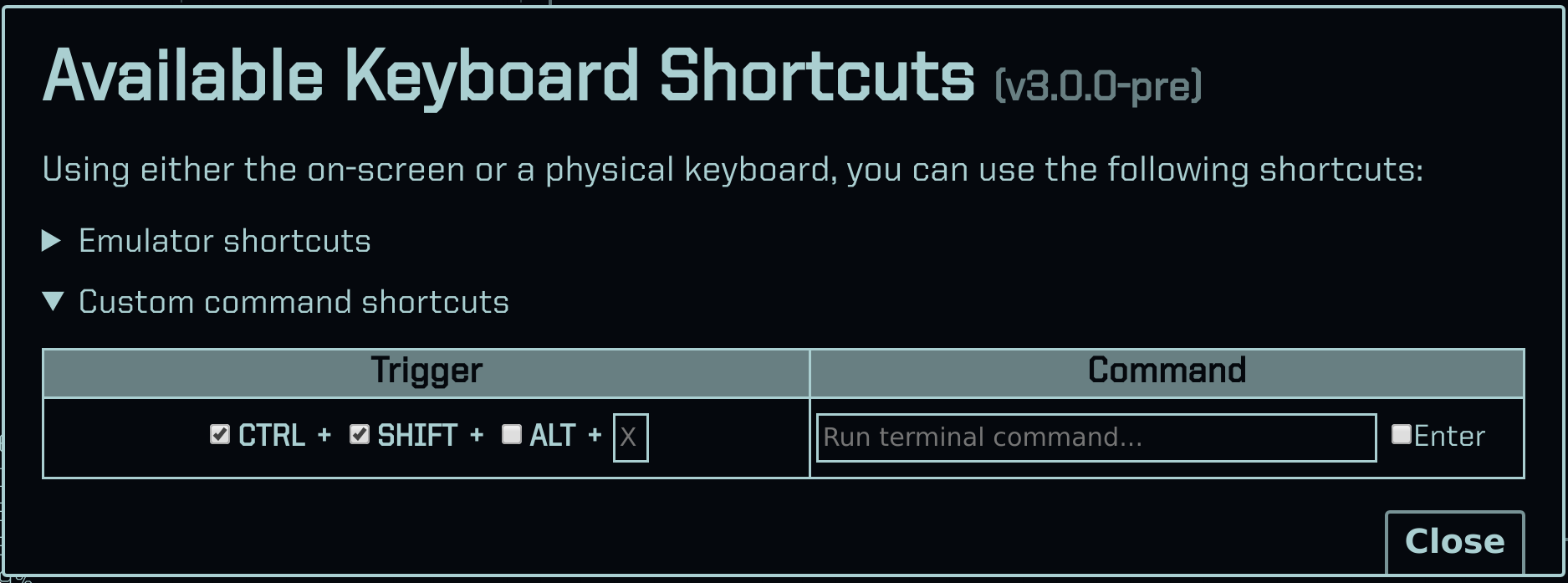
- Custom keyboard shortcuts system
GitSquared
on 26 Aug 2019
WIP:
GitSquared
on 2 Sep 2019
Right click on a file to insert the path would be really useful, especially now since you cannot get the path of picture files anymore.
It would also help getting the path of directories, so this feature would be quite useful. I don't know how it would be implemented on touch, maybe long-tap? This is mostly a windows thing since the browser runs attached on linux anyways.
By the way, ctrl-clicking on things to open them outside of edex is also very useful, just sadly doesnt work with pictures and other things like folders yet, either.
 clragon
on 10 Nov 2019
clragon
on 10 Nov 2019
@clragon Since we implemented Ctrl+Click as a way to xdg-open things, why not Shift+Click as a way to print the path, overriding any default action?
On touch devices, pressing ctrl/shift with the right hand and touching the fs display with the left hand produces similar behavior.
By the way, ctrl-clicking on things to open them outside of edex is also very useful, just sadly doesnt work with pictures and other things like folders yet, either.
I will make Ctrl+Click override default actions, this is something I didn't think about when implementing it.
Also, I need to finish the visual shortcuts editor so I can close this and #577.
GitSquared
on 10 Nov 2019
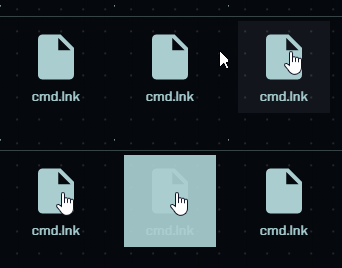
For some reason, right click also causes flashing as long as it is held down, by the way.
clragon
on 10 Nov 2019
Left-click does too. This is because of the way animations are fired. I'd rate this "not a bug, but a feature".
I implemented Shift+Click and made Ctrl+Click override default actions.
GitSquared
on 10 Nov 2019
Very cool, works nicely, would be even cooler when it would also work for folders though, imo.
clragon
on 10 Nov 2019
Very cool, works nicely, would be even cooler when it would also work for folders though, imo.
I think it does..?
GitSquared
on 10 Nov 2019
I would send you a video but video making machine broke
Anyways, it doesnt work on my end, for sure...
clragon
on 10 Nov 2019
@clragon I just tested it on Linux & Win32. Ctrl+ and Shift+ click works, even on folders. Are you sure you pulled the last commits?
GitSquared
on 10 Nov 2019
@GitSquared just recompiled from master again, nothing. You did push the changes, right?
clragon
on 10 Nov 2019
@clragon I did, it's on 0062940.
(by the way, you don't have to rebuild the app every time, right? npm start will do.)
GitSquared
on 10 Nov 2019
@GitSquared I know. I just like to have the app installed.
Anyways, it doesnt work for me 🤔
clragon
on 10 Nov 2019
Related issues
clragon
·
6Comments
GitSquared
·
6Comments
 maggot99999
·
5Comments
maggot99999
·
5Comments
 wolfen351
·
5Comments
clragon
·
6Comments
wolfen351
·
5Comments
clragon
·
6Comments