Edex-ui: The network is offline in windows. How to enable that?
(...)
 diptampaul
All 12 comments
@diptampaul Open the settings (Ctrl+Shift+S). On iface, use the dropdown menu to select the right network interface - you'll want to avoid virtualization (VMware) stuff, and select something like Wi-Fi or Ethernet.
Then, on the lower part of the window, hit Save to Disk and Reload UI. Should work now.
 GitSquared
on 11 May 2019
GitSquared
on 11 May 2019
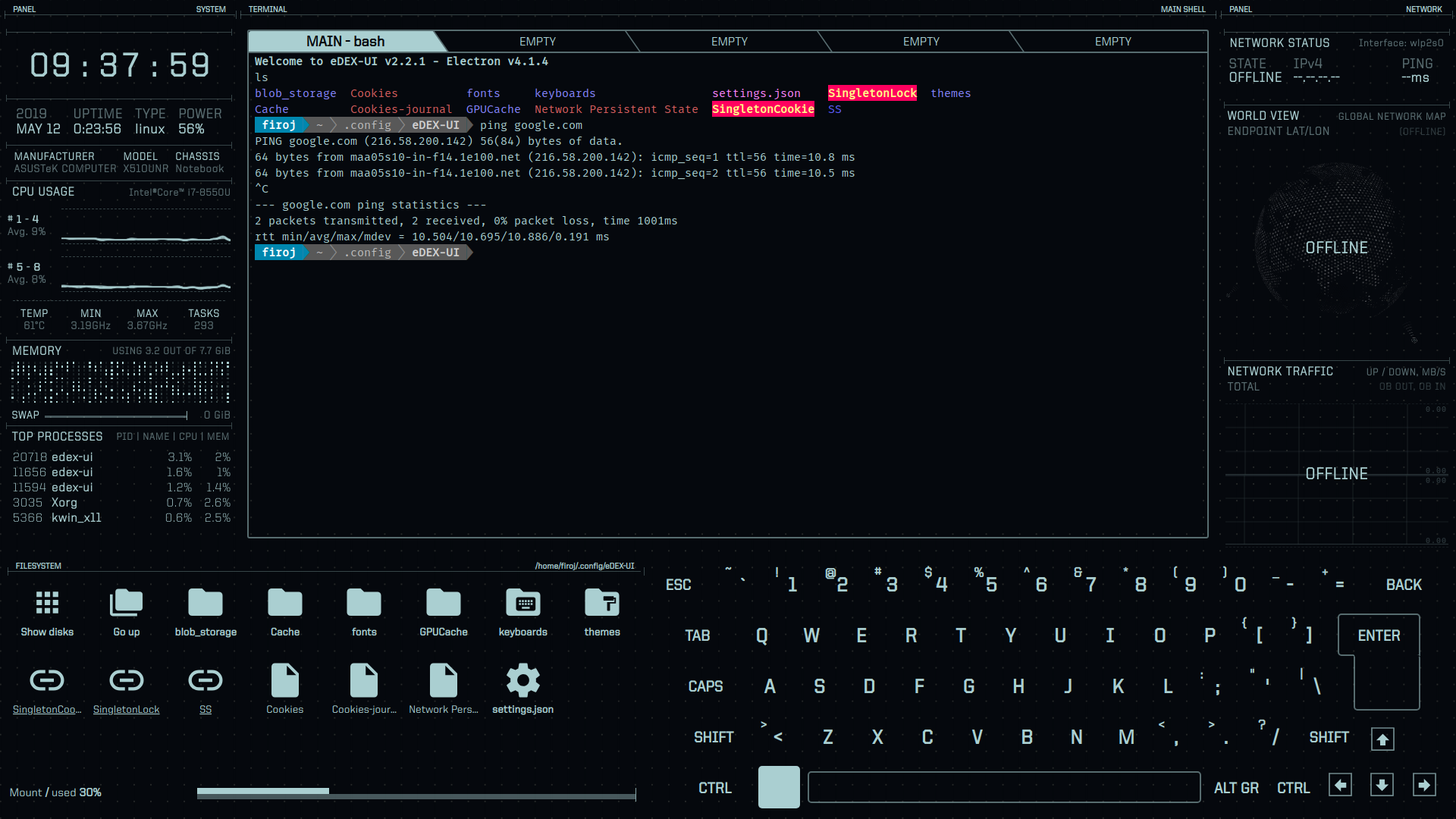
I am on Deepin Linux. Though Correct interface has been detected, Network status, World View, Network Traffic all showing offline. But Ping 8.8.8.8 is working fine in terminal.
What's the issue with my system? please take a look
 fir0j
on 12 May 2019
fir0j
on 12 May 2019
One Strange thing i found, When i am connecting my laptop with mobile hotspot then Network status = ONLINE that is it's EDex-ui is working fine but when i am connected to my wifi router it's showing Network status = OFFLINE even if it's detecting correct interface and ping is working termnal too.
fir0j
on 12 May 2019
same here on windows
 rinku98
on 14 May 2019
rinku98
on 14 May 2019
It doesn't work now with a wifi roueter neither a mobile hotspot
rinku98
on 14 May 2019
@GitSquared Is it stated somewhere that you can open the settings with ctrl+shift+s?
because I havent been able to find that until I've now seen that comment. I did notice though that you can open it by clicking the file, also that json editor is pretty fucking neatly designed ngl, would even be nice as a general thing 👀
 clragon
on 14 May 2019
clragon
on 14 May 2019
It doesn't work now with a wifi roueter neither a mobile hotspot
it does work when i connect my laptop to my mobile's hotspot. Don't why? but ya it works
fir0j
on 14 May 2019
@clragon It is stated in the Settings wiki page - there's also a keyboard shortcuts article in the wiki.
In latest versions you can use Ctrl+Shift+K to open a pop-up with a list of available keyboard shortcuts. By the way, these work whether you're using a physical keyboard or eDEX's touch-enabled one.
GitSquared
on 14 May 2019
@fir0j @rinku98 3 things can cause eDEX to display the network as "offline" when it is not:
- The automatic interface selection script might have failed to detect the correct interface
- The IP address used for latency testing (default
1.1.1.1) might be unreachable, possibly because of a proxy/firewall block - The geoip API backend (
ipinfo.now.sh, also made by me) might be unreachable (see possible reasons above, although it is more likely to be offline than the latency IP - that said, we're rocking a solid 100% uptime worldwide since 6 months)
You can use the settings to override the network interface and the latency testing address.
Currently you cannot point eDEX to another geoip backend.
First thing i'd advise to check if you're confident the network interface is good:
- Is eDEX blocked by your firewall?
- Do you use a network proxy?
- Does accessing
ipinfo.now.shin a browser work?
And, worst case scenario, try and open the dev tools (Ctrl+Shift+I) and if anything pops up in the "console" tab, report to me. :wave:
GitSquared
on 14 May 2019
@GitSquared
- don't use network proxy
output foripinfo.now.shwhat i got is{"api_version":"3.0.0","geo":{"latitude":12.9833,"longitude":77.5833,"metro_code":null,"time_zone":"Asia/Kolkata"},"ip":"115.99.87.169","time":1557918541}
i have no idea if eDEX is blocked by firewall. How to check?
while i am doing
ping 1.1.1.1in eDEX terminal, i am able to get reply. it's working there but still Network status is OFFLINEi even tried
8.8.8.8in eDEX terminal instead of '1.1.1.1' . But still no lucki am repeating again WHY THE HELL eDEX IS WORKING WHEN I CONNECTING MY LAPTOP TO MOBILE HOTSPOT ? . I Would be more than happy if you answer.
THNKS FOR YOUR REPLY
fir0j
on 15 May 2019
@fir0j I can't tell you how to check your firewall or even if you have one at all, I don't know how your system is configured/what you've installed - especially if you're on Linux.
Regarding the mobile hotspot thing, I have no idea. Maybe your laptop is using a different network interface when you switch to the hotspot. Maybe there's a configuration somewhere that prevents eDEX from accessing the Internet through your router.
All I can tell you is that I'm confident the issue is not coming from my software, and as such there's nothing I can do.
GitSquared
on 15 May 2019
In ping Addr / IPv4 address to test Internet connectivity / put the address of your router eg. 192.168.1.1 or whatever your address is, it worked for me.
 rikmac
on 14 Nov 2020
rikmac
on 14 Nov 2020
Related issues
 tztl0
·
4Comments
tztl0
·
4Comments
 tandriamil
·
5Comments
tandriamil
·
5Comments
 maggot99999
·
5Comments
maggot99999
·
5Comments
 probonopd
·
4Comments
probonopd
·
4Comments
 Zireael07
·
5Comments
Zireael07
·
5Comments
Most helpful comment
@clragon It is stated in the Settings wiki page - there's also a keyboard shortcuts article in the wiki.
In latest versions you can use
Ctrl+Shift+Kto open a pop-up with a list of available keyboard shortcuts. By the way, these work whether you're using a physical keyboard or eDEX's touch-enabled one.