Edex-ui: ping test fails on non-english Windows 10
I installed the exe for windows and selected my Wi-Fi interface, the globe and the traffic shows offline, it can't ping 1.1.1.1 or any other, I can successfully ping to 1.1.1.1 on my cmd.
 rinku98
All 17 comments
This sounds like a firewall-related issue. Could you please check that you're not blocking eDEX from accessing the network?
 GitSquared
on 1 Feb 2019
GitSquared
on 1 Feb 2019
I checked the firewall and eDex has access to private and public networks, maybe I'm missing something?
rinku98
on 1 Feb 2019
Are you sure that you selected the right interface?
GitSquared
on 2 Feb 2019
Yes, I selected the Wi-Fi interface.
rinku98
on 2 Feb 2019
I'm not really sure what's wrong. Could you send a screenshot of the available network interfaces in the Settings window? What shell are you using inside edex?
GitSquared
on 3 Feb 2019
I'm using the windows' subsystem (ubuntu) but i have the same issue using powershell.

rinku98
on 3 Feb 2019
Same here, but i've tried it on both my Windows 10 pc through ethernet and a Debian live usb on a notebook's WLAN, and none worked.
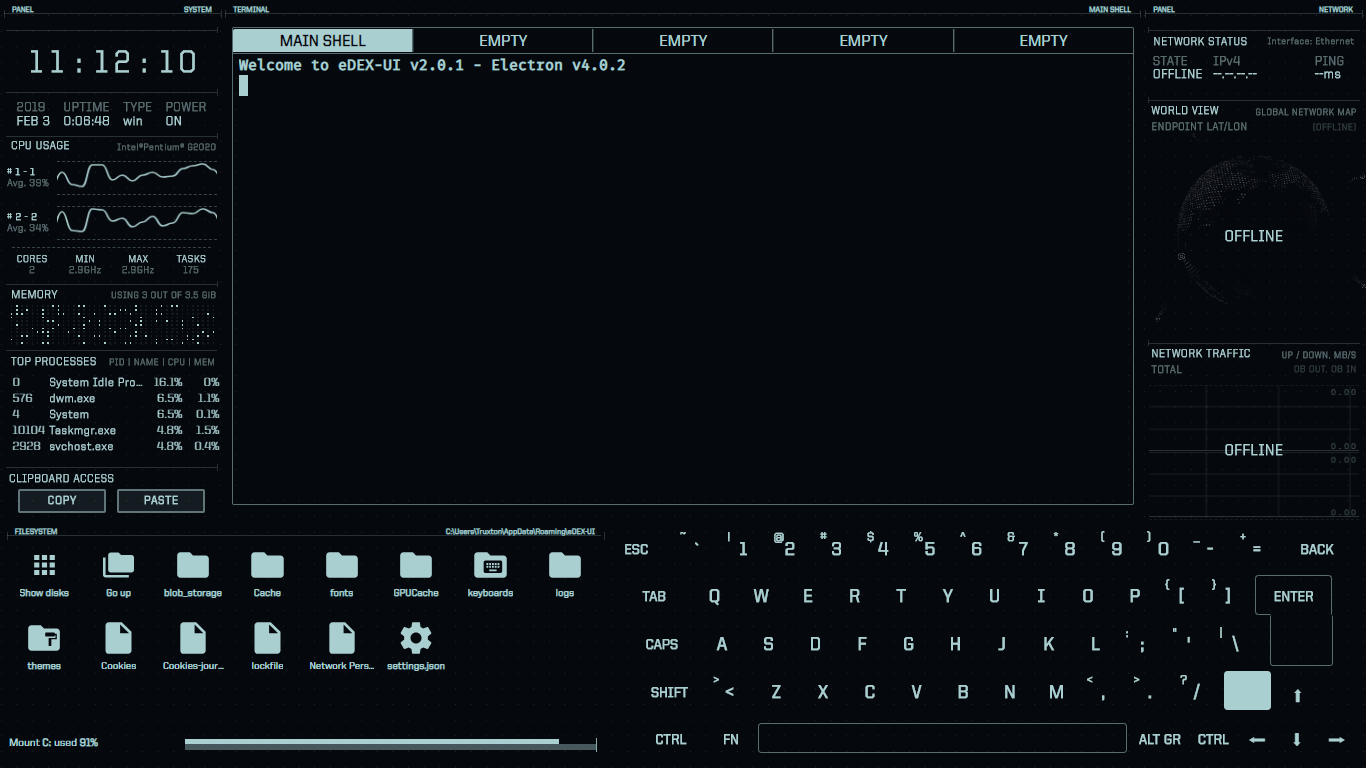
Could it be related to the router blocking something?
 GioF
on 3 Feb 2019
GioF
on 3 Feb 2019
I have this problem only on Windows, I installed it on Manjaro and work everything.
rinku98
on 3 Feb 2019
Same problem even if I change "pingAddr" to someone in my local network. But it does recognize my public IP address.
 RangerCD
on 4 Feb 2019
RangerCD
on 4 Feb 2019
Just realized that inetLatency which is used here
https://github.com/GitSquared/edex-ui/blob/6b063257dc1b9442ac37f0a2163547d4ce4071ee/src/classes/netstat.class.js#L117
only supports English version of ping by parsing stdout of ping(check here).
So it might fail if your system language is not English.
It works by changing system language into en-US, but that's not a good solution at all.
RangerCD
on 4 Feb 2019
@RangerCD Thanks for finding the problem. I'll report the problem to systeminformation... I'm also kind of looking for a way to replace inetLatency with something on top of Node.js sockets that could also respect the network interface choice. More on that if I can make a working prototype.
GitSquared
on 4 Feb 2019
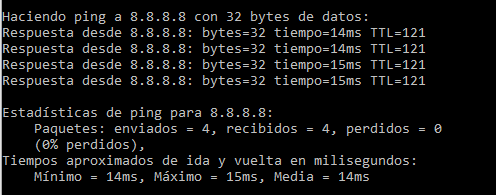
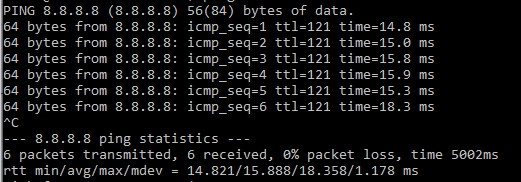
@rinku98 Could you give me the output of running ping in a regular cmd/powershell window on your system?
GitSquared
on 4 Feb 2019
A quick fix is to parse by "ms" rather than "min" in inetLatency, but not pretty sure whether it works on any other language.
And maybe net-ping is what you are looking for. Hope it would help.😃
RangerCD
on 4 Feb 2019
@GitSquared Sure, the first is ping on my cmd and the second on the windows subsystem.
rinku98
on 5 Feb 2019
Thank you @rinku98 and @RangerCD, issue was reported upstream - and I'm going to look into net-ping next.
GitSquared
on 5 Feb 2019
systeminformation v4.0.8 has been released, which fixed remaining Chinese problem related to this issue. Could you please upgrade the dependency? Thank you.
RangerCD
on 6 Feb 2019
@RangerCD Will do in a few hours.
Edit in case I come back to this issue again: dropped the idea of replacing systeminformation by net-ping because np requires elevated privileges
GitSquared
on 6 Feb 2019
Related issues
 Zireael07
·
5Comments
GitSquared
·
6Comments
Zireael07
·
5Comments
GitSquared
·
6Comments
 clragon
·
6Comments
clragon
·
6Comments
 mkbcaptain
·
3Comments
clragon
·
6Comments
mkbcaptain
·
3Comments
clragon
·
6Comments
Most helpful comment
Just realized that
inetLatencywhich is used herehttps://github.com/GitSquared/edex-ui/blob/6b063257dc1b9442ac37f0a2163547d4ce4071ee/src/classes/netstat.class.js#L117
only supports English version of
pingby parsing stdout ofping(check here).So it might fail if your system language is not English.
It works by changing system language into en-US, but that's not a good solution at all.