mac中文乱码,怎么解决
 yzytmac
All 19 comments
使用v1.1.2?
 GitSquared
on 28 Dec 2018
GitSquared
on 28 Dec 2018
是的v1.1.2
yzytmac
on 29 Dec 2018
在几天的时间内,v2.0.0将有一个修复
看到:#276 0407558
抱歉给你带来不便
GitSquared
on 29 Dec 2018
非常感谢!Thank you very much!!!
yzytmac
on 29 Dec 2018
已经更新了v2.0.0,但是依然中文乱码哦
yzytmac
on 16 Jan 2019
mac下终端也不能输入中文,Linux下都是完美的
yzytmac
on 16 Jan 2019
@yzytmac 奇怪,你能提供截图吗?
GitSquared
on 18 Jan 2019


shell是zsh,在iterm2下面正常,在edex-ui下中文显示乱码,且不支持中文输入
yzytmac
on 19 Jan 2019
好的,我发现了问题。
将添加具有中文支持的新默认字体。
GitSquared
on 20 Jan 2019
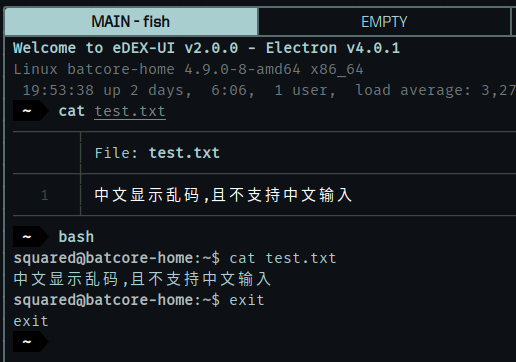
很奇怪,现在一切都在为我工作
我还在调查这个,但我不确定再怎么了
GitSquared
on 21 Jan 2019
Linux是没问题的,只有在mac下才会乱码,你这个是Linux吧
yzytmac
on 22 Jan 2019
Linux是没问题的,只有在mac下才会乱码,你这个是Linux吧
哦,是的,抱歉。
我会看到我能做什么。
GitSquared
on 23 Jan 2019
I have tested v2 on MacOS. It's fine with Chinese characters.
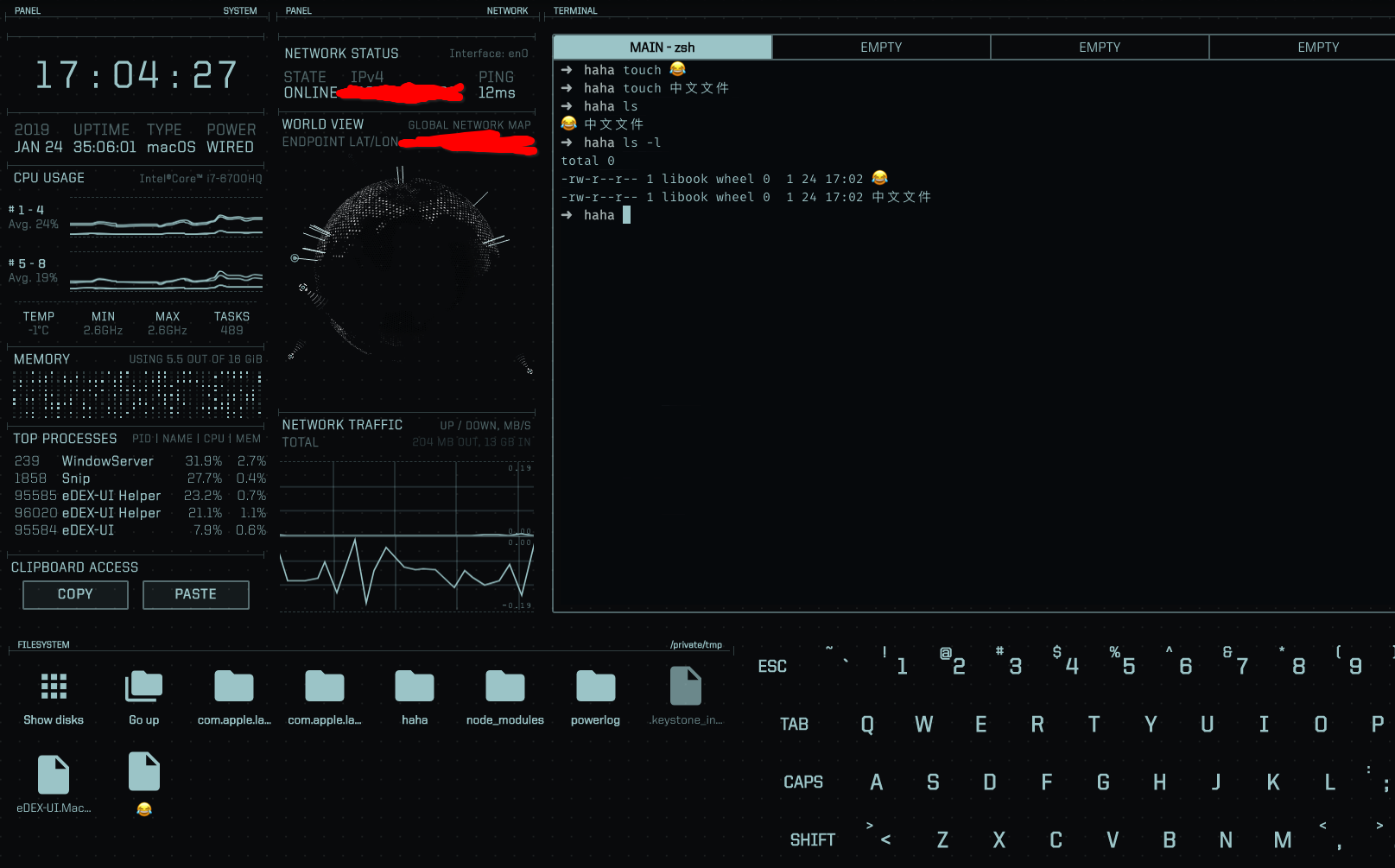
Maybe, it is a issue about font.
 libook
on 24 Jan 2019
libook
on 24 Jan 2019
@libook 你的mac系统版本是多少?我的是mojave 10.14.2
yzytmac
on 24 Jan 2019
@yzytmac
We are the same.
You can start eDEX-UI. And then, type these commands in terminal emulator:
echo $LANG
echo $LC_ALL
To see your local(language and encoding) settings.
According to your screenshots, I found that you were using different shells.
In your main terminal emulator, you were using zsh;
in the terminal emulator of eDEX-UI, you were using bash.
Environment variables may be different in different shells, especially for 'local' variables.
Please look at this https://wiki.archlinux.org/index.php/Locale#LANG:_default_locale
If the 'local' of your bash is 'C' or empty, your shell will use ASCII encoding. Chinese characters are not included by ASCII. You need to set 'local' to UTF-8 encoding.
libook
on 24 Jan 2019
It may also be the problem of the font.
Not every font has Chinese characters.
So, find out which font your eDEX-UI was using. Check whether it support Chinese characters.
libook
on 24 Jan 2019
@libook 添加了环境变量就好了,谢谢. @GitSquared 添加环境变量LANG=zh_CN.UTF-8就可以了
yzytmac
on 24 Jan 2019
@libook 谢谢您的帮助!由于问题出在本地shell配置中,因此eDEX本身没有其他修复方法。
(Also, even though eDEX doesn't ship with Chinese fonts, it should fallback to UTF8 fonts provided by your system.)
GitSquared
on 24 Jan 2019
@GitSquared You may add some description into the README. That shell problems may be caused by configuration of user's shell.
libook
on 25 Jan 2019
Related issues
 tztl0
·
4Comments
tztl0
·
4Comments
 jakewilliami
·
4Comments
jakewilliami
·
4Comments
 kingfengji
·
4Comments
kingfengji
·
4Comments
 mkbcaptain
·
3Comments
mkbcaptain
·
3Comments
 dvdmuckle
·
6Comments
dvdmuckle
·
6Comments
Most helpful comment
@yzytmac
We are the same.
You can start eDEX-UI. And then, type these commands in terminal emulator:
To see your local(language and encoding) settings.
According to your screenshots, I found that you were using different shells.
In your main terminal emulator, you were using zsh;
in the terminal emulator of eDEX-UI, you were using bash.
Environment variables may be different in different shells, especially for 'local' variables.
Please look at this https://wiki.archlinux.org/index.php/Locale#LANG:_default_locale
If the 'local' of your bash is 'C' or empty, your shell will use ASCII encoding. Chinese characters are not included by ASCII. You need to set 'local' to UTF-8 encoding.