Easy-digital-downloads: 3.0 - Customer not created upon new purchase
Bug Report
Expected behavior
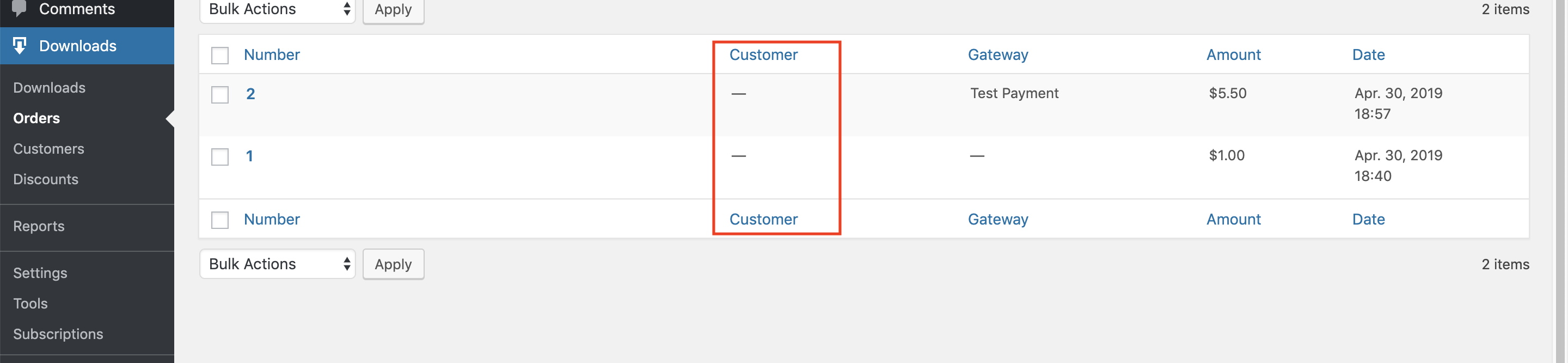
When I purchase a product, I expect an EDD customer to be generated using the data entered on the checkout page.
Actual behavior
No customer is generated.
Steps to reproduce the behavior
1) Install EDD3 and purchase a product.
2) View the "Orders" tab, and notice no customers exist.

Information (if a specific version is affected):
EDD Version (or branch): 3.0
 mintplugins
All 15 comments
Going to leave this open, just merged #7238, and hopfully that solves it for most people. If there are other cases, please drop a line on this issue.
 cklosowski
on 1 May 2019
cklosowski
on 1 May 2019
Mine was happening despite the uuid column existing. Going to try and track it down and add details here.
mintplugins
on 1 May 2019
Also worth noting, this is happening to me on a new, unmigrated version of EDD3.0. So whatever my issue is, it's not related to migration.
mintplugins
on 1 May 2019
I pulled latest on release/3.0 and did another purchase, but no customer is being created still.
mintplugins
on 2 May 2019
@mintplugins can you look through your PHP error logs to see if there are any mysql errors happening?
cklosowski
on 3 May 2019
Ok so turns out I _don't_ have the uuid column in my customers table (too many installations right now).
Does https://github.com/easydigitaldownloads/easy-digital-downloads/pull/7238 handle fixing/adding the column even if I am not upgrading from 2.9? This is a brand new installation so no migration functions are running.
mintplugins
on 3 May 2019
No, because the column is always included when a new customer table is created.
It’s only on upgrade where it needs to be added to the very end of the table.
 JJJ
on 3 May 2019
JJJ
on 3 May 2019
So it would seem that the column wasn't added upon table creation then. Does that sound like what happened here?
mintplugins
on 3 May 2019
If so, is there anything (realistically) we can do to check the existence of columns after plugin activation?
Spitballing:
- Cron job?
- Before any purchase?
mintplugins
on 3 May 2019
It really should be just created on activation, it's part of the schema. The upgrade process was simply just b/c it's an added column to an existing table...since customers table has existed prior to 3.0
I can't think of a reason why a simple fresh install/activation wouldn't create that column for you.
cklosowski
on 3 May 2019
As far as process....the cron seems overkill for a single column, and before purchase would possibly work, but really we just need to actually get the issue figured out. I can't replicate that part as it keeps creating for me....here is what I would do:
1) Fresh WordPress install without EDD 3.0 activated.
2) Switch to EDD 3.0 branch
3) Activate EDD and see if that creates it.
cklosowski
on 3 May 2019
Did that and (of course) it was fine.
I'm sure 99 times out of 100 it will go perfectly, but for that 100th time, I'm just wondering if there's an "on the fly health check" that can make sure the tables are all schema'd up properly before they are attempted to be used.
If that's considered to be not necessary that's fine as well.
mintplugins
on 3 May 2019
Maybe, under the 'tools' we can have a 'health check' type thing @jjj
This could use the new components interface and build out a UI that basically iterates through each table, checks if the current schema matches the schema we have defined, and if so give an indication that the table it healthy.
If there is an issue, like a missing column, or something we can have it maybe repair? Just throwing out ideas.
cklosowski
on 3 May 2019
That's an interesting idea. Although unless it's something that absolutely requires user interaction, I would prefer to avoid it and just do it silently in the background. Is this something you see as requiring user interaction/permission?
mintplugins
on 3 May 2019
Closing this as it was due to table issues.
cklosowski
on 10 Jun 2019
Related issues
 mindctrl
·
4Comments
mindctrl
·
4Comments
 julien731
·
5Comments
julien731
·
5Comments
 JeroenSormani
·
5Comments
JeroenSormani
·
5Comments
 michaelbeil
·
5Comments
michaelbeil
·
5Comments
 zackkatz
·
5Comments
zackkatz
·
5Comments
Most helpful comment
Going to leave this open, just merged #7238, and hopfully that solves it for most people. If there are other cases, please drop a line on this issue.