Easy-digital-downloads: 3.0 - Bulk deleting orders is not working
Bug Report
Expected behavior
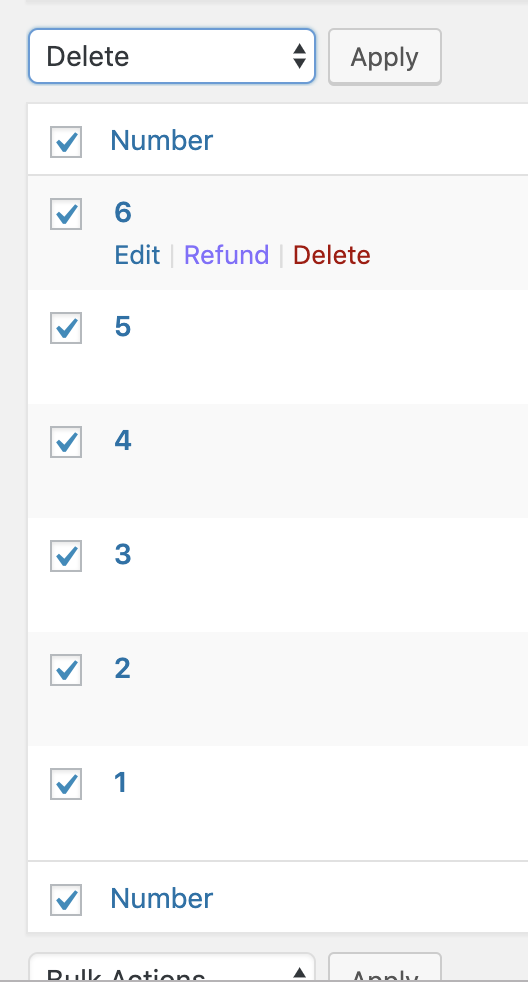
When I select multiple orders, choose "Delete", and then click "Apply", I expect those orders to be deleted.
Actual behavior
None are deleted.
Steps to reproduce the behavior
1) Select multiple orders from the order list view
2) Select "delete" from the Bulk actions dropdown
3) Click "Apply".
4) No order are deleted.
Information (if a specific version is affected):
EDD Version (or branch): 3.0
 mintplugins
All 11 comments
This is happening due to the following logic:
    // Bail if we aren't processing bulk actions.
    if ( 'action' !== $action ) {
        return;
    }
When $action is passed to delete, the value is delete which _is not_ action and therefor it leaves the function early.
 cklosowski
on 29 Apr 2019
cklosowski
on 29 Apr 2019
Confirmed fixed on issue/7224
mintplugins
on 2 May 2019
Just remembered, we need to make sure that refunds are deleted as well. Going to do some looking into if this handles all rows related to the order, including the refund orders associated with it.
cklosowski
on 3 May 2019
So interesting though @easydigitaldownloads/developers
Currently we're running edd_delete_order when we...delete an order. But we introduced edd_destroy_order which actually deletes all the order items and adjustments as well. I'm pretty sure that's what we 'intend' here. It doesn't quite make sense to delete an order but none of the order items, so I think the edd_delete_order and edd_destroy_order are a bit confusing in that people would likely use delete and leave abandoned card items in their DB.
Also this begs the question, is the assumption that if you delete an order (destroy, for the function terminology), that any relevant 'refund' orders are also deleted (destroyed)?
To me that's a Yes. If I want to delete an order, I'm assuming nothing exists anymore, in relation to that order. Order items, adjustments, the order itself, and including all the refund data. But I want the opinion of a few other people.
cklosowski
on 3 May 2019
I agree. Putting my "user" hat on, I don't see a difference between deleting an order and destroying one.
And if that order has refunds, I would assume that those would be removed as well.
Now putting my "developer" hat on, as far as deleting orders is concerned, I'm not sure I expect that to be possible, but that's probably another conversation altogether.
mintplugins
on 3 May 2019
@mintplugins we toyed with not being able to 'delete' orders, but after much discussion in slack a while back, we decided it's a feature that people use (debatable if that's a good thing or not), but removing it is a pretty big change.
cklosowski
on 4 May 2019
We’ve had _all_ of these conversations before in Slack unfortunately, and decided on maintaining functional equivalents for the basic CRUD functions, and not having those functions be invasive.
In this case:
• Delete is a function for the row
• Destroy also obliterates all child data
These are newly named developer functions, so it’s only a small educational hurdle.
As you can see, the destroy function does quite a bit more than just delete a single row.
At this point, I’d prefer not to change it?
 JJJ
on 4 May 2019
JJJ
on 4 May 2019
If I am understanding correctly, we aren't considering re-naming any functions, right @cklosowski?
Correct me if I am wrong, but to scope the question, are we _only_ trying to nail-down what happens when a user clicks "delete"?
mintplugins
on 4 May 2019
We discussed having a trash, or flagging things as deleted, and I am not sure exactly where we ended up with it.
I think, the ideal scenario, is to not permanently delete the data, but to mark it as deleted in the database with a custom status, as a method to have a report for deleted orders.
JJJ
on 4 May 2019
That's correct. We may want a new issue for this...the scope of this issue was just making bulk delete work...which it does. How we handle deletions, maybe should be up for discussion in a new issue, that we can then choose what action the bulk delete takes from there.
I'll open a new one to discuss that.
Although it does raise a question...do we want to encourage bulk deleting orders? We have individual deletions, as well as a reset tool, do we want to allow mass deleting orders still, even though we know the side affects it can have on a store's data and their customers?
cklosowski
on 4 May 2019
This is going to be fixed in #7245, as I had to go through and redo some of the bulk action logic in there as well. We'll keep this open and close it when that is merged, but i'm closing this PR inf favor of that one.
cklosowski
on 15 May 2019
Related issues
 boluda
·
4Comments
boluda
·
4Comments
 zackkatz
·
4Comments
zackkatz
·
4Comments
 mikeyhoward1977
·
5Comments
mikeyhoward1977
·
5Comments
 mihaijoldis
·
5Comments
mihaijoldis
·
5Comments
 nabeghe
·
5Comments
nabeghe
·
5Comments