E107: contact form and 2x hidden input name rand_num
Hi,
could somebody check if you have on contact form
twice times?
On latest github.
Recaptcha plugin replaces one of them but one still stays there and spams are coming through the contact form.
Thanks
 Jimmi08
All 11 comments
Hi!
I have one in login form on modal window and another on contact form and also 2x hidden input name code_verify... After login only one. Or you mean something else?
 sudakk
on 21 Oct 2019
sudakk
on 21 Oct 2019
Hi, no, you have 2 forms on one page, so you have it there 2x. And you can have it as menu too.
With one form there is code and it's correct.
<input type="hidden" name="rand_num" value="1571664677000493900" id="rand-num-1571664677000493900">
<input type="text" name="code_verify" value="" maxlength="20" id="code-verify" class="tbox form-control" size="20" required="required" placeholder="Enter code">
But with contact form:
<div class="control-group form-group">
<label for="code-verify">Enter code</label>
<input type="hidden" name="rand_num" value="1571664856090046600">
<img src="/e107_demo/e107_images/secimg.php?id=1571664856090046600&clr=cccccc" class="icon secure-image" alt="Missing Code" style="max-width:100%">
<input type="hidden" name="rand_num" value="1571664856090046600" id="rand-num-1571664856090046600">
<input type="text" name="code_verify" value="" maxlength="20" id="code-verify" class="tbox form-control" size="20" required="required" placeholder="Enter code"></div>
And recaptcha plugin uses this code:
      e107::getOverride()->replace('secure_image::r_image',     'e107recaptcha::input');
        e107::getOverride()->replace('secure_image::renderInput', 'e107recaptcha::hiddeninput');
        e107::getOverride()->replace('secure_image::invalidCode', 'e107recaptcha::invalid');
        e107::getOverride()->replace('secure_image::renderLabel', 'e107recaptcha::blank');
        e107::getOverride()->replace('secure_image::verify_code', 'e107recaptcha::verify');
And result is:

Something is wrong. It wasn't this way before.
Jimmi08
on 21 Oct 2019
Yes, you are right!
I have the same twin. One with id='rand-num, another without.
<div class='control-group form-group'>
<input type='hidden' name='rand_num' value='1571675922092261800' />
<img src='/images2/secimg.php?id=1571675922092261800&clr=cccccc' class='icon secure-image' alt='Missing Code' style='max-width:100%' />
<input type='hidden' name='rand_num' value='1571675922092261800' id='rand-num-1571675922092261800' />
<input type='text' name='code_verify' value='' maxlength=20 id='code-verify' class='tbox form-control' size='20' required='required' placeholder='Введите код' />
</div>
Shortcodes in contact_template:
    {CONTACT_IMAGECODE}
    {CONTACT_IMAGECODE_INPUT}
contact_shortcodes.php:
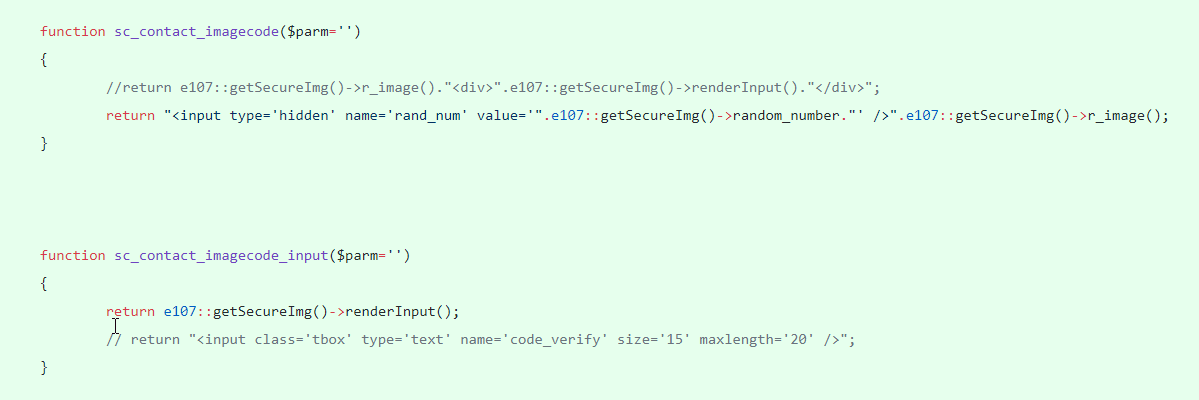
function sc_contact_imagecode($parm='')
{
    //return e107::getSecureImg()->r_image()."<div>".e107::getSecureImg()->renderInput()."</div>";
    return "<input type='hidden' name='rand_num' value='".e107::getSecureImg()->random_number."' />".e107::getSecureImg()->r_image();
}
This is first. And secure_img_handler.php:
function renderInput()
{
    if ($user_func = e107::getOverride()->check($this,'renderInput'))
    {
            return call_user_func($user_func);
    }

    $frm = e107::getForm();
    return $frm->hidden("rand_num", $this->random_number).$frm->text("code_verify", "", 20, array( "size"=>20, 'required'=>1, 'placeholder'=>LAN_ENTER_CODE));
}
This is second. And may be "<input type='hidden' name='rand_num' value='".e107::getSecureImg()->random_number."' />" is not needed
sudakk
on 21 Oct 2019
Just overview of using image captcha:
this is code from admin auth and it should work this way:
                $sec_img->renderImage().
                $sec_img->renderInput()."
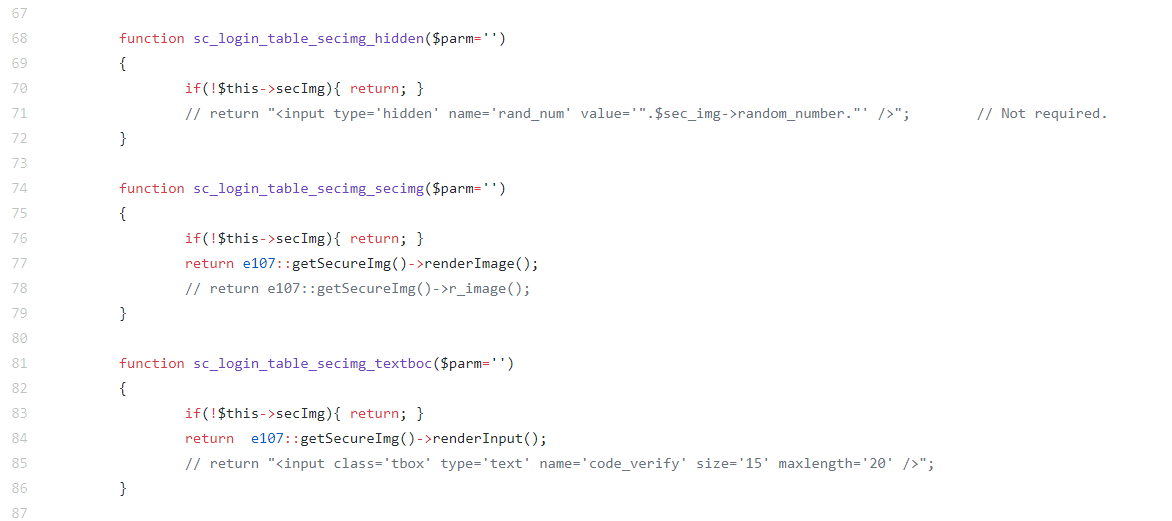
Login shortcodes (confusing, but correct)
Core template: {LOGIN_TABLE_SECIMG_SECIMG} {LOGIN_TABLE_SECIMG_TEXTBOC}
Signup shortcodes:
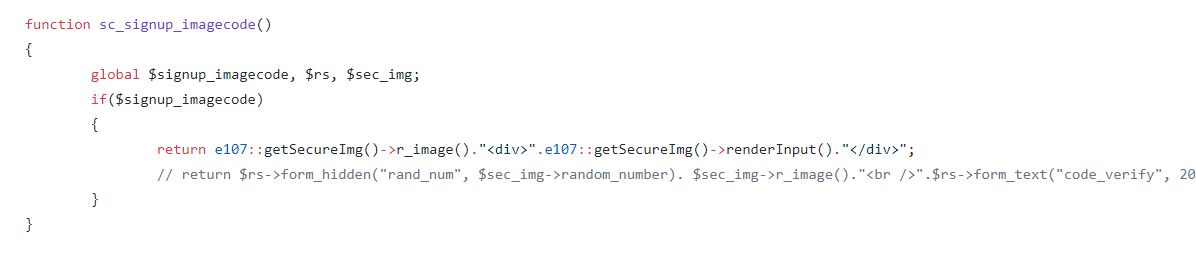
(r_image() is alias of render_image())
Core template: {SIGNUP_IMAGECODE}
Contact shortcodes:
core template: {CONTACT_IMAGECODE} {CONTACT_IMAGECODE_INPUT}
I understand why there should be 2 shortcodes (to be able to use $sc_style for HTML markup) but why it can not be done the same way in all places?
Thanks
Jimmi08
on 22 Oct 2019
Ok, I replaced it with theme shortcodes. I am noting it here just to know from time to watch spam problem.
Jimmi08
on 27 Oct 2019
@CaMer0n I had a feeling you asked me to check this with VisualCaptcha, but I can't find it now.
I did it. It looks correct
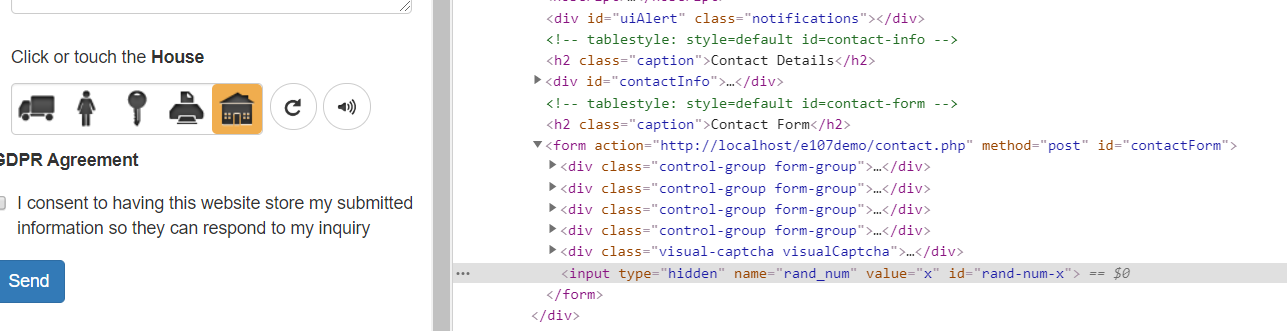
I think you are using in one method and r_image is blank:
    e107::getOverride()->replace('secure_image::r_image',   'visualcaptcha_module::blank');
    e107::getOverride()->replace('secure_image::renderInput', 'visualcaptcha_module::input');

        $element = '<div class="visual-captcha"></div>';
        $element .= $form->hidden('rand_num', 'x'); // BC compat.
but ReCaptcha is:
e107::getOverride()->replace('secure_image::r_image',     'e107recaptcha::input');
        e107::getOverride()->replace('secure_image::renderInput', 'e107recaptcha::hiddeninput');


static function input()
        {
         $text = '<div class="g-recaptcha"  ></div> ';
            return $text;
        }

        static function hiddeninput()
        {
            $frm = e107::getForm();
            return $frm->hidden("rand_num", 'google' );
        }
Has this been fixed already?
 Moc
on 28 Apr 2020
Moc
on 28 Apr 2020
Has this been fixed already?
I am not aware of fix. I don't use core contact.php anymore, so I really don't know.
Jimmi08
on 28 Apr 2020
It's likely a bug in reCaptcha if VisualCaptcha works without a problem.
 CaMer0n
on 30 Nov 2020
CaMer0n
on 30 Nov 2020
@CaMer0n There definitely is an issue somewhere: https://github.com/e107inc/visualcaptcha/issues/5
Moc
on 23 Dec 2020
Related issues
CaMer0n
·
4Comments
Jimmi08
·
3Comments
 chory
·
4Comments
chory
·
4Comments
 Evgura
·
3Comments
Evgura
·
3Comments
 nlstart
·
5Comments
nlstart
·
5Comments