E107: Response time is too high when visiting Admin area (first time after logging in)
As far as I know, it is because of checking available updates for installed plugins. But it has a bad impact on the user experience. I think we should schedule these kind of tasks with Cron. Furthermore, it would be good to have a core pref for enabling/disabling it as in the case of core updates: "Check for e107 updates once/day".
 lonalore
All 17 comments
I agree, the problem is that very few people use or even set up the cron mechanism, so we cannot rely on that. However, we might be able to offset the timing of the lookups by checking the 'last login' time.
I'm open to suggestions.
 CaMer0n
on 14 Oct 2017
CaMer0n
on 14 Oct 2017
What about an internal cron handler? By default, it could work by checking at the end of each e107 request (_register_shutdown_function()_) to see when cron last ran and if it has been too long, processing the cron tasks as part of that request. This internal cron handler could be switched off if a user want to use or set up a cron daemon or external cron handler. There would be a core pref, e.g:
Run internal cron handler every:
- Never (I use cron daemon or external cron handler)
- 1 hour
- 3 hours (default)
- 6 hours
- 12 hours
- 1 day
- 1 week
What do you think? I would love to work on this... :)
lonalore
on 14 Oct 2017
Didn't php 5.4 has assynchronous php runs?
Or is it only v7?
 rica-carv
on 14 Oct 2017
rica-carv
on 14 Oct 2017
@lonalore The problem with this over cron is that the script can timeout after 30 seconds, no?
CaMer0n
on 14 Oct 2017
How about we run the upgrade-check scripts via ajax after the login has occurred?
CaMer0n
on 15 Oct 2017
@CaMer0n PHP time limit can be overriden with set_time_limit() in most cases (almost always). Anyway, 28-29 seconds (depending on how much time page rendering takes) should be enough to run cron jobs. If you call cron.php manually (with the correct token of course), it will run in a few seconds. Furthermore, we really need some way to run cron tasks even if the user did not set it up (as daemon). I have met such a solution already in other systems. Other systems also use an internal cron handler (Drupal, WordPress).
Running upgrade-check scripts via ajax might solve this (slow Admin pages) issue, but it would not a solution to run all cron jobs.
lonalore
on 15 Oct 2017
Yes, I used to do this with v1.x. We can place a check inside class2 or the header and then maybe load via Ajax so it doesn't slow down the user experience when it runs.
CaMer0n
on 15 Oct 2017
rica-carv
on 17 Oct 2017
I believe we should first benchmark the login so we know exactly what is causing the long delay. It could be the scanning of files, or of the database.
CaMer0n
on 24 Oct 2017
@lonalore I believe the problem could be the plugin/theme updates. Would you mind adding this to admin_shortcodes.php at line 1389? Does it help?
function sc_admin_addon_updates()
{
    return null;
If so, maybe it could be done with ajax after login.
CaMer0n
on 7 Nov 2017
@lonalore I have moved the core database update to ajax. I don't think it was the whole problem, but part of it. Please re-test. Thank you.
CaMer0n
on 16 Nov 2017
It's better, but it's still very slow. After clearing cache and re-visiting admin dashboard, it's very slow for the first time (takes 10-15 sec).
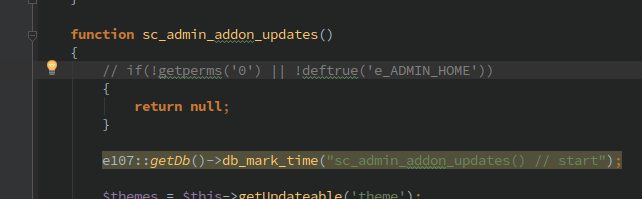
Btw I did a small modification in order to hide empty li element:

lonalore
on 16 Nov 2017
If I disable {ADMIN_ADDON_UPDATES} shortcode, dashboard loads under 1-2 sec.
lonalore
on 16 Nov 2017
Indeed, this is the main issue. I need to give it the same treatment.
CaMer0n
on 16 Nov 2017
@lonalore Please try again. I did similar for the addons check. If you find a way to add a slideDown animation when it is added, that would be great!
CaMer0n
on 16 Nov 2017
Much better! Dashboard's load time is about ~1 sec now.
lonalore
on 24 Nov 2017
Closing! Thanks @lonalore !
CaMer0n
on 2 Dec 2017
Related issues
CaMer0n
·
4Comments
 Norwayman
·
3Comments
Norwayman
·
3Comments
 nlstart
·
5Comments
nlstart
·
5Comments
 Evgura
·
3Comments
Evgura
·
3Comments
 Jimmi08
·
5Comments
Jimmi08
·
5Comments