Dynamo: Crash report from Dynamo 2.7.0.8167
Issue Description
Please fill in the following information to help us reproduce the issue:
What did you do?
Created a python script that created and displayed points. I then right-clicked on the python script and chose "Show Labels"
What did you expect to see?
Labelled points
What did you see instead?
A crash dialog window
What packages or external references (if any) were used?
None
Stack Trace
Unable to load DLL 'd3dx11_43.dll': The specified module could not be found. (Exception from HRESULT: 0x8007007E)

   at SharpDX.Direct3D11.D3DX11.D3DX11CreateShaderResourceViewFromMemory_(Void* arg0, Void* arg1, Void* arg2, Void* arg3, Void* arg4, Void* arg5, Void* arg6)
   at SharpDX.Direct3D11.D3DX11.CreateShaderResourceViewFromMemory(Device deviceRef, IntPtr srcDataRef, PointerSize srcDataSize, Nullable`1 loadInfoRef, IntPtr pumpRef, ShaderResourceView& shaderResourceViewOut, Result& hResultRef)
   at SharpDX.Direct3D11.ShaderResourceView.FromMemory(Device device, Byte[] memory)
   at HelixToolkit.Wpf.SharpDX.BillboardTextModel3D.Attach(IRenderHost host)
   at Dynamo.Controls.Watch3DView.ViewModelRequestAttachToSceneHandler(Model3D model3D)
   at Dynamo.Wpf.ViewModels.Watch3D.HelixWatch3DViewModel.OnRequestAttachToScene(Model3D model3D)
   at Dynamo.Wpf.ViewModels.Watch3D.HelixWatch3DViewModel.AttachAllGeometryModel3DToRenderHost()
   at Dynamo.Wpf.ViewModels.Watch3D.HelixWatch3DViewModel.AggregateRenderPackages(IEnumerable`1 packages)
   at Dynamo.Wpf.ViewModels.Watch3D.HelixWatch3DViewModel.GenerateViewGeometryFromRenderPackagesAndRequestUpdate(RenderPackageCache taskPackages)
   at System.Windows.Threading.ExceptionWrapper.InternalRealCall(Delegate callback, Object args, Int32 numArgs)
   at System.Windows.Threading.ExceptionWrapper.TryCatchWhen(Object source, Delegate callback, Object args, Int32 numArgs, Delegate catchHandler)
   at System.Windows.Threading.DispatcherOperation.InvokeImpl()
   at MS.Internal.CulturePreservingExecutionContext.CallbackWrapper(Object obj)
   at System.Threading.ExecutionContext.RunInternal(ExecutionContext executionContext, ContextCallback callback, Object state, Boolean preserveSyncCtx)
   at System.Threading.ExecutionContext.Run(ExecutionContext executionContext, ContextCallback callback, Object state, Boolean preserveSyncCtx)
   at System.Threading.ExecutionContext.Run(ExecutionContext executionContext, ContextCallback callback, Object state)
   at MS.Internal.CulturePreservingExecutionContext.Run(CulturePreservingExecutionContext executionContext, ContextCallback callback, Object state)
   at System.Windows.Threading.DispatcherOperation.Invoke()
   at System.Windows.Threading.Dispatcher.ProcessQueue()
   at System.Windows.Threading.Dispatcher.WndProcHook(IntPtr hwnd, Int32 msg, IntPtr wParam, IntPtr lParam, Boolean& handled)
   at MS.Win32.HwndWrapper.WndProc(IntPtr hwnd, Int32 msg, IntPtr wParam, IntPtr lParam, Boolean& handled)
   at MS.Win32.HwndSubclass.DispatcherCallbackOperation(Object o)
   at System.Windows.Threading.ExceptionWrapper.InternalRealCall(Delegate callback, Object args, Int32 numArgs)
   at System.Windows.Threading.ExceptionWrapper.TryCatchWhen(Object source, Delegate callback, Object args, Int32 numArgs, Delegate catchHandler)
   at System.Windows.Threading.Dispatcher.LegacyInvokeImpl(DispatcherPriority priority, TimeSpan timeout, Delegate method, Object args, Int32 numArgs)
   at MS.Win32.HwndSubclass.SubclassWndProc(IntPtr hwnd, Int32 msg, IntPtr wParam, IntPtr lParam)
   at MS.Win32.UnsafeNativeMethods.DispatchMessage(MSG& msg)
   at System.Windows.Threading.Dispatcher.PushFrameImpl(DispatcherFrame frame)
   at System.Windows.Application.RunDispatcher(Object ignore)
   at System.Windows.Application.RunInternal(Window window)
   at DynamoSandbox.DynamoCoreSetup.RunApplication(Application app)
OS: Microsoft Windows NT 6.2.9200.0
CLR: 4.0.30319.42000
Dynamo: 2.7.0.8167
 wassimj
All 12 comments
Hello @wassimj - was this a complex Python node, or a simple one? Are you able to upload a reproducible graph for us to test on?
 Amoursol
on 7 Apr 2020
Amoursol
on 7 Apr 2020
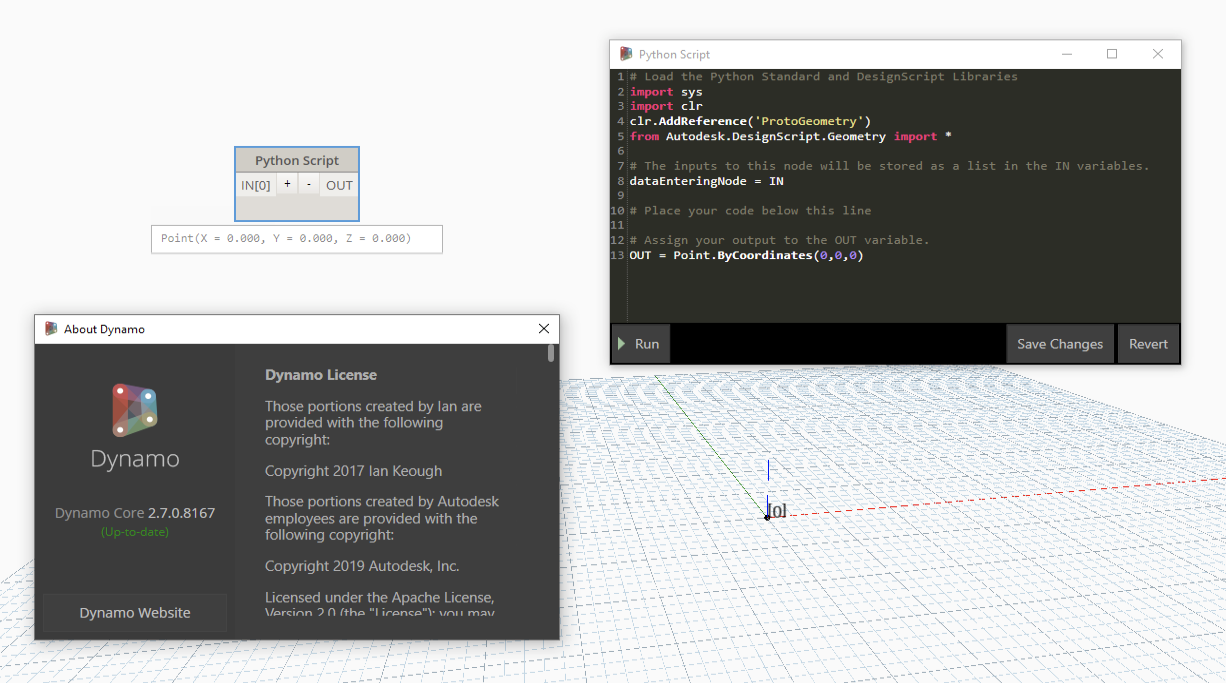
Hi @Amoursol. It crashes on a one-line trivial script. Just create a single Point.ByCoordinates(0,0,0) and try to label the python script. as in:
OUT = Point.ByCoordinates(0,0,0)
wassimj
on 7 Apr 2020
@wassimj - is this a new machine? Is this a new install of windows? Is it really windows NT? Is directx installed?
 mjkkirschner
on 7 Apr 2020
mjkkirschner
on 7 Apr 2020
Hi @Amoursol. It is a very new machine Dell Latitude 5580. Don't be fooled by "Windows NT".. This is what is reported in the crash report, but it is the latest Windows 10. Yes, I have DirectX installed. Here is the information:
System Information
  Time of this report: 4/7/2020, 15:53:47
         Machine name: DESKTOP-LBFMU1L
           Machine Id: XXXXXXXXXXXXXXXXXXXXXXXXX (I deleted this)
     Operating System: Windows 10 Pro 64-bit (10.0, Build 18363) (18362.19h1_release.190318-1202)
             Language: English (Regional Setting: English)
  System Manufacturer: Dell Inc.
         System Model: Latitude 5580
                 BIOS: 1.1.1 (type: UEFI)
            Processor: Intel(R) Core(TM) i7-7600U CPU @ 2.80GHz (4 CPUs), ~2.9GHz
               Memory: 32768MB RAM
  Available OS Memory: 32630MB RAM
            Page File: 13680MB used, 23814MB available
          Windows Dir: C:\Windows
      DirectX Version: DirectX 12
  DX Setup Parameters: Not found
     User DPI Setting: 96 DPI (100 percent)
   System DPI Setting: 120 DPI (125 percent)
      DWM DPI Scaling: UnKnown
             Miracast: Available, with HDCP
Microsoft Graphics Hybrid: Supported
DirectX Database Version: 1.1.4
DxDiag Version: 10.00.18362.0387 64bit Unicode
wassimj
on 7 Apr 2020
I've used the same daily build - cannot reproduce the issue (Clean build - no packages), so it appears that something is conflicting.
Amoursol
on 7 Apr 2020
@wassimj what type of GPU ? can you confirm you have set sandbox to use high performance mode (the discrete gpu)
mjkkirschner
on 7 Apr 2020
Hi @mjkkirschner and @Amoursol . It has an NVIDIA GeForce 930MX. It is set to use high performance globally. Here is a link to the video of the crash:
https://cf-my.sharepoint.com/:v:/g/personal/jabiw_cardiff_ac_uk/EZ3W7XL3ac9Aq_wgS7vwbN0ByXzDZ92NSSB7gXoN-zHGxQ?e=5g4oU9
oh and in the video, I have chosen to hide the grid. It is not because of the video card.
wassimj
on 7 Apr 2020
For installed packages, I had:
Graphical
MeshToolkit
SpaceAnalysis
Topologic
I removed all of them, restarted Dynamo and tested again, and it is still crashing.
wassimj
on 7 Apr 2020
@wassimj ah - this again... please try installing:
https://www.microsoft.com/en-us/download/details.aspx?id=8109
we have moved to include dx compiler 43 but apparently the billboard shader also needs the effects framework dll - ugh. Thankfully, when we pull in our references to a more modern helix version this should no longer be a problem, for now please try installing that older version of directX, it will not replace your new one.
mjkkirschner
on 7 Apr 2020
checking in on this - did this workaround help?
mjkkirschner
on 15 Apr 2020
Hi Michael
Sorry. Got distracted with other tasks. Will check today.
wassimj
on 15 Apr 2020
Hi @mjkkirschner and @Amoursol. Yes. Installing the older version of DirectX worked. It now shows the label without crashing. Thanks.
wassimj
on 15 Apr 2020
Related issues
 mccrone
·
8Comments
mccrone
·
8Comments
 LuisaCPBR
·
4Comments
LuisaCPBR
·
4Comments
 dimven
·
10Comments
dimven
·
10Comments
 johnpierson
·
10Comments
johnpierson
·
10Comments
 DrLicor
·
4Comments
DrLicor
·
4Comments