Dynamo: Can't place nodes immediately after opening graph, "running started" from Dynamo 2.2.1.5175
Issue Description
Please fill in the following information to help us reproduce the issue:
When i open a graph, or even make a new graph, i can search for nodes, but not place any. Automatic is chosen already, and it says "running started"
What did you do?
I'm trying to figure out how to reinstall Dynamo for Revit 2020 and can't find anything.
What did you expect to see?
I expected to be able to place nodes, and to be able to change from automatic to manual mode
What did you see instead?
locked mode changer, and unable to place any nodes from either right click search, or from library search.
What packages or external references (if any) were used?
n/a - error is from opening new graph
Stack Trace
(From the Dynamo crash window select 'Details' -> 'Copy' and paste here)
OS: Microsoft Windows NT 10.0.15063.0
CLR: 4.0.30319.42000
Dynamo: 2.2.1.5175
 ariccb
All 27 comments
hi @ariccb , can you describe in what case you need to reinstall Dynamo in Revit 2020? Dynamo should come with it and be updated with Revit patches, you can always reinstall Revit to achieve that but that may be an overkill.
 QilongTang
on 7 Nov 2019
QilongTang
on 7 Nov 2019
@QilongTang I've tried closing and reopening dynamo within revit to 'reset' dynamo, but the same issue keeps happening. I'll try closing out of everything and doing a computer reset to see if anything changes. I'll report back.
ariccb
on 7 Nov 2019
@ariccb It also seems the graph you are opening is set to AutoRun mode, that sometimes cause trouble in Revit context (elements operation usually takes time). A workaround could be that you turn the graph back to Manual mode and run it when you are ready. You can do that by opening the dyn with text editor and edit this
"RunType": "Automatic",
Update to
"RunType": "Manual",
Then save the graph and start from there
QilongTang
on 7 Nov 2019
@QilongTang Just tried that, and it didn't solve anything. It took ages to open the graph for some reason, i thought i froze for a sec. Then it opened, and "manual" was selected and no more "running started" was shown. Tried to insert some nodes, but still having the same issue, where it won't place any in the workspace. I'm not able to switch from graph to 3d view either, and none of the tabs work (file, edit, view, packages, settings, help, !) I'm only able to search from library right now, scrolling through the list works, but that's about it. I've attached the graph to see if that's the problem, but i think it's my installation.
rjcCopyOpeningsFromLink_2.0.dyn.zip
ariccb
on 7 Nov 2019
@QilongTang strangely, when i close the graph so that the Dynamo "home landing page" is visible, the tabs (home, edit, view etc.) work. Only when i have a .dyn file open is it having issues. It also seems like it's running very slowly.
ariccb
on 7 Nov 2019
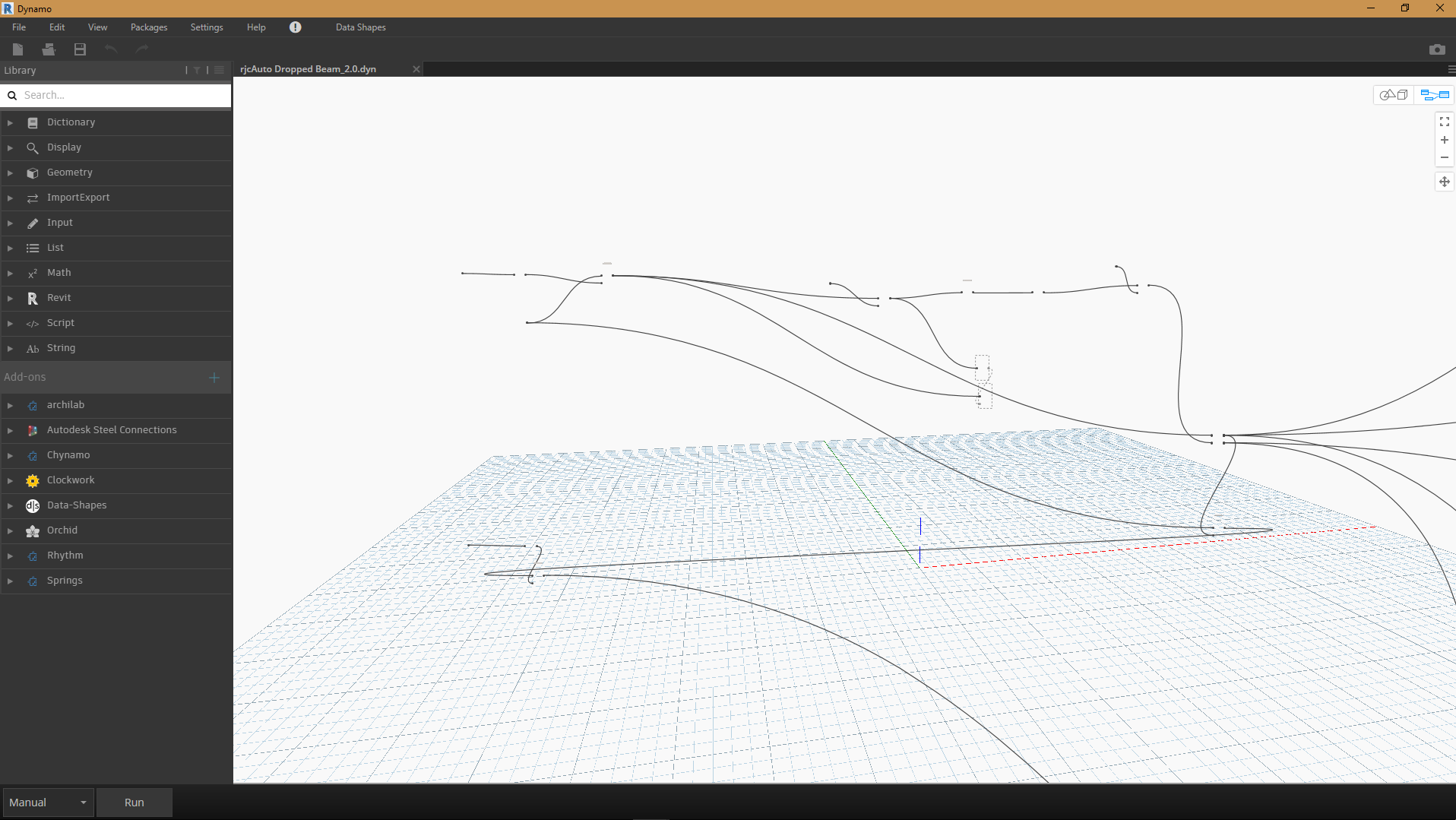
I just tried opening an existing .dyn file, and it's clearly broken - none of the nodes showed up, but all of the splines connecting them are there.
ariccb
on 7 Nov 2019
@ariccb Our team has been fighting this issue for weeks. I feel sorry for your case but you are actually not the only guy seeing the nodes missing. I am almost sure some strange things on either another Revit addin disturbing Dynamo or some load time issue with all the packages on our end.
Would you do me a favor if you can, remove all other revit addins and see if this still reproduces?
FYI: @zeusongit this is the bug you are working on, please watch this thread.
QilongTang
on 7 Nov 2019
@QilongTang What's the best way to 'remove all other revit addins'? Can i save the files in another folder to re-add them later? (i just spent the greater part of a day finding and installing them, moving from revit 2019 to 2020. )
ariccb
on 7 Nov 2019
a list of the addins would be very useful for us as well to try to reproduce this.
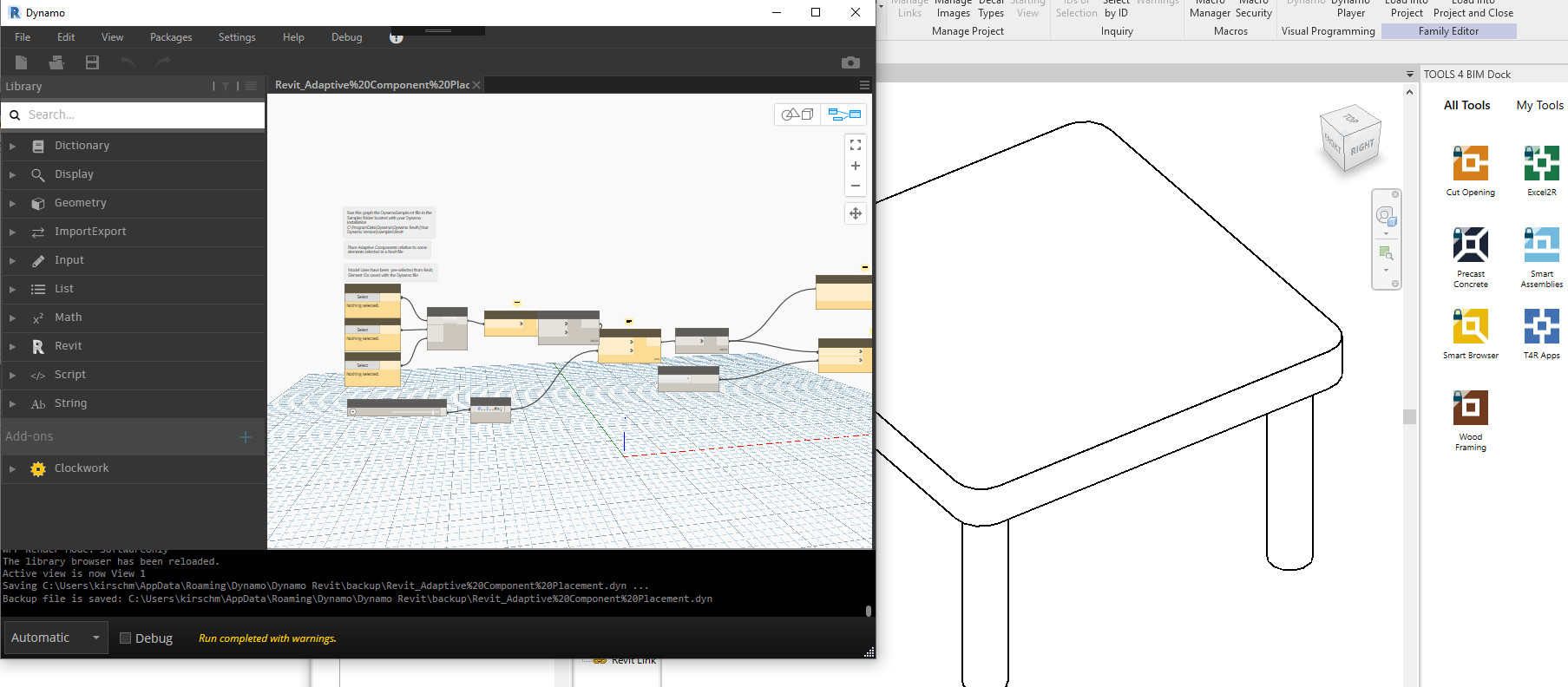
@zeusongit also please take note of the packages shown in the image above.
 mjkkirschner
on 7 Nov 2019
mjkkirschner
on 7 Nov 2019
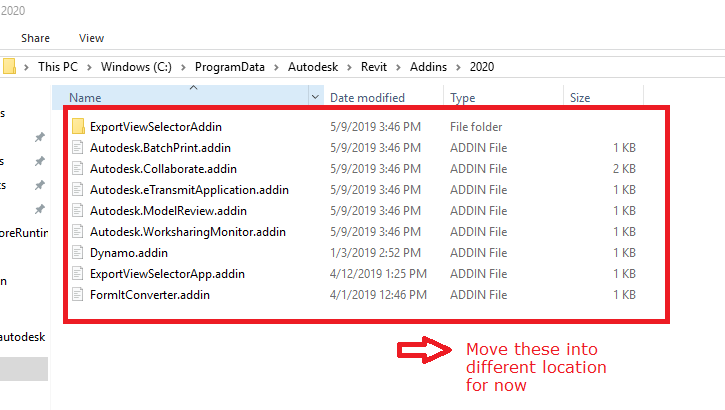
@ariccb Would you follow this link: https://knowledge.autodesk.com/support/revit-products/learn-explore/caas/sfdcarticles/sfdcarticles/How-to-Disable-Add-Ins-for-Revit-Products.html. I dont think you will need to touch those binaries in your second picture. You can disable loading them by moving those manifest files into a different location, here is my example:
QilongTang
on 7 Nov 2019



ariccb
on 7 Nov 2019

ariccb
on 7 Nov 2019
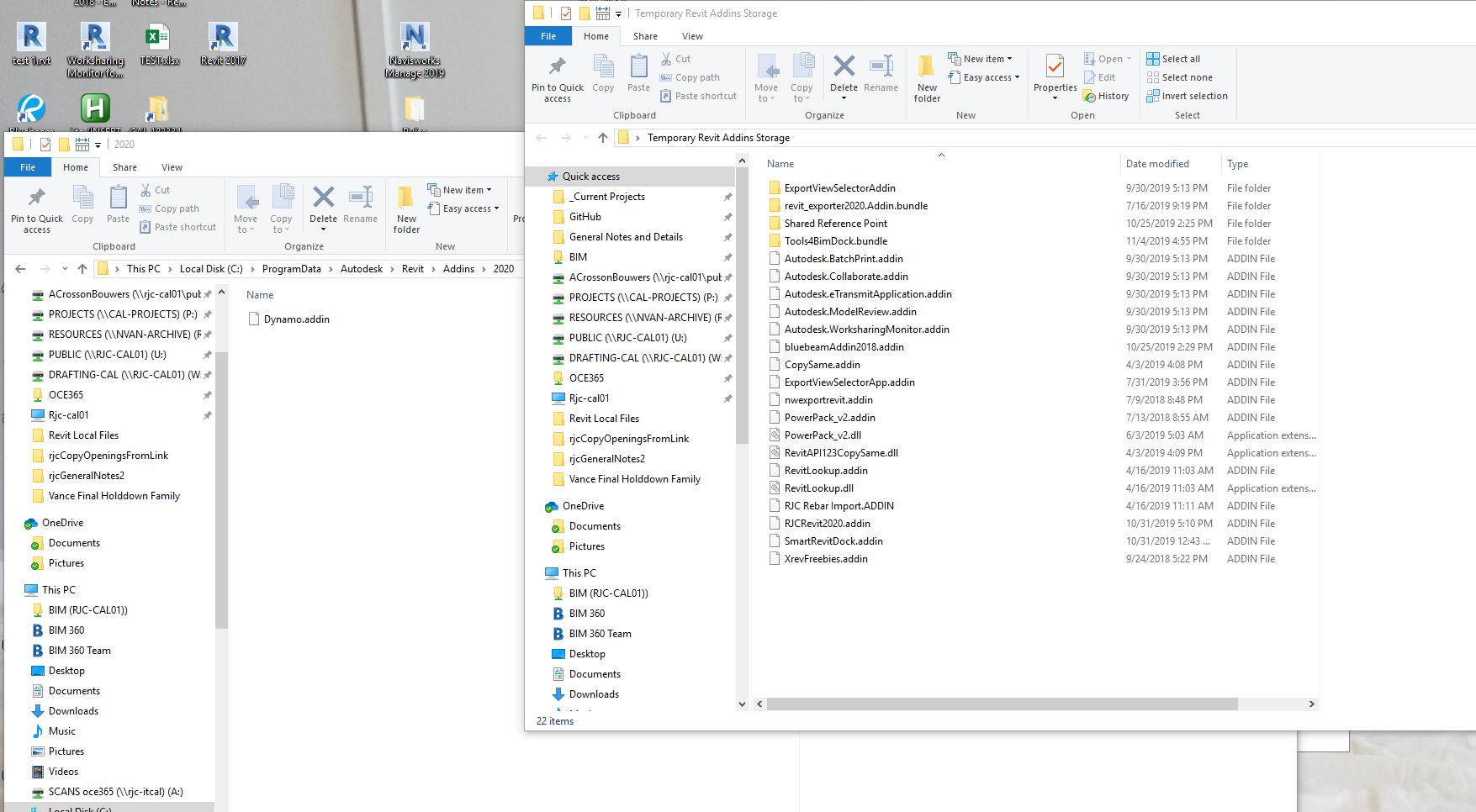
Ok it's definitely an issue with one of the addins in my first photo, (i'll post it below again for easy reference), because after moving the addin files to a temporarily disable them, my dynamo is working swimmingly again.
ariccb
on 7 Nov 2019
Here is my dynamo graph now, same one as before that was just showing the splines.

ariccb
on 7 Nov 2019
@ariccb Glad for you! We have other reports saying similar thing, some other addin may cause conflicts with Dynamo and Dynamo will be completely non useful in that case.. To unblock you, hopefully you can enable what you need to continue your daily work. If you end up narrowing it down, let us know so we can contract the add in author and figure out ways. Thank you for reaching out to us, much appreciated!
QilongTang
on 7 Nov 2019
@QilongTang i just tried adding the .addin files one by one back into the ProgramData>Autodesk>Revit>Addins>2020 folder, and none of them caused my Dynamo to stop working. I'll have to test this more if the problem rears it's head again
Thanks for the help, anywho!
ariccb
on 7 Nov 2019
@QilongTang I think i might have narrowed down which Add-in might be messing up my Dynamo working. I believe it's the Tools4BIM dock, provided by AGACAD. We use their Wood+ Wall software, and when i have the folder "Tools4BimDock.bundle" as well as the "SmartRevitDock.addin" file in the Revit 2020 addins folder it seems to break functionality while using Dynamo.
ariccb
on 15 Nov 2019
@ariccb Thank you so much for narrowing it down. A good step forward. FYI: @mjkkirschner @smangarole
QilongTang
on 15 Nov 2019
hmm -
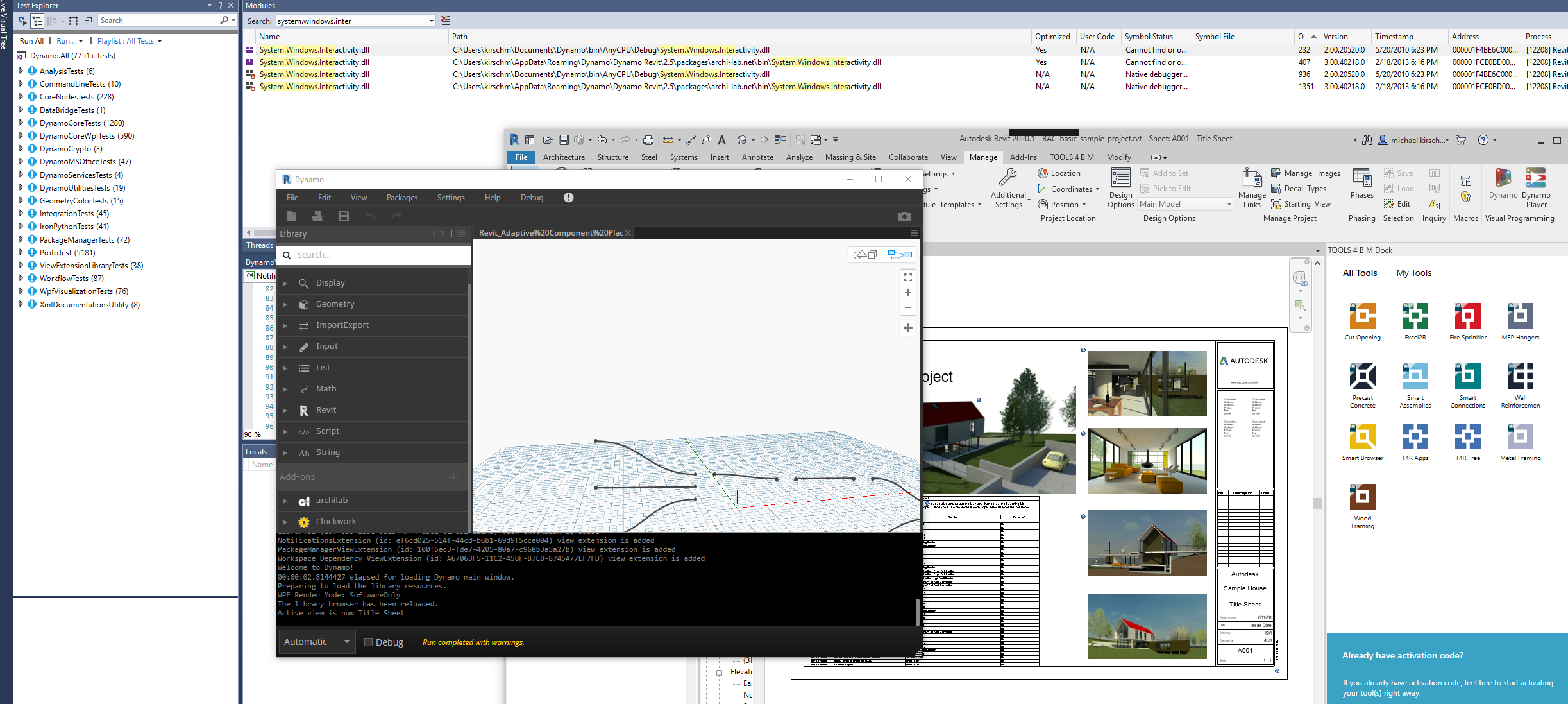
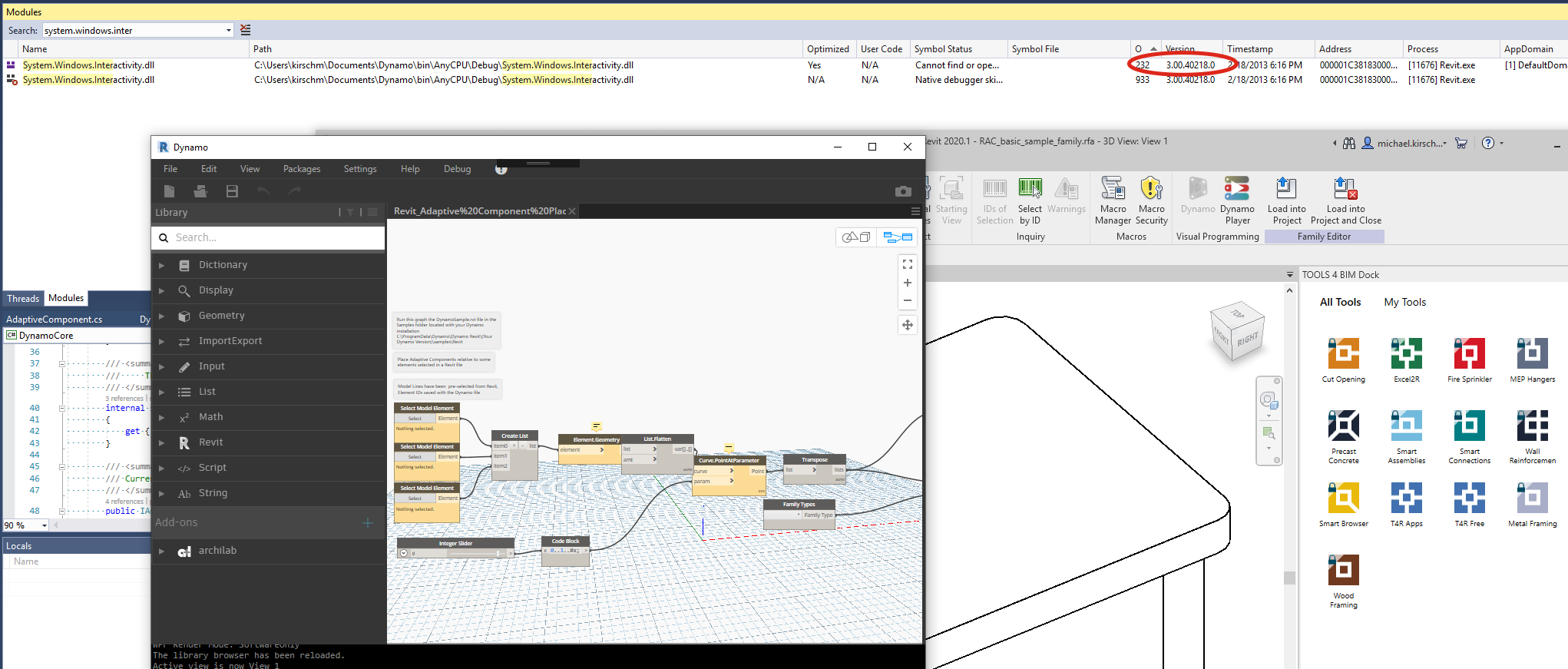
when this addin is not loaded - Dynamo's version of system.windows.interactivity(2.0) - is loaded AFTER archilab's version (3.0) -
when this addin is installed the order is reversed - I've examined this addin and it also ships a 2.x version of system.windows.interactivity - oddly, Revit's 3.x version (which is also ships) 🤷♂ - is never loaded EVER. (that I can find - I clicked a lot of buttons)....
I will continue investigating - but I can definitely reproduce it now. FYI @zeusongit
mjkkirschner
on 15 Nov 2019
after removing archilab:
now only dynamo's system.windows.interactivity.dll is loaded - it's still loaded early by the other addin - I'm assuming because our assembly resolve handler is loaded first or some such...
Hypothesis:
this bug occurs when any addin (or anything else) causes an older version of system.windows.interactivity to be loaded first into the process - and then a newer (major version difference) version is loaded later. This is a bit unintuitive, I would have though the opposite order would cause issues.
... thinking of solutions.
mjkkirschner
on 15 Nov 2019
I tried recompiling Dynamo against the Revit supplied 3.x version of windows.interactivty - this works - and since archilab references the same version - the already loaded assembly is referenced.
likely the 3 best fixes are:
- get rid of this dependency, we use it in one small place and can likely figure something else out.
- consult with Revit team to add an assembly bind redirect for this assembly to Revit's app config to always direct to their version.
- update our version to align with Revit's - they seem to be compatible as I had to make 0 changes in Dynamo except for recompiling.
I think the real issue here occurs when two of these versions are loaded in the same process and it causes some kind of type identity failures - I think parsing out exactly why loading one version over the other first is going to be very hard.
mjkkirschner
on 16 Nov 2019
@mjkkirschner I remember @zeusongit had shown me a change to preload system.windows.interactivity always from Revit in DynamoRevit, similar to how we address the bug for AvalonEdit. Seems that would be a good plus as well?
QilongTang
on 16 Nov 2019
@QilongTang that won't help - because this other addin is loading the dll before Dynamo does - since Dynamo requires pressing the Dynamo button to start.
mjkkirschner
on 16 Nov 2019
I asked AGACAD for a solution to their addin causing the issue, and they sent this as a solution:
"Could you try to rename or move this folder: C:\Users\%username%\AppData\Roaming\TOOLS 4 BIM\2020\Smart Browser Free
We suspect that this folder causing this issue."
Changing the folder name seems to have resolved the problem for me.
ariccb
on 21 Nov 2019
@ariccb Thanks so much! Did they mention any reason?
QilongTang
on 22 Nov 2019
@QilongTang no, there was no explanation as to why that specific folder might be causing the problem. I'll ask.
ariccb
on 22 Nov 2019
@ariccb Thank you for chasing so far in this problem. Your experience in this case will help other Reviter for sure. Enjoy Dynamo! I am closing this issue for now.
QilongTang
on 4 Dec 2019
Related issues
 AndersDeleuran
·
6Comments
AndersDeleuran
·
6Comments
 ThomasMahon
·
3Comments
ThomasMahon
·
3Comments
 dimven
·
6Comments
dimven
·
6Comments
 andydandy74
·
8Comments
andydandy74
·
8Comments
 dbaldacchino
·
7Comments
dbaldacchino
·
7Comments