Dxvk: I can't force DXVK to use my IGPU, and fullscreen doesn't work - Brawlhalla [d3d9]
I want to run Brawlhalla on my IGPU, but DXVK choose my DGPU automatically. I tried DRI_PRIME=0, and WINEDLLOVERRIDES="dxgi=b", but still DXVK uses my DGPU.
Also, the game looks like this when using fullscreen mode:

Edit: I can fix this issue by running the game in window mode, and resize it to fit my screen, because there is no other way to change the resolution of that stupid game.
Software information
Brawlhalla, default settings, DX9.
System information
- CPU: Intel Core I5 4200M
- GPU: AMD Radeon HD 8750M
- Driver: Mesa 20 (kisak ppa)
- Wine version: 5.2 - staging
- DXVK version: 1.5.4
- OS: Kubuntu 19.10 - kernel: 4.19.104
Log files
- d3d9.log: Brawlhalla_d3d9.log
 Ahmed-E-86
All 13 comments
Use DXVK_FILTER_DEVICE_NAME.
 Joshua-Ashton
on 23 Feb 2020
Joshua-Ashton
on 23 Feb 2020
DXVK_FILTER_DEVICE_NAME
That is mentioned in README, I am so sorry about that. Apparently, the game flickers so much when using IGPU.
Also, I can't use the game in fullscreen mode, it looks like this picture, and there is no option inside the game to change the resolution:
Ahmed-E-86
on 23 Feb 2020
@Ahmed-E-86
Does the flicker occur on the Intel GPU or the AMD one?
 jrugia
on 23 Feb 2020
jrugia
on 23 Feb 2020
@Ahmed-E-86
Does the flicker occur on the Intel GPU or the AMD one?
It happens only on the Intel GPU.
Ahmed-E-86
on 23 Feb 2020
@Ahmed-E-86
Does the flicker occur on the Intel GPU or the AMD one?It happens only on the Intel GPU.
The flickering is an Intel ANV driver bug which occurs on Gen8 GPUs (and older apparently too). Here's how GRID looks: https://drive.google.com/file/d/1XGOu5-TmIxlsPekBx3kPW-xPCKSVnVeR
In case you still can't run it using the AMD GPU, try DXVK 1.5.1 where the flicker is not present.
jrugia
on 23 Feb 2020
In case you still can't run it using the AMD GPU, try DXVK 1.5.1 where the flicker is not present.
But DXVK 1.5.1 doesn't has d3d9.
Ahmed-E-86
on 23 Feb 2020
In case you still can't run it using the AMD GPU, try DXVK 1.5.1 where the flicker is not present.
But DXVK 1.5.1 doesn't has d3d9.
It does, wouldn't suggest it otherwise ;)
jrugia
on 23 Feb 2020
In case you still can't run it using the AMD GPU, try DXVK 1.5.1 where the flicker is not present.
But DXVK 1.5.1 doesn't has d3d9.
It does, wouldn't suggest it otherwise ;)
Sorry about that. I am totally off tonight.
DXVK 1.5.1 fixed the issue with the flickering, and the other issue with screen resolution. Thanks for your suggestion, and thanks to @Joshua-Ashton
Ahmed-E-86
on 23 Feb 2020
In case you want to keep track of the flickering issue, I filed a bug report on Mesa's gitlab page: https://gitlab.freedesktop.org/mesa/mesa/issues/2553
DXVK 1.5.1 will eventually become old and will miss important fixes down the line, so the issue must be dealt with.
jrugia
on 23 Feb 2020
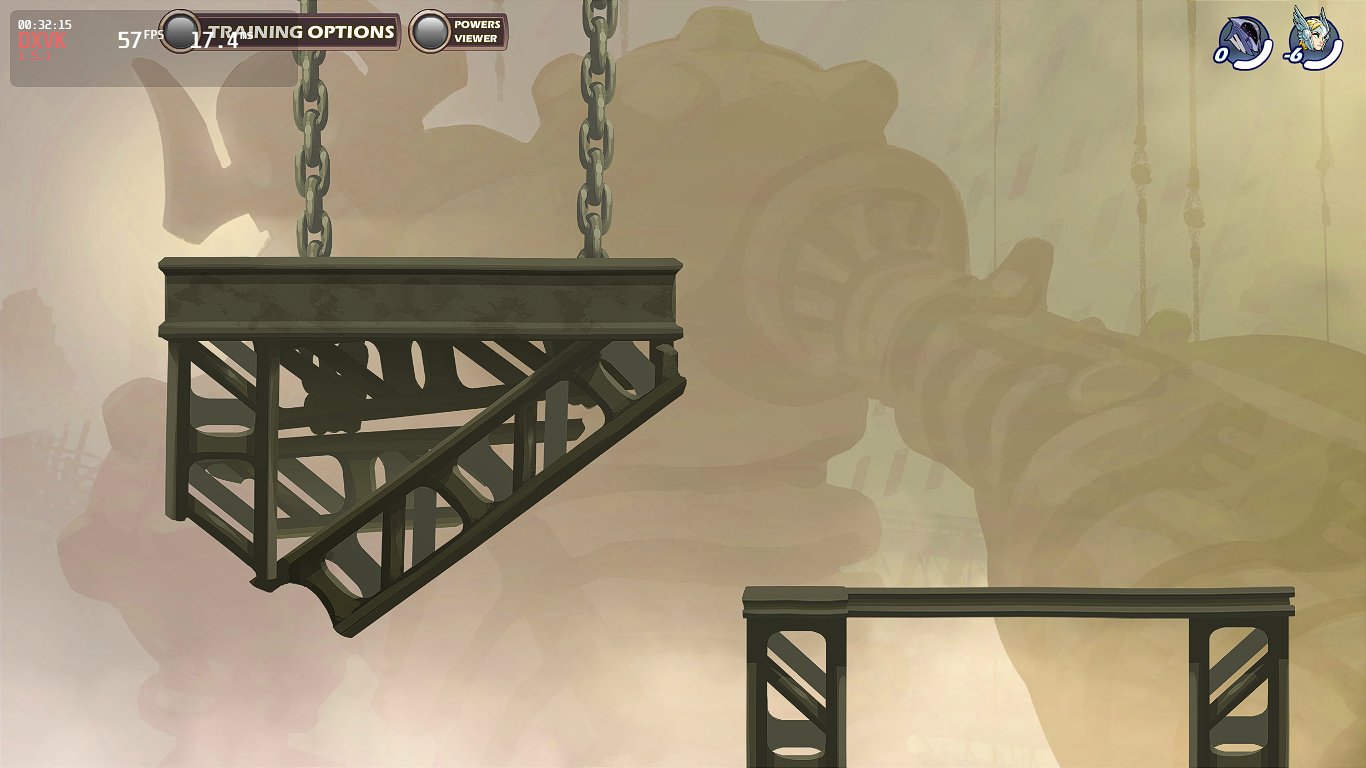
There is a new issue, the characters doesn't appear inside the game (this issue happens only with Intel GPU)
Ahmed-E-86
on 23 Feb 2020
The flickering is fixed by recent commit f095f6385ef780d4ae00b8ca8a1a8ccc4f7dc8bc and was started in the 609856db35c674b5b61bdfdb62fbb92baed5ca37
 werman
on 25 Feb 2020
werman
on 25 Feb 2020
Hi @Ahmed-E-86
I've tried to reproduce the issue on my side with DXVK 1.5.1/1.5.4/master and mesa-19.3.4/20.0.0/master - and with no luck.
Could you confirm that you see the issue with characters on DXVK 1.5.4 and mesa-20.0.0?
If yes - could you please create one more new ticket for this issue and provide some more information about the issue.
Thanks.
 PaulChe
on 28 Feb 2020
PaulChe
on 28 Feb 2020
I tried master, and all the issues are fixed including the issue with invisible characters. Thank you all for your help.
Ahmed-E-86
on 28 Feb 2020
Related issues
 t14462
·
4Comments
t14462
·
4Comments
 torokati44
·
4Comments
torokati44
·
4Comments
 7oxicshadow
·
3Comments
Ahmed-E-86
·
4Comments
7oxicshadow
·
3Comments
Ahmed-E-86
·
4Comments
 yusdacra
·
4Comments
yusdacra
·
4Comments