Dxvk: GTA IV Frame skipping / jumping lag
I dont know if you can see this in the video but you can clearly see it in the frametime graph.
https://www.youtube.com/watch?v=clxQTkD14y0&feature=youtu.be
Also for some reason there's a bug with gta4Browser.exe that its constantly using 25% of the cpu and really drops performance without stoping it or kill it soon as i enter the game, not sure if its wine/proton problem tho.
- GPU: GTX 670
- Driver: 440.59
- Wine version: proton 4.11-12
- DXVK version: 1.5.4
 NikoBellicRU
All 21 comments
Low performance is expected on weak hardware, especially if your CPU is slow. There's probably no bug here.
That said, the number of queue submissions seems high, but to look into that we'd need an apitrace as requested by the issue template.
 doitsujin
on 8 Feb 2020
doitsujin
on 8 Feb 2020
Where is that file and whats the name? Also i played this game with d9vk before it was merged with dxvk a while ago and it waas working great i played with all very high settings and now with medium settings that wierd lag happends
NikoBellicRU
on 8 Feb 2020
I encountered this a few days ago, but didn't think this was DXVK's issue as I also have this issue in Modern Warfare Remastered.
I don't think specs are the issue here, I have an i7-4770 & 980 Ti (not the best, but good enough for GTA IV)
I'll try get an apitrace of it.
 telans
on 9 Feb 2020
telans
on 9 Feb 2020
@NikoBellicRU use this instruction for dx9 games https://github.com/Joshua-Ashton/d9vk/wiki/Making-a-Trace#on-linux
instead editing setting via winecfg try use environment variable through set launch option... for steam games, example
WINEDLLOVERRIDES="d3d9,d3d11,d3d10,d3d10core,d3d10_1,dxgi=n,b" DXVK_HUD=full %command%
 Iglu47
on 9 Feb 2020
Iglu47
on 9 Feb 2020
https://drive.google.com/file/d/1RDlcqGlgY2yCfETqUI6YoFlpTJDFd9ML/view?usp=sharing
https://drive.google.com/file/d/17h4ugjTxXDnDvhBDWCmlA1-aHKDnIivO/view?usp=sharing
NikoBellicRU
on 9 Feb 2020
Hello @NikoBellicRU , very strange that you can't get a good fps in GTA IV with a higher GPU, I can get between 50~60 FPS on an E8400:
You can try to disable And use You can try ThirteenAG's FusionFix and XLivelessAddon:Click here


gta4Browser.exe:
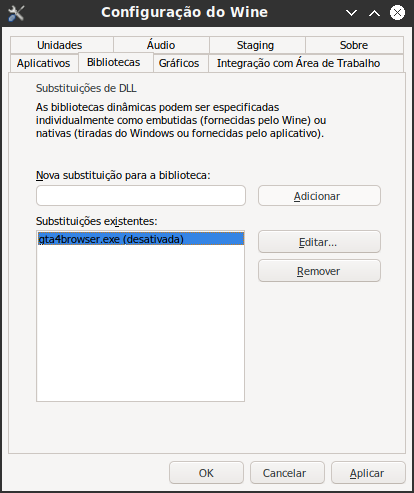
__GL_THREADED_OPTIMIZATIONS in Environment Variables in Lutris.
https://github.com/ThirteenAG/GTAIV.EFLC.FusionFix
https://bitbucket.org/ThirteenAG/xlivelessaddon/downloads/XLivelessAddon.zip
with ThirteenAG's XLiveless I am able to run directly from GTAIV.exe with a higher performance, I have the GTAIV DVD which may be why I have the best performance too
 ViNi-Arco
on 23 Mar 2020
ViNi-Arco
on 23 Mar 2020
I also get micro stutters on the steam version, but the redacted version from redacted works fine, overall perfomance is better by about 10 frames. My rig is:
Ryzen 5 2600
RX 590
Mesa 20.1-git
DXVK various versions, from 1.4.0 to 1.6.0
DXVK also works better than Gallium9 for me
 HughJass
on 31 Mar 2020
HughJass
on 31 Mar 2020
apitrace
steam system info
run with default proton 5.0.5
I recorded it on minimal settings to reduce file size, and without using DXVK, as was recommended in post linked by @Iglu47, but if I launch this same slice with default DXVK settings, it has heavy framegraph spikes. This can be heavily reduced by setting maxFrameLatency=1, but it does not fix it completely.
Another thing I noticed is that comparing to Wine D3D implementation:
- game causes constant 99-100% gpu usage, even if scene is simple. (with vsync on it seems to be 100% even in menu). It is so big, that not only game, but the whole desktop has stutters. On regular wine I see avg. of 30% and max of 70% while having same/more fps most of the time
- game causes significantly bigger PCIe Bandwidth Utilization (70%, while in regular wine it is 10%-20%)
UPDATE:
I tried to figure out which version introduced low fps and stuttering and it seems to be something between D9VK-0.30(Froglet) and D9VK-0.40(Croakacola). Froglet is the last version with good performance (where newer versions have 30fps, this one had 70), but I did not try the rc versions inbetween, ended up playing instead of experimenting.
 valgusk
on 15 Apr 2020
valgusk
on 15 Apr 2020
Dude nice one that fixed 99% of that problem but when Vsync is ON the problem is still there and kinda worse so aparently this " d3d9.presentInterval = 0 " fixed the game with Vsync ON and this " d3d9.maxFrameLatency = 1 " fixed with it OFF , now the game plays very well some times it has that lag but its like for 1-2 seconds and really not that often, also that happends even on windows sometimes so i guess probably its not fully fixable cause as we know this was a bad port. . .
doitsujin can you check it and merge to next build?
NikoBellicRU
on 16 Apr 2020
aparently this " d3d9.presentInterval = 0 " fixed the game with Vsync ON
d3d9.presentInterval = 0 forces Vsync off
 bno1
on 16 Apr 2020
bno1
on 16 Apr 2020
I tried 1 and 2 both with bad performance so maybe 0 its not the solution for vsync but well at least now the game is playable with it off
NikoBellicRU
on 16 Apr 2020
Ok now i can confirm that this is not only on nvidia, i just upgrated to a rx 570 and still having the same problem either on medium/high or very high settings and im getting like 90fps.
The only fix for now is really using this " d3d9.maxFrameLatency = 1 " on dxvk.conf
NikoBellicRU
on 5 Jun 2020
The problem still exists.
Tested on:
Ryzen 1700
RAM 32GB
Nvidia GTX 1650 4GB
See it in the frametime graph on Video:
Grand Theft Auto IV
https://youtu.be/GR1NpdFnfZE
Grand Theft Auto The Lost and Damned
https://youtu.be/FtghGB0mTKU
Tip for other users:
To play comfortably, use the command,
PROTON_USE_WINED3D=1 %command%
but it limits the fps to 30 or less. The simplest option until the problem with DXVK is not fixed.
 ArturWroblewski
on 14 Jun 2020
ArturWroblewski
on 14 Jun 2020
In your video it looks like the frame time spikes are caused by shader compilation. This can't be fixed.
 K0bin
on 14 Jun 2020
K0bin
on 14 Jun 2020
In your video it looks like the frame time spikes are caused by shader compilation. This can't be fixed.
I dont think that is the problem, as mencioned this " d3d9.maxFrameLatency = 1 " fixes most of the problem and also when i use frame limit in this game that doesnt happed but soon as it goes under the capped framerate it starts again.
NikoBellicRU
on 14 Jun 2020
@NikoBellicRU Have you tried to disable Vsync in the game instead of using d3d9.presentInterval=0, I tried to use d3d9.maxFrameLatency=1 here and it got really bad, leaving the game default is smooth for me, I could see that there are more people getting along with d3d9.maxFrameLatency=1 for example here:
https://www.reddit.com/r/pcgaming/comments/gsn6w8/dxvk_works_magic_on_gta_iv/
I think it's best to leave it as an option for the user to choose as it is
ViNi-Arco
on 3 Jul 2020
Since i installed mesa ACO ppa it got better but it not fully fixed, also i been using that command for a while now cause it was the only way to not get bad performance, its wierd that you had bad experience with it but what i really think its wierd is that this never been a problem for me on wined3d, i just dont get this
NikoBellicRU
on 3 Jul 2020
but what i really think its wierd is that this never been a problem for me on wined3d, i just dont get this
OpenGL (what wined3d is currently using) and Vulkan (what dxvk is using) are fundamentally different, so are their issues and quirks and also how well they work on certain hardware configurations. Issues are not always caused by something someone can fix or optimize on a global level.
If wined3d works just fine for you, why are you not using it? Don't get me wrong, I'd also like to live in a world where we can use a single wrapper to get the best performance out of everything in all cases, but for many reasons I don't think that's remotely feasible.
 WinterSnowfall
on 6 Jul 2020
WinterSnowfall
on 6 Jul 2020
Limiting FPS to 30 with MangoHud helped with stuttering on DXVK
MANGOHUD_CONFIG=fps_limit=30
 rafalb8
on 3 Aug 2020
rafalb8
on 3 Aug 2020
PR 1714 should fix the problem.
K0bin
on 10 Aug 2020
Awesome the game is really good now :)
Thanks!
NikoBellicRU
on 12 Aug 2020
Related issues
 arabcian
·
3Comments
arabcian
·
3Comments
 knuxyl
·
5Comments
knuxyl
·
5Comments
 SzDavidHUN
·
3Comments
SzDavidHUN
·
3Comments
 yusdacra
·
4Comments
yusdacra
·
4Comments
 ghost
·
5Comments
ghost
·
5Comments
Most helpful comment
PR 1714 should fix the problem.