Dxvk: Games crash on Nvidia due to memory allocation failures
For some reason it looks like DXVK's device memory allocation strategy does not work reliably on Nvidia GPUs. This leads to game crashes with the characteristic DxvkMemoryAllocator: Memory allocation failed error in the log files.
This issue has been reported in the following games:
1099 (Bloodstained: Ritual of the Moon)
1087 (World of Warcraft)
If you run into this problem, please do not open a new issue. Instead, post a comment here, including the full DXVK logs, your hardware and driver information, and information about the game you're having problems with.
Update: Please check https://github.com/doitsujin/dxvk/issues/1100#issuecomment-509484527 for further information on how to get useful debugging info.
Update 2: Please also see https://github.com/doitsujin/dxvk/issues/1100#issuecomment-515083534.
Update 3: Please update to driver version 440.59.
 doitsujin
All 244 comments
The same error with World of Tanks.
Hardw.: 6700k 16GB GTX 780 3GB
when i set and without __GL_SHADER_DISK_CACHE_PATH=~/.nv Nvidia doesn't allocate cache. Maybe here is issue?
GPU drivers: 418.52.10 or 430.26
 Sandok4n
on 19 Jun 2019
Sandok4n
on 19 Jun 2019
@Sandok4n
post a comment here, including the full DXVK logs
The shader cache should have nothing to do with memory allocation issues.
doitsujin
on 19 Jun 2019
Ok. I'll try to reproduce this error but when it appeared I've downgraded kernel, dxvk and wine. Problem were that same. Only one thing was not changed. NV drivers (installation version in AUR was only new). Problem is for about two weeks.
Sandok4n
on 19 Jun 2019
The shader cache should have nothing to do with memory allocation issues.
Maybe not, but as i have pointed out in another thread "dirty shader cache", it seems to me i have fewer crashes with a fresh .nv cache (delete the GLCache folder AND the WoW/_Retail_/Cache folder). If i keep clearing it regularly the crashes is less, but more stuttering at the start. Crashing while zoning COULD perhaps mean something weird happens when DXVK shader compilation is done?
I assume that the shader compilation business with WoW goes something in the lines of:
WoW (Cache .WDB) -> DXVK -> .nv (driver cache)? Could the WoW cache folder contain some weird shaders that DXVK uses too much memory to compile/read somehow?
 SveSop
on 19 Jun 2019
SveSop
on 19 Jun 2019
https://github.com/Joshua-Ashton/d9vk/issues/170 - possibly connected.
From my observations, crashes are more often if "free" host memory is low. But IMHO app should use "available" memory.
https://gist.github.com/pchome/fb43b3752b878501757bdad571473a4e - mem data during such crash (from D9VK issue 170).
_#103 - I was happy with this fix, some "heavy" games was able to use my whole VRAM, then RAM, swap, ... and still be alive :smile: . Or REISUB sysrq sometimes.
Because of current issue I definitely want more "magically created RAM"._
Test cache behaviour:
- drop whole caches (not recommended):
sync && echo 3 | sudo tee /proc/sys/vm/drop_caches
more free ram, longer game sessions.
- fill caches:
search/copy/... large amount of files
less free ram, shorter game sessions.
p.s. 418.52.10
 pchome
on 19 Jun 2019
pchome
on 19 Jun 2019
If you can grab /proc/slabinfo or slabtop output that would be helpful. As is the output from grep . /proc/sys/vm/* preferably before and after though that understandably might be hard.
You could for example bump /proc/sys/vm/swappiness as a test, it would tell the kernel to be more active in freeing memory. Your gist doesn't show any swap at all which is odd.
 h1z1
on 19 Jun 2019
h1z1
on 19 Jun 2019
From my observations, crashes are more often if "free" host memory is low. But IMHO app should use "available" memory.
The average application doesn't even know or care about how much RAM you have at all.
Someone on the VKx discord found that if VRAM is full, vkAllocateMemory fails even on a memory type that is not device local. This would also explain why #1099 crashes even though memory utilization is very low. This does include VRAM allocated by other applications (window manager, browser, ...), which DXVK has no control over.
doitsujin
on 19 Jun 2019
@doitsujin
From my observations, crashes are more often if "free" host memory is low. But IMHO app should use "available" memory.
The average application doesn't even know or care about how much RAM you have at all.
Yes, it was not a technical description.
@h1z1
Your gist doesn't show any swap at all which is odd.
swap:512MiB, swappiness:10, swap in my system used only as "fallback", it rarely filled and used as indicator "be ready". Also it's zram.
Well, superposition test still the thing, I able to reproduce the issue running the "1080p" profile. It quits immediately when VRAM got filled. "720p" profile is fine with ~1200/1300MB used/allocated.
I installed 418.49.04, the lowest (IIRC) driver version for my current kernel (5.0.21) and was able to fill whole VRAM (1900+) and have ~2700/2800MB used/allocated during benchmark. Well, it's freshly booted system, so I going to stay on 418.49.04 driver for a while and perform more tests later, to be sure.
pchome
on 20 Jun 2019
This is also an issue with Borderlands GOTY Enhanced. Seems to occour when loading new map areas/title sequence. It seems that this does not happen once loaded successfully into a map, until I have been playing for around 15-20minutes. For example, after loading in, traveling between seperate map areas (loading sequence) does not produce a crash no matter how many times you travel. But trying to load a new area after ~10 minutes crashes the game.
Regarding https://github.com/doitsujin/dxvk/issues/1100#issuecomment-503645510, Clearing an already built cache makes the game crash on launch with the same errors nearly every single time until the 3rd or 4th launch. Very strange.
At first I thought this was an issue with Reshade, however it appears that this happens less often with Reshade active. Perhaps this is just placebo.
d3d11.log (note: I removed a few thousand lines of compiling shader outputs, above paste limit)
Specs:
i7-4770 GTX 980 Ti
Kernel: 5.1.11-arch
Driver: 430.26.0
DXVK: 1.2.2
Wine: ge-protonified-4.10 (tested Proton 4.2-7 & Wine 4.9 Staging)
Cheers (side question: Is this a recent development? I've never noticed this with any other games before, although previous DXVK versions have the same error)
 telans
on 20 Jun 2019
telans
on 20 Jun 2019
@telans @Rugaliz Can you test setting the environment variable __GL_AllowPTEFallbackToSysmem=1?
Note that performance will most likely be poor, but this should hopefully work around the crashes.
doitsujin
on 20 Jun 2019
 telans
on 20 Jun 2019
telans
on 20 Jun 2019
Is Borderlands a 32-bit game? In that case your issue is most likely something else, on Proton you can try PROTON_FORCE_LARGE_ADDRESS_AWARE=1. Some wine builds in Lutris may also support this (it would be WINE_LARGE_ADDRESS_AWARE=1 there).
doitsujin
on 20 Jun 2019
The Enhanced version (remastered/released a couple months ago) I'm playing is 64bit, the remastered versions are also updated to DX11 from DX9.
update: ge-wine does support WINE_LARGE_ADDRESS_AWARE, but this didn't change anything.
telans
on 20 Jun 2019
From my observations, crashes are more often if "free" host memory is low. But IMHO app should use "available" memory.
The average application doesn't even know or care about how much RAM you have at all.
I had the error in D9VK on my system with 32 GB on a 2080 Ti. Both RAM and VRAM were barely 25% used when I got this error. It has nothing to do with availability.
Also interesting is that I can hit the error with BL2 in a couple of minutes, but I've been playing Bloodstained Ritual of the Night for much longer without a problem. Could it be something new that is not included in Proton yet? The errors are also relatively new to D9VK (as in, builds older than Monday 10 June were fine).
 edwin-v
on 20 Jun 2019
edwin-v
on 20 Jun 2019
From my observations, crashes are more often if "free" host memory is low. But IMHO app should use "available" memory.
The average application doesn't even know or care about how much RAM you have at all.
I had the error in D9VK on my system with 32 GB on a 2080 Ti. Both RAM and VRAM were barely 25% used when I got this error. It has nothing to do with availability.
The couple of times i have actually had any monitoring up while this crash happened with World of Warcraft and DXVK, the dxvk HUD had a bump in allocated up around 3.6GB-4GB, and nVidia SMI was barely 2GB'ish. This is with RTX2070 8GB card.
So yeah, it does not really seem to be ACTUAL resource starvation, but some imaginary problem possibly from the driver perhaps.
SveSop
on 20 Jun 2019
I placed __GL_AllowPTEFallbackToSysmem=1 in lutrisas @telans did.
Bloodstained still crashes after moving a few screens.
performance is pretty much the same though
 Rugaliz
on 20 Jun 2019
Rugaliz
on 20 Jun 2019
Could it be something new that is not included in Proton yet? The errors are also relatively new to D9VK (as in, builds older than Monday 10 June were fine).
There have been no memory allocation changes at all for several months. Only 138dde6c3d4458a1d262093b93773b6a90090c40 (from today) changs things a bit, but most likely won't affect this issue at all.
I also somehow doubt that this can be fixed within DXVK since it's the vkAllocateMemory calls that are failing for no apparent reason, no matter which memory type we're trying to allocate from.
doitsujin
on 20 Jun 2019
There have been no memory allocation changes at all for several months. Only 138dde6 (from today) changs things a bit, but most likely won't affect this issue at all.
Yeah, just tried it and still crashed unfortunately.
New lines in log:
err: DxvkMemoryAllocator: Memory allocation failed
Size: 53660160
Alignment: 256
Mem flags: 0x7
Mem types: 0x681
err: Heap 0: 1319 MB allocated, 1181 MB used, 6144 MB available
err: Heap 1: 857 MB allocated, 766 MB used, 5935 MB available
telans
on 20 Jun 2019
I also somehow doubt that this can be fixed within DXVK since it's the
vkAllocateMemorycalls that are failing for no apparent reason, no matter which memory type we're trying to allocate from.
As mentioned, I haven't actually run into this one myself with DXVK in Proton 4.2-7. But assuming that D9VK still shares the same memory allocation code, something changed in the last 10 days that made it highly sensitive. Maybe there is a hint there.
edwin-v
on 20 Jun 2019
There are a few people with Proton having similar crashing issues: https://www.protondb.com/app/729040
telans
on 20 Jun 2019
Well, found a little snippit to allocate ram via CUDA.
https://devtalk.nvidia.com/default/topic/726765/need-a-little-tool-to-adjust-the-vram-size/
#include <stdio.h>

int main(int argc, char *argv[])
{
     unsigned long long mem_size = 0;
     void *gpu_mem = NULL;
     cudaError_t err;

     // get amount of memory to allocate in MB, default to 256
     if(argc < 2 || sscanf(argv[1], " %llu", &mem_size) != 1) {
        mem_size = 256;
     }
     mem_size *= 1024*1024;; // convert MB to bytes

     // allocate GPU memory
     err = cudaMalloc(&gpu_mem, mem_size);
     if(err != cudaSuccess) {
        printf("Error, could not allocate %llu bytes.\n", mem_size);
        return 1;
     }

     // wait for a key press
     printf("Press return to exit...\n");
     getchar();

     // free GPU memory and exit
     cudaFree(gpu_mem);
     return 0;
}
Needs cuda-dev-kit from nVidia (or distro). Compile with:
nvcc gpufill.cu -o gpufill
That way you can allocate and "spend" vram without actually spending it.. What happened if i spend 6GB vram, was that WoW started as normal, and did not crash even tho after running around a bit and zoning++ vram was topped out at 7.9GB+ on my 8GB card. Did not crash, not notice any huge issues, but did not test more than maybe 10-15 minutes.
However, using "gpufill" to load 7GB ram ./gpufill 7000 to spend 7GB vram BEFORE starting WoW, something was clearly taxed to system ram instead, cos the performance was horrible. But i still did not crash from that.
Screenshot:

Closing "gpufill" by pressing enter did release 7GB of vram according to nVidia-smi, but there was no change in WoW performance. This atleast indicates that allocated vram -> system ram does not "transfer" back to actual vram even if its freed later. That may well be intended tho, but from what i gather even this experiment did not immediately crash WoW, so the crashing might not REALLY be actual memory allocation problems due to memory starvation.
The "shared memory" thing between vram<->sysram probably does not work the same way that swap does i guess? Ie. in a memory starving situation things gets put to swap on disk, but once memory gets freed, it does not continue to be used from swap. I have no clue what is supposed to happen in a situation like that tho?
Will do some more testing with this, and with the latest https://github.com/doitsujin/dxvk/commit/138dde6c3d4458a1d262093b93773b6a90090c40
SveSop
on 20 Jun 2019
https://github.com/doitsujin/dxvk/commit/138dde6c3d4458a1d262093b93773b6a90090c40
seems an improvement so far.
Doing the same test as above with 7GB memory allocated with "gpufill", WoW loaded and had a lot higher fps, although some stuttering and framespikes.. closing "gpufill" to release 7GB vram brought the frametimes down, and fps up. Fairly playable, but i noticed GPU load was still 90%+ vs if normally where i was standing it usually is 45-50% with 30+ more fps.
So for the little testing i did, https://github.com/doitsujin/dxvk/commit/138dde6c3d4458a1d262093b93773b6a90090c40 did help on performance when in a out of vram situation.
EDIT: Clearing the .nv/GLCache folder and WoW/_retail_/Cache folder brought back the same "issues" as https://github.com/doitsujin/dxvk/issues/1100#issuecomment-504068676 it seems..
One other thing i noticed was nVidia-smi seemed to indicate less vram usage from WoW. Is this due to "reuising chunks" so that "actual" vram is not so much?
SveSop
on 20 Jun 2019
Since i am an incredibly slow learner, and a n00b.. Let me just ask this to TRY to get my head around this "allocated" thing.
The Cuda app i posted above "allocates" vram from "actual" vram. If i have 7800MB free vram, i can allocate 7800MB, but if i try to allocate 7900MB i get "Error, could not.."
So, when i open eg. firefox, it uses (according to nVidia SMI) 79MB. When i play WoW at my current resolution/settings, the app uses 1880'ish MB. This does not vary much, but may vary with spell effects, and possibly when changing "worlds" (ref. expansions and different texture details and whatnot).
Simple math according again to nVidia SMI, 1880 (wow) + 79 (firefox) = 1959mb. This means i can allocate 6GB (well.. i could allocate 5960MB with the cuda app).
Reading from DXVK HUD, the "allocation" is 4500+ MB. What is this "allocation", and is this "unlimited"? Is the allocation limited by vram + system ram? (in my case 8 + 16 = 24GB)
From the little tests i have done, it is atleast clear that the "allocated" and "used" listed on dxvk hud does not in any way limit me allocating vram with the cuda app, or starting chrome or whatnot. The only thing that actually spew an error message is if i try to use the cuda app to allocate > available vram.
What i don't know is supposed to happen with this "dxvk allocation" is what happens if physical vram is full. From the tests it SEEMS as it will happily use system ram (as i guess this is the intended function). The "allocation" and "used" does not change, but WoW (according to nVidia SMI) uses less physical vram if the game is started in a vram starved situation vs. not.
What was rather clear tho, is that it can seem as if once any actual data (textures and whatnot) is put in the system ram, it stays there for some reason. The tests with really starved vram makes the GPU usage 99%, and fps.. a LOT less even after i kill the cuda app, even if i then get 5GB free physical vram.
Would it not be ideal if allocation blocks could be freed or moved to vram once vram is free? Or is that not a feature available to vulkan.. or perhaps a driver thing that things dont get "transfered"?
SveSop
on 20 Jun 2019
Would it not be ideal if allocation blocks could be freed or moved to vram once vram is free?
Indeed, but that would require recreatnig all Vulkan resources that are in system memory, as well as all views for those resources. This is an absolute nightmare, and I have no plans to do that.
DXVK can let the driver do the paging so that it doesn't have to recreate any resources, however that only works on drivers which support VK_EXT_memory_priority and allow over-subscribing the device-local memory heap. On Linux, this currently only works on AMD and possibly Intel drivers.
doitsujin
on 20 Jun 2019
SveSop, have you tried completely disabling GLCache with __GL_SHADER_DISK_CACHE=0?
 IngeniousDox
on 21 Jun 2019
IngeniousDox
on 21 Jun 2019
DXVK can let the driver do the paging so that it doesn't have to recreate any resources, however that only works on drivers which support
VK_EXT_memory_priorityand allow over-subscribing the device-local memory heap. On Linux, this currently only works on AMD and possibly Intel drivers.
Since this extension IS available for Windows and nVidia, hopefully this COULD be a thing for Linux aswell.
IF this happens, would this help in situations like this? Cos to me it kinda seems like somewhat of a drawback if resources ever get put in system ram and never moved back. I wonder if this is somewhat related to what i have tried to describe before - After playing a while (2-3hours +), the performance is worse (less fps) standing at the same spot, but restarting the game will gain back the same performance i had earlier.
Maybe over time some stuff gets bumped to sysmem due to the "allocated memory" actually allocating memory outside of vram and decides to put some shit there? Cos as i have kinda proven above - allocation does not seem to have anything AT ALL to do with available vram.
Is it up to the driver not to mess this up? If i have 2GB physical vram, and DXVK allocates 4.5GB, it is feasible to think 2.5GB of that is allocated in system ram, but if i have 8GB vram, it "should" be allocated in vram... but that does not seem to be the way things actually works i guess. Can one blame the driver for putting stuff "where it seems fit", assuming VK_EXT_memory_priority extension is not available?
SveSop
on 21 Jun 2019
So I assume there aren't any possible ways to temporarily fix this? (aside from reinstalling Windows...) I'm at a point in the game where I can't progess because it always crashes when loading a section of the last available mission, which is a bummer
Let me know if there are any settings you'd like to try, log etc. Like the help resolve this if possible, but I'm not familliar with code much.
telans
on 22 Jun 2019
Total number of allocations can be limited, not only their size.
 ghost
on 22 Jun 2019
ghost
on 22 Jun 2019
The limit is something like 4 billion on Nvidia's desktop driver.
That said, even if it was 4096 I'd be surprised if DXVK ran into the issue, the memory allocator is designed to only only do a few hundred allocations at most.
doitsujin
on 22 Jun 2019
I had same problem with Fallout4 + Proton 4.2-7 + GTX960. PC freezed each 30-40 min, however problem got fixed after disabling TRANSPARENT_HUGEPAGES. Try put transparent_hugepage=never into linux kernel options (grub.cfg).
 7AndreyPetrov
on 22 Jun 2019
7AndreyPetrov
on 22 Jun 2019
PC crash or game crash with memory allocation errors?
Doesn't this slighty decrease performce with it off?
telans
on 22 Jun 2019
I had same problem with Fallout4 + Proton 4.2-7 + GTX960. PC freezed each 30-40 min, however problem got fixed after disabling TRANSPARENT_HUGEPAGES. Try put transparent_hugepage=never into linux kernel options (grub.cfg).
Can't say I'm surprised, I used to use automatic huge page for tmpfs (with huge=within_size) and it frequently led to my PC fully freezing (randomly) when doing things like building software on tmpfs (took me a while to realize it was the problem). That made me lose faith in the thing and I disabled huge pages completely. The idea behind it isn't bad though, but I'd rather stay away for a while (could be fixed though, I know huge pages are actively being worked on). Transparent huge pages is however a default on a lot of distributions, I'd assume it "usually" works fine, but wine and games perhaps lead to more unusual use-cases.
This doesn't sound like it's related to this issue though.
 ionenwks
on 22 Jun 2019
ionenwks
on 22 Jun 2019
@ionenwks
No problems for me w/ transparent huge pages enabled.
$ zgrep TRANSPARENT_HUGE /proc/config.gz
CONFIG_HAVE_ARCH_TRANSPARENT_HUGEPAGE=y
CONFIG_HAVE_ARCH_TRANSPARENT_HUGEPAGE_PUD=y
CONFIG_TRANSPARENT_HUGEPAGE=y
CONFIG_TRANSPARENT_HUGEPAGE_ALWAYS=y
# CONFIG_TRANSPARENT_HUGEPAGE_MADVISE is not set
CONFIG_TRANSPARENT_HUGE_PAGECACHE=y
Also, I prefer "huge" ccache on regular hard drive, rather than tmpfs for building software.
Off-topic TL;DR
Even on my ancient PC everything builds very quickly (updates and subsequent rebuilds). I also use emerge --exclude="package/name" ... to control build times, and I usually doing (re)builds during my rest/sleep times.
Well, this PC got configured over time, I can even build/load/etc. when doing other things -- no freezing, no glitches, even w/o any kernel "interactivity" patches. If there is still any free RAM/Swap, and even then I can do SysRqs. No hard locks ever happen.
So, my usual workflow is switching between workspaces where different things are running and only limitation is the free RAM (my swap in tmpfs, x16 times smaller then the whole ram size :) ). Sometimes there's a game running in background, utilizing ~100% CPU/GPU, and I don't lose DE interactivity while doing other things in the mean time.
\ ~FYI
Maybe I'll check if transparent_hugepage=never changes anything, on next reboot.
pchome
on 22 Jun 2019
Off-topic TL;DR
Maybe I'll check iftransparent_hugepage=neverchanges anything, on next reboot.
You can just echo never >/sys/kernel/mm/transparent_hugepage/enabled
However, I did that + kernel param and it seemed to help for 20-30 minutes, but then I crashed again. Not sure if that's luck or not.
telans
on 23 Jun 2019
I have been able to mitigate the issue as @doitsujin suggested by having everything i don't need closed. So basically i just have desktop environment running (Gnome here) plus lutris and the game. Anything else opened and sooner or later Bloodstained eventually crashes.
Rugaliz
on 23 Jun 2019
I placed __GL_AllowPTEFallbackToSysmem=1 in lutrisas @telans did.
Bloodstained still crashes after moving a few screens.
performance is pretty much the same though
@Rugaliz you tried that out with the 418.74 driver, correct? Would you be able to try the Vulkan Developer Beta 418.52.10 driver?
You won't need to use the __GL_AllowPTEFallbackToSysmem environment variable with that driver. Let me know if that works without you needing to close your other applications.
 liam-middlebrook
on 23 Jun 2019
liam-middlebrook
on 23 Jun 2019
I placed __GL_AllowPTEFallbackToSysmem=1 in lutrisas @telans did.
Bloodstained still crashes after moving a few screens.
performance is pretty much the same though@Rugaliz you tried that out with the 418.74 driver, correct? Would you be able to try the Vulkan Developer Beta 418.52.10 driver?
You won't need to use the
__GL_AllowPTEFallbackToSysmemenvironment variable with that driver. Let me know if that works without you needing to close your other applications.
Unrelated, but do you know when changes in that branch will make it up the the mainstream drivers? There's a few other changes/fixes there that are quite useful for DXVK/D9VK.
 Joshua-Ashton
on 24 Jun 2019
Joshua-Ashton
on 24 Jun 2019
I've been playing around with the simple code from SveSop above and can replicate crashing of it, problem is it's been random. What window managers are being used? One thing I've noticed with newer drivers is kwin randomly causing corruption in anything GPU related like mpv while X swallows a lot of GPU memory. Example
| NVIDIA-SMI 430.14       Driver Version: 430.14       CUDA Version: 10.2     |
|-------------------------------+----------------------+----------------------+
| GPU  Name        Persistence-M| Bus-Id        Disp.A | Volatile Uncorr. ECC |
| Fan  Temp  Perf  Pwr:Usage/Cap|         Memory-Usage | GPU-Util  Compute M. |
|===============================+======================+======================|
|   0  GeForce GTX 108...  Off  | 00000000:43:00.0  On |                  N/A |
|  9%   51C    P0    87W / 280W |   9859MiB / 11178MiB |      4%      Default |
+-------------------------------+----------------------+----------------------+

+-----------------------------------------------------------------------------+
| Processes:                                                       GPU Memory |
|  GPU       PID   Type   Process name                             Usage      |
|=============================================================================|
|    0     11517      G   X                                           8217MiB |
|    0     38149      G   kwin                                         467MiB |
|    0     68423      G   mpv                                           10MiB |
|    0     89658      G   ...quest-channel-token=4620640961200869647    65MiB |
|    0     98390      G   ...quest-channel-token=4771647170898914487   963MiB |
+-----------------------------------------------------------------------------+
89658 and 98390 are Discord, doing what I have no idea. Point is it's quite possible to have rather large resource swings and quickly. Kwin
h1z1
on 24 Jun 2019
I placed __GL_AllowPTEFallbackToSysmem=1 in lutrisas @telans did.
Bloodstained still crashes after moving a few screens.
performance is pretty much the same though@Rugaliz you tried that out with the 418.74 driver, correct? Would you be able to try the Vulkan Developer Beta 418.52.10 driver?
You won't need to use the
__GL_AllowPTEFallbackToSysmemenvironment variable with that driver. Let me know if that works without you needing to close your other applications.
Doesn't change anything for me going from 430.26 to 418.52.10
telans
on 24 Jun 2019
I have reproduced errors:
WorldOfTanks_d3d11.log
WorldOfTanks_dxgi.log
DE: XFCE, memory allocation during start game ~95MB, unfortunately i didn't catch memory use during crash.
And here is full run log with all start params:
run.log
Sandok4n
on 25 Jun 2019
I was experiencing exactly the same memory allocation errors with Final Fantasy XIII and D9VK (it was impossible to load a savegame). The setting which helped was d3d9.evictManagedOnUnlock = True in dxvk.conf. Maybe DXVK needs something similar ?
 GitArUs
on 26 Jun 2019
GitArUs
on 26 Jun 2019
D3D11 has no concept of managed memory, so the D9VK option does not apply here.
Also it's quite likely that you are simply running out of 32-bit address space in Final Fantasy XIII, I sometimes have that problem even with wined3d and d9vk makes it even worse.
doitsujin
on 26 Jun 2019
I'm running into some issues reproducing this locally with 430.26. Could someone who has a fairly consistent repro try today's DXVK release? It looks like @doitsujin added some extra logging for failed allocations that might help provide a better picture of what's going on.
I've tried with _Bloodstained: Ritual of the Night_ and _World of Tanks_ and I'm running latest DXVK (from Git) against Proton 4.2-8
liam-middlebrook
on 27 Jun 2019
@liam-middlebrook Borderlands GOTY Enhanced debug logs with dxvk built from afe2b487a62cc62246926e11723a0277ecc42aca:
I can't see anything different from my previous logs unfortunately
telans
on 27 Jun 2019
@liam-middlebrook
I'm not sure my logs are relevant, but just in case: dxvk-superposition-1280x720-crash.zip
All data collected while the crash dialog window is up (while application still running).
Unigine Superposition benchmark with higher quality textures (-textures_quality 2), just to fill the whole VRAM (2GB).
RAM: ~300MB free (~5GB in caches/buffers) before the test.
After cleaning caches I able to launch the benchmark with the same params, DXVK HUD reports ~2700/2800MB used/allocated memory.
RAM: ~6GB free before the test / ~2GB free during the test
_I kind of understand and can accept such behaviour, but ... it looks like "something" just checks free mem, but not trying to allocate it. In opposite case more free RAM should be pushed out of caches by the system ... Well, I'm not good in technical details (and English)._
pchome
on 27 Jun 2019
@pchome
_In opposite case more free RAM should be pushed out of caches by the system ... Well, I'm not good in technical details (and English)._
This is kind of what i have been trying to ask aswell. I do not really know how vram<->systemram (shared system ram) kinda interlink when it comes to this. I kinda have a idea how this works with system memory and swap tho, and what i believe there is that the system will move "less used shit" to swap when you get in a low system memory state (kernel tunable, but even so).
If you THEN close whatever ram hungry app and start accessing apps that have memory on swap, this will be moved back to free system memory again. Might not happen immediately (and probably kernel tunable too), but you wont end up in a situation where everything is running like a -386 cos its constantly reading from swapfile, with 12GB unused physical memory.
As i said a few posts up, it might NOT be intended to work this way when it comes to vram and shared-system ram and whatnot for graphics related apps... but if it IS intended that free vram means "move data from system ram -> vram" (like it happens with swap), this does clearly not happen with DXVK.
Is it a "system" thing? "Driver" thing? "Vulkan" thing? "Intended behavior" thing? :)
SveSop
on 27 Jun 2019
Googled an example how to quickly fill cache : find . -type f -exec cat {} + > /dev/null
So, just run watch free -m in the one terminal and the "find" command in another, then stop the "find" command when "free" mem will be small enough. Then try to use DXVK.
This should help systems w/ "a lot of" RAM quicker reach the behaviour described above.
ref: Experiments and fun with the Linux disk cache
_p.s. the command just "reads" files from current directory into /dev/null, even if it looks scary._
pchome
on 27 Jun 2019
Here are my logs from Frostpunk which is constantly crashing in ~20 minutes:
Frostpunk_dxgi.log
Frostpunk_d3d11.log
 mozo78
on 27 Jun 2019
mozo78
on 27 Jun 2019
Kernel: 4.19.49-1-MANJARO
Proton 4.2-9
CPU: AMD Ryzen 5 1600 Six-Core Processor
GPGPU: NVIDIA Corporation GeForce GTX 960 (2GB)
Driver: 4.6.0 NVIDIA 430.14
RAM: 16053 MB
Game: VALKYRIE DRIVE -BHIKKHUNI- (steam id 550080)
Game randomly crashes during loading with (err: DxvkMemoryAllocator: Memory allocation failed)
I looked into logs and decided that it's better to go with this problem directly to dxvk issues.
Proton log: steam-550080.log
VD_BHIKKHUNI_dxgi.log
VD_BHIKKHUNI_d3d11.log
Tell me if I missed something.
 Dvakote
on 1 Jul 2019
Dvakote
on 1 Jul 2019
I get a pretty guaranteed crash now when loading into World of Warcraft. Saw you added more debugging info in the latest commits so I did a build from master in hopes that I could be helpful in locating the issue.
Kernel: 5.1.15-arch1-1-ARCH
Cpu: AMD Ryzen 7 2700X
Gpu: GeForce GTX 980:
Driver: 430.26.0
Vulkan: 1.1.99
Wine version: ge-protonified-4.10-x86_64
I set all the debugging environment variables I could see in the readme. Tell me if I'm missing anything, I'm fairly certain that I can reproduce the crash by logging in to the same character.
 JonasKnarbakk
on 3 Jul 2019
JonasKnarbakk
on 3 Jul 2019
info:    Memory Heap[0]:
info:      Size: 4096 MiB
info:      Flags: 0x1
info:      Memory Type[7]: Property Flags = 0x1
info:      Memory Type[8]: Property Flags = 0x1
info:    Memory Heap[1]:
info:      Size: 12025 MiB
info:      Flags: 0x0
err:   DxvkMemoryAllocator: Memory allocation failed
  Size:      13824
  Alignment: 256
  Mem flags: 0x7
  Mem types: 0x681
err:   Heap 0: 405 MB allocated, 309 MB used, 406 MB allocated (driver), 1189 MB available (driver), 4096 MB total
err:   Heap 1: 128 MB allocated, 127 MB used, 132 MB allocated (driver), 12025 MB available (driver), 12025 MB total
So, how do one interpret these data? 1189 MB available vram, and 12025 MB available system ram, and still Memory allocation failed?
Very small allocation with 405MB tho, so that does not seem right i guess. I tend to easily top atleast 4GB allocated, but depending on settings, you might have 3'ish GB "allocated".
Also, why is 128MB allocated from "Heap 1"? (System memory) in the first place? Is the driver responsible for this, or is the numbers not right when it comes to this log (hence my question about only 405MB allocated from vram).
Perhaps more to it than this?
EDIT: I wonder about the "size" of 13824? Is this 1189MB + 12025MB + 406MB + 132MB = 13752MB? How come this is CLOSE to the value? Free + allocated = total?
SveSop
on 4 Jul 2019
EDIT: I wonder about the "size" of 13824?
That's the number of bytes it was trying to allocate (so ~13kB). The actual allocation from the driver however will be 64MB.
doitsujin
on 4 Jul 2019
The log may be a bit confusing because the "available" value corresponds to a budget, not an amount of memory that is still free to allocate. The difference is that the budget includes allocations that were already made.
Looking at SveSop's log:
err: Heap 0: 405 MB allocated, 309 MB used, 406 MB allocated (driver), 1189 MB available (driver), 4096 MB total
That suggests that there is 1189-406 = 783MB of free memory on the GPU, yet a 64MB allocation is failing. This makes little sense, unless the memory budget was queried after some application consuming a lot of VRAM was killed.
 ahuillet
on 4 Jul 2019
ahuillet
on 4 Jul 2019
It can be fragmentation issue. 4096MB = 64 blocks by 64MB. Imagine VRAM have allocated 32MB every 64MB block, so we have 2048MB free, but we can`t allocate 64MB block.
 lieff
on 4 Jul 2019
lieff
on 4 Jul 2019
:thinking: I want an UKSM + auto compaction for VRAM.
pchome
on 4 Jul 2019
3b1376b2feba0bed66fd3581766bf8c357a33ecc increases the chunk size to 128 MB (from 64), please test if this changes anything. Here's a build:
dxvk-master.tar.gz
doitsujin
on 4 Jul 2019
Unfortunately Total War: Rome II continue to crash on extreme settings in the beginning of a new game:
`sun_direction
Imposter quality 3 (size 2048, step 0.05): 156Mb
sun_direction
d3d call failed (0x80004001) : unspecified
d3d call failed (0x80004001) : unspecified
d3d call failed (0x80004001) : unspecified
d3d call failed (0x80004001) : unspecified
d3d call failed (0x80004001) : unspecified
err: DxvkMemoryAllocator: Memory allocation failed
Size: 251658240
Alignment: 256
Mem flags: 0x7
Mem types: 0x681
err: Heap 0: 2096 MB allocated, 1883 MB used, 2136 MB allocated (driver), 10755 MB available (driver), 11264 MB total
err: Heap 1: 1140 MB allocated, 908 MB used, 1144 MB allocated (driver), 24062 MB available (driver), 24062 MB total
terminate called after throwing an instance of 'dxvk::DxvkError'
abnormal program termination
`
Rome2_d3d11.log
Rome2_dxgi.log
mozo78
on 4 Jul 2019
@ahuillet
Looking at SveSop's log:
err: Heap 0: 405 MB allocated, 309 MB used, 406 MB allocated (driver), 1189 MB available (driver), 4096 MB totalThat suggests that there is 1189-406 = 783MB of free memory on the GPU, yet a 64MB allocation is failing. This makes little sense, unless the memory budget was queried _after_ some application consuming a lot of VRAM was killed.
Just to clarify, it is not my log, but a snippit from the log JonasKnarbakk above posted. Anyway, the error messages and questions are mostly the same.
@lieff
>
It can be fragmentation issue. 4096MB = 64 blocks by 64MB. Imagine VRAM have allocated 32MB every 64MB block, so we have 2048MB free, but we can`t allocate 64MB block.
So, this begs the question of why it needs to be like this? Perhaps rather complicated to "defragment" those blocks, at this might not even be feasable i guess. Then what about "Memory Heap[1]" (system memory), would it not start allocating blocks from sysmem? (Like i suspect is happening over time). So in a 8GB vram/16GB sysram situation, IS it really possible to use 24GB of allocations for a game that is using tops of <2GB vram?
If the latter is the case, this SURELY has to be something not intentional.
Looking at DXVK hud, the allocations when playing eg. World of Warcraft it is around 4GB, but i dont think i have really seen >5GB. What would be the worst case scenario then with a total of 24GB combined ram? You should have 386 blocks of 64MB in that situation (Now with latest build 192 blocks of 128MB).
I am struggeling a bit to figure out how this "allocation" is actually tracked in the system. Is there a way to view "system allocation" per app and a total value some place in Linux? pmap -x pid? Plx someone clever pop in with a copy&paste line for a human readable type to "confirm" the allocation of dxvk (outside of the HUD)..
SveSop
on 4 Jul 2019
So in a 8GB vram/16GB sysram situation, IS it really possible to use 24GB of allocations for a game that is using tops of <2GB vram?
As you can see, there is something like (total RAM)-25% available ...
pchome
on 4 Jul 2019
Fragmentation doesn't sound like a very probable scenario here, but the best thing to focus on at this point is to obtain a consistent reproduction with a minimal set of variables.
Once this is available, it becomes possible to debug inside the driver to find out the origin of the memory allocation failure.
I'm also curious to see the contents of dmesg after someone reproduces the problem, as well as the output of nvidia-smi.
ahuillet
on 4 Jul 2019
@doitsujin
Is it possible (and make sense) to create a "self test", which will try to allocate requested amount of memory from all available heaps.
dxvk.selfTest = 2048 in dxvk.conf will try to allocate 2GB VRAM and RAM, and then continue to execute or exit if allocation failed. Or so.
pchome
on 4 Jul 2019
@pchome what is that supposed to accomplish and how is that in any way a clean solution to the problem? Why 2048 MB? Why should every user have to enter an arbitrary number into the configuration file?
doitsujin
on 4 Jul 2019
@ahuillet
I'm also curious to see the contents of dmesg after someone reproduces the problem, as well as the output of nvidia-smi.
The "reproduce" is a problem, but the times this HAS happened, there is nothing special listed in nvidia-smi. Last this happened and i had nvidia-smi up listing loads and ram usage, i had 6GB vram free. Nothing "chugging" vram.. but there might be some nvidia-smi options available that can get some more details? I just do nvidia-smi --loop-ms=500 to refresh stats when i check something.
SveSop
on 4 Jul 2019
@doitsujin
how is that in any way a clean solution to the problem?
Not solution, for testing.
Why 2048 MB?
Just example.
Why should every user have to enter an arbitrary number into the configuration file?
Just for testing, e.g. after fail I could pick "allocated" err: Heap 0: 2096 MB allocated, ... and could pass this or bigger value to self-test, just to check if it will fail again. For example.
Just a suggestion. Forget about this.
pchome
on 4 Jul 2019
So I tried logging in with the same build as I have given logs for earlier (3b128179ab): crash
Tried the dxvk-master build from doitsujin (3b1376b2fe): crash
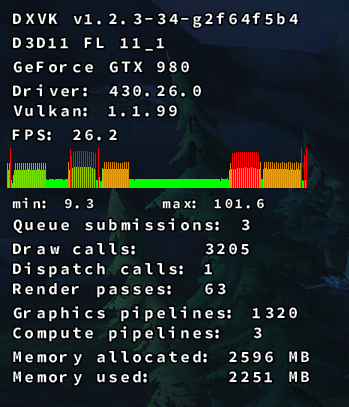
Checked out the newest commit (2f64f5b4e7): Loaded into the game this time, though the fps is really low compared to what it was before the this crash issue started occurring.
JonasKnarbakk
on 4 Jul 2019
3b1376b increases the chunk size to 128 MB (from 64), please test if this changes anything. Here's a build:
Before i go to bed, i just wanna ask a couple of quick questions you probably will think is so stupid that you wonder how i even are able to log into my Linux account, let alone a webpage like Github.
In a "suspected low memory situation", how does logic dictate that "Hey, lets increase the allocation from 64 -> 128 MB so it uses more memory? Or was it just a test to see if ppl crashed more often when that happens?
What does
constexpr VkDeviceSize MinChunkCount = 16;indicate? Other than when i lowered that number to 2, i had (ofc) less memory allocation? Is it for better performance, since doing the allocation uses more resources than placing whatever shaders in a already allocated chunk?
I did some tests in WoW (was not able to crash the game tho, but did not test for hours ofc). I logged in and zoned around a couple of places.
Test1: 128 max chunk size, 2 chunks - 3152MB allocated/2503Used
Test2: 32MB max chunk size, 2 chunks - 2847MB allocated/2447Used
Test3: 16MB max chunk size, 2 chunks - 2804 MB allocated/2463Used
I understand this might not be a problem for THIS game (WoW), but does having low max chunk size cause problems in games with large textures and such?
And lastly - the wording indicate "MaxChunkSize", but is it? Or should it be "ChunkSize", since i think you said someplace more or less that "The chunks are 64MB" (Well, with this patch i guess 128MB).
Again, sorry for not understanding obvious elementary things, but i am positive and try to learn :)
SveSop
on 4 Jul 2019
Having a larger chunk size may reduce external fragmentation, which appears to be a bit of a problem on some drivers. On the other hand you'll see increased internal fragmentation, but also reduced queue submission overhead on some other drivers.
It's a tradeoff, and both 128 MB and 64 MB look like reasonable picks; we've had 32 MB in the past but that turned out to be too small, especially with games happily filling up 6-8 GB of VRAM these days.
What does
constexpr VkDeviceSize MinChunkCount = 16;indicate?
It basically caps the chunk size for very small heaps, so that we can at least allocate 16 different chunks. This is important on AMD GPUs there's a 256MB device-local+host-visible heap which gets used a lot by DXVK, and also for integrated GPUs which tend to have small amounts of dedicated memory (768 MB on my Kaveri notebook).
doitsujin
on 4 Jul 2019
Possibly related?
Unfortunately I know of no way to see -WHAT- is allocated so I don't have much to contribute for why. I have however run into two crashes this week alone where I should have had GPU memory yet allocations were failing. I've been able to duplicate entirely random allocation failures using the cuda script above. The card itself would take upto a few minutes respond to to nvidia-smi, though it showed very little GPU use.
I was seeing this in SteamVR too.
Thu Jun 27 2019 15:15:35.527841 - CVulkanVRRenderer::CreateTexture - Unable to allocate memory
Thu Jun 27 2019 15:15:35.527875 - Failed to create new shared image: format=37 dimensions=1912x2124
Thu Jun 27 2019 15:15:35.656027 - CVulkanVRRenderer::CreateTexture - Unable to allocate memory
Thu Jun 27 2019 15:15:35.656104 - Failed to create new shared image: format=37 dimensions=1912x2124
Thu Jun 27 2019 15:15:35.800281 - CVulkanVRRenderer::CreateTexture - Unable to allocate memory
Thu Jun 27 2019 15:15:35.800309 - Failed to create new shared image: format=37 dimensions=1912x2124
Thu Jun 27 2019 15:15:35.805583 - CVulkanVRRenderer::CreateTexture - Unable to allocate memory
Having a larger chunk size may reduce external fragmentation, which appears to be a bit of a problem on some drivers. On the other hand you'll see increased internal fragmentation, but also reduced queue submission overhead on some other drivers.
It's a tradeoff, and both 128 MB and 64 MB look like reasonable picks; we've had 32 MB in the past but that turned out to be too small, especially with games happily filling up 6-8 GB of VRAM these days.
Yeah, probably what i kinda thought of sorts. Would it be a feasible idea to have this as a "game tunable" tho? With todays values as "default", and dxvk.conf tweakable if it is found to be of benefit for certain games/drivers? This might not be the issues with the memory allocation AT ALL tho, and if it is basically no benefit of tuning this for anyone its fine as it is. I am going to do some more testing just in case anyway, but so far no definite result.
What does
constexpr VkDeviceSize MinChunkCount = 16;indicate?It basically caps the chunk size for very small heaps, so that we can at least allocate 16 different chunks. This is important on AMD GPUs there's a 256MB device-local+host-visible heap which gets used a lot by DXVK, and also for integrated GPUs which tend to have small amounts of dedicated memory (768 MB on my Kaveri notebook).
Hmm.. I dont really have a proper grasp of heap, chunk and blocks, but i thought it kinda could be like this:
Heap 0: Device memory (vram)
Heap 1: Some mix between vram and sysram?
Chunk: A "portion" of heap memory "set aside" (Ie. 128MB currently)
Block: Portion of memory containing image/data - must reside inside a "Chunk".
Something like this? And if so, why would "Min"chunkcount have anything to do with "size"? The word indicates that it is the minimum amount of chunks created, and in current case 16x128MB = 2048MB. My limited understanding then sais to me that 2048MB of Heap 0 (vram) memory is "set aside" (allocated), and one have 16 pieces of 128MB "portions" to put various amounts and sizes of "blocks" of data inside those. Eg. I have 20 images each of 10MB would fill 120MB of one "chunk", then 80MB of another "chunk". This leaves the first chunk a wee bit fragmented, since you cannot fit another image inside that..
Probably completely bunkus and im not understanding this AT ALL tho, so sorry for that.
I can only assume its a costly affair to move a block from one chunk to another, and it should be avoided since it would ultimately eat resources doing that? I guess blocks gets freed once the image/shader whatever leaves the queue? But is freeing a chunk also a costly affair?
What i am aiming at is the reason why chunks gets created but never released. Is this just "common practice"? (Cos for a system comparison, this would really be considered a memory leak hehe).
SveSop
on 5 Jul 2019
I found something interesting with WoW i think. Atleast i cant directly explain this tho.
With latest commit i seem to have just shy of 2.8GB memory allocated after zoning a bit back and forth to various worlds. Now setting dxgi.nvapiHack = False doing exactly the same will allocate around 3.1-3.2GB. Why is that?
The game detects i have switched "adapters", cos when i change between true/false a dialog box will pop up when logging in saying something in the line of "Hardware changed. Reload default settings?". I select NO, so that i use the same settings tho.
Why would memory allocation change by 3-400MB by doing this? Internal WoW tweaks that will use different set of textures if i have a nVidia adapter?
The nvapi calls being made by WoW when you have set to nVidia adapter (nvapiHack=false) is the call to what i believe is the "profile" stuff of nvapi. The same functions as this: https://github.com/doitsujin/dxvk/issues/853#issuecomment-507770326
Maybe some hidden graphic setting only usable if WoW detects a nVidia adapter?
PS. Just had a memory allocation crash when i logged in while i was testing this false/true options back and forth for some reason. Relogging worked fine.. Totally random :(
SveSop
on 5 Jul 2019
This seems to happen with Path of Exile too, I can't even log into a character as it is and get bombarded with allocation failures:
PathOfExile_x64_d3d11.log
PathOfExile_x64_dxgi.log
But then one user in the forums found out that passing the game a few launch flags(_--waitforpreload --gc 2 --noasync_) made it not crash anymore for him. I was able to reproduce his results and I think just _--noasync_ is enough to stop it from crashing. The wiki states this flag makes so it "Do not preload art assets on startup and disable background loading threads. Completely disable the asynchronous loading changes introduced in version 2.3.0. ". Perhaps that helps shed some light on the issue?
Edit: after some more thorough testing it seems even with those flags crashes are still possible, just significantly rarer
My specs are:
GeForce GT740, 1GB GDDR5, 430.14 drivers
Ryzen 5 1600
16 GB DDR4
kernel 5.1.8-1-MANJARO
wine staging 4.11
DXVK from https://github.com/doitsujin/dxvk/commit/c631953ab6852fb63c91dbc3385b482db2d09240
 AlpacaRotorvator
on 6 Jul 2019
AlpacaRotorvator
on 6 Jul 2019
@SveSop
Now setting
dxgi.nvapiHack = Falsedoing exactly the same will allocate around 3.1-3.2GB. Why is that?
nvapidepends onwined3d, which was created w/ opengl in mind. So, some functions may initialize additional structures ... Just diff your logs w/WINEDEBUG="+loaddll,+nvapi,+wined3d,+opengl32"or so, to see what actually going on.- Some engines picks base configuration profile based on CPU/GPU model (e.g. UE3
BaseCompat.ini) - Some games using different shaders/settings for different GPUs
pchome
on 6 Jul 2019
@pchome well first of all, the nvapi hack doesn't have anything to do with nvapi directly, it literally just reports Nvidia GPUs as an RX 480.
But yeah, if there are differences in memory usage / performance, that's on the game.
doitsujin
on 6 Jul 2019
@doitsujin
well first of all, the nvapi hack doesn't have anything to do with nvapi directly, it literally just reports Nvidia GPUs as an RX 480.
Yes, but like in case of UE4, when the hack disabled, game then can decide to use nvapi
- which will report GPU as "GTX 999" or so (if requested)
- which will obtain GPU memory size from wined3d (if requested)
That's what I mean.
@SveSop likely uses his own nvapi implementation, so things differs even more.
pchome
on 6 Jul 2019
Yes, but my point is that not all games do that and that this isn't necessarily what's causing the WoW weirdness.
doitsujin
on 6 Jul 2019
@pchome
That's what I mean.
@SveSop likely uses his ownnvapiimplementation, so things differs even more.
Yes, when doing testing i do. The only two called functions is as i said what i believe to be "getting profiles" from the nvidia gaming profiles you have in Windows, but since the actual call addresses for nvapi is under some NDA of sorts (i guess you need a nvidia dev account to get it, and i don't) i cannot directly verify that these calls that are just "NULL terminated" in staging nvapi actually IS those calls. (But i posted what i know in the other post i linked).
What those functions actually do is kinda beside the point.. i just wanted to mention that WoW probably uses some differences in quality/textures whatever between AMD and nVidia.
I started on a lengthy post last night, but was so tired i scrapped it. So i thought a bit more about this, and would like to ask a (dumb i guess) question.
When allocating memory, does this allocation happen in system ram, and then transfer whatever is needed to the vram? And if so, is this "by design", so that you ALWAYS will need to have a potential available systemram = vram to not get this problem in ALL vulkan applications?
Example: I have a vulkan app that display a image on-screen of exactly 8GB (yeah, i have a 40K screen or whatever resolution.. just for argument). Does this mean that the vulkan app will allocate 8GB of system memory, put that image there and THEN transfer it to vram to display on my uber high-res monitor?
I was experimenting with creating a ramdisk yesterday, and filling that with a file to the point of going VERY low on system ram, and lo and behold when DXVK did some allocations in a low system memory situation, it crashed rather than waiting for the system to pop stuff over to swap. Is there a "timing issue" here, where dxvk memory allocator just times out too fast and throw this error, rather than wait for the system to catch up?
This COULD explain why this would seem random at times, cos in whatever occurance that makes the system sluggish (could be whatever really, just something that makes the "system" busy enough that dxvk memory allocation would HAVE to wait), even tho you have available system ram, if the dxvk memory allocation has to wait x amount of nanoseconds it throw this error? Could this be the case?
SveSop
on 6 Jul 2019
@doitsujin
WoW weirdness
Such "weirdness" is pretty common, especially for d3d9 games and D9VK. Game using mixed APIs at the same time (Vulkan,OpenGL,...(?)), which causing issues very similar to described above.
I did faced similar issues before (GTA IV, Batman AA, almost every "nvapi hack OFF", etc.).
https://github.com/Joshua-Ashton/d9vk/issues/90#issuecomment-494609218
https://github.com/Joshua-Ashton/d9vk/issues/90#issuecomment-495169048 (sorted +loaddll log )
Can't say what exactly going on in WoW w/o WINEDEBUG tracing.
\
EDIT: Also, GL and Vulkan driver parts are involved at the same time for the same application, if this matter.
pchome
on 6 Jul 2019
I was having the same issue while playing (failing to play) WoW. After trying a lot of things (wine and dxvk versions, disabling nv hack) the following worked. I've been playing 10 minutes and WoW does not crash. It was crashing within minutes of launching the game or while loading.
Following were set in dxvk.conf
dxgi.customDeviceId = 11c6
dxgi.customVendorId = 10de
d3d11.maxFeatureLevel = 11_0
My system is:
Dxvk: 1.2.3
D3D11 FL 11_0
Driver: Nvidia 430.26.0 (GeForce GTX 650 Ti)
Vulkan: 1.1.99
Manjaro: 5.1.15-1-MANJARO
Edit: Crashed again. I noticed that Memory Allocated was 1128 MB (my card is 1024 MB) and when Memory used surpassed 1024 MB game crashed, but when it doesn't surpass the GPU memory limit game is okay.
I'll try to set dxgi.maxDeviceMemory = 1024 MB.
 panabar
on 6 Jul 2019
panabar
on 6 Jul 2019
@panabar
I also can play for hours on end... after randomly hitting a "crash streak" of dxvk.. then it magically just works for a good while.
This randomly occurs even with loads of free vram/system ram. Keep playing while it works tho :)
SveSop
on 6 Jul 2019
BTW, once I accidentally figured out that disabling -fipa-pta GCC flag makes The Witcher 3 randomly crash w/ Memory Allocation error. _(I use -fipa-pta as system-wide compiler flag by default)_
https://github.com/doitsujin/dxvk/issues/798#issuecomment-444207165
Still too many "variables" and it was a while ago, but may worth to check.
-fipa-pta short description
EDIT:
Also, may be worth to check DXVK w/ clang-tidy again
Just random output for *bugprone* clang-tidy check:
../src/d3d11/../dxvk/dxvk_buffer.h:250:30: warning: loop variable has narrower type 'uint32_t' (aka 'unsigned int') than iteration's upper bound 'VkDeviceSize' (aka 'unsigned long') [bugprone-too-small-loop-variable]
        for (uint32_t i = 0; i < m_physSliceCount; i++) {
BTW, once I accidentally figured out that disabling
-fipa-ptaGCC flag makes The Witcher 3 randomly crash w/ Memory Allocation error. _(I use-fipa-ptaas system-wide compiler flag by default)_
#798 (comment)
No, it doesn't. I compiled DXVK with -fipa-pta for some time now, and the crashes remain. It's totally dependent on VRAM and system RAM usage. The memory allocation error may occur even when enough memory is free for the allocation. It's probably some memory fragmentation issue when the driver needs memory mapped contiguously and the system cannot currently provide that. My uneducated guess is this is why Linux huge pages make the problem much more prominent.
The best chance is to close down all applications/windows that make extensive use of render surface compositing via the GPU, that is most browsers. It can also help to disable compositing in your window manager.
So it's more likely you also accidently closed some windows while you did your tests, or managed to accidentally optimize memory usage of those apps.
-fipa-pta does nothing that would change memory consumption or allocation behavior of a program (tho it may theoretically reduce the pressure on stack usage). You just recompiled stuff, that may have kicked in the kernel memory defragmenter, and the result was a more stable game. Or a combination of all the above.
Usually memory fragmentation isn't an issue... The CPU page tables will show allocated memory as a linear block of addressable space. But as soon as hardware is involved which needs to DMA such memory, it may need contiguous memory to do its job. And there's no layer of page tables involved to simulate linear address space. It has to be physically contiguous. The same goes for memory to be allocated within VRAM. I guess this is the underlying problem here.
I think this is also when an issue called "alloc stall" kicks in which can lead to severe stutter during gaming: It's the kernel rearranging and moving memory around to make space for the allocation request.
I'm not sure how to fix this - but using bigger chunks as DXVK introduced in the latest commits may improve this tho OTOH it leads to higher memory usage with more unused slack space. It could reduce the pressure of finding contiguous blocks immediately because larger chunks of contiguous memory may have already been allocated, and the memory needed just fits into a existing chunk more likely.
But this is only my uneducated guess, I'm not really sure how the NVIDIA driver (which is involved in my case) works here, and neither what's demanded from the kernel when doing such allocations.
 kakra
on 8 Jul 2019
kakra
on 8 Jul 2019
I think this is also when an issue called "alloc stall" kicks in which can lead to severe stutter during gaming: It's the kernel rearranging and moving memory around to make space for the allocation request.
Since the memory allocation problem seems kind of random, and you cannot directly (atleast not in an easy manner) verify that this thing happens, could there (as i kinda asked before) be a timing issue? Cos if it was this, launching a game after using the system for a long time with multiple apps open/closing++ would make this happen a LOT more often, but for my case i have not been able to verify this.
I sometimes have multiple browsers up, videos, compiling stuff in the background++ without issues, and other times i can experience this crash from a freshly booted system that ONLY have the game running.
Question: How long does DXVK "wait on the system" before crashing with a memory allocation error?
I'm not sure how to fix this - but using bigger chunks as DXVK introduced in the latest commits may improve this tho OTOH it leads to higher memory usage with more unused slack space. It could reduce the pressure of finding contiguous blocks immediately because larger chunks of contiguous memory may have already been allocated, and the memory needed just fits into a existing chunk more likely.
Well, the same could be said about using smaller allocations, as finding smaller chunks of contiguous memory would be easier too.. so i dunno.
Question: When does the allocation happen? "When it is needed"? How about some sort of "predictive allocation" where you would always have X amounts of allocations "ahead of what is currently needed" sort of thing? This would ofc lead to even more memory usage tho...
SveSop
on 8 Jul 2019
I would appreciate if you guys could stay even remotely on topic with your discussions, although I guess it's too late for this thread anyway.
Question: How long does DXVK "wait on the system" before crashing with a memory allocation error?
It doesn't wait at all; why would it? If a memory allocation fails, why would we expect it to succeed after an arbitrary amount of time if nothing else changes?
doitsujin
on 8 Jul 2019
I would appreciate if you guys could stay even remotely on topic with your discussions, although I guess it's too late for this thread anyway.
I took a random gander up the thread, and i dont really understand why comments about memory allocation and theories and tests that have been done to try to figure out a persistent way to crash the game is NOT on topic for this? Talking about and trying to understand HOW memory allocation happens is IMO "on topic" to the topic of "Games crash on Nvidia due to memory allocation failures".
Question: How long does DXVK "wait on the system" before crashing with a memory allocation error?
It doesn't wait at all; why would it? If a memory allocation fails, why would we expect it to succeed after an arbitrary amount of time if nothing else changes?
I find it hard to believe that allocation while having 10GB of 16GB+2GB(swap) available memory will be so fragmented that the system is completely unable to provide a 128MB continuous block of memory. For other programs in memory you have "page faults" and other mechanics that sort this out. Is there no such thing in Vulkan/DXVK?
Does vulkan memory allocation not follow regular system memory allocation of pagefaults and whanot? https://scoutapm.com/blog/understanding-page-faults-and-memory-swap-in-outs-when-should-you-worry
SveSop
on 8 Jul 2019
Is there no such thing in Vulkan/DXVK?
No, since it's kernel-level stuff. It's not the application's job to sort that out, and you simply cannot do it because you have no control over it. Likewise, DXVK has no control whatsoever over physical memory fragmentation, and no control over allocations made by other applications at all.
Talking about and trying to understand HOW memory allocation happens is IMO "on topic" to the topic of "Games crash on Nvidia due to memory allocation failures".
No, technically it isn't, since by asking those questions you're not contributing anything to the solution of the problem and also aren't giving any additional relevant information, but whatever.
doitsujin
on 8 Jul 2019
For some additional logging information could people try to add the following
kernel module option to nvidia.ko:
NVreg_ResmanDebugLevel=0
You can add this option with modprobe via the command-line at module-load time,
or by creating a modprobe configuration file. Here's a sample command-line for
loading the nvidia.ko module with this option:
modprobe nvidia NVreg_ResmanDebugLevel=0
You can verify that this option is set by running the following command:
grep ResmanDebugLevel /proc/driver/nvidia/params
Note: The kernel module must be unloaded before running modprobe via the
command-line in order for this option to be set. If you run modprobe when the
module is already loaded it will return an exit code of 0 and not present any
warning messages indicating that no change has taken place.
This will help us track information at the system memory page allocation level,
and will be extremely verbose. If you enable this option you'll want to be
mindful of your physical storage device usage, and disable this option after
you've gotten a reproduction.
This will log to dmesg, so in addition to the normal d3d11 and dxgi logs, please
send us an nvidia-bug-report.log.gz file, which can be generated using the
nvidia-bug-report.sh script (normally placed in /usr/bin). If you're unable to
attach the bug report log to this GitHub thread, please send an email to
linux-bugs [at] nvidia.com and put "DXVK Memory Crash" in the Subject field.
liam-middlebrook
on 9 Jul 2019
Leaving it here, since it's not in the original post – it seems that I originally had the same issue for Escape from Tarkov in #873 a while ago.
Thanks for investigating!
 Faalagorn
on 9 Jul 2019
Faalagorn
on 9 Jul 2019
I had a couple people reach out to me with questions about modprobe so here's some much simpler instructions on how to setup kernel module options with modprobe.d where you can just reboot your machine to apply the changes.
As root (or with sudo) create a new configuration file in /etc/modprobe.d/, for simplicity you can call this nvidia.conf. Then add the following line to the new file:
options nvidia NVreg_ResmanDebugLevel=0
You can use # to create comments in your modprobe.d configuration files, for more information checkout the man page for modprobe.d(5).
Once you've done that, just reboot and the next time nvidia.ko is loaded, the verbose kernel logging will be enabled.
liam-middlebrook
on 10 Jul 2019
@liam-middlebrook I have just tried your suggestion of creating the nvidia.conf file and rebooted. It appears that the Nvidia driver does not load when the nvidia.conf is present. I checked that I had not made any typos or anything.
When I removed this file and restarted everything functioned as normal again? Any ideas?
 7oxicshadow
on 10 Jul 2019
7oxicshadow
on 10 Jul 2019
@liam-middlebrook I also had a go at loading a modprobe.d/ conf file.
It appears to not have worked? After reboot I checked and get this:
++++++++++++++++++++++++++++++++++++++++++++++++++++++++++++++++
tim@tim-MS-7B17:$ tail /etc/modprobe.d/nvidia.conf
. Temporarily change debug level
options nvidia NVreg_ResmanDebugLevel=0
tim@tim-MS-7B17:$ grep ResmanDebugLevel /proc/driver/nvidia/params
ResmanDebugLevel: 4294967295
tim@tim-MS-7B17:$ cd /etc/modprobe.d/
tim@tim-MS-7B17:/etc/modprobe.d$ ls -l
total 48
-rw-r--r-- 1 root root 2507 Jul 30 2015 alsa-base.conf
-rw-r--r-- 1 root root 154 Jan 7 2019 amd64-microcode-blacklist.conf
-rw-r--r-- 1 root root 325 Apr 12 04:23 blacklist-ath_pci.conf
-rw-r--r-- 1 root root 1518 Apr 12 04:23 blacklist.conf
-rw-r--r-- 1 root root 210 Apr 12 04:23 blacklist-firewire.conf
-rw-r--r-- 1 root root 677 Apr 12 04:23 blacklist-framebuffer.conf
-rw-r--r-- 1 root root 156 Jul 30 2015 blacklist-modem.conf
lrwxrwxrwx 1 root root 41 Jul 1 07:22 blacklist-oss.conf -> /lib/linux-sound-base/noOSS.modprobe.conf
-rw-r--r-- 1 root root 583 Apr 12 04:23 blacklist-rare-network.conf
-rw-r--r-- 1 root root 127 Aug 6 2018 dkms.conf
-rw-r--r-- 1 root root 154 Mar 16 20:07 intel-microcode-blacklist.conf
-rw-r--r-- 1 root root 347 Apr 12 04:23 iwlwifi.conf
-rw-r--r-- 1 root root 73 Jul 10 11:26 nvidia.conf
tim@tim-MS-7B17:/etc/modprobe.d$
+++++++++++++++++++++++++++++++++++++
I'm also having this issue sporadically while playing Escape From Tarkov.
Once I get this set, I'll email you my log files.
-Tim
 conga3
on 10 Jul 2019
conga3
on 10 Jul 2019
I had a couple people reach out to me with questions about
modprobeso here's some much simpler instructions on how to setup kernel module options withmodprobe.dwhere you can just reboot your machine to apply the changes.As root (or with sudo) create a new configuration file in
/etc/modprobe.d/, for simplicity you can call thisnvidia.conf. Then add the following line to the new file:options nvidia NVreg_ResmanDebugLevel=0You can use
#to create comments in yourmodprobe.dconfiguration files, for more information checkout the man page formodprobe.d(5).Once you've done that, just reboot and the next time
nvidia.kois loaded, the verbose kernel logging will be enabled.
You forgot an important step if they have an initram file, you have to rebuild your initramfs with (on ubuntu) sudo update-initramfs -u
 ericwomer
on 10 Jul 2019
ericwomer
on 10 Jul 2019
Got a new game, but in conjunction with D9VK: Sonic & Allstars Racing Transformed (on Steam).
The game runs fine with WineD3D, but performance isn't that great. With D9VK on the other hand
it'll crash immediately.
I tested to change the driver from 430.26 to 390.xx: no change.
I tested 3 different kernel versions (linux419, linux51, linux52): When I changed from linux52 to linux419 I was able to get to the main menu, but a couple seconds later it crashed - I couldn't reproduce the behavior since then.
I gonna try to generate the nvidia bug report as described above & will attach it when it's ready.
EDIT: Wasn't able to verify if the changes were applied and the needed data is logged, but hopefully it worked:
nvidia-bug-report.log
I was able to get in-game again on this try for whatever reason and it crashed again about 30 seconds after launch. Let me know if this is of any use.
btw I had to tab out of the game and kill the process.
EDIT2: Updated d3d9 and steam log files
System information
GPU: GTX 1060 6GB
Driver: 430.26
Wine version: Proton 4.2-9
D9VK version: Latest Master / Version 0.13 (tested both)
more system infos: https://gist.github.com/MadByteDE/e3977871207310f9f9acb035e8c1257c
Log files
d3d9.log: https://gist.github.com/MadByteDE/61c0104da87c615bedf6224a0b6c8e9b
Steam.log: https://gist.github.com/MadByteDE/883324eafac62b57fb1e68ffc2f5604f
 MadByteDE
on 10 Jul 2019
MadByteDE
on 10 Jul 2019
Same problem with Elite Dangerous Horizons
GPU: GTX 1050 Ti 4GB
Driver: 430.26
Wine version: tkg-4.2-x86_64
DXVK version: 1.2.3
 Ninrazer
on 12 Jul 2019
Ninrazer
on 12 Jul 2019
Even though this bug is believed to be related to Nvidia, I have noticed that I get the same issue on my laptop which is an intel integrated gpu.
My little nephew plays beamng and it often crashes. I decided to check the dxvk logs and found the above. It is 100% repeatable when trying to load certain scenarios. The laptop is quite old and very under spec for such a demanding game but on lowest graphics settings it can run reasonably well with DXVK.
Maybe it isn't just an Nvidia problem?
7oxicshadow
on 13 Jul 2019
Hmm, I did some more reading from this bug and there is a comment from doitsujin that suggests that 64MB will try to be allocated even if it is only a small amount of VRAM required (just under 4MB in this instance).
If that is correct then there is a good chance that the log above is not the same issue and that it is actually a genuine memory allocation issue due to insufficient spare VRAM.
7oxicshadow
on 13 Jul 2019
@7oxicshadow
Hmm, I did some more reading from this bug and there is a comment from doitsujin that suggests that 64MB will try to be allocated even if it is only a small amount of VRAM required (just under 4MB in this instance).
Afaik 128MB is now the smallest "chunk size" that is being allocated ref: https://github.com/doitsujin/dxvk/commit/3b1376b2feba0bed66fd3581766bf8c357a33ecc
It is unclear to me what VkDeviceSize MinChunkCount = 16; mean tho, but from reading it directly it CAN be read as "the minimum number of chunks allocated", and if 128MB is the chunksize, 128x16=2048MB. But it do NOT seem to be the actual case of doing that tho, so i am a bit unsure what this actually does.
Still i think you would be hard pressed running anything DXVK with less than 2GB vram without performance issues.
If you compile DXVK yourself, you can experiment with the size in the commit above. Eg constexpr VkDeviceSize MaxChunkSize = 32 << 20; or something to see if it changes stuff.
SveSop
on 13 Jul 2019
Had some time to test with NVreg_ResmanDebugLevel, the logs are certainly verbose though still not clear what is happening / worth reporting here? The allocations randomly fail and at different amounts. At least on 1080 TIs, allocation on lower 1G is substantially faster.
Can also confirm the entire GPU still becomes unstable around 6G.
h1z1
on 14 Jul 2019
It is unclear to me what
VkDeviceSize MinChunkCount = 16;mean tho, but from reading it directly it CAN be read as "the minimum number of chunks allocated", and if 128MB is the chunksize, 128x16=2048MB.
It is not unclear if you'd actually look at the code in memory.cpp: If your heap is too small to fit at least 16 chunks, it will fall back to a smaller chunk size instead. This is to provide at least 16 chunk types (because there's different types of memory allocated from chunks - but it will use only one type of memory allocations per chunk). That's why I said previously that bigger chunks may reduce the problem: It's likely that all types of memory will be allocated very early during game initialization, and later on there's a higher chance of no additional chunk being needed for a specific small allocation type. But it will also increase the chance of failing to allocate a chunk later if it is needed because the system may struggle with finding contiguous memory for it (external vs. internal fragmentation).
If your heap is too small (below 2048 MB), it will instead allocate just smaller chunks (heapSize devided by 16). @doitsujin I wonder: Are there any alignment constraints? Because let's say we have some uncommon heapsize 1024+512=1536M, and divide that by 16, it would allocate 96M chunks. This is not a power of 2. Does this matter?
kakra
on 14 Jul 2019
Does this matter?
No, doesn't matter. In fact, there are sometimes dedicated memory allocations only for one single resource (most of the time, render targets), which have arbitrary sizes. This is allowed in Vulkan and works fine in practice.
doitsujin
on 14 Jul 2019
@kakra
Thank you for the explanation that i as a non-coder could use to understand without having to "learn" how to "read" memory.cpp.
I have been testing various stuff to try to "force" this problem happening, but have so far not come up with a reproducible result. Yesterday i used the "gpufill" proggy (cuda app i posted above in this thread someplace) to fill 7GB of vram + i used a ramdisk to fill 14/16GB system ram, and i was able to run the "Monster Hunter Online benchmark" program without a memory allocation error. This should really not be possible, but the system was happily filling my swap before coming to a almost dead halt (graphics freeze, X freeze++) but i was able to kill some tasks via telnet and do a clean reboot.
This means that everything worked "as intended" by using system memory > vram and when running low on systemram swap started. Still within needed allocations.
Now tests like these i did by creating a "hopeless situation" before running the app, and thus the allocation happens probably from system ram instead of vram. Am i right in assessing allocation "probing" what type of memory to use for allocation https://github.com/doitsujin/dxvk/blob/master/src/dxvk/dxvk_memory.cpp#L182-L206 happens every time a new chunk is to be allocated?
Eg. Lets say an app have allocated 3840MB on my 4GB adapter (+there are some 100'ish MB in use by system and whatnot), and then needs another 128MB block, will it then spew a memory allocation error, or would it allocate 128MB from VK_MEMORY_PROPERTY_DEVICE_LOCAL_BIT rather than VK_MEMORY_HEAP_DEVICE_LOCAL_BIT? (And subsequently could there be a problem with the driver figuring out when and what those heaps have available?)
SveSop
on 14 Jul 2019
@SveSop I'm not sure about architecture of Vulkan itself but from the code it looks like there are allocation types that are allowed to fall back to sysmem, and there are some that depend von vram and cannot fallback. This is a trade-off between speed and space because the GPU is much slower at accessing sysmem via PCIe than accessing its local memory. There's no swapping involved here, DXVK (or Vulkan on its behalf) will not swap memory dynamically from vram to sysmem to optimize access patterns or make space for more device-local-only memory.
So, if it needs another device-local chunk and the driver cannot provide that, it will return a memory allocation error. Vulkan has a whole lot of allocation flags that could be combined to different configurations. You may also want to look at the Vulkan docs for more info. It is quite complicated because it also honors things like memory caches etc.
Looking at the code you mentioned, there may be a concept of required flags and optional flags (referring memory that needs no device-local memory).
But going more into depth is probably not adding to the issue, you may want to start a thread somewhere else or open a new discussion thread.
kakra
on 14 Jul 2019
@kakra
But going more into depth is probably not adding to the issue, you may want to start a thread somewhere else or open a new discussion thread.
Yeah, i know. Both you and Philip keep saying this is highly off-topic, so i guess i should just stop doing any tests. Conclusion: Everything is working as expected, and if someone do not feel so, learn to be a vulkan guru and make your own DXVK version :)
Hopefully someone with half a brain wont waste time asking stupid questions (like me) and figure this out (if there is a problem) and post a nice PR, while i come to my senses and do something else.
Thanks for the info tho.
SveSop
on 14 Jul 2019
Yeah, i know. Both you and Philip keep saying this is highly off-topic, so i guess i should just stop doing any tests. Conclusion: Everything is working as expected, and if someone do not feel so, learn to be a vulkan guru and make your own DXVK version :)
That's really not how you should understand this. Try imaging the developers place: If this has a lot of noise it becomes useless as an issue to properly work on or follow up on. No question is stupid. Maybe just start a new thread about testing memory allocation behavior and reference this thread here. Anyone interested can follow the link that will be referenced here. And if we come up with some useful results, it can be mentioned here. I'd happily join such a separate discussion thread but I'm not very eager on adding more noise to this thread. Testing different scenarios without some well founded technical conclusion doesn't really help in the thread. Such development of test results should be done in another thread. Can you agree?
kakra
on 14 Jul 2019
Given I'm seeing the allocations fail completely outside DXVK or wine, are we chasing the wrong thing here?
For reference I've tested with 2x eVGA FT3 1080TI's, 86.02.39.00.90 BIOS on both. If there was a way to enable more logging without needing to unload the module (seriously Nvidia?), I'd test on other hardware. I'd imagine NVIDIA has a lab of machines they can validate with.
Updating: It's worth noting some braindead syslog replacements will throttle and outright discard messages, leading to lovely things like
Jul 14 03:16:53 localhost rsyslogd: imjournal: 197974 messages lost due to rate-limiting
Jul 14 03:26:54 localhost rsyslogd: imjournal: 181846 messages lost due to rate-limiting
Jul 14 03:36:55 localhost rsyslogd: imjournal: 194669 messages lost due to rate-limiting
Jul 14 03:46:56 localhost rsyslogd: imjournal: 106647 messages lost due to rate-limiting
...
Jul 15 17:10:40 localhost rsyslogd: imjournal: 26029 messages lost due to rate-limiting
Jul 15 17:20:41 localhost rsyslogd: imjournal: 1495171 messages lost due to rate-limiting
Jul 15 17:30:42 localhost rsyslogd: imjournal: 578974 messages lost due to rate-limiting
Perhaps it would be better _not_ to use syslog for this and heed the warning from Nvidia regarding verbosilly^Wverbosity. It is interesting those events happen at almost 10minute intervals. The 1.5Million was during a crash which makes this entire excercise pointless.
h1z1
on 14 Jul 2019
If you use D9VK and try to play Ghostbusters: The Video Game it will crash 100% of the time just as it tries to render the first frame in game (menus and fmv work fine).
info:  D3D9: Setting display mode: 1920x1080@60
err:   DxvkMemoryAllocator: Memory allocation failed
  Size:      16384
  Alignment: 256
  Mem flags: 0xe
  Mem types: 0x681
err:   Heap 0: 584 MB allocated, 443 MB used, 594 MB allocated (driver), 7621 MB available (driver), 8192 MB total
err:   Heap 1: 456 MB allocated, 455 MB used, 511 MB allocated (driver), 24080 MB available (driver), 24080 MB total
This is using Proton with the proton.py script updated to add support for d3d9.dll. All other DX9 games appear to work well in Proton.
7oxicshadow
on 14 Jul 2019
Did you tried setting video memory size manually? This help me with Star Wars: The Force Unleashed II and D9VK. I set VRAM in Wine to 4096 and it helps. Otherwise the game crashes every minute or two with the memory allocation error.
mozo78
on 15 Jul 2019
My laptop has nvidia 730m with only 1024MiB of vram, I play A hat in time with d9vk and it immediately crash with memory allocation failed on proton's log.
I did what @SveSop suggested, basically set the chunk size as low as 8Mib. I don't really understand but somehow i can load the game and doesn't crash, though i only play for a while, 2 first stage to be precise.
Log (with edited d9vk)
d3d9 log: https://gist.github.com/rezzafr33/3ac4eddefc815d9257f89cd265dd1611#file-hatintimegame_d3d9-log
proton log: https://gist.github.com/rezzafr33/3ac4eddefc815d9257f89cd265dd1611#file-steam-253230-log
d9vk version
https://github.com/Joshua-Ashton/d9vk/tree/40f65abbb1df01f114ec98e1ffbc27f33feb9177
diff --git a/src/dxvk/dxvk_memory.cpp b/src/dxvk/dxvk_memory.cpp
index 9a8cec3d..14b1f729 100644
--- a/src/dxvk/dxvk_memory.cpp
+++ b/src/dxvk/dxvk_memory.cpp
@@ -402,7 +402,7 @@ namespace dxvk {
     // Pick a reasonable chunk size depending on the memory
     // heap size. Small chunk sizes can reduce fragmentation
     // and are therefore preferred for small memory heaps.
-    constexpr VkDeviceSize MaxChunkSize  = 128 << 20;
+    constexpr VkDeviceSize MaxChunkSize  = 8 << 20;
     constexpr VkDeviceSize MinChunkCount = 16;

     return std::min(heapSize / MinChunkCount, MaxChunkSize);
System Information
Computer Information:
    Manufacturer:  Unknown
    Model:  Unknown
    Form Factor: Laptop
    No Touch Input Detected

Processor Information:
    CPU Vendor:  GenuineIntel
    CPU Brand:         Intel(R) Core(TM) i5-3230M CPU @ 2.60GHz
    CPU Family:  0x6
    CPU Model:  0x3a
    CPU Stepping:  0x9
    CPU Type:  0x0
    Speed:  3200 Mhz
    4 logical processors
    2 physical processors
    HyperThreading:  Supported
    FCMOV:  Supported
    SSE2:  Supported
    SSE3:  Supported
    SSSE3:  Supported
    SSE4a:  Unsupported
    SSE41:  Supported
    SSE42:  Supported
    AES:  Supported
    AVX:  Supported
    CMPXCHG16B:  Supported
    LAHF/SAHF:  Supported
    PrefetchW:  Unsupported

Operating System Version:
    Pop!_OS 19.04 (64 bit)
    Kernel Name:  Linux
    Kernel Version:  5.0.0-21-generic
    X Server Vendor:  The X.Org Foundation
    X Server Release:  12004000
    X Window Manager:  GNOME Shell
    Steam Runtime Version:  jenkins-steam-runtime-beta-release_0.20190320.2

Video Card:
    Driver:  NVIDIA Corporation GeForce GT 730M/PCIe/SSE2
    Driver Version:  4.6.0 NVIDIA 430.34
    OpenGL Version: 4.6
    Desktop Color Depth: 24 bits per pixel
    Monitor Refresh Rate: 60 Hz
    VendorID:  0x10de
    DeviceID:  0x1290
    Revision Not Detected
    Number of Monitors:  1
    Number of Logical Video Cards:  1
    Primary Display Resolution:  1366 x 768
    Desktop Resolution: 1366 x 768
    Primary Display Size: 12.17" x 6.81" (13.94" diag)
                                            30.9cm x 17.3cm (35.4cm diag)
    Primary Bus: PCI Express 8x
    Primary VRAM: 1024 MB
    Supported MSAA Modes:  2x 4x 8x 16x

Sound card:
    Audio device: IDT 92HD99BXX

Memory:
    RAM:  7830 Mb

Miscellaneous:
    UI Language:  English
    LANG:  en_US.UTF-8
    Total Hard Disk Space Available:  468734 Mb
    Largest Free Hard Disk Block:  25760 Mb
    VR Headset: None detected

Recent Failure Reports:
 rezzafr33
on 15 Jul 2019
rezzafr33
on 15 Jul 2019
I pushed some more memory allocation tweaks, most importantly, DXVK will now try to allocate smaller chunks if a large allocation fails. This will not solve the underlying issue, but might help in some cases.
Additionally, 32-bit games (i.e. all D3D9 games) will use a smaller chunk size for host-visible memory types, which should hopefully help a bit with games running out of 32-bit address space, but that's a different issue.
This build includes D9VK as well with the patches applied, so might be worth testing there as well:
dxvk-memory.tar.gz
doitsujin
on 16 Jul 2019
Out of curiosity. Since you have started having this issue with memory allocation problems, does DXVK have a number of attempts at trying to allocate memory or does it just crash out on the first failure?
I am wondering if the memory allocator has an almost random element to it and just because it fails once it doesn't mean that it would fail if you requested it again. I am probably over simplifying it but given how seemingly random it appears to be it could be possible.
Edit: With respect to same size chunks, not falling back to smaller chunks as mentioned in your previous comment.
7oxicshadow
on 16 Jul 2019
There's no good reason to expect a memory allocation that fails the first time to succeed the second time if nothing else happened in between. It doesn't seem to be "random" but rather influenced by the environment.
So yes, it did crash on the first failure.
doitsujin
on 16 Jul 2019
Tested dxvk-memory.tar.gz on a known D9VK game that would fail consistently (Ghostbusters). With your memory test build it actually gets in game for ~20 seconds and then freezes (it would never get in game before). The interesting thing is that the game doesn't crash to desktop like it did previously. It just hangs.
The log no longer shows a memory allocation error either so this could be a genuine D9VK bug now.
Either way, your new build is certainly having some positive effect.
7oxicshadow
on 16 Jul 2019
I was able to play Sonic & Allstars Racing Transformed (D9VK) with this build for > 30 minutes without issues, then I quit. Previously it crashed right before the race started 100% of the time. Seems like an improvement to me.
Edit: The nvidia-bug report from my previous post (older D9VK version):
nvidia-bug-report.log
MadByteDE
on 16 Jul 2019
Great that it's improved for you guys but if you had a game where you could consistently reproduce the issue then please also take the time and collect some data using an older DXVK/D9VK build for the Nvidia devs: https://github.com/doitsujin/dxvk/issues/1100#issuecomment-509484527
 K0bin
on 16 Jul 2019
K0bin
on 16 Jul 2019
One thing to note is that 32-bit games are not particularly interesting for this issue since those are more likely to just run out of address space. This especially applies to D9VK since 64-bit D3D9 games don't really exist.
They might still run out of memory, but there's a good chance that this has nothing to do with the driver issue being discussed here.
doitsujin
on 16 Jul 2019
Where I used to crash in Borderlands Enhanced (64-bit, changing any map), I haven't so far. Played for ~1hr30 with 5-6 map changes. Built from latest git
telans
on 18 Jul 2019
This will not solve the underlying issue, but might help in some cases.
That is I hope the real takeaway from this, the bug itself lives in Nvidia land somewhere. I can confirm with a slightly modified version of the test above that smaller allocations were less likely to fail though ultimately did.
The worst part is either Nvidia's own utils are pulling memory use out of their ass or they're not understanding what "free memory" means because allocations failling do not line up at all with reported memory.
h1z1
on 18 Jul 2019
Linux 418.52.17
Fixes:
Fixed a bug that could cause heapUsage values reported by VK_EXT_memory_budget to not immediately update after vkFreeMemory was called
Could this be related to the underlying problem in any way / help with fixing it?
telans
on 18 Jul 2019
Looks like it's just something they fixed while investigating the issue.
Joshua-Ashton
on 18 Jul 2019
Could this be related to the underlying problem in any way
Not really, no, but it makes the logging a bit more accurate.
doitsujin
on 18 Jul 2019
I'm completely confused right now. I know @doitsujin said, D9VK problems may not be interesting for that topic, but I think this might be an exception.
I was in the process of creating another nvidia-bug-report to test some kernel parameters and submit a new report. While doing so, I found that my Dualshock 4 Controller somehow seemed to be involved in the problem. I know how that sounds, but let me explain:
Before I launch the game (Sonic Racing) I always enable my DS4 to connect it via bluetooth. So I did as always, launched the game, it crashed and the log said "DxvkMemoryAllocator: Memory allocation failed" as always. Then I rebooted and tried again, but I forgot to enable the DS4 controller this time. The game launched and I was able to play via keyboard (hadn't changed anything else).
I closed the game and enabled the controller, and again, "DxvkMemoryAllocator: Memory allocation failed". I tried this a couple times and I was able to reproduce it every time (controller off: game runs / controller on:"DXVK MEM ALL ERR") with D9VK 0.13f. Looked veery strange to me, so I thought what if I use the custom build @doitsujin posted two days ago with some tweaks for the problem. I copied the files, enabled the controller and launched the game - and it worked (tried at least 3 times). btw I had DXVK_HUD enabled to make sure that the correct versions were used by Proton, and I also checked the logs to make sure that the game failed to launch while using D9VK and not WineD3D or a wrong DXVK version.
I also made sure to remove the modprobe.d file I had to create (nvidia.conf) and rebuilt the kernel using mkinitcpio (Arch) and that no kernel parameters were set.
I gonna try other kernel versions now and see if this changes anything.
I'm not sure if it would help to post a log file, because it just shows the same as any of my previously posted log files.
Edit: Tried linux419 and linux52 kernel versions, no difference.
Edit2: Connecting controller via USB cable also results in a crash with "DxvkMemoryAllocator: Memory allocation failed"
MadByteDE
on 18 Jul 2019
Issue corrected itself for me by unplugging everything from the USB 3.0 ports of my computer and only using USB 2.0.
 AttackMagnet
on 18 Jul 2019
AttackMagnet
on 18 Jul 2019
Issue corrected itself for me by unplugging everything from the USB 3.0 ports of my computer and only using USB 2.0.
I can fairly consistently reproduce this with Path of Exile on a machine that has no USB 3.0 ports (and has CONFIG_USB_XHCI_HCD unset), so that was probably a fluke.
 lesderid
on 18 Jul 2019
lesderid
on 18 Jul 2019
Maybe it has to do with Audio? When I connect the DS4, the system automatically tries to use its mic as Input device and it's speaker as output (which wont work) when connecting the controller via usb. I also use the GPU for HDMI audio on my system through the monitor audio output jack.
Edit: No I guess not, connecting via bluetooth doesn't show any additional sound devices and it still crashes, so this cannot be the problem.
MadByteDE
on 19 Jul 2019
with call of Juarez gunslinger (32 bit), i can reproduce the problem. start the game, choose duels, the game crash.
(Proton 4.11 GE-1, d9vk 0.13f)
CoJGunslinger_d3d9.log
nvidia-bug-report-call of juarez-gunslinger.log
Sometimes i can reproduce it with post scriptum (64 bit). start postscriptum, sometimes the game crash.
(Proton 4.2.9, d9vk 0.13f)
PostScriptum_d3d11.log
nvidia-bug-report-post scriptum.log.gz
PostScriptum_dxgi.log
 matou68
on 20 Jul 2019
matou68
on 20 Jul 2019
Have the same issue with Nioh. Game starts ok, I choose Load game or New game and it hangs on loading screen. In the log file - "DxvkMemoryAllocator: Memory allocation failed"
 catcombo
on 21 Jul 2019
catcombo
on 21 Jul 2019
@catcombo can you test DXVK 1.3.1?
doitsujin
on 21 Jul 2019
@doitsujin Hangs on the same place with 1.3.1
catcombo
on 21 Jul 2019
About 32bit games in Wine, they are typically known to run out of virtual address space long before DXVK existed. I recommend to patch the game's exe to make them Large Address Aware before trying anything else. This method for me has solved pretty much all issues with 32bit games related to virtual memory.
I'm using the tool found in this thread: www.techpowerup.com%2Fforums%2Fthreads%2Flarge-address-aware.112556%2F (Works on Wine with Mono installed).
 jrugia
on 21 Jul 2019
jrugia
on 21 Jul 2019
Nioh is 64-bit game. I run it with the flags PROTON_NO_ESYNC=1 and PROTON_FORCE_LARGE_ADDRESS_AWARE=1.
catcombo
on 21 Jul 2019
With DXVK version 1.3.1 Bloodstained seams to last a while longer before crashing...it still eventually does.
Rugaliz
on 21 Jul 2019
Does this issue only effect certain makes of Nvidia cards?
 808-cowbell
on 21 Jul 2019
808-cowbell
on 21 Jul 2019
Does this issue only effect certain makes of Nvidia cards?
Are we aware of similar crash reports for 64 bit programs with Intel/AMD? It wouldn't appear so to me.
Regarding 32 bit games: Borderlands: TPS runs without issues for me on native Windows with D9VK, only Wine is an issue with it (also Gallium Nine often crashes when changing levels).
 aufkrawall
on 25 Jul 2019
aufkrawall
on 25 Jul 2019
Three different people so far have reproduced the problem and all had a Xid 32 error in dmesg. This error corresponds to PCIe DMA issue.
https://docs.nvidia.com/deploy/xid-errors/index.html#topic_5_3
In one, possibly two cases, this was solved by turning off the IOMMU that had been forced on with intel_iommu=on. In another case, this was solved by upgrading the system BIOS.
The problem here is memory allocation failures for system memory, not video memory. Given the above, it sounds like there may be low-level platform characteristics involved in the problem, which explains why it's so hard to reproduce for some people and easy for others.
If you can reproduce what you suspect to be this problem, please double check if you're getting Xid 32 (or any other Xid error message from the NVIDIA driver).
ahuillet
on 25 Jul 2019
i look in my nvidia log file posted five days ago :
NVRM: Xid (PCI:0000:08:00): 13, Graphics Exception: Class 0x0 Subchannel 0x0 Mismatch
Jul 14 20:48:29 linux kernel: [ 3615.467357] NVRM: Xid (PCI:0000:08:00): 13, Graphics Exception: ESR 0x4041b0=0x80000
Jul 14 20:48:29 linux kernel: [ 3615.467359] NVRM: Xid (PCI:0000:08:00): 13, Graphics Exception: ESR 0x404000=0x80000002
Jul 14 20:48:29 linux kernel: [ 3615.467963] NVRM: Xid (PCI:0000:08:00): 13, Graphics Exception: ChID 0034, Class 0000c197, Offset 00001288, Data 00000000
the same xid error in COJ Gunslinger and Postscriptum
from the nvidia link :
XID 13: GR: SW Notify Error
This event is logged for general user application faults. Typically this is an out-of-bounds error where the user has walked past the end of an array, but could also be an illegal instruction, illegal register, or other case.
In rare cases, it’s possible for a hardware failure or system software bugs to materialize as XID 13.
with Nvidia Driver Version 430.26
https://devtalk.nvidia.com/default/topic/1055344/b/t/post/5349860/#5349860
matou68
on 25 Jul 2019
today tried to login a few times in wow and it always crashed.
after installing https://github.com/doitsujin/dxvk/files/3396361/dxvk-memory.tar.gz, i was able to login without crashes multiple times. i will keep an eye on it and will report crashes happen again.
 fishxz
on 27 Jul 2019
fishxz
on 27 Jul 2019
I have noticed random crashes with my nvidia 1080TI card at times (game screen freeze), happened a few times in KingdomComeDeliverence BUT its not easily repeatable, just completely random sometimes. Might have happened in a few other games also like war thunder, again random and generally doesn't happen.
Not sure if its related, using Manjaro XFCE NVIDIA 430.26 drivers atm.
 jarrard
on 29 Jul 2019
jarrard
on 29 Jul 2019
at times (game screen freeze), happened a few times
Instead of a DXVK memory allocation error, and game crashing (experienced with WoW for my case), the game now just freezes. I need to telnet in and kill WoW.exe/wine to get back control.
This is something that either have started happening with recent nVidia drivers (418.52.17/18), or with recent DXVK. I experienced this after playing a couple of hours of WoW yesterday with DXVK https://github.com/doitsujin/dxvk/commit/6ab074c95b6ec536df2b014e55e82329e5032576
I dunno if this is a intended change of DXVK (To be more persistent in not immediately failing allocation), or if this is due to driver changes?
SveSop
on 30 Jul 2019
Try launching and playing the game via Lutris / Wine / Steam / DXVK combo, as in steam via lutris container vs using Linux native steam and steamplay.
I suspect my KCD game is more stable playing this way where as under linux steam it ctd most the time.
jarrard
on 30 Jul 2019
Instead of a DXVK memory allocation error, and game crashing (experienced with WoW for my case), the game now just freezes. I need to telnet in and kill WoW.exe/wine to get back control.
I had it on my GTX760 since when this whole problem started. About a month ago I "fixed" crashes by closing browser, but it began to freeze my PC for 10 seconds, then unfreeze for a couple, then loop like that. I do not have to ssh in to kill WoW, I keep lutris window on another screen so I can press "Kill all Wine processes" there, but it is hard when PC freezes and unfreezes. It still sometimes happens during long WoW sessions.
 FREEZEball
on 31 Jul 2019
FREEZEball
on 31 Jul 2019
So, does this happen with other vulkan applications or with dxvk only?
ghost
on 4 Aug 2019
@xpue
I have not played any Linux native Vulkan games a length of time, so i dunno. Google searches only come up with Steam and dxvk games with this problem.
I have however played World of Warcraft in length with vkd3d without having issues. Sadly after WoW 8.2 there is a bug with vkd3d that makes it not work in the newest zones. vkd3d is d3d12 -> Vulkan translation tho, so it might not do the same things as dxvk does in terms of causing errors perhaps.
SveSop
on 5 Aug 2019
So, does this happen with other vulkan applications or with dxvk only?
No Man's Sky vulkan experimental renderer has similar memory issues on Nvidia although from the logs it says: vkCreateCommandPool Support for allocation callbacks not implemented yet. That might be down to the way Hello Games are implementing vulkan though.
Don't really play any native linux vulkan games as most seem to use OGL.
 fls2018
on 6 Aug 2019
fls2018
on 6 Aug 2019
@fls2018 that error message comes from winevulkan and has nothing to do with the memory allocation issues DXVK is running into. Does NMS also occationally crash?
doitsujin
on 6 Aug 2019
For me that error happens consistently on the Vulkan NMS branch, and won't let me get past the loading sequence. Stock NMS uses OpenGL which has never crashed for me.
EDIT: That must be the reason it doesn't work then, I'm using 418.52.18
telans
on 6 Aug 2019
@fls2018 that error message comes from winevulkan and has nothing to do with the memory allocation issues DXVK is running into. Does NMS also occationally crash?
It is unstable however the main issue with Nvidia 430 (418 dev drivers don't work) is a strange issue where it won't allocate more than 1GB of video memory, which is why I thought that might be related to this DXVK issue.
fls2018
on 6 Aug 2019
strange issue where it won't allocate more than 1GB of video memory
Which Nvidia 430 driver does this? (using .26/8 atm I think) I will need to keep track of vram usage during my next play session as I haven't noticed this.
jarrard
on 7 Aug 2019
@jarrard All of the 430 drivers including up to 430.40, here's a link back on the Proton GH to when I first discovered it:
https://github.com/ValveSoftware/Proton/issues/438#issuecomment-489279982
fls2018
on 7 Aug 2019
I don't have any UNIX background, don't know how to replicate the instructions given in #1100 (comment), specifically running modprobe before "module-load time". Can someone baby me through the process for Pop!_OS 19.04? Would like to be able to help out here since I can pretty reliably reproduce this problem across multiple games, D3D11 and D3D9.
808-cowbell
on 9 Aug 2019
My 1080TI seems to be using more then 1GB VRAM, otherwise things like KCD wouldn't work well (a texture hungry game).
jarrard
on 9 Aug 2019
I think that's referring to a 1GB limit with NMS
telans
on 9 Aug 2019
Regarding transparent huge pages, I'm running without issues since I've changed some settings:
#!/bin/sh
echo within_size >/sys/kernel/mm/transparent_hugepage/shmem_enabled
echo always >/sys/kernel/mm/transparent_hugepage/enabled
echo defer+madvise >/sys/kernel/mm/transparent_hugepage/defrag
echo 128 >/sys/kernel/mm/transparent_hugepage/khugepaged/max_ptes_none
#    ^^^ adjust this
One trick seems to be lowering the max_ptes_none (see https://www.kernel.org/doc/Documentation/vm/transhuge.txt), essentially this tells THP how many extra small pages it may allocate from memory to fill a huge page for combining. I.e., a value of 128 allows the kernel to allocate additional 512k of memory to make 1.5M of allocated memory into a full 2M huge page. So it allows wasting up to 25% of memory in my case. The default value seems to be much higher, thus allowing huge amounts of memory to be wasted when THP kicks in. The system will take it from swap instead, in case of the video driver, that's not possible.
I recommend to completely turn the THP feature off if you're using less than 16G of memory and running games. For other applications it may still be worth to have it on, especially if most memory is going to be allocated by one or two single services.
If you still want to try, I recommend using max_ptes_none with 128 (with high system memory) or 64 (with low system memory, e.g. below 16G), maybe even smaller values. However, the less memory you allow the kernel to allocate in addition to the existing allocation, the lower the chance of gaining performance by THP. I think the default is somewhat near the full huge page size (maybe even as near as 511 pages). That default is much too high for applications that tend to allocate less than 2M of memory a lot.
If you're seeing bad swap performance, you may also want to adjust max_ptes_swap (defaults to 64 pages = 256kB): This value allows the kernel to swap back in so many pages to create a huge page.
Also, I'm recommending going with the defer+madvise parameter: This makes THP mostly useless for non-THP-aware applications (unless free memory is not fragmented) but the THP defrag will only kick in for applications that explicitly ask for THP, and only in deferred mode to reduce allocation latency/stalls.
The within_size parameter is interesting for shared memory allocations. There's a similar parameter for tmpfs that you may want to apply especially on systemd systems (since those mount /tmp with tmpfs). This parameter makes SHM only use THP if at least 2M are allocated. Pulseaudio users may benefit from that for some games.
kakra
on 9 Aug 2019
Why are we thinking that transparent huge pages are a factor here?
Note, we at NVIDIA are still trying to reproduce the problem in house, and so far we've had no success. Quite a few people came forward with a reproduction, but often it was a 32bit game (with suspicion of VA space exhaustion that would not be the driver's fault), and in no case was I able to observe the problem myself with the provided instructions.
ahuillet
on 9 Aug 2019
@ahuillet I wonder which system configuration parameters could be involved so that you cannot reproduce it but others can. Months back I discovered that THP has something (aka "a lot") to do with it at least for my system. Some people could confirm that it helped turning THP off, it was also mentioned in this thread so I decided to send my parameters. Of course, in this case the driver can probably do nothing about it. But some distributions ship with THP turned on (in full mode instead of madvise mode) and that can be a big factor.
So maybe people should make sure THP is turned off (or tune it as I did) and see if they still can reproduce the problem. I no longer could reproduce (except I leave my browser running but I that last one I want to try again since the last DXVK/driver changes).
kakra
on 9 Aug 2019
@ahuillet
Why are we thinking that transparent huge pages are a factor here?
I guess it can be an complex problem, or several separate problems, where each one can lead to memory allocation failures. If so, then each of them (likely) reveals itself depend on user's system/configuration. And we, users, wrongly recognizing them as this particular issue (if it even exist).
Let's just name and describe all (most) possible "memory allocation" issues, and tell users how to recognise and filter them out.
pchome
on 9 Aug 2019
@ahuillet
I have also extensively (imo) tried to reproduce this with numerous tests and whatnot creating "impossible" scenarios where i make ramdisk filling 14+GB of my 16GB physical mem + using the cuda snippet i posted someplace in this thread using up to 7GB of vram, to the only result that the system starts swapping and/or eventually crawl to a snailpace without crashing... And other tests creating random allocations and freeing trying to fragment memory as much as possible, but still without a reproducible result.
Yet i can suddenly experience random crashes while playing WoW... In other words, i DO believe you guys not being able to reproduce this, but this MAY be game related perhaps? Maybe some strange d3d11 texture/function creating a weird thing "at random"? I also tried to fiddle around with the VK_KHR_dedicated_allocation extension, as this does indeed seem to be allocating/clearing "constantly" when used to see if it perhaps was creating some sort of memory leak or something. (Ref. https://github.com/doitsujin/dxvk/issues/1139)
The only thing i ended up concluding was that the driver seems to be "in control" of whatever gets allocated or whatnot when that extension is used, but it is unclear to me what determines if a resource is to use the extension or not... But i have not had the time to dig more through it.
Using various logging methods is kinda moot, since i do not have 40TB of free diskspace if i need to trace++ log 4-5 hours of gameplay at 5fps to MAYBE get this to crash.
That said, i have actually played WoW 3-4 hours every day for the past week with build d579f0723810b59d4deea87b18301b08121130f9 and nVidia 430.40 without any crashes. (Oh, i sure hope i did not jinx myself now, as i am about to log in hehe).
SveSop
on 9 Aug 2019
I think there is an issue with NVidia and Vulkan in general, because a lot of things have issues and crashes, UE4 Editor, which is native, is unstable on and NVidia card with vulkan, but amd is fine.
ericwomer
on 9 Aug 2019
A bit late to the party here but I do have plenty of Xid going on while the issue is taking place, here's the relevant part of my dmesg output: dmesg.txt
Also FWIW I can play Path of Exile for hours with little to no issues as long as it's the first time I'm running the game from a fresh reboot. As long as I shut down the game at least once it's pretty much guaranteed to crash shortly after if I try to launch it again without rebooting first. Simply restarting X doesn't seem to help either, it has to be a full reboot.
AlpacaRotorvator
on 11 Aug 2019
@AlpacaRotorvator
Simply restarting X doesn't seem to help either, it has to be a full reboot.
As root (not sudo) try
sync; echo 3 > /proc/sys/vm/drop_caches
See if you get the same result
 Generator
on 11 Aug 2019
Generator
on 11 Aug 2019
/proc/sys/vm/drop_caches
@AlpacaRotorvator
Simply restarting X doesn't seem to help either, it has to be a full reboot.
As root (not sudo) try
sync; echo 3 > /proc/sys/vm/drop_caches
See if you get the same result
@AlpacaRotorvator
You should be able to sudo it with:
sudo sync && sudo sh -c "echo '3' >> /proc/sys/vm/drop_caches"
SveSop
on 12 Aug 2019
@AlpacaRotorvator
You should be able to sudo it with:
sudo sync && sudo sh -c "echo '3' >> /proc/sys/vm/drop_caches"
Or just sync && echo 3 | sudo tee /proc/sys/vm/drop_caches.
lesderid
on 12 Aug 2019
What is somewhat bothersome with these "XID errors" vs. just a "memory allocation error" from dxvk, is that it kinda locks up X11 totally, and i have to ssh in to my computer... or ofc i can do the "2 minute per action" bit, but im kinda impatient like that.
Crashed with WoW just now, and got this:
[13857.807921] NVRM: GPU at PCI:0000:01:00: GPU-49e16335-552c-8128-77c9-81cbe8aed6bf
[13857.807923] NVRM: Xid (PCI:0000:01:00): 13, pid=1002, Graphics Exception:  MISSING_MACRO_DATA
[13857.807927] NVRM: Xid (PCI:0000:01:00): 13, pid=1002, Graphics Exception: ESR 0x404490=0x80000001
[13857.808134] NVRM: Xid (PCI:0000:01:00): 13, pid=1002, Graphics Exception: ChID 001b, Class 0000c597, Offset 00000000, Data 00000000
ps aux|grep -i 1002
nvidia-+  1002  0.0  0.0  25512  1688 ?        Ss   13:45   0:00 /usr/bin/nvidia-persistenced --user nvidia-persistenced
I have long wanted to write, but there was no time. I just limited the cache size and the problem no longer occurs.
 griga211
on 19 Aug 2019
griga211
on 19 Aug 2019
I have long wanted to write, but there was no time. I just limited the cache size and the problem no longer occurs.
I suspect: Random ocurance of working.
SveSop
on 19 Aug 2019
Some kind of issue in how memory management is done in the nvidia driver has been identified:
https://github.com/doitsujin/dxvk/issues/1169#issuecomment-527864978
Maybe the fix for that will help here.
 ryao
on 4 Sep 2019
ryao
on 4 Sep 2019
The failure pattern is very different, so that is unlikely. I should note that at this point we still don't have an internal, consistent reproduction of this issue.
We can reproduce this on 32bit applications that are running out of virtual address space, and we can reproduce this on 64bit applications when system memory is already almost full. But neither of these cases are really bugs.
ahuillet
on 4 Sep 2019
@ahuillet
I have been able to reproduce XID failures from the driver when experimenting with switching between ESYNC and FSYNC using the Proton wine branch from GIT.
Delete the .nv caches, and the dxvk.cache file, switch to WINEFSYNC=1.. if game start, switch to WINEESYNC=1.. A few rounds of that, clearing cache here and there, and i seem to be able to cause random lockups and/or XID errors from the driver.
Now, this is almost (imo) guaranteed not to be from memory allocation alone (resource starvation), but MAYBE some sort of timing issues or something like that perhaps? Since ESYNC/FSYNC deals with different methods of process synchronization perhaps this is something causing the driver to lock up? I think most wine-gamers have used ESYNC for a long time, and STEAM/Proton does now default to the new FSYNC with a fallback to ESYNC if kernel support is not available. (Configurable ofc).
If the caches are built (.nv/GLCache or custom folder + dxvk.cache file), it seems as this error has reduced occurrence for me. Switching drivers/wine version and possibly dxvk version will cause stuff to be rebuilt and the random lock-ups seems more frequent. Since the dxvk cache function is the same when dealing with AMD, this could perhaps point in the direction of something strange happening when nVidia is writing to its internal cache? Some sort of "out-of-sync" issue even with ESYNC.
I am aware that FSYNC is considered experimental, as it requires custom kernel patches + custom wine patches, so it is not the best explanation for "blame", but it is nevertheless interesting that lockups with XID errors from the driver happens often enough vs just an application crash....
SveSop
on 4 Sep 2019
This is a stab in the dark, but would people affected by this try sysctl vm.overcommit_memory=1 as root and see if the issues go away? You can read about what this does here:
https://serverfault.com/questions/606185/how-does-vm-overcommit-memory-work#606193
I suggest this because it occurs to me that this issue might be related to how Linux handles overcommit. The default behavior is a heuristic that will allow overcommit for certain allocations, but not others. That means that it is possible for a system to have 64GB of RAM (for example), be using only 8GB of it, have the rest in use by the page cache and get an ENOMEM on a memory allocation for only a few megabytes.
Having an allocation succeed due to overcommit will result in soft faults pulling pages from the Linux page cache. The pages aren’t pulled out of it on allocations where overcommit isn’t allowed, even if doing that would allow it to satisfy those allocations, so those allocations will return ENOMEM.
Perhaps the OSS drivers are triggering the heuristic in a way that enables overcommit while the Nvidia driver is not. The result would be the mess that we currently have. Basically, the issue would be rare, unreproducible and occur on systems that appear to have plenty of RAM to satisfy allocations. If that is true, then disabling the heuristic in favor of always allowing overcommit would make the issue go away. Knowing what happens when that is done on systems affected by this might be a useful data point.
ryao
on 6 Sep 2019
That sysctl setting was found to make the allocation failures stop for a user of D9VK:
https://github.com/Joshua-Ashton/d9vk/issues/216#issuecomment-528666157
It would be a good idea to study the RADV code to figure out if it is permitting overcommit on these allocations, but I lack spare cycles for that. If my guess turns out to be right, I suspect that the Linux mainline view would be that the nvidia driver should mimic RADV here.
ryao
on 6 Sep 2019
I played a bit with vm.overcommit_memory=1 a while ago. Suspecting a heuristic somehow involved in the problem with cache I described earlier.
I used Unigine Superposition with textures/shaders set to maximum for more VRAM usage, and was able (sometimes) successfully launch the benchmark several times in a row, while memory allocations and usage was almost 4GB reported by DXVK hud (my "specs": 2GB GPU VRAM, 8GB RAM and 512MB zram swap + 1.5GB tmpfs /tmp). The "free" RAM value was near 200MB before launch, and near 200-300 MB VRAM was occupied by system.
Anyway, I wasn't able clearly reproduce successful launches of Unigine Superposition, doing a "fill a memory - run a tool" cycles, sometimes it launched and sometimes isn't. So I gave up. Maybe I just picked a wrong tool to test, or test method.
But I can confirm that caches was freed more actively. Maybe at some point an system part decided that this takes too long.
Used info
overcommit_memory
Overcommit Accounting
man proc
/proc/sys/vm/overcommit_memory
This file contains the kernel virtual memory accounting mode. Values are:
0: heuristic overcommit (this is the default)
1: always overcommit, never check
2: always check, never overcommit
In mode 0, calls of mmap(2) with MAP_NORESERVE are not checked, and the default check is very weak, leading to the risk of getting a process "OOM-killed". Under Linux 2.4 any nonzero value implies mode 1. In mode 2 (available since Linux 2.6), the total virtual address space on the system is limited to (SS + RAM*(r/100)), where SS is the size of the swap space, and RAM is the size of the physical memory, and r is the contents of the file /proc/sys/vm/overcommit_ratio.
pchome
on 6 Sep 2019
@pchome Something like filling the page cache and then testing would be intended to reproduce this readily with the default behavior. The kernel is able to kill processes under true low memory conditions. You might have encountered the OOM killer when you tested the force overcommit behavior.
ryao
on 6 Sep 2019
@ryao
You might have encountered the OOM killer when you tested the force overcommit behavior.
I'm not sure, I guess I never met a situation where OOM killer kills processes for me, rather apps just failing w/ a memory allocation errors. Or it's real "silent assassin", it didn't log it's activity.
Anyway, the test flow was following:
- Make sure system caches are full or fill them w/ command like
$ find /usr -type f -exec cat {} + > /dev/nulluntil "free" mem will be near 200MB, then Ctrl+C - Run Unigine Superposition w/ high-enough settings twice, first pass should try to free caches and successfully launch, second pass should successfully launch w/ freed caches too.
- Repeat step 1.
The first step I started with system caches was filled naturally, by the system during long-time usage. And Superposition started successfully first time, but then this was completely random. It was four states, where: "it starts", "it reports memory allocation error via dialog window", "DXVK memory allocation error" and "silently closed during start, no error logs".
So, I guess I need different tool to test this. Something that can quickly allocate a lot of VRAM during launch, but not Unigine Superposition, which unstable. I have Just Cause 3, which act similar, but obviously have a long starting time, so testing this will be a pain. Maybe I should try Monster Hunter Online benchmark, but it never crashed for me IIRC.
EDIT: oops, I corrected quotation :)
EDIT2: trying to revert :)
pchome
on 6 Sep 2019
The heuristic of vm.overcommit_memory=0 (default) is simple: It will reject only obvious over-allocations. Since allocation requests from the graphics driver / DXVK are usually small (or kind of smallish, in any case far from obvious over-allocations), this makes no difference. The problem happens only later because memory will not be really allocated upon allocation request but only later lazily when data is written to this memory. If now, on write request, memory cannot be allocated, it's already too late to deny the allocation. The process will be OOM killed. This does clearly not happen here. So changing this setting is not the root problem and doesn't solve it.
It also makes no sense how you can see less problems with vm.overcommit_memory=1 because memory availability is never checked but just granted. The graphics stack will eventually fill it fast and suffer an OOM kill. But this doesn't happen here.
I think NVIDIA already found a memory allocation problem in its Vulkan driver and a fix is in the works: It can fail some allocations when it shouldn't.
Also, I'm not sure how the driver internals work but the driver probably needs some invariable mappings between sysmem and VRAM so data can be transferred via PCIe bus direct memory access. This memory also probably has to be contiguous. And I think here's one problem: With huge memory pages enabled, it's exponentially harder for the kernel to find such regions without defragmenting memory. And since the NVIDIA driver doesn't support page table mappings and page-fault handling, the kernel also is not able to move (or swap) memory around allocated by the graphics driver: There's just no interface that could notify the driver or kernel of such events. In contrast, the AMD driver does support this, and thus it can do real overcommits.
But vm.overcommit_memory is different from overcommitting VRAM. That's two different pairs of shoes (although it's basically the same idea).
That's at least why disabling huge pages and closing browser windows helped a lot for me: Chrome is a VRAM memory hog in Xorg (1.5G+ VRAM allocated most of the time). I now have 24G of RAM installed (and also upgraded to a 6G VRAM graphics card) and it became exponentially harder to force this problem show up, even with the browser windows still open and huge pages enabled (but in a less intrusive mode than default). I'm still experimenting with this.
So I suggest to try lowering your memory footprint: stop services, stop programs, drop caches (so there's a higher chance of having a lot of free contiguous memory) and then try again. I can only conclude that changing the VM overcommit settings for you changes how your system arranges memory, maybe it swaps a little more or less? The settings itself should have absolutely no influence on NVIDIA memory allocation behavior.
If the OOM killer kicks in, it will say so in dmesg.
You could also try Alt+SysRq+F (you may need to enable it in some distributions first, it may be disabled) prior to starting the game: It will trigger the OOM killer and free memory, maybe even kill a process in that effort. Then see if the game still fails. Alternatively: echo f > /proc/sysrq-trigger.
kakra
on 6 Sep 2019
I did some experimentation with Unigine Superposition, and a rather.. uhm.. insane setting.
Superposition settings:
Preset: Custom
API: DirectX
Fullscreen: Enabled
Resolution: 10240x4320

Shaders Quality: Extreme
Textures Quality: High

Vsync: Off
Depth of Field: On
Motion Blur: On
Allocation > 10GB vram (according to DXVK Hud)
Now, doing this ended up in some nice flashbacks from coming home from vacation in the 70'ies.. ie. a nasty slideshow.
Other than that, i was only able to cause DXVK memory allocation failure when creating a ramdisk with files filling ram beyond swap while superposition was loading, and tbh using a graphics setting that is 2GB > vram + filling swap to the brim is NOT what is happening when i regularly play. I also started Chrome at the same time this horrible slideshow happened, and that caused something...
NVRM: GPU at PCI:0000:01:00: GPU-49e16335-552c-8128-77c9-81cbe8aed6bf
NVRM: GPU Board Serial Number:
NVRM: Xid (PCI:0000:01:00): 31, pid=1115, Ch 0000003b, intr 00000000. MMU Fault: ENGINE GRAPHICS GPCCLIENT_RAST faulted @ 0x0_00000000. Fault is of type FAULT_PDE ACCESS_TYPE_VIRT_WRITE
PID 1115: /usr/bin/nvidia-persistenced --user nvidia-persistenced (The PID usually points to this, but disabling persistenced just made it point to something else when caused, so i dunno if it is just some sort of "pick whatever nVidia process it finds with the lowest PID" kind of thing?)
It did not matter if i used 0, 1 or 2 for /proc/sys/vm/overcommit_memory, other than not being able to create any large files in ramdisk when using "2" (to NOT allow any kind of overcommit). Superposition still loaded with > 10GB vram allocated (as i have 10'ish GB of free sysmem).
Probably not really helpful, but somewhat "proof" that it is as @kakra sais above, probably not related to kernel overcommit_memory setting on the immediate part.
SveSop
on 6 Sep 2019
I did some experimentation with Unigine Superposition, and a rather.. uhm.. insane setting.
Go on...
Resolution: 10240x4320
...oh.
Anyway:
NVRM: Xid (PCI:0000:01:00): 31, pid=1115, Ch 0000003b, intr 00000000. MMU Fault: ENGINE GRAPHICS GPCCLIENT_RAST faulted @ 0x0_00000000. Fault is of type FAULT_PDE ACCESS_TYPE_VIRT_WRITE
This is #1169. Exactly the same Xid & details I get when Squad croaks on me.
PID 1115: /usr/bin/nvidia-persistenced --user nvidia-persistenced(The PID usually points to this, but disabling persistenced just made it point to something else when caused, so i dunno if it is just some sort of "pick whatever nVidia process it finds with the lowest PID" kind of thing?)
This also matches what I see. The PID is either SquadGame.exe or Xorg, but the freeze only happens when playing Squad. Looks like nvidia-driver just pins the fault on whatever process happened to win the bork lottery that time by touching a VRAM address range or something (I'm a moron regarding GPU stuff, please interpret my speculation as a form of poetry).
 imaami
on 6 Sep 2019
imaami
on 6 Sep 2019
@pchome The Xid issue is separate from the issue being discussed here, which involves err: DxvkMemoryAllocator: Memory allocation failed being printed to ${EXENAME}_d3d11.log. That one is #1169 (and possibly others).
ryao
on 6 Sep 2019
NVIDIA Vulkan Beta Driver 435.19.03 fixed alt tabing on GTA V
It was crashing/hanging because i was running out of VRAM.
 kassindornelles
on 7 Sep 2019
kassindornelles
on 7 Sep 2019
Unigine Superposition, first run on 435.19.03
Still no luck.
err:   DxvkMemoryAllocator: Memory allocation failed
err:     Size:      22413312
err:     Alignment: 65536
err:     Mem flags: 0x1
err:     Mem types: 0x82
err:   Heap 0: 1670 MB allocated, 1547 MB used, 1723 MB allocated (driver), 1724 MB budget (driver), 2048 MB total
err:   Heap 1: 272 MB allocated, 216 MB used, 276 MB allocated (driver), 5975 MB budget (driver), 5975 MB total
Maybe I'll try the patch, referenced above, on next kernel update.
pchome
on 10 Sep 2019
For the people affected, please try it. That would be of great help!
 Tk-Glitch
on 12 Sep 2019
Tk-Glitch
on 12 Sep 2019
@pchome
Maybe I'll try the patch, referenced above, on next kernel update.
Well, after system was in use for a while, and caches was filled in a "natural" way, I did ten Unigine Superposition launches in a row. I didn't tested whole benchmark, only the fact it launches.
The results (for 2GB VRAM, 8GB RAM, custom Superposition profile: 1080p windowed and high shaders/textures ):
- First launch was successful, 3.4GB allocated, 3.0GB used, 6fps avg.
- For the next launch and all other successful launches the "allocated" was 3.2GB. Also, I noticed VRAM usage was lower sometimes, near 1.8GB (while ~300MB already used by the system).
- Sometimes the benchmark silently failed on the first frame, I guess some kind of setup problem (winelib build, or old Wine prefix, bad command line params, or so).
- No single memory allocation error was observed.
_p.s. patched 435.19.03_
pchome
on 12 Sep 2019
If changing to __GFP_RETRY_MAYFAIL really fixes a few more cases, then the problem probably was about memory fragmentation as far as I understand this flag (plus the other memory allocation fixes gone into 435.19.03). Tho, it can increase allocation latency resulting to stutters. But that's probably better than having a game crash randomly.
kakra
on 13 Sep 2019
No, this is not related to fragmentation.
ahuillet
on 13 Sep 2019
For the people affected, please try it. That would be of great help!
I have a game (Zombi) that crashes with this memory allocation failure in the exact same spot every time using D9VK, so it's easily testable/reproducible. I'd love to try testing this patch out and giving feedback if it can help.
I currently run Valve's fsync Kernel via Arch AUR, and am using the nVidia beta DKMS also via Arch AUR. How do I test this fix exactly? Remove existing nVidia DKM's and build the new one using your scripts? Sorry for the "nooby" question, but looking to try and assist with this.
 alligatorshoes
on 14 Sep 2019
alligatorshoes
on 14 Sep 2019
@alligatorshoes
I have not done this on Arch, but i would assume DKMS works the same.
You need to find your driver source (for ubuntu this is /usr/src/nvidia-435.19.03), and you can just edit the /usr/src/nvidia-435.19.03/nvidia/nv-vm.c file directly (remember to use the sudo command), or use the patch.
Arch might have sources in a different folder than /usr/src/nvidia-xxx tho.
Kernel-headers, gcc and various compile stuff ofc needed if you have not installed that.
Once that is done, you remove your old kernel module like this:
sudo dkms remove nvidia/435.19.03 -k $(uname -r) (This removes your running kernel module)
sudo update-initramfs -u (Dunno if this is actually needed.. I just tend to do it)
sudo dkms autoinstall -k $(uname -r) (This install the kernel module with your modified source)
sudo update-initramfs -u (This updates your initramfs with the new kernel module)
Reboot, and you should be using the fix. Good luck.
SveSop
on 14 Sep 2019
@SveSop Thanks so much for the information! I'll go ahead and do some testing and report back.
alligatorshoes
on 14 Sep 2019
OK, so I grabbed the TKG-Glitch repo and then entered the nvidia-all folder and ran makepkg -si. I applied the patch mentioned and the builder detected my previous nVidia DKMS and asked me if I wanted to remove them, which I did, and then built the new ones for me as well as installing them automatically (a god-send for people like me, thank you!). After reboot everything was well and no issues.
Unfortunately, though, Zombi sill crashes in the same place with the usual error:
SAVEerr: DxvkMemoryAllocator: Memory allocation failed
err: Size: 786432
err: Alignment: 256
err: Mem flags: 0x6
err: Mem types: 0x681
err: Heap 0: 1763 MB allocated, 1678 MB used, 1782 MB allocated (driver), 7872 MB budget (driver), 8192 MB total
err: Heap 1: 1638 MB allocated, 1635 MB used, 1642 MB allocated (driver), 11985 MB budget (driver), 11985 MB total
terminate called after throwing an instance of 'dxvk::DxvkError'
alligatorshoes
on 14 Sep 2019
If it is a 32bit game you are most likely running out of virtual address space, which is not a NVIDIA driver bug and not this issue.
ahuillet
on 14 Sep 2019
@alligatorshoes If you are using a 32-bit game, set PROTON_FORCE_LARGE_ADDRESS_AWARE=1 %command% as part of the launch options and try again.
ryao
on 14 Sep 2019
I'm not using Proton, so AFAIK PROTON_FORCE_LARGE_ADDRESS_AWARE=1 will do nothing for me. That said, I'm using WINE and have already set the WINE_LARGE_ADDRESS_AWARE=1 environment variable long ago.
As a test I rebuilt using the nVidia Vulcan Developer drivers (435.19.03) and still see the same error:
err: DxvkMemoryAllocator: Memory allocation failed
err: Size: 786432
err: Alignment: 256
err: Mem flags: 0x6
err: Mem types: 0x681
err: Heap 0: 1763 MB allocated, 1675 MB used, 1932 MB allocated (driver), 8012 MB budget (driver), 8192 MB total
err: Heap 1: 1635 MB allocated, 1631 MB used, 1639 MB allocated (driver), 11985 MB budget (driver), 11985 MB total
terminate called after throwing an instance of 'dxvk::DxvkError'
alligatorshoes
on 14 Sep 2019
And just to be sure, I tried it with the latest Proton (4.11-4) and it actually crashed even earlier than usual with the same error:
SAVEerr: DxvkMemoryAllocator: Memory allocation failed
err: Size: 921600
err: Alignment: 256
err: Mem flags: 0x6
err: Mem types: 0x681
err: Heap 0: 1763 MB allocated, 1667 MB used, 1872 MB allocated (driver), 7913 MB budget (driver), 8192 MB total
err: Heap 1: 1627 MB allocated, 1621 MB used, 1631 MB allocated (driver), 11985 MB budget (driver), 11985 MB total
terminate called after throwing an instance of 'dxvk::DxvkError'
alligatorshoes
on 14 Sep 2019
@alligatorshoes Is this game 32-bit or 64-bit? Is there somewhere that people can read about it like on pcgamingwiki?
ryao
on 14 Sep 2019
@ryao: Sure thing. The game is called Zombi, by Ubisoft. It appears to be 32-bit and uses DX9, so I'm running this with D9VK. While I understand this isn't DXVK, from what I can gather they share similarities in the code? So hopefully by testing this it can assist with DX11 titles. If I'm wrong, I apologise for wasting everybody's time :sob: The only reason I'm using this title is because the crash is easily reproducible in the same place (give or take) without fail.
PCGamingWiki link: https://pcgamingwiki.com/wiki/Zombi_(2015)
If you need any more information, please let me know.
alligatorshoes
on 14 Sep 2019
@alligatorshoes That is likely out of scope for this issue. I have had similar problems with Company of Heroes. It supports both Direct3D 9 and Direct3D 10, but uses a 32-bit binary. The only thing that I can say is to try using WineD3D. It seems to have somewhat lower address space usage than DXVK and D9VK.
Other than that, higher memory usage than native Windows on 32-bit causing out of memory failures can be considered to be a wine bug from the memory overhead of emulating the NT kernel in userspace. I have heard that Codeweavers might have a solution for this in the future due to the work that they are doing to support 32-bit on future versions of Mac OS X. Perhaps things will be better in the future.
ryao
on 14 Sep 2019
@alligatorshoes I remember hearing that D9VK increases memory usage on Windows compared to the native implementation (e.g. 1GB higher for A Hat In Time). You could try filing an issue with D9VK about memory usage. You would probably want to do comparisons with native Windows before filing it. I completely understand how the need to test on Windows before filing that issue could be a problem.
That said, it would be best to report only problems with 64-bit games here. This issue focuses on the nvidia driver reporting out of memory when there is sufficient address space and system memory. 32-bit games getting out of memory almost always involve running out of address space, which is a different issue entirely.
ryao
on 14 Sep 2019
@ryao OK, no problem. Everything you've said makes sense. Thanks to you and @SveSop for the assistance, and my apologies for cluttering up the GitHub issue! For the record, the game doesn't crash at all using WineD3D but naturally performance is worse :smile: so I'll post on D9VK and see if there's any luck. Have a great weekend.
alligatorshoes
on 14 Sep 2019
Elite dangerous still completely hangs on startup even with patch. However this time i had to switch to console and kill it. While hang before was out of memory.
In my case I cannot figure exactly when it hangs, sometimes it just goes. It is possible it do when chrome is launched prior the game.
Also it was weird behavior installing patched package - when I did & reboot, computer self powered off after next grub.
 alexzk1
on 17 Sep 2019
alexzk1
on 17 Sep 2019
Elite dangerous still completely hangs on startup even with patch. However this time i had to switch to console and kill it. While hang before was out of memory.
In my case I cannot figure exactly when it hangs, sometimes it just goes. It is possible it do when chrome is launched prior the game.
Also it was weird behavior installing patched package - when I did & reboot, computer self powered off after next grub.
Elite Dangerous works fine here, although there are rare stutters/momentary hangs that weren't there a few months ago.
fls2018
on 18 Sep 2019
I've been stalking this thread for some time as it seemed the only place close to providing an answer to the crashes. I've been having constant video freezes after 5-30 minutes of play with a GTX 760 2GB on kubuntu using the 430 drivers in Path of Exile and Overwatch. XID errors 69 and 31.
I saw the new beta driver 435.24.02 came out, touting fixes to memory allocation crashes (specifically using system memory as a fallback for full vram) leading to XID 31 and installed it. So far no crashes since.
 earldbjr
on 19 Sep 2019
earldbjr
on 19 Sep 2019
As for my Elite Dangerous I think I found - that was dxvk cache file. I did system updates and since then game was launching 1 per 10 tries, otherwise all sort of errors. Once I deleted dxvk cache file all went smooth. Also, initial game "shader generation" was as fast without file as with file. I.e. something else caching too (driver?).
alexzk1
on 20 Sep 2019
@alexzk1
If you have a nVidia card, the driver will have its own cache. This will be replaced if you update driver/wine/whatever.
As for fixing this by clearing out the dxvk.cache file, i guess this has to be a random fluke or a hardware failure with your harddrive, cos i think there is no such thing as errors with the cache file :)
SveSop
on 20 Sep 2019
As for my Elite Dangerous I think I found - that was dxvk cache file. I did system updates and since then game was launching 1 per 10 tries, otherwise all sort of errors. Once I deleted dxvk cache file all went smooth. Also, initial game "shader generation" was as fast without file as with file. I.e. something else caching too (driver?).
I had a similar experience to yours. I renamed the cache folder to force a rebuild of the shader cache and I was able to play for a night without any crashes (though I had to suffer the rebuild like you). Eventually the problem came back though. I'm not an expert in these things, but since my issues seemed memory related perhaps having to rebuild shaders prevented the memory fallback driver bug from emerging as quickly as if everything was built and ready to load into vram.
earldbjr
on 20 Sep 2019
To help Nvidia devs implement a fix, could the users @'d here confirm that
- You can still reproduce it
- The listed game is 64-bit (32-bit games likely run out of virtual memory)
- No XID errors are reported in kernel logs (I believe these have been fixed elsewhere )
If the above are satisfied, could you try out _nvdxvktest option in Tk-Glitch's nvidia-all package https://github.com/Tk-Glitch/PKGBUILDS/tree/master/nvidia-all and report if it helps at all? If on a non-arch-based distro, you can just apply the nvidia-all/patches/GFP_RETRY_MAYFAIL-test.diff patch directly to a dkms nvidia driver install (usually in /usr/src/nvidia-435.XX.YY/nvidia/nv-vm.c)
These games are the ones that may satisfy all the above, so I'll call them out here:
@Rugaliz Bloodstained: Ritual of the Night
@Sandok4n World of Tanks
@telans Borderlands GOTY Enhanced - known 64 bit
@Dvakote VALKYRIE_DRIVE_BHIKKHUNI - probably 32 bit
@rezzafr33 Hat in Time
@alexzk1 @fls2018 Elite Dangerous
@SveSop @JonasKnarbakk + a few others World of Warcraft
Thanks!
 wgpierce
on 1 Oct 2019
wgpierce
on 1 Oct 2019
@wgpierce
Random XID 31/32 errors seems to be reproducible when i switch different wine versions with/without FSYNC eg. Switching from regular wine-staging with WINEESYNC=1 to Lutris-wine with WINEFSYNC=1, especially in conjunction with clearing the ~./nv/ caches. Fiddling with this after a fresh boot almost always stalls graphics with a corresponding XID error logged in the systemlog. (5.3 kernel with fsync patches is used)
However, after i enabled the BIOS option Above 4G Decoding, i do not experience an overly amount of random memory problems in World of Warcraft. This could ofc just be that i am in a "winning streak" atm, as long as i do not touch caches or change wine version...
Above 4G Decoding
Allows you to enable or disable the above 4 G Address Space (Only if System Supports 64bit PCI Decoding). Configuration options: [Enabled] [Disabled]
This option is default disabled for my motherboard, and afaik does some magic to map GPU memory above 4G address space. This would probably cause huge problems for a 32-bit os, so i guess its why it is default disabled... and in theory a 64-bit os should perhaps not really care about this? But there might be an issue with this when it comes to wine? (Or, i am just imagining things...)
SveSop
on 1 Oct 2019
@SveSop
I think those errors may be unrelated — or the fsync patches exacerbate it. I began getting frequent xid errors causing crashes in Warframe using an fsync wine build + fsync kernel, I switched to a regular kernel + Steam 4.11 proton and I stopped getting any xid error crashes at all.
I previously never crashed in Warframe whatsoever, but had frequent xid error crashes in a select few games for months now.
 rsw0x
on 1 Oct 2019
rsw0x
on 1 Oct 2019
or the fsync patches exacerbate it.
THIS!
I suspect MAYBE some sort of timing issue with kernel especially when switching between different "syncmodes" as i describe... and the driver trying to do its thing.
Ill see if things goes tits up again with next wine version and nVidia driver decides to recreate the cache files with new # id's as usual.
SveSop
on 1 Oct 2019
@SveSop Switching "sync modes" should really not effect how the driver handles memory, or even other stuff. It just changes how the wine source is waiting on events. By default, it does that quite inefficiently with higher latency. "esync" has improved on that. And "fsync" is a step further by moving the waiting group for events right into the kernel. This probably reduces context switches by a big factor. Context switches are normal (and needed) but can be quite bad to the CPU performance (because switching context between threads flushes various caches and registers inside of the CPU).
I'm also not sure why recreating the ".nv" cache has any other side-effects than reduced performance for you. I've never seen that problem here.
Both your observations may be a net effect of other problems you're experiencing. One of those you might have found: Enabling "Above 4G decoding" allows the kernel to use your GPU without allocating bounce buffers (buffers that are bouncing their mapping between below 4G 32-bit address boundary and what the driver expects). With below-4G mapping, it is not possible for your GPU to present its VRAM to the CPU as a whole. It has to constantly swap mappings. Under certain conditions, the kernel may have a hard time finding address space below 4G to map to the CPU. This could well explain why you're still seeing memory related errors. And extensively bouncing buffers could have yet undetected side-effects in the driver when multiple threads require different mappings at the same time, also constantly changing. This may explain why switching the sync algorithm affects you: Without fsync or esync, it's much less likely that stuff happens at the same time. But this probably needs fixing at multiple layers, not only the driver.
32 bit games aren't really affected by above-4G mappings: They only see a 32-bit address space anyways counting from 0, no matter where the 64-bit OS mapped their address space into memory. But the kernel would have a hard time constantly finding address space below 4G if the BIOS doesn't allow above 4G. 32-bit OS will always allocate from below 4G, it shouldn't be affected by the setting. This is probably just a setting to fix bugs with drivers or hardware that claim to properly support 64-bit addressing but in reality they don't. Only in such cases you can and should use below 4G mappings. BIOS settings tend to be at a most compatible and conservative setting by default, even if that means reduced performance. You should change them if you know your hardware could do better (this excludes "overclocking" as a recommendation).
This BIOS setting may come in different flavors, be it "64-bit OS support", "high memory DMA", "4G IO limit"... If other users are still affected they may want to check their BIOS settings. @SveSop good find. :-)
kakra
on 1 Oct 2019
BTW: I'm running on NVIDIA 435.24.02 now, and even with browsers open and without the above patch, I don't see errors or performance problems anymore. Gentoo users can use my driver repo over here: https://github.com/kakra/nvidia-vulkan. But I still think the kernel driver patch CAN make a difference, because sending MAY_FAIL with the memory request allows the kernel to reply with RETRY if it cannot immediately allocate memory. Tho, other parts of the driver have been fixed which means it now expects that memory allocations may fail and falls back to retrying a different allocation type which in turn may render the patch useless.
kakra
on 2 Oct 2019
@wgpierce Is it possible that this patch can lead to GPU thread lag a lot in certain memory conditions? Since using this patch I see browser tabs seemingly hang with high CPU usage in the "GPU process" of Chrome. Also, I see strange freezes in games, e.g. parts of the game freeze, sometimes rendering freezes, sometimes I can still move the camera but animation freezes, and usually sounds seems to continue and react to events in the game world. Eventually, those freezes resume after a few seconds. If not, it's almost always a soft freeze and I can easily quit the process or pull up the game menus and reload a saved game.
kakra
on 5 Oct 2019
I have not tested the patch yet, as i have had a couple of weeks playing WoW almost every day for 2-3 hours without any crashes.
Suddenly yesterday WoW crashed one time with a "XID 69" error, and a couple of times with "Error 132". I did not log dxvk at the time tho.
I did update DXVK to latest git + there was a minor WoW patch. (Don't think it was graphic engine related, but patchnotes does not always detail such things).
Nothing else was changed.. no settings.. no driver.. not wine.. so i dunno. Seems like random dice-rolling to me :(
SveSop
on 5 Oct 2019
Is it worth splitting this bug up into different issues given the time and sheer length?
From what I gather there are :
- cases of unexplained memory consumption leading to exhaustion
- GPU crashes as a result of running out of GPU memory
- Issues with specific titles that may or may not be related to the above
What are the outstanding items NVIDIA needs clarified exactly? I can still replicate GPU crashing/hanging due to running out of / some abitrary (~2G) amount of, GPU memory and reproducible outside of DXVK.
I don't know that they all stem from the same problem but regarding the nvcache, I thought it was known that it becomes corrupt.
Thought of using system memory in lieu of GPU feels like a throwback to AGP days.
h1z1
on 6 Oct 2019
Its all up to because of Microsoft updates.
They sabotage everything so nothing works, only Apple and/or xbox.....were he invests in.
What are you even talking about? Did you reply to the wrong thread?
earldbjr
on 6 Oct 2019
Its all up to because of Microsoft updates.
They sabotage everything so nothing works, only Apple and/or xbox.....were he invests in.
Just stupid bullshit conspiracy theories.
K0bin
on 6 Oct 2019
@wgpierce Is it possible that this patch can lead to GPU thread lag a lot in certain memory conditions? Since using this patch I see browser tabs seemingly hang with high CPU usage in the "GPU process" of Chrome. Also, I see strange freezes in games, e.g. parts of the game freeze, sometimes rendering freezes, sometimes I can still move the camera but animation freezes, and usually sounds seems to continue and react to events in the game world. Eventually, those freezes resume after a few seconds. If not, it's almost always a soft freeze and I can easily quit the process or pull up the game menus and reload a saved game.
The expectation is that this patch asks the kernel to try a little harder to allocate memory, but not to trigger the kernel OOM killer. Usually I've seen that there's ~1GB memory in caches, so this asks the kernel to free up some of those caches for allocation, but the kernel can free up any other freeable memory as well.
@kakra What happens without the patch? In the situations you described, does the game crash without the patch or work just fine?
@h1z1
cases of unexplained memory consumption leading to exhaustion
GPU crashes as a result of running out of GPU memory
Issues with specific titles that may or may not be related to the above
The allocation error in this issue is DXVK/NV driver failing to allocate _system_ memory. I believe any XID errors have been taken care of. XID errors often mean a problem with your setup or the application doing something bad, so any of those remaining can be put in separate issues. I'm not sure how many specific titles in this issue are having problems different from the memory allocation failures mentioned here.
What are the outstanding items NVIDIA needs clarified exactly? I can still replicate GPU crashing/hanging due to running out of / some abitrary (~2G) amount of, GPU memory and reproducible outside of DXVK.
_That_ issue should be fixed at least in the latest Nvidia Vulkan side branch driver: the driver will now properly fall back to sysmem allocations when GPU memory is exhausted. On this current issue, we just want to see if the proposed patch causes games to _not_ crash when there is sufficient sysmem available and they want to do an allocation.
I don't know that they all stem from the same problem but regarding the nvcache, I thought it was known that it becomes corrupt.
I'm not sure that it gets corrupt, but some have been running successfully after deleting it, so it may be worth a try.
wgpierce
on 6 Oct 2019
That issue should be fixed at least in the latest Nvidia Vulkan side branch driver: the driver will now properly fall back to sysmem allocations when GPU memory is exhausted. On this current issue, we just want to see if the proposed patch causes games to not crash when there is sufficient sysmem available and they want to do an allocation.
Could you give the link to NVIDIA issue or something? From NVIDIA, what we need to wait for ?
 zentarim
on 6 Oct 2019
zentarim
on 6 Oct 2019
Could you give the link to NVIDIA issue or something? From NVIDIA, what we need to wait for ?
This current issue is about an OOM for sysmem when there does seem to be sysmem available. As for the fallback to sysmem when vidmem is exhausted: https://developer.nvidia.com/vulkan-driver
September 6th, 2019 - Linux 435.19.03
Fall back to system memory when video memory is full for some driver-internal allocations.
This can help fix Xid 13 and Xid 31 cases when video memory is full.
wgpierce
on 7 Oct 2019
The expectation is that this patch asks the kernel to try a little harder to allocate memory, but not to trigger the kernel OOM killer. Usually I've seen that there's ~1GB memory in caches, so this asks the kernel to free up some of those caches for allocation, but the kernel can free up any other freeable memory as well.
OOM has never triggered for me.
@h1z1
cases of unexplained memory consumption leading to exhaustion
GPU crashes as a result of running out of GPU memory
Issues with specific titles that may or may not be related to the aboveThe allocation error in this issue is DXVK/NV driver failing to allocate _system_ memory. I believe any XID errors have been taken care of. XID errors often mean a problem with your setup or the application doing something bad, so any of those remaining can be put in separate issues. I'm not sure how many specific titles in this issue are having problems different from the memory allocation failures mentioned here.
It could be argued a memory allocation failure ought naught cause a _hardware_ crash. I can reproduce this using cuda or really any application where GPU memory is allocated.
What are the outstanding items NVIDIA needs clarified exactly? I can still replicate GPU crashing/hanging due to running out of / some abitrary (~2G) amount of, GPU memory and reproducible outside of DXVK.
_That_ issue should be fixed at least in the latest Nvidia Vulkan side branch driver: the driver will now properly fall back to sysmem allocations when GPU memory is exhausted. On this current issue, we just want to see if the proposed patch causes games to _not_ crash when there is sufficient sysmem available and they want to do an allocation.
I don' t see that happening. Using the gpufill from above for example
$ ./gpufill 11031
Error, could not allocate 11566841856 bytes.
$ ./gpufill 11030
Press return to exit...
I highly suggest you test with the cuda examples from NVIDIA, many of them will cause _hard_ crashes. p2pBandwidthLatencyTest for example.
[48372.817491] NVRM: GPU at PCI:0000:43:00: GPU-UUID
[48372.817498] NVRM: GPU Board Serial Number: NULL
[48372.817501] NVRM: Xid (PCI:0000:43:00): 8, pid=0, Channel 00000008
[48374.819350] NVRM: os_schedule: Attempted to yield the CPU while in atomic or interrupt context
[48376.819330] NVRM: os_schedule: Attempted to yield the CPU while in atomic or interrupt context
[48511.042469] resource sanity check: requesting [mem 0x000c0000-0x000fffff], which spans more than PCI Bus 0000:00 [mem 0x000c0000-0x000dffff window]
[48511.042605] caller os_map_kernel_space+0xa5/0xc0 [nvidia] mapping multiple BARs
[48523.256578] resource sanity check: requesting [mem 0x000c0000-0x000fffff], which spans more than PCI Bus 0000:00 [mem 0x000c0000-0x000dffff window]
[48523.256714] caller os_map_kernel_space+0xa5/0xc0 [nvidia] mapping multiple BARs
$ cat /proc/driver/nvidia/version
NVRM version: NVIDIA UNIX x86_64 Kernel Module  435.24.02  Mon Sep 16 21:47:11 UTC 2019
GCC version:  gcc version 4.8.5 20150623 (Red Hat 4.8.5-36) (GCC)
I don't know that they all stem from the same problem but regarding the nvcache, I thought it was known that it becomes corrupt.
I'm not sure that it gets corrupt, but some have been running successfully after deleting it, so it may be worth a try.
The generated code itself may be completely valid yes. It's corrupt in that it requires removing to function.
h1z1
on 7 Oct 2019
I have never experienced an kernel OOM killer in these cases. I have never "run out of gpu mem" either, as games like WoW rarely uses more than 2-3GB out of my 8GB, and have never actually been filled.
So there is IMO not a actual case of low memory that is causing this. There have been talks about fragmentation, and that is possibly a valid culprit, as you could have plenty of free memory, just not in a contiguous block - and that triggers a memory allocation problem.
One stupid question I have been trying to ask elsewhere is that the extension KHR_dedicated_allocation that is being used by DXVK seem to be constantly allocating and freeing chunks when used. Could this be causing problems when gaming for a prolonged time? Can it cause fragmentation of sorts?
SveSop
on 7 Oct 2019
GitArUs
on 7 Oct 2019
Maybe related ?
https://www.phoronix.com/scan.php?page=news_item&px=NVIDIA-Generic-Allocator-2019
While this is another silly Nvidia-exclusive story of pain, this shouldn't affect issues on xorg (and probably isn't important for anything but Wayland compositors themselves anyway).
aufkrawall
on 7 Oct 2019
Getting same crash on work computer, with Radeon HD 8570 / R7 240/340 OEM
 SteveEbey73742
on 8 Oct 2019
SteveEbey73742
on 8 Oct 2019
440.26 was released. Wonder if this is related?
Fall back to system memory when video memory is full for some driver-internal allocations. This can help fix Xid 13 and Xid 31 cases in Vulkan applications when video memory is full.
Would be nice for NVIDIA to provide at least _some_ context.
I don't see much of a point buying nvidia hardware anytime soon.
h1z1
on 18 Oct 2019
Wonder if this is related?
I believe it is, but there's another issue regarding sysmem allocations. There's a patch floating around somewhere, but I don't know if it made its way into any official driver release yet.
doitsujin
on 18 Oct 2019
As the context provided in the changelog entry implies, this fixes a different issue with different symptoms. That was #1169
For the issue here, there has been a patch floating around that we were waiting for feedback on, and we didn't really get a lot of testing data from end users. It has now been added to our trunk, and will show up in the next release in our Vulkan beta sidebranch, as well as in an unspecified future official release.
ahuillet
on 18 Oct 2019
@h1z1
440.26 was released. Wonder if this is related?
Fall back to system memory when video memory is full for some driver-internal allocations. This can help fix Xid 13 and Xid 31 cases in Vulkan applications when video memory is full.Would be nice for NVIDIA to provide at least _some_ context.
It seems this patch was introduced in the vulkan beta branch with 435.19.03 a while back, but its nice to have it for a release driver.
@ahuillet
Are you talking about the __GFP_NORETRY -> __GFP_RETRY_MAYFAIL patch?
Due to the somewhat random nature of this allocation failure it is near impossible to pin a certain patch as a fix. As i posted either up the thread, or someplace else, i have had streaks of several days playing 3-4 hours a day without ANY issues, and suddenly i can experience a failure 2-3 times in a row.
This means adding this patch and play for 3-4 hours a couple of times is not enough to say "it fixes things" sadly. Perhaps with a large enough test-base it could indicate something, and implementing this is the only way to go, as most ppl do not patch and compile their own drivers.
Is there an extension one can easily use to check allocations in native vulkan apps? Like the DXVK HUD outputs "allocated" and "used". It could perhaps be an interesting experiment to see how allocations are used in games like The Talos Principle or similar when compared to DXVK/Wine games.
SveSop
on 18 Oct 2019
As the context provided in the changelog entry implies, this fixes a different issue with different symptoms. That was #1169
There was no context, unless you're privy to something else. No where was Squad even mentioned let alone the bug.
There are several reports of memory allocations failing. 1169 may be triggered by some other specific code path within the driver but the end result is the same as this one. Memory is not allocated. The crashes likely are a result of where the allocation happened.
When the errors are being reported by the hardware it's pretty far outside anything end users would understand. What else is NVIDIA expecting? It's literally impossible to diagnose a binary blob. Maybe it's a specific bios vendor or some combination of hardware.
h1z1
on 18 Oct 2019
Could someone please summarize which 64 bit applications definitely are affected?
aufkrawall
on 18 Oct 2019
Updated nvidia/dxvk 2 days ago, to current at that day.
Now E:D still may fail 1-2 times to start but not so often as it was before (before I could do 7 times alt+sysreq+reisub prior game going).
In game had no hangs during 2 days at all (it was before, solved sysreq+b). Also game started to lag heavy as it was in May-June periodically (sys mem allocation?).
It seems for me some regression was done in driver / dxvk.
alexzk1
on 18 Oct 2019
@alexzk1 Yes, the effect of fallback allocation from sysmem can result in reduced performance. I can confirm that with the driver fixes, games are more likely to lag instead of crashing. Tho, I never saw hard/complete system freezes as the result of that. In KDE there's a keyboard shortcut to invoke a window kill mouse pointer (Ctrl+Alt+Esc by default). It always worked, tho, it could take 20-30 seconds to kill the game window. Usually, this leaves processes lingering which should then be killed with kill -9 but it gets you back to the desktop.
What always helped the lags (after the driver fixes) in my case was lowering the texture quality. In many games, reducing the quality just one step usually helps a lot with only barely visible loss of render quality, especially if you're going from "ultra" to "very high", or from "very high" to "high".
There's a patch floating around which patches the open source interface of the driver to use a different allocation strategy. It instructs the kernel to not immediatly fail kernel memory request but let the driver retry while the kernel tries to free some memory for the allocation. It will still be in the fallback path, of course (allocating from sysmem).
The patch is here:
https://github.com/Tk-Glitch/PKGBUILDS/blob/master/nvidia-all/patches/GFP_RETRY_MAYFAIL-test.diff
@wgpierce is asking here for trying the patch and reporting back the results.
I tried this patch but I found it introduces lags in normal desktop usage in render-heavy browser tabs, and also in games (other types of lags not seen before), without really improving the situation of the existing problems. Not sure if this was coincidence or really a side-effect of the patch. I'll try to reproduce that later.
kakra
on 18 Oct 2019
This bug has always been about sysmem allocation failures. This isn't a fallback path.
This bug isn't about video memory being full.
ahuillet
on 18 Oct 2019
This bug has always been about sysmem allocation failures. This isn't a fallback path.
This bug isn't about video memory being full.
Yes, I know that. You probably wrote that because I wrote "what helped [...] in my case was lowering the texture quality". While this would indeed sound like a video memory allocation issue, it really isn't in my case: VRAM always had free space left (1GB+). But still, reducing the texture quality reduced crashes. There may be some interaction between handling texture uploads and sysmem allocations. With current drivers, it now doesn't crash but starts to lag/stutter at the same instant in the game. If that's not a result of the latest driver changes, what is it then? Why would this bug be affected by texture usage if it shouldn't be?
Texture memory was never really an issue yet. With too high texture settings, games would either crash very early (during load), or have low FPS right from the start because texture reads are going to sysmem.
kakra
on 18 Oct 2019
Borderlands: The Pre-Secuel via Forced PROTON with the UHD textures pack installed, crash with D9VK....
err:   DxvkMemoryAllocator: Memory allocation failed
err:     Size:      33554432
err:     Alignment: 256
err:     Mem flags: 0x6
err:     Mem types: 0x681
err:   Heap 0: 1105 MB allocated, 969 MB used, 1149 MB allocated (driver), 7616 MB budget (driver), 8192 MB total
err:   Heap 1: 976 MB allocated, 934 MB used, 1035 MB allocated (driver), 11955 MB budget (driver), 11955 MB total
err:   DxvkMemoryAllocator: Memory allocation failed
With D9Vk disabled, the game doesn't crash, but the performance is horrible.
The GPU is an Nvidia 2060 SUPER
The CPU is an intel 4690K with 4x4GB DDR3 2400 CL11
All SSD's
This is the Steam log...
steam-261640.log
I don't know how to create a full DXVK log.
 CSahajdacny
on 19 Oct 2019
CSahajdacny
on 19 Oct 2019
Borderlands: The Pre-Sequel is a 32bit game so it probably runs out of address space just like Borderlands 2.
K0bin
on 19 Oct 2019
Borderlands: The Pre-Sequel is a 32bit game so it probably runs out of address space just like Borderlands 2.
I know, that's why I have PROTON_FORCE_LARGE_ADDRESS_AWARE=1 on both games..
I don't have that crash on Borderlands 2 and, like The Pre-Sequel, it has the UHD textures pack installed.
Remember that if I use the default Proton OpenGL, The Pre-Sequel works without any crash...
CSahajdacny
on 19 Oct 2019
I know, that's why I have PROTON_FORCE_LARGE_ADDRESS_AWARE=1 on both games..
The problem still happens with LAA.
Remember that if I use the default Proton OpenGL, The Pre-Sequel works without any crash...
Unrelated.
This is a DXVK/D9VK issue (higher memory usage). It's not the Nvidia driver issue.
K0bin
on 19 Oct 2019
@CSahajdacny @K0bin Yes The Pre-Sequel runs out of address space with UHD textures. That game blows out the address space even with PROTON_FORCE_LARGE_ADDRESS_AWARE=1. That issue is the same as here (BL2 also suffers from it) and is not what the Nvidia devs are trying to fix in this issue.
wgpierce
on 20 Oct 2019
yeh, i can definitely say that i get that borderlands 2 issue with the memory when i am on max.
let me know if i can do anything to help debug, i own the game 😄
 BigFatHairyGamer
on 20 Oct 2019
BigFatHairyGamer
on 20 Oct 2019
Weird.
I can play Borderlands 2 with UHD textures without any problem with everything at maximum...
Is there an specific part where the game crash? I am on the second map of the game, where Hammerlock is located.
CSahajdacny
on 20 Oct 2019
It can also be exacerbated by screen resolution. Discussion of it would be better suited in https://github.com/Joshua-Ashton/d9vk/issues/170
wgpierce
on 20 Oct 2019
Not sure guys what u did there, but I got banned for client modification of E:D.
That's sad to say least.
alexzk1
on 21 Oct 2019
@doitsujin I can reliably reproduce this with d9vk and Heroes of Might and Magic 5 (in the main campaign and when starting the Dark Messiah addon). In the main campaign it crashes when starting a cutscene (the game automatically saves right before it, which means that loading the save triggers the crash) and the addon dies when starting. Is there something I can provide you with or is this purely a driver issue (skimmed the comments, but have a hard time extracting meaningful information)?
 RobertZenz
on 12 Nov 2019
RobertZenz
on 12 Nov 2019
Again, crashes with 32-bit games running out of memory are unrelated.
doitsujin
on 12 Nov 2019
@doitsujin Unless I misinterpreted what I'm seeing and what this is about, I do believe that I see the same problem. dxvk reports that the memory allocation failed, but the stats on the next line show that there is enough memory available. Also this doesn't happen without d9vk as far as I can tell (but I'd have to test that again).
RobertZenz
on 12 Nov 2019
Again, you are testing 32 bit games which have only 2GB of virtual memory available, which isn't always enough for d9vk (or dxvk in general). This has nothing to do with this issue.
doitsujin
on 12 Nov 2019
Anyway, closing since the original problem should mostly be fixed.
doitsujin
on 12 Nov 2019
440.59 should be the first stable driver revision to fix the issue.
doitsujin
on 4 Feb 2020
Related issues
 linuxwrper
·
4Comments
linuxwrper
·
4Comments
 index-0
·
3Comments
index-0
·
3Comments
 HunterCZ122
·
4Comments
HunterCZ122
·
4Comments
 jekstrand
·
4Comments
jekstrand
·
4Comments
 EnigmaRaptor
·
5Comments
EnigmaRaptor
·
5Comments
Most helpful comment
For some additional logging information could people try to add the following
kernel module option to nvidia.ko:
NVreg_ResmanDebugLevel=0You can add this option with modprobe via the command-line at module-load time,
or by creating a modprobe configuration file. Here's a sample command-line for
loading the nvidia.ko module with this option:
modprobe nvidia NVreg_ResmanDebugLevel=0You can verify that this option is set by running the following command:
grep ResmanDebugLevel /proc/driver/nvidia/paramsNote: The kernel module must be unloaded before running modprobe via the
command-line in order for this option to be set. If you run modprobe when the
module is already loaded it will return an exit code of 0 and not present any
warning messages indicating that no change has taken place.
This will help us track information at the system memory page allocation level,
and will be extremely verbose. If you enable this option you'll want to be
mindful of your physical storage device usage, and disable this option after
you've gotten a reproduction.
This will log to dmesg, so in addition to the normal d3d11 and dxgi logs, please
send us an nvidia-bug-report.log.gz file, which can be generated using the
nvidia-bug-report.sh script (normally placed in /usr/bin). If you're unable to
attach the bug report log to this GitHub thread, please send an email to
linux-bugs [at] nvidia.comand put "DXVK Memory Crash" in the Subject field.