Dxvk: [d3d11] Killer Instinct hidden/missing textures
Unfortunately it appears character models have hidden/missing textures during various in-game _Selection_ and _VS_ screens:


_NOTE: This issue was also reported on the Proton tracker._
Software information
Name: Killer Instinct
System information
- GPU: GeForce RTX 2060
- Driver: NVIDIA 440.44
- Wine version: Proton 4.11-11
- DXVK version: 1.5-16-g3b180e3bb
Apitrace file(s)
- KillerInstinctX64_r.trace (expires December 27)
Log files
 mimattr
All 17 comments
KillerInstinctX64_r.trace (expires December 27)
Please note that I don't plan to work over the holidays. I'll download the thing, but in general, don't expect any new bug reports to get noticed until next year.
 doitsujin
on 21 Dec 2019
doitsujin
on 21 Dec 2019
@mimattr Firefox Send does not work, please upload the file on a different service. nvm someone else already re-uploaded it on Mega.
doitsujin
on 21 Dec 2019
The same thing happens on Windows when replaying your apitrace. Honestly this looks like some sort of game bug, since the game uses a different view-projection matrix for the depth pre-pass than for the color pass. It doesn't seem to be fixable in DXVK.
Might be worth testing if the same thing happens on Windows with DXVK.
doitsujin
on 21 Dec 2019
Might be worth testing if the same thing happens on Windows with DXVK.
@doitsujin Thanks for looking into this so soon, currently not able to test on Windows but assuming the result is the same (i.e. visually incorrect) are you suggesting there's no path forward?
mimattr
on 22 Dec 2019
but assuming the result is the same (i.e. visually incorrect) are you suggesting there's no path forward?
More like the opposite: If it does work on Windows, then the bug is definitely elsewhere. We do have some weird cases of that already, e.g. #1152, #444.
The latter is tagged as a wine bug, but I cannot say with any confidence what exactly the problem is. This could very well be due to broken thread synchronization in the game or something.
doitsujin
on 22 Dec 2019
I actually have some info on this. It seems more related to not having various versions of Visual C Runtime installed in your wine prefix. If you install something like "vcrun2015" in winetricks or protontricks, it should display correctly.
There are, however, still serious issues with shadowing in the game, where they're too intense and buggy with no clear way to fix them.
 SirBubbles
on 24 Dec 2019
SirBubbles
on 24 Dec 2019
I'll ask again, does this work correctly with DXVK on Windows?
doitsujin
on 24 Dec 2019
I'll ask again, does this work correctly with DXVK on Windows?
I wouldn't know as of yet, that's for the original person you were communicating with. I was simply interjecting with something I thought was relevant.
I would imagine there's a chance that it wouldn't work correctly on windows though, as simply installing the right vcrun sorts it out.
SirBubbles
on 24 Dec 2019
I was asking about the shadowing issue you were having. I'm just having a hard time imagining that there are still very basic things not working correctly that are used in pretty much every single game.
doitsujin
on 24 Dec 2019
I was asking about the shadowing issue you were having. I'm just having a hard time imagining that there are still very basic things not working correctly that are used in pretty much every single game.
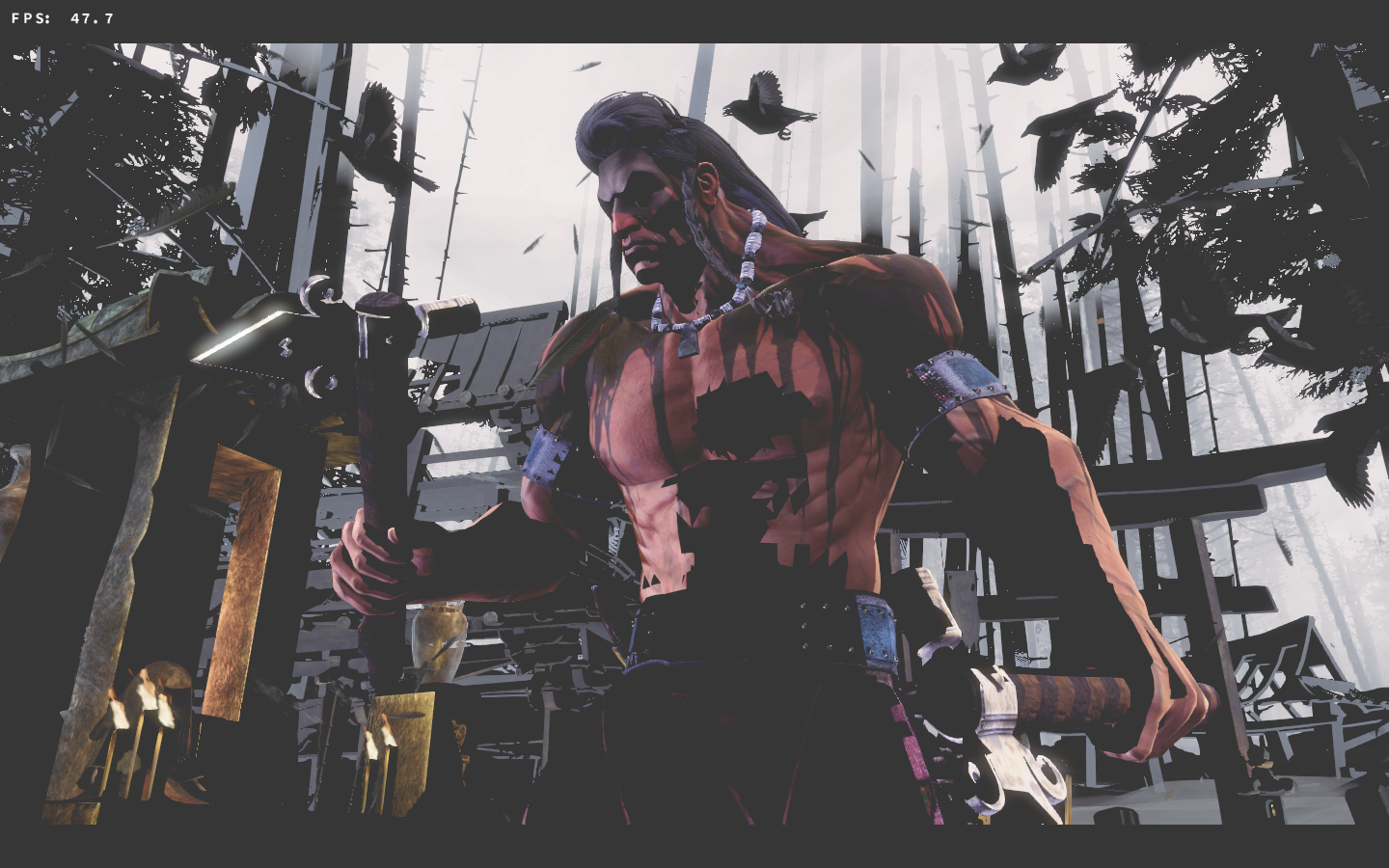
Well I still don't have an answer for whether or not it works in Windows, sadly. I'd have to assume that it does, and that something else that I can't account for is at work. No combination of settings or tweaks has thus far managed to fix it, and I don't have much else that I can try. Example screenie attached.
SirBubbles
on 25 Dec 2019
That doesn't really look like a lighting issue but more like the exact same problem that already affects the main menu (i.e. failed depth tests because the game uses different MVP matrices).
doitsujin
on 26 Dec 2019
That doesn't really look like a lighting issue but more like the exact same problem that already affects the main menu (i.e. failed depth tests because the game uses different MVP matrices).
Dangit. That's a tad unfortunate.
SirBubbles
on 26 Dec 2019
Happy new year! :tada:
If it does work on Windows, then the bug is definitely elsewhere. We do have some weird cases of that already, e.g. #1152, #444
The application appears to work as expected on Windows using either the native DX11 implementation or DXVK 1.5:
Windows 10 (DX11/DXVK 1.5)

Ubuntu 18.04 LTS (Proton 4.11-11/DXVK 1.5)

System information
- GPU: GeForce RTX 2060
- Driver: NVIDIA 440.44 (Ubuntu 18.04 LTS), NVIDIA 441.66 (Windows 10)
- Wine version: Proton 4.11-11
- DXVK version: 1.5
Apitrace file(s)
- KillerInstinctX64_r.windows10_dx11.trace (works as expected)
- KillerInstinctX64_r.ubuntu1804_dxvk15.trace (visual issues)
Log files
Windows 10
- KillerInstinctX64_r_d3d11.log (works as expected)
- KillerInstinctX64_r_dxgi.log (works as expected)
Ubuntu 18.04 LTS
- KillerInstinctX64_r_d3d11.log (visual issues)
I cannot say with any confidence what exactly the problem is.
Should this now be considered a Wine/Proton issue?
mimattr
on 2 Jan 2020
I have tested it with Lutris using the Wine Steam runner ( lutris-4.21 ). The textures are renderered properly.
 vinifmor
on 6 Jan 2020
vinifmor
on 6 Jan 2020
I have tested it with Lutris using the Wine Steam runner ( lutris-4.21 ). The textures are renderered properly.
I seem to be able to confirm this, actually, with wine-4.20 and dxvk 1.5.
SirBubbles
on 7 Jan 2020
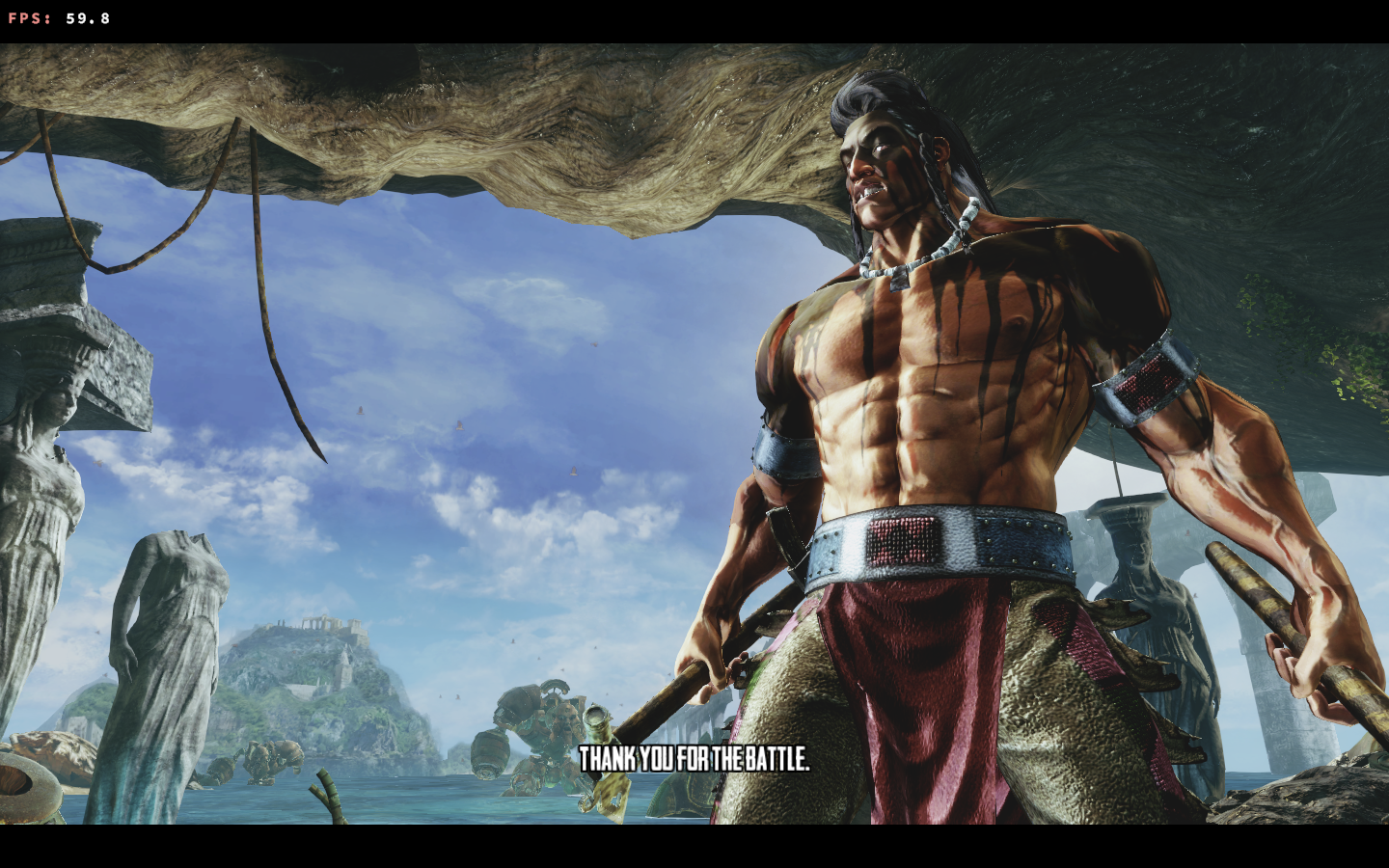
I have screenies confirming that this bug no longer happens in my setup.

SirBubbles
on 7 Jan 2020
This issue appears to be resolved with Proton 5.0-1
System information
- GPU: GeForce RTX 2060
- Driver: NVIDIA 440.59
- Wine version: Proton 5.0-1
- DXVK version: 1.5.4
Many thanks to all involved!
mimattr
on 9 Feb 2020
Related issues
 arabcian
·
3Comments
arabcian
·
3Comments
 AuroransSolis
·
3Comments
AuroransSolis
·
3Comments
 artivision
·
4Comments
artivision
·
4Comments
 jekstrand
·
4Comments
jekstrand
·
4Comments
 knuxyl
·
5Comments
knuxyl
·
5Comments
Most helpful comment
Please note that I don't plan to work over the holidays. I'll download the thing, but in general, don't expect any new bug reports to get noticed until next year.