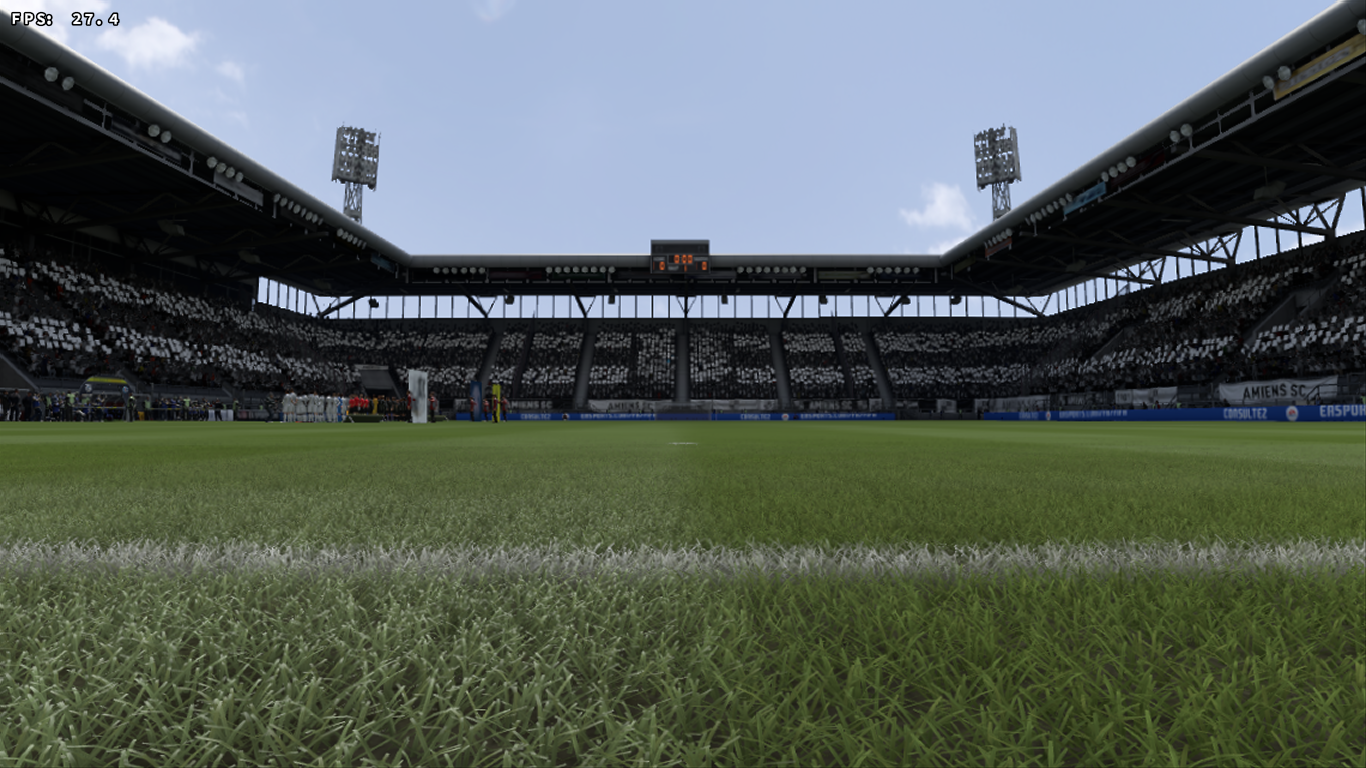
Dxvk: FIFA 19 demo grass render issues..
Screenshoot:

logs show no issues..
System information
- GPU: Titan V
- Driver: 399.24 (Windows)
- Wine version: none
- DXVK version: 0.72
Apitrace file(s)
Log files
- d3d11.log:
FIFA19_demo_d3d11.log - dxgi.log:
FIFA19_demo_dxgi.log
 oscarbg
All 51 comments
Also tested with 399.28 which should be equivalent to Linux 396.54.05 with no changes..
FIFA19_demo_dxgi.log
oscarbg
on 16 Sep 2018
Apitrace?
 Leopard1907
on 16 Sep 2018
Leopard1907
on 16 Sep 2018
Game asks for ID3D12Device, which is interesting. But you should know that an apitrace is REQUIRED in such cases, so please add one. I'd also rather have reports from Linux where stuff like nvapi etc. doesn't exist.
 doitsujin
on 16 Sep 2018
doitsujin
on 16 Sep 2018
Fifa 19 demo doesn't work on Wine. https://bugs.winehq.org/show_bug.cgi?id=45830
 AccountOneOff
on 18 Sep 2018
AccountOneOff
on 18 Sep 2018
Ok, will add apitrace soon!
oscarbg
on 20 Sep 2018
After this patch https://source.winehq.org/git/wine.git/commit/7e39544bfa6cf3e68a8567c202624f7f2d3fc7c8 FIFA 19 have been working on wine.
Look what a strange thing. In the minigame before the match we can see the grass:

In the gameplay, we can't see the grass:

The game crashes when I try to get a apitrace:

 stumts
on 25 Sep 2018
stumts
on 25 Sep 2018
@stumts can you post the full wine console output when running the game?
doitsujin
on 25 Sep 2018
Log files
- wine.log (without any WINEDEBUG)
wine.log - d3d11.log
fifa19_demo_d3d11.log - dxgi.log
fifa19_demo_dxgi.log
stumts
on 25 Sep 2018
Nothing interesting. Guess I'll take a look when the wine patch lands.
doitsujin
on 25 Sep 2018
I don't know if it's useful, but I've tested wined3d and I've gotten the same black grass.

stumts
on 29 Sep 2018
I get black grass on Windows 2 using dxvk
 massatt212
on 29 Sep 2018
massatt212
on 29 Sep 2018
Not even the grass of all stadiums is black. Some work perfectly fine, some are completely black and some are only partially black.
 Tobiplayer3
on 15 Oct 2018
Tobiplayer3
on 15 Oct 2018
Black screen also confirmed with following settings:
- Ubuntu 18.04.01
- Lutris with DXVK support 0.90
- esync-staging-pba-3.18
- AMD Radeon R9 280x
I also have a weird issue, where when my controller is plugged in first it all of the sudden always moves to the right. I need to remove the controller from "Start > Control Center > Gamecontroller", then start the game. Confirm the keyboard as input device (so that the Enter/Space/etc. buttons are shown within the game rather than the XBOX A/B/X/Y buttons) and then move around and play with my controller. This way it does not move arbitrarily.

 macskay
on 12 Nov 2018
macskay
on 12 Nov 2018
I can confirm the black grass/stadium problem is here with DXVK 0.93:


- Arch Linux
- DXVK 0.93
- Wine esync-staging-pba-3.21
- NVIDIA GTX 1080Ti
 mozo78
on 2 Dec 2018
mozo78
on 2 Dec 2018
Can anyone record an apitrace? Screenshots aren't exactly helpful, and Origin doesn't work for me.
doitsujin
on 2 Dec 2018
The game crashes for me when I try to get an apitrace. I'll try again.
According to wine bug the mentioned wine patch is implemented with 7e39544bfa6cf3e68a8567c202624f7f2d3fc7c8 in Wine 3.17:
https://bugs.winehq.org/show_bug.cgi?id=45523
mozo78
on 2 Dec 2018
Nope the game crashed when I try to get an apitrace. Here you are the log if it can be of some help:
mozo78
on 2 Dec 2018
Here is the apitrace to the crash:
https://my.pcloud.com/publink/show?code=XZCTKg7ZOwNnjqAYGQF1NUtCVB75jXAGfBQy
mozo78
on 2 Dec 2018
It's not useful unless it actually shows the grass rendering issue.
doitsujin
on 2 Dec 2018
I know but this is I can get :(
mozo78
on 2 Dec 2018
May be try RenderDoc then?
It can be depth bias issue similar to SOTTR on nvidia and can be driver related.
 lieff
on 2 Dec 2018
lieff
on 2 Dec 2018
A user from discord called Aymen has gotten an apitrace from windows.
https://drive.google.com/open?id=1ISC5VdAFD31MUdPOyCQid0ViqzGNsikm
Is it usefull for you? Anyway, I'll try to get the fifa 19 apitrace from wine again.
stumts
on 2 Dec 2018
@stumts yep it's me :)
But your link points weirdly to https://github.com/doitsujin/dxvk/issues/url
here is the apitrace link https://drive.google.com/file/d/1ISC5VdAFD31MUdPOyCQid0ViqzGNsikm/view
Hope it helps
 4ymen
on 2 Dec 2018
4ymen
on 2 Dec 2018
System Information:
- SO: Ubuntu 18.04.1
- GPU: Nvidia GTX 850m
- Video driver: 415.18.02
- Wine version: 3.21 (vanilla)
- DXVK version: 0.93
Apitrace File:
Log Files:
- d3d11.log: FIFA19_d3d11.log
- dxgi.log: FIFA19_dxgi.log
stumts
on 3 Dec 2018
I'm able to reproduce the problem, but I don't think I'll be able to fix this any time soon. The game does actually render the grass just fine, it's just extremely dark for no obvious reason, and I don't have the slightest idea what DXVK might be doing wrong.
doitsujin
on 4 Dec 2018
May be it's Wine problem?
mozo78
on 4 Dec 2018
No, it's not. It's quite obviously a DXVK bug but I don't know what it's doing wrong.
doitsujin
on 4 Dec 2018
I see, thank you :)
mozo78
on 4 Dec 2018
Ok, we'll wait...u are the best!! thnxs for taking the time!
 beyimanman
on 18 Dec 2018
beyimanman
on 18 Dec 2018
Looks like 01b8e74457ed7cbc750e4550f08e178c157012d2 fixes this on AMD and Intel. Still not sure what's going on, but this narrows it down a bit.
doitsujin
on 8 Jan 2019
We'll wait. I'm pretty shure you will finally figure it out :) It may be by accident or not but this doesn't really matters.
mozo78
on 8 Jan 2019
I already figured out what's wrong, only problem is, it's a game bug. I'll have to work around that somehow but it's going to be complicated.
doitsujin
on 8 Jan 2019
You are great but you know it :)
mozo78
on 8 Jan 2019
This branch enables raw SSBOs for this game, which should work around the bug. Apitraces still won't replay correctly, but the game itself should work.
Here's a build:
dxvk-fifa.tar.gz
doitsujin
on 8 Jan 2019
Yes it works like a charm! Thank you very much!!!
mozo78
on 8 Jan 2019
Thanks for testing, merged into master.
doitsujin
on 8 Jan 2019
That doesn't work for me with the demo.

Dxgi reports the exe as fifa19_demo.exe instead of FIFA19_demo.exe
Works if I set it with dxvk.conf
AccountOneOff
on 8 Jan 2019
There is a known render grass issue in some mobile nvidia GPUs. These GPUs don't render grass. But they're rendering with dxvk.
Fifa 19 on dx11 (windows):

Fifa 19 on dxvk (ubuntu):
@doitsujin , congratulations. Amazing job.
stumts
on 8 Jan 2019
@AccountOneOff How many different exe names are there? The initial bug report clearly lists it as FIFA2019_demo.exe.
doitsujin
on 9 Jan 2019
Awesome work as always. Thanks for fix for Fifa.
 ZargEzey
on 9 Jan 2019
ZargEzey
on 9 Jan 2019
I don't know mine is named FIFA19_demo.exe. You're setting the right exe so it should be working but it's not for some reason.

I'll try reinstalling.
No difference still doesn't render.
AccountOneOff
on 9 Jan 2019
Is their a FPS Limiter build in to DXVK
This Game drops frames on cut scenes to 20fps instead of steady 60fps all the way through
The Game is Vysnc Bug for Windows, Nvidia Control Pannel Vysnc (on) Fixes the fps drop on cut scenes
But with 60 fps cap ingame launcher option cut scenes are 30 -20fps on scenes, and on No limits fps is 100 druing game play then Vysnc Kicks in at cap its at 60 fps for Cut scenes.
But no limits cause a lot of stutter
So is their a way to limit FPS to 60 ?
Or a Vsync Command built into DXVK to test out ?
massatt212
on 25 Jan 2019
@massatt212 use librstrangle https://gitlab.com/torkel104/libstrangle
AccountOneOff
on 25 Jan 2019
Looking rather unstable with steam or have u tried it and it's all good ?
massatt212
on 25 Jan 2019
I'm not using Proton and no I don't have FIFA 19 just the demo. I have tried it with other games and it helps on those. Namely Beyond Good & Evil.
AccountOneOff
on 25 Jan 2019
I don't know mine is named FIFA19_demo.exe. You're setting the right exe so it should be working but it's not for some reason.
Try to launch the game a couple of times and go directly to kick-off. In my case, the 2nd or 3rd try the grass loads and the game works fine.
This takes me to a related question, which I don't know if it is the right place to ask.
When I start the game (FIFA 19 -- no demo --) with Lutris, I can either go directly to kick off (i.e. a quick friendly match), in which case after a couple of tries the grass works ok and works until I close the game in any stadium and game mode. Or I can go to one of the game modes with cinematics.
If I choose kick off first, then choose a game mode with cinematics, the latter run at 1/2 fps and take forever, making the game mode unplayable, because they can't be skipped. If I choose the mode with cinematics first, they render ok (60 fps) but then the grass is always black.
I think I've traced this problem to the GPU memory usage. In the first case, if I'm lucky, I still have GPU memory before the match starts and the grass loads. In the second case, by the time the match is supposed to load I'm out of memory and the appropriate amount of memory is freed to load all the assets but the grass.
My humble my Nvidia 750Ti has twice the minimum required memory in the game specs. I would be surprised if DXVK had a 100% memory footprint. On top of that, the memory consumption seems independent of the rendering options (low, medium, high, ultra) and the anisotropic filtering (0, 2x, 4x). The FPS in gameplay, are independent of this parameter too (I get 50/60 fps on all the combinations, with or without grass), so this certainly seems to me like a bug.
- Is this a possible bug?
- If affirmative, should I leave this here or open a new bug?
- How can I help to track if is this a FIFA, WINE or DXVK bug?
Sorry for the vagueness, I don't know the protocol for reporting things here (and I don't know what that apitrace thing is).
My system:
CPU: Intel(R) Core(TM) i7-4790 CPU @ 3.60GHz
RAM: 16 GB
GPU: Nvidia GeForce GTX 750 Ti
OS: Fedora 29
Kernel: 4.20.5
GPU driver: 415.27
Lutris: 0.4.23
Wine: tkg 4.0
DXVK: 0.96
 sabian2008
on 5 Feb 2019
sabian2008
on 5 Feb 2019
- Is this a possible bug?
Probably not, although the DXVK memory allocator doesn't handle memory-constrained cards all that well. This isn't trivial to improve and would require a major rewrite of a lot of things, so hoping that Nvidia one day implements VK_EXT_memory_priority on Linux is probably the better solution.
Try running the Nvidia control panel next to the game (the GPU tab shows memory usage), also DXVK_HUD=memory (shows combined vram+system ram usage, might not be super useful).
Also, make sure to close all applications that may eat VRAM (web browsers!) before starting the game. As far as I understand, Nvidia drivers do not support paging out allocations from other apps.
doitsujin
on 5 Feb 2019
Thanks for the reply!
My observation about VRAM was coming from nvidia-smi, as you suggest, and an htop in the side to see CPU + RAM. After a clean reinstall I managed to make different texture resolution consume different amount of VRAM. However, although the game runs at 120 FPS and has about 300MB VRAM to spare, in some cutscenes the FPS drop to 2 or 3. Anyway, this has gotten too specific to be useful or worth looking into.
Thanks for the great work! Cheers,
sabian2008
on 6 Feb 2019
First, thanks for dxvk, it's great. :) It works well with a lot of steam games I have. I tried Fifa19 last night, but it runs a lot slower than on Windows. I don't have a good computer, but I can play Ffifa19 smoothly on Windows with 1080p. But on Linux, the fps is 8-10 on 1080p, and 15-20 on 1600x900. My question is why? I thought dxvk doesn't add any overhead, does it? Can I finetuune it somehow? Maybe esync?
My config:
Distro:Ubuntu Disco Dingo (development branch)
Kernel:5.0.0-7-generic
RAM:10 GB
GPU Driver:NVIDIA 410.104
GPU:NVIDIA GeForce GTX 750
CPU:AMD FX-6300 Six-Core
Wine: 4.4 staging repo
DXVK. 1.0.1
 rockybalboa
on 20 Mar 2019
rockybalboa
on 20 Mar 2019
First of all, check whether you are actually GPU bound (in the nvidia settings). DXVK doesn't run well on old GPUs, especially since yours only has 1GB of VRAM (or is it 2GB?).
doitsujin
on 20 Mar 2019
Yes, as I see the GPU is the bottleneck, it only has 1 GB of VRAM. I can get a GTX 670 2 GB, which is a stronger GPU, but as you mentioned DXK doesn't run well on old cards. Should I buy a newer one? What is your recommendation for my setup?
rockybalboa
on 21 Mar 2019
Related issues
 index-0
·
3Comments
index-0
·
3Comments
 Ahmed-E-86
·
4Comments
Ahmed-E-86
·
4Comments
 EnigmaRaptor
·
5Comments
EnigmaRaptor
·
5Comments
 yusdacra
·
4Comments
yusdacra
·
4Comments
 SzDavidHUN
·
3Comments
SzDavidHUN
·
3Comments
Most helpful comment
I'm able to reproduce the problem, but I don't think I'll be able to fix this any time soon. The game does actually render the grass just fine, it's just extremely dark for no obvious reason, and I don't have the slightest idea what DXVK might be doing wrong.