Dxvk: Overwatch recompiling shaders on every restart
Software information
Latest Overwatch, default battle net launcher.
It might be related or not .... Overwatch.dxvk-cache file provided by lutris regularly gets resetted during game start and then texture precompilation doesnt seems to work at all. as a workaround I currently have that file as readonly. but it would be preferable to get the caching working so I dont have to wait a few minutes on every start for texture caching.
System information
- GPU: 2070 super
- Driver: 440.31 (on Kernel 5.3.11-1)
- Wine version: 4.20
- DXVK version: 1.4.4
Log files
- d3d11.log:
info:  D3D11CoreCreateDevice: Probing D3D_FEATURE_LEVEL_11_0
info:  D3D11CoreCreateDevice: Using feature level D3D_FEATURE_LEVEL_11_0
info:  Device properties:
info:    Device name:     : GeForce RTX 2070 SUPER
info:    Driver version   : 440.31.0
info:  Enabled device extensions:
info:    VK_EXT_conditional_rendering
info:    VK_EXT_depth_clip_enable
info:    VK_EXT_host_query_reset
info:    VK_EXT_shader_demote_to_helper_invocation
info:    VK_EXT_shader_viewport_index_layer
info:    VK_EXT_transform_feedback
info:    VK_EXT_vertex_attribute_divisor
info:    VK_KHR_create_renderpass2
info:    VK_KHR_dedicated_allocation
info:    VK_KHR_depth_stencil_resolve
info:    VK_KHR_descriptor_update_template
info:    VK_KHR_draw_indirect_count
info:    VK_KHR_driver_properties
info:    VK_KHR_get_memory_requirements2
info:    VK_KHR_image_format_list
info:    VK_KHR_maintenance1
info:    VK_KHR_maintenance2
info:    VK_KHR_sampler_mirror_clamp_to_edge
info:    VK_KHR_shader_draw_parameters
info:    VK_KHR_swapchain
info:  Device features:
info:    robustBufferAccess                     : 1
info:    fullDrawIndexUint32                    : 1
info:    imageCubeArray                         : 1
info:    independentBlend                       : 1
info:    geometryShader                         : 1
info:    tessellationShader                     : 1
info:    sampleRateShading                      : 1
info:    dualSrcBlend                           : 1
info:    logicOp                                : 1
info:    multiDrawIndirect                      : 1
info:    drawIndirectFirstInstance              : 1
info:    depthClamp                             : 1
info:    depthBiasClamp                         : 1
info:    fillModeNonSolid                       : 1
info:    depthBounds                            : 1
info:    multiViewport                          : 1
info:    samplerAnisotropy                      : 1
info:    textureCompressionBC                   : 1
info:    occlusionQueryPrecise                  : 1
info:    pipelineStatisticsQuery                : 1
info:    vertexPipelineStoresAndAtomics         : 0
info:    fragmentStoresAndAtomics               : 1
info:    shaderImageGatherExtended              : 1
info:    shaderStorageImageExtendedFormats      : 1
info:    shaderStorageImageReadWithoutFormat    : 1
info:    shaderStorageImageWriteWithoutFormat   : 1
info:    shaderClipDistance                     : 1
info:    shaderCullDistance                     : 1
info:    shaderFloat64                          : 1
info:    shaderInt64                            : 1
info:    variableMultisampleRate                : 1
info:  VK_EXT_conditional_rendering
info:    conditionalRendering                   : 1
info:  VK_EXT_depth_clip_enable
info:    depthClipEnable                        : 1
info:  VK_EXT_host_query_reset
info:    hostQueryReset                         : 1
info:  VK_EXT_memory_priority
info:    memoryPriority                         : 0
info:  VK_EXT_shader_demote_to_helper_invocation
info:    shaderDemoteToHelperInvocation         : 1
info:  VK_EXT_transform_feedback
info:    transformFeedback                      : 1
info:    geometryStreams                        : 1
info:  VK_EXT_vertex_attribute_divisor
info:    vertexAttributeInstanceRateDivisor     : 1
info:    vertexAttributeInstanceRateZeroDivisor : 1
info:  Queue families:
info:    Graphics : 0
info:    Transfer : 1
info:  DXVK: Read 67417 valid state cache entries
info:  DXVK: Using 16 compiler threads
info:  D3D11CoreCreateDevice: Probing D3D_FEATURE_LEVEL_11_0
info:  D3D11CoreCreateDevice: Using feature level D3D_FEATURE_LEVEL_11_0
info:  Device properties:
info:    Device name:     : GeForce RTX 2070 SUPER
info:    Driver version   : 440.31.0
info:  Enabled device extensions:
info:    VK_EXT_conditional_rendering
info:    VK_EXT_depth_clip_enable
info:    VK_EXT_host_query_reset
info:    VK_EXT_shader_demote_to_helper_invocation
info:    VK_EXT_shader_viewport_index_layer
info:    VK_EXT_transform_feedback
info:    VK_EXT_vertex_attribute_divisor
info:    VK_KHR_create_renderpass2
info:    VK_KHR_dedicated_allocation
info:    VK_KHR_depth_stencil_resolve
info:    VK_KHR_descriptor_update_template
info:    VK_KHR_draw_indirect_count
info:    VK_KHR_driver_properties
info:    VK_KHR_get_memory_requirements2
info:    VK_KHR_image_format_list
info:    VK_KHR_maintenance1
info:    VK_KHR_maintenance2
info:    VK_KHR_sampler_mirror_clamp_to_edge
info:    VK_KHR_shader_draw_parameters
info:    VK_KHR_swapchain
info:  Device features:
info:    robustBufferAccess                     : 1
info:    fullDrawIndexUint32                    : 1
info:    imageCubeArray                         : 1
info:    independentBlend                       : 1
info:    geometryShader                         : 1
info:    tessellationShader                     : 1
info:    sampleRateShading                      : 1
info:    dualSrcBlend                           : 1
info:    logicOp                                : 1
info:    multiDrawIndirect                      : 1
info:    drawIndirectFirstInstance              : 1
info:    depthClamp                             : 1
info:    depthBiasClamp                         : 1
info:    fillModeNonSolid                       : 1
info:    depthBounds                            : 1
info:    multiViewport                          : 1
info:    samplerAnisotropy                      : 1
info:    textureCompressionBC                   : 1
info:    occlusionQueryPrecise                  : 1
info:    pipelineStatisticsQuery                : 1
info:    vertexPipelineStoresAndAtomics         : 0
info:    fragmentStoresAndAtomics               : 1
info:    shaderImageGatherExtended              : 1
info:    shaderStorageImageExtendedFormats      : 1
info:    shaderStorageImageReadWithoutFormat    : 1
info:    shaderStorageImageWriteWithoutFormat   : 1
info:    shaderClipDistance                     : 1
info:    shaderCullDistance                     : 1
info:    shaderFloat64                          : 1
info:    shaderInt64                            : 1
info:    variableMultisampleRate                : 1
info:  VK_EXT_conditional_rendering
info:    conditionalRendering                   : 1
info:  VK_EXT_depth_clip_enable
info:    depthClipEnable                        : 1
info:  VK_EXT_host_query_reset
info:    hostQueryReset                         : 1
info:  VK_EXT_memory_priority
info:    memoryPriority                         : 0
info:  VK_EXT_shader_demote_to_helper_invocation
info:    shaderDemoteToHelperInvocation         : 1
info:  VK_EXT_transform_feedback
info:    transformFeedback                      : 1
info:    geometryStreams                        : 1
info:  VK_EXT_vertex_attribute_divisor
info:    vertexAttributeInstanceRateDivisor     : 1
info:    vertexAttributeInstanceRateZeroDivisor : 1
info:  Queue families:
info:    Graphics : 0
info:    Transfer : 1
info:  DXVK: Read 67417 valid state cache entries
info:  DXVK: Using 16 compiler threads
info:  Presenter: Actual swap chain properties:
info:    Format:       VK_FORMAT_B8G8R8A8_UNORM
info:    Present mode: VK_PRESENT_MODE_IMMEDIATE_KHR
info:    Buffer size:  1920x1080
info:    Image count:  3
info:  Presenter: Actual swap chain properties:
info:    Format:       VK_FORMAT_B8G8R8A8_UNORM
info:    Present mode: VK_PRESENT_MODE_IMMEDIATE_KHR
info:    Buffer size:  1920x1080
info:    Image count:  3
info:  Presenter: Actual swap chain properties:
info:    Format:       VK_FORMAT_B8G8R8A8_UNORM
info:    Present mode: VK_PRESENT_MODE_IMMEDIATE_KHR
info:    Buffer size:  1920x1080
info:    Image count:  3
info:  Presenter: Actual swap chain properties:
info:    Format:       VK_FORMAT_B8G8R8A8_UNORM
info:    Present mode: VK_PRESENT_MODE_IMMEDIATE_KHR
info:    Buffer size:  1920x1080
info:    Image count:  3
- dxgi.log:
info:  Game: Overwatch.exe
info:  DXVK: v1.4.4
info:  Found config file: ~/Games/battlenet/dxvk.conf
info:  Found built-in config:
info:  Effective configuration:
info:    d3d11.allowMapFlagNoWait = False
info:    dxgi.nvapiHack = False
info:    dxvk.hud = compiler
warn:  OpenVR: Failed to locate module
info:  Enabled instance extensions:
info:    VK_KHR_get_physical_device_properties2
info:    VK_KHR_surface
info:    VK_KHR_win32_surface
info:  GeForce RTX 2070 SUPER:
info:    Driver: 440.31.0
info:    Vulkan: 1.1.119
info:    Memory Heap[0]:
info:      Size: 8192 MiB
info:      Flags: 0x1
info:      Memory Type[7]: Property Flags = 0x1
info:      Memory Type[8]: Property Flags = 0x1
info:    Memory Heap[1]:
info:      Size: 24013 MiB
info:      Flags: 0x0
info:      Memory Type[0]: Property Flags = 0x0
info:      Memory Type[1]: Property Flags = 0x0
info:      Memory Type[2]: Property Flags = 0x0
info:      Memory Type[3]: Property Flags = 0x0
info:      Memory Type[4]: Property Flags = 0x0
info:      Memory Type[5]: Property Flags = 0x0
info:      Memory Type[6]: Property Flags = 0x0
info:      Memory Type[9]: Property Flags = 0x6
info:      Memory Type[10]: Property Flags = 0xe
info:  Adapter LUID 0: 0:656b
info:  Game: Overwatch.exe
info:  DXVK: v1.4.4
info:  Found config file: ~/Games/battlenet/dxvk.conf
info:  Found built-in config:
info:  Effective configuration:
info:    d3d11.allowMapFlagNoWait = False
info:    dxgi.nvapiHack = False
info:    dxvk.hud = compiler
warn:  OpenVR: Failed to locate module
info:  Enabled instance extensions:
info:    VK_KHR_get_physical_device_properties2
info:    VK_KHR_surface
info:    VK_KHR_win32_surface
info:  GeForce RTX 2070 SUPER:
info:    Driver: 440.31.0
info:    Vulkan: 1.1.119
info:    Memory Heap[0]:
info:      Size: 8192 MiB
info:      Flags: 0x1
info:      Memory Type[7]: Property Flags = 0x1
info:      Memory Type[8]: Property Flags = 0x1
info:    Memory Heap[1]:
info:      Size: 24013 MiB
info:      Flags: 0x0
info:      Memory Type[0]: Property Flags = 0x0
info:      Memory Type[1]: Property Flags = 0x0
info:      Memory Type[2]: Property Flags = 0x0
info:      Memory Type[3]: Property Flags = 0x0
info:      Memory Type[4]: Property Flags = 0x0
info:      Memory Type[5]: Property Flags = 0x0
info:      Memory Type[6]: Property Flags = 0x0
info:      Memory Type[9]: Property Flags = 0x6
info:      Memory Type[10]: Property Flags = 0xe
info:  Game: Overwatch.exe
info:  DXVK: v1.4.4
info:  Found config file: ~/Games/battlenet/dxvk.conf
info:  Found built-in config:
info:  Effective configuration:
info:    d3d11.allowMapFlagNoWait = False
info:    dxgi.nvapiHack = False
info:    dxvk.hud = compiler
warn:  OpenVR: Failed to locate module
info:  Enabled instance extensions:
info:    VK_KHR_get_physical_device_properties2
info:    VK_KHR_surface
info:    VK_KHR_win32_surface
info:  GeForce RTX 2070 SUPER:
info:    Driver: 440.31.0
info:    Vulkan: 1.1.119
info:    Memory Heap[0]:
info:      Size: 8192 MiB
info:      Flags: 0x1
info:      Memory Type[7]: Property Flags = 0x1
info:      Memory Type[8]: Property Flags = 0x1
info:    Memory Heap[1]:
info:      Size: 24013 MiB
info:      Flags: 0x0
info:      Memory Type[0]: Property Flags = 0x0
info:      Memory Type[1]: Property Flags = 0x0
info:      Memory Type[2]: Property Flags = 0x0
info:      Memory Type[3]: Property Flags = 0x0
info:      Memory Type[4]: Property Flags = 0x0
info:      Memory Type[5]: Property Flags = 0x0
info:      Memory Type[6]: Property Flags = 0x0
info:      Memory Type[9]: Property Flags = 0x6
info:      Memory Type[10]: Property Flags = 0xe
warn:  DXGI: MakeWindowAssociation: Ignoring flags
 darix
darix
All 31 comments
Maybe related
warn:  D3D11Texture2D::QueryInterface: Unknown interface query
warn:  f8fb5c27-c6b3-4f75-a4c8-439af2ef564c
@darix`
No, it isn't.
 Joshua-Ashton
on 18 Nov 2019
Joshua-Ashton
on 18 Nov 2019
ok. let me know if I can help with more information :)
darix
on 18 Nov 2019
You have this set: dxvk.hud = compiler
The compiling shaders on the HUD indicates its compiling shaders from the state cache -- ie. cached shaders.
Joshua-Ashton
on 18 Nov 2019
info:  DXVK: Read 67417 valid state cache entries
info:  DXVK: Using 16 compiler threads
this indicates that everything is working as intended; what exactly is the problem?
DXVK does not reset the file according to your log.
 doitsujin
on 18 Nov 2019
doitsujin
on 18 Nov 2019
so it is to be expected that the game is basically unusable for 5 minutes compiling shaders on every start? I was hoping it would cache those.
right now the Overwatch.dxvk-cache file is u=r,go= :) it cant break that. :p
the Overwatch.dxvk-cache file only grew a few 100kB over the 15.6MB file shipped by lutris.
from which file/directory would it read/store those cache entries?
darix
on 18 Nov 2019
Maybe don't make the state cache file readonly?
Joshua-Ashton
on 18 Nov 2019
as mentioned in the initial bug report .... the file gets occasionally reset to 0 bytes and then no precompilation happens at all. which is worse than having to wait 5 minutes on every start because then the game becomes unplayable. I read other reports on youtube/reddit that the cache should be a few GB big and that never happened for me. it only grew by a few hundred kilobytes.
If you can tell me which details I would need to dig up to debug why the file gets reset to 0 bytes then I will make it writable again.
darix
on 18 Nov 2019
Can you provide a log of a run where it resets the size to 0?
doitsujin
on 19 Nov 2019
I will reenable writable tomorrow and monitor the situation. could also be the dxvk cache merge tool that lutris hooks in. that complains about v8 vs v5 cache entries.
darix
on 19 Nov 2019
I wasn't aware that Lutris had a merge tool built in. No such thing is part of DXVK, and of course that's not going to work if it doesn't support v8 cache files, please disable that if possible.
Anyway, doesn't sound like this is my bug.
doitsujin
on 19 Nov 2019
they hook it in via a script:
darix
on 19 Nov 2019
I mostly opened this issue to get help understanding this better. I read the whole wiki but didnt get enough guidance on how to debug such issues :)
I removed the manual command option from the game config to make sure it cant be triggered.
darix
on 19 Nov 2019
the dxvk-cache was just reset to 0:
would the cache be reset if the version of dxvk changed? it seems lutris set it back to 1.3.3.
which is funny because the option dialog says "1.4.4"
maybe I should just find out how to launch the game without lutris and still using the same environment.
info:  Game: Overwatch.exe
info:  DXVK: v1.3.3
info:  Found config file: ~/Games/battlenet/dxvk.conf
info:  Effective configuration:
info:    dxvk.hud = compiler
info:    dxgi.nvapiHack = False
warn:  OpenVR: Failed to locate module
info:  Enabled instance extensions:
info:    VK_KHR_get_physical_device_properties2
info:    VK_KHR_surface
info:    VK_KHR_win32_surface
info:  GeForce RTX 2070 SUPER:
info:    Driver: 440.31.0
info:    Vulkan: 1.1.119
info:    Memory Heap[0]:
info:      Size: 8192 MiB
info:      Flags: 0x1
info:      Memory Type[7]: Property Flags = 0x1
info:      Memory Type[8]: Property Flags = 0x1
info:    Memory Heap[1]:
info:      Size: 24013 MiB
info:      Flags: 0x0
info:      Memory Type[0]: Property Flags = 0x0
info:      Memory Type[1]: Property Flags = 0x0
info:      Memory Type[2]: Property Flags = 0x0
info:      Memory Type[3]: Property Flags = 0x0
info:      Memory Type[4]: Property Flags = 0x0
info:      Memory Type[5]: Property Flags = 0x0
info:      Memory Type[6]: Property Flags = 0x0
info:      Memory Type[9]: Property Flags = 0x6
info:      Memory Type[10]: Property Flags = 0xe
info:  Game: Overwatch.exe
info:  DXVK: v1.3.3
info:  Found config file: ~/Games/battlenet/dxvk.conf
info:  Effective configuration:
info:    dxvk.hud = compiler
info:    dxgi.nvapiHack = False
warn:  OpenVR: Failed to locate module
info:  Enabled instance extensions:
info:    VK_KHR_get_physical_device_properties2
info:    VK_KHR_surface
info:    VK_KHR_win32_surface
info:  GeForce RTX 2070 SUPER:
info:    Driver: 440.31.0
info:    Vulkan: 1.1.119
info:    Memory Heap[0]:
info:      Size: 8192 MiB
info:      Flags: 0x1
info:      Memory Type[7]: Property Flags = 0x1
info:      Memory Type[8]: Property Flags = 0x1
info:    Memory Heap[1]:
info:      Size: 24013 MiB
info:      Flags: 0x0
info:      Memory Type[0]: Property Flags = 0x0
info:      Memory Type[1]: Property Flags = 0x0
info:      Memory Type[2]: Property Flags = 0x0
info:      Memory Type[3]: Property Flags = 0x0
info:      Memory Type[4]: Property Flags = 0x0
info:      Memory Type[5]: Property Flags = 0x0
info:      Memory Type[6]: Property Flags = 0x0
info:      Memory Type[9]: Property Flags = 0x6
info:      Memory Type[10]: Property Flags = 0xe
info:  Game: Overwatch.exe
info:  DXVK: v1.3.3
info:  Found config file: ~/Games/battlenet/dxvk.conf
info:  Effective configuration:
info:    dxvk.hud = compiler
info:    dxgi.nvapiHack = False
warn:  OpenVR: Failed to locate module
info:  Enabled instance extensions:
info:    VK_KHR_get_physical_device_properties2
info:    VK_KHR_surface
info:    VK_KHR_win32_surface
info:  GeForce RTX 2070 SUPER:
info:    Driver: 440.31.0
info:    Vulkan: 1.1.119
info:    Memory Heap[0]:
info:      Size: 8192 MiB
info:      Flags: 0x1
info:      Memory Type[7]: Property Flags = 0x1
info:      Memory Type[8]: Property Flags = 0x1
info:    Memory Heap[1]:
info:      Size: 24013 MiB
info:      Flags: 0x0
info:      Memory Type[0]: Property Flags = 0x0
info:      Memory Type[1]: Property Flags = 0x0
info:      Memory Type[2]: Property Flags = 0x0
info:      Memory Type[3]: Property Flags = 0x0
info:      Memory Type[4]: Property Flags = 0x0
info:      Memory Type[5]: Property Flags = 0x0
info:      Memory Type[6]: Property Flags = 0x0
info:      Memory Type[9]: Property Flags = 0x6
info:      Memory Type[10]: Property Flags = 0xe
warn:  DXGI: MakeWindowAssociation: Ignoring flags
info:  D3D11CoreCreateDevice: Probing D3D_FEATURE_LEVEL_11_0
info:  D3D11CoreCreateDevice: Using feature level D3D_FEATURE_LEVEL_11_0
info:  Device properties:
info:    Device name:     : GeForce RTX 2070 SUPER
info:    Driver version   : 440.31.0
info:  Enabled device extensions:
info:    VK_EXT_conditional_rendering
info:    VK_EXT_depth_clip_enable
info:    VK_EXT_host_query_reset
info:    VK_EXT_shader_demote_to_helper_invocation
info:    VK_EXT_shader_viewport_index_layer
info:    VK_EXT_transform_feedback
info:    VK_EXT_vertex_attribute_divisor
info:    VK_KHR_create_renderpass2
info:    VK_KHR_dedicated_allocation
info:    VK_KHR_depth_stencil_resolve
info:    VK_KHR_descriptor_update_template
info:    VK_KHR_draw_indirect_count
info:    VK_KHR_driver_properties
info:    VK_KHR_get_memory_requirements2
info:    VK_KHR_image_format_list
info:    VK_KHR_maintenance1
info:    VK_KHR_maintenance2
info:    VK_KHR_sampler_mirror_clamp_to_edge
info:    VK_KHR_shader_draw_parameters
info:    VK_KHR_swapchain
info:  Device features:
info:    robustBufferAccess                     : 1
info:    fullDrawIndexUint32                    : 1
info:    imageCubeArray                         : 1
info:    independentBlend                       : 1
info:    geometryShader                         : 1
info:    tessellationShader                     : 1
info:    sampleRateShading                      : 1
info:    dualSrcBlend                           : 1
info:    logicOp                                : 1
info:    multiDrawIndirect                      : 1
info:    drawIndirectFirstInstance              : 1
info:    depthClamp                             : 1
info:    depthBiasClamp                         : 1
info:    fillModeNonSolid                       : 1
info:    depthBounds                            : 1
info:    multiViewport                          : 1
info:    samplerAnisotropy                      : 1
info:    textureCompressionBC                   : 1
info:    occlusionQueryPrecise                  : 1
info:    pipelineStatisticsQuery                : 1
info:    vertexPipelineStoresAndAtomics         : 0
info:    fragmentStoresAndAtomics               : 1
info:    shaderImageGatherExtended              : 1
info:    shaderStorageImageExtendedFormats      : 1
info:    shaderStorageImageReadWithoutFormat    : 0
info:    shaderStorageImageWriteWithoutFormat   : 1
info:    shaderClipDistance                     : 1
info:    shaderCullDistance                     : 1
info:    shaderFloat64                          : 1
info:    shaderInt64                            : 1
info:    variableMultisampleRate                : 1
info:  VK_EXT_conditional_rendering
info:    conditionalRendering                   : 1
info:  VK_EXT_depth_clip_enable
info:    depthClipEnable                        : 1
info:  VK_EXT_host_query_reset
info:    hostQueryReset                         : 1
info:  VK_EXT_memory_priority
info:    memoryPriority                         : 0
info:  VK_EXT_shader_demote_to_helper_invocation
info:    shaderDemoteToHelperInvocation         : 1
info:  VK_EXT_transform_feedback
info:    transformFeedback                      : 1
info:    geometryStreams                        : 1
info:  VK_EXT_vertex_attribute_divisor
info:    vertexAttributeInstanceRateDivisor     : 1
info:    vertexAttributeInstanceRateZeroDivisor : 1
info:  Queue families:
info:    Graphics : 0
info:    Transfer : 1
warn:  DXVK: State cache entry size changed
warn:  DXVK: Creating new state cache file
info:  DXVK: Using 16 compiler threads
info:  D3D11CoreCreateDevice: Probing D3D_FEATURE_LEVEL_11_0
info:  D3D11CoreCreateDevice: Using feature level D3D_FEATURE_LEVEL_11_0
info:  Device properties:
info:    Device name:     : GeForce RTX 2070 SUPER
info:    Driver version   : 440.31.0
info:  Enabled device extensions:
info:    VK_EXT_conditional_rendering
info:    VK_EXT_depth_clip_enable
info:    VK_EXT_host_query_reset
info:    VK_EXT_shader_demote_to_helper_invocation
info:    VK_EXT_shader_viewport_index_layer
info:    VK_EXT_transform_feedback
info:    VK_EXT_vertex_attribute_divisor
info:    VK_KHR_create_renderpass2
info:    VK_KHR_dedicated_allocation
info:    VK_KHR_depth_stencil_resolve
info:    VK_KHR_descriptor_update_template
info:    VK_KHR_draw_indirect_count
info:    VK_KHR_driver_properties
info:    VK_KHR_get_memory_requirements2
info:    VK_KHR_image_format_list
info:    VK_KHR_maintenance1
info:    VK_KHR_maintenance2
info:    VK_KHR_sampler_mirror_clamp_to_edge
info:    VK_KHR_shader_draw_parameters
info:    VK_KHR_swapchain
info:  Device features:
info:    robustBufferAccess                     : 1
info:    fullDrawIndexUint32                    : 1
info:    imageCubeArray                         : 1
info:    independentBlend                       : 1
info:    geometryShader                         : 1
info:    tessellationShader                     : 1
info:    sampleRateShading                      : 1
info:    dualSrcBlend                           : 1
info:    logicOp                                : 1
info:    multiDrawIndirect                      : 1
info:    drawIndirectFirstInstance              : 1
info:    depthClamp                             : 1
info:    depthBiasClamp                         : 1
info:    fillModeNonSolid                       : 1
info:    depthBounds                            : 1
info:    multiViewport                          : 1
info:    samplerAnisotropy                      : 1
info:    textureCompressionBC                   : 1
info:    occlusionQueryPrecise                  : 1
info:    pipelineStatisticsQuery                : 1
info:    vertexPipelineStoresAndAtomics         : 0
info:    fragmentStoresAndAtomics               : 1
info:    shaderImageGatherExtended              : 1
info:    shaderStorageImageExtendedFormats      : 1
info:    shaderStorageImageReadWithoutFormat    : 0
info:    shaderStorageImageWriteWithoutFormat   : 1
info:    shaderClipDistance                     : 1
info:    shaderCullDistance                     : 1
info:    shaderFloat64                          : 1
info:    shaderInt64                            : 1
info:    variableMultisampleRate                : 1
info:  VK_EXT_conditional_rendering
info:    conditionalRendering                   : 1
info:  VK_EXT_depth_clip_enable
info:    depthClipEnable                        : 1
info:  VK_EXT_host_query_reset
info:    hostQueryReset                         : 1
info:  VK_EXT_memory_priority
info:    memoryPriority                         : 0
info:  VK_EXT_shader_demote_to_helper_invocation
info:    shaderDemoteToHelperInvocation         : 1
info:  VK_EXT_transform_feedback
info:    transformFeedback                      : 1
info:    geometryStreams                        : 1
info:  VK_EXT_vertex_attribute_divisor
info:    vertexAttributeInstanceRateDivisor     : 1
info:    vertexAttributeInstanceRateZeroDivisor : 1
info:  Queue families:
info:    Graphics : 0
info:    Transfer : 1
info:  DXVK: Read 0 valid state cache entries
info:  DXVK: Using 16 compiler threads
info:  Presenter: Actual swap chain properties:
info:    Format:       VK_FORMAT_B8G8R8A8_UNORM
info:    Present mode: VK_PRESENT_MODE_IMMEDIATE_KHR
info:    Buffer size:  1920x1080
info:    Image count:  3
info:  Presenter: Actual swap chain properties:
info:    Format:       VK_FORMAT_B8G8R8A8_UNORM
info:    Present mode: VK_PRESENT_MODE_IMMEDIATE_KHR
info:    Buffer size:  1920x1080
info:    Image count:  3
info:  Presenter: Actual swap chain properties:
info:    Format:       VK_FORMAT_B8G8R8A8_UNORM
info:    Present mode: VK_PRESENT_MODE_IMMEDIATE_KHR
info:    Buffer size:  1920x1080
info:    Image count:  3
info:  Presenter: Actual swap chain properties:
info:    Format:       VK_FORMAT_B8G8R8A8_UNORM
info:    Present mode: VK_PRESENT_MODE_IMMEDIATE_KHR
info:    Buffer size:  1920x1080
info:    Image count:  3
So after we figured out the mystery about the reset of the dxvk-cache file ... how big should the dxvk-cache file be after it went through shader compiling?
Should the game really spend every restart with compiling?
darix
on 19 Nov 2019
would the cache be reset if the version of dxvk changed? it seems lutris set it back to 1.3.3.
If you go back to an older DXVK version, then yes. According to the new log, that's also what happened there since 1.3.3 doesn't understand the new cache file format.
doitsujin
on 19 Nov 2019
this might be related? https://github.com/lutris/lutris/issues/2279#issuecomment-556165402
darix
on 20 Nov 2019
See post here https://github.com/lutris/lutris/issues/2279#issuecomment-556882426 (tl;dr Nvidia GLCache being deleted on app start due to small max cache size hardcoded in driver, can use __GL_SHADER_DISK_CACHE_SKIP_CLEANUP=1 to skip cleaning cache, thereby greatly reducing shader load time)
This fix should work for nvidia to greatly reduce the time needed at start. Either way its not anything DXVK can fix(well actually its caused by dxvk pre-loading the cache, but you want that)
 Flamewires
on 21 Nov 2019
Flamewires
on 21 Nov 2019
The issue is that in 440.xx drivers, generated shader cache (at least with Overwatch, but it most likely affects other games) is huge. For me, with OW, it's 670 Mb. However, because Nvidia's limitation for shader cache is ~150 mb, it get discarded on every relaunch, even though it's valid. Which is why __GL_SHADER_DISK_CACHE_SKIP_CLEANUP=1 helps workaround it.
I honestly don't understand why Nvidia has such a limit in the first place and why it's so tiny.
 tannisroot
on 23 Nov 2019
tannisroot
on 23 Nov 2019
@tannisroot according to this nvidia post https://devtalk.nvidia.com/default/topic/1032059/linux/opengl-shader-disk-cache-max-size-garbage-collection-/1
the small cache is a know issue "Enhancement request tracked as NVIDIA bug 2109833." but that was from 2018...
Flamewires
on 23 Nov 2019
You can use the __GL_SHADER_DISK_CACHE_SIZE and __GL_SHADER_DISK_CACHE_PATH environment variables to control the disk cache. More information about these variables can be found in the Specifying OpenGL Environment Variable Settings chapter of our README in the OpenGL Shader Disk Cache section.
Note the last paragraph of that section:
If the default cache is used and
__GL_SHADER_DISK_CACHE_SIZEis set locally: any applications that subsequently run without setting it will revert the cache to the default size and cause the cache to be wiped if it now goes over. To increase the cache size globally,__GL_SHADER_DISK_CACHE_SIZEcan be set in e.g.~/.bashrcor~/.profile.
The __GL_SHADER_DISK_CACHE_SIZE environment variable is available starting in the 415 driver series.
 liam-middlebrook
on 23 Nov 2019
liam-middlebrook
on 23 Nov 2019
The issue is that in 440.xx drivers, generated shader cache (at least with Overwatch, but it most likely affects other games) is huge. For me, with OW, it's 670 Mb.
@tannisroot I am on 440.26 and my overwatch install's GLCache folder is 1.8GB. The folder is exactly 1 week old (I did a manual delete last saturday).
I've been using
__GL_SHADER_DISK_CACHE=1__GL_SHADER_DISK_CACHE_SKIP_CLEANUP=1__GL_SHADER_DISK_CACHE_PATH=/path/to/my/overwatch
since forever (it was included in the lutris config when I installed the game) and it seemed to work as I expected it apart from the surprisingly big folder size. __GL_SHADER_DISK_CACHE_SKIP_CLEANUP is not mentioned in the docs so I'm not sure what's up with that.
Apart from the considerable time it takes for the game to start (no ssd) and compile dxvk's pipeline cache (which is 14.7MB for me) the game runs as expected - I found the performance quite reliable in the last few hundred hours I put in the game. I never had either of these caches dropped randomly.
 dsge
on 23 Nov 2019
dsge
on 23 Nov 2019
@liam-middlebrook Thanks for this, but since Nvidia driver now generates shader caches that are far bigger than the driver's default size limit, wouldn't it make sense to increase the default value?
tannisroot
on 23 Nov 2019
The just released Vulkan Beta Driver 440.43.01 is rebased on the 440 branch but seems to have fixed the shader cache size. My cache for Overwatch was nearly 690MB with 440.26 but only 30MB so far with 440.43.01
 Sporif
on 12 Dec 2019
Sporif
on 12 Dec 2019
Yep with nv 440.44 things seem fixed. Shader cache size is in 10's of megs instead of 100's and load time back down to a few seconds.
Flamewires
on 16 Dec 2019
confirmed now the load time is so much better.
darix
on 17 Dec 2019
Did it get worse again for anyone else? -.-
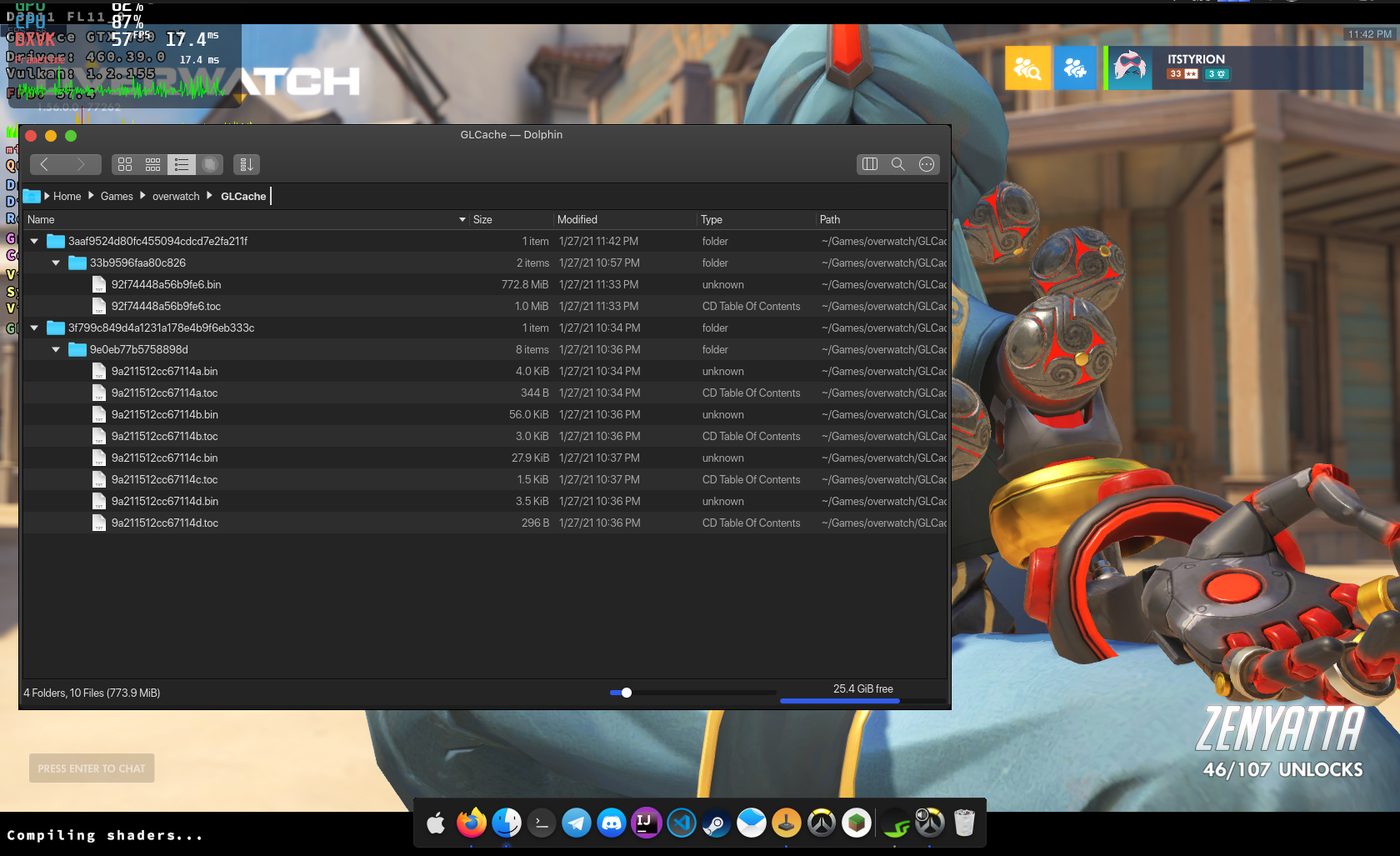
(No, these are not my normal HUD settings, I was just checking for anything strange)
Very strong lag for a few seconds, followed by a speedup and the compilation message showing for another.. 2 minutes or so.
I JUST re-ran the Lutris install script, waited for DXVK to finish compilation (took quite a while bc old i5), and restarted the game
 itsTyrion
on 27 Jan 2021
itsTyrion
on 27 Jan 2021
for me i see overwatch not shutting down properly sometimes. make sure you do not have more than one instance of it running.
darix
on 28 Jan 2021
for me i see overwatch not shutting down properly sometimes. make sure you do not have more than one instance of it running.
I'd notice a second instance because PC would melt.
Also it doesn't get much cleaner than 'Exit to Desktop'
itsTyrion
on 28 Jan 2021
I'm using Lutris to get Overwatch installed, and that uses what appears to be a nightly build of 1.7.x out of the box of DXVK.
BUT the difference is I'm on an AMD GPU, specifically the RX 580.
As a temporary work-around, switching back to DXVK 1.6 for launch causes the shaders to appear to not have to recompile every launch (at least initial testing shows this). So this appears to be a regression when it comes to AMD with newer DXVK releases.
I'm posting here instead of starting my own thread as it seems like the thing to do.
 BloodyIron
on 3 Mar 2021
BloodyIron
on 3 Mar 2021
I would like to update my previous post, the matter looks to have been related to the contents of "~/.cache/mesa_shader_cache"
It was recommended to me by /u/baryluk on reddit to empty that folder, so I did. I then switched to DXVK v1.7.3L-03f11ba in Lutris, ensuring I was using WINE version Lutris-6.0. Launched Overwatch, and the shaders complted compilation in approximately 30 seconds or so. I was getting max FPS in training room. Quit the game, re-launch, shaders compiled in a similar time (30 seconds). And the game is now working fabulously! I had only a split second of shader compilation in a match, just once.
I didn't even realise this cache folder was here, I thought the OW shader cache was elsewhere. So, if there's some way we can make this folder more known, it might help for situations like this IMO.
But yeah, as of right now, my issue has been addressed and I do not see evidence of DXVK code regression for the 1.7.3 version.
BloodyIron
on 7 Mar 2021
Related issues
 arabcian
·
3Comments
arabcian
·
3Comments
 jekstrand
·
4Comments
jekstrand
·
4Comments
 index-0
·
3Comments
index-0
·
3Comments
 SzDavidHUN
·
3Comments
SzDavidHUN
·
3Comments
 mozo78
·
5Comments
mozo78
·
5Comments
Most helpful comment
I'm using Lutris to get Overwatch installed, and that uses what appears to be a nightly build of 1.7.x out of the box of DXVK.
BUT the difference is I'm on an AMD GPU, specifically the RX 580.
As a temporary work-around, switching back to DXVK 1.6 for launch causes the shaders to appear to not have to recompile every launch (at least initial testing shows this). So this appears to be a regression when it comes to AMD with newer DXVK releases.
I'm posting here instead of starting my own thread as it seems like the thing to do.