Dxvk: Wolcen: Lords of Mayhem - Rendering issues in main menu
Hello,
In general the game working well for me but when I exit from active game to the main menu there are color and rendering issues which aren't present in the initial start - only when returning to main menu from active game:

See the Player name at the lower middle, the color rainbow in the upper left corner, etc.
When I open settings and close them, I have this:

If I open them on initial start there isn't a problem and everything is working fine.
For reference, when I start the game for the first time and not played yet, the main menu looks like this:

In the log I saw the following error which I think may be a part of the problem:
warn: D3D11Device: Vertex input 'COLOR0' not defined by input layout
This problem isn't present with WineD3D.
Since the game has very long loading times I'm afraid the apitrace should be enormous but if I have to I'll try to porovide it.
Software information
Wolcen: Lords of Mayhem
System information
- GPU: GTX 1080 Ti
- Driver: 430.26
- Wine version: 4.11
- DXVK version: 1.2.3 and latest master
Log files
d3d11.log:
Wolcen_d3d11.logdxgi.log:
Wolcen_dxgi.log
 mozo78
All 26 comments
Apitrace? I can't debug the game by looking at screenshots.
warn: D3D11Device: Vertex input 'COLOR0' not defined by input layout
Could be an issue, but that's technically a game bug.
 doitsujin
on 5 Jul 2019
mozo78
on 5 Jul 2019
doitsujin
on 5 Jul 2019
mozo78
on 5 Jul 2019
Unfortunately for this apitrace I have to install Windows for it's impossible to record it on Linux. I tested the game on Windows and I saw it runs with ~150 FPS. With DXVK it runs with ~70/75. Is there any obvious reason for such a big performance gap? Usually we expect 10-15% difference.
mozo78
on 6 Jul 2019
I don't have the game so I can't comment on that, especially with so little information given (are you CPU limited? GPU limited?)
doitsujin
on 6 Jul 2019
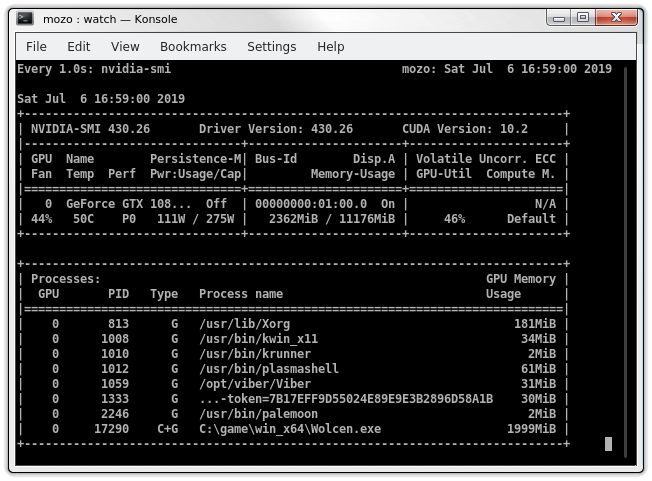
Neither CPU, neither VRAM/RAM:

mozo78
on 6 Jul 2019
46% GPU -> CPU limit. It's normal for the Windows Nvidia driver to be much faster in that case.
doitsujin
on 6 Jul 2019
I didn't understand you for english isn't my native language but if you say that's normal, ok :)
mozo78
on 6 Jul 2019
The game might not batch drawcalls and then some secret Nvidia D3D11 driver sauce kicks in. At least that seemed to be the case in Kingdom Come: Deliv., there you could enable batching via the game's console and it boosted CPU performance a lot for the AMD driver.
 aufkrawall
on 10 Jul 2019
aufkrawall
on 10 Jul 2019
How do you do that?
Unfortunately DXVK 1.3 doesn't fix both the problems.
mozo78
on 13 Jul 2019
Hmm, lowering the settings to their minimum doesn't affect the performance in any way.
mozo78
on 13 Jul 2019
How do you do that?
Found this: https://www.youtube.com/watch?v=GruK4j-Rr3c
The console key was disabled at some point in Wolcen, dunno how current situation is and if there is a way to get it working. Seems it would be crazy if this wasn't enabled by default.
aufkrawall
on 14 Jul 2019
Thank you :)
mozo78
on 14 Jul 2019
To give you an update, the game uses counters for some inexplicable reason (they are primarily a debugging and profiling feature, not something you should be using in a release build in your game...) which are not and cannot be supported by DXVK in any meaningful way. This is usually not an issue, but causes apitrace to crash so I'll have to figure out a workaround for that.
doitsujin
on 17 Jul 2019
Thank you very much for your kindness :)
mozo78
on 17 Jul 2019
@doitsujin
Can I ask you something?
You say my CPU is the bottleneck for this game. How Intel 9900K can be the bottleneck and why?
mozo78
on 20 Jul 2019
@mozo78 The fact you have an Intel 9900K has nothing to do with it. The thing restricting you from getting better performance is you aren't able to submit work to the GPU fast enough (in layman's terms.)
 Joshua-Ashton
on 20 Jul 2019
Joshua-Ashton
on 20 Jul 2019
Thank you, Josh :)
Do you know what may be the reason?
mozo78
on 20 Jul 2019
Not off the top of my head, no.
Joshua-Ashton
on 20 Jul 2019
I see. Thank you.
mozo78
on 20 Jul 2019
I tried the latest game version 1.1.5 with DXVK 1.3.2 but the problem is still here.
mozo78
on 8 Aug 2019
I worked around the counter problem with the apitrace, but I cannot reproduce the issue. There are also no Vulkan validation errors.
doitsujin
on 23 Aug 2019
No problem, thank you for your efforts :)
mozo78
on 23 Aug 2019
I have this issue sometimes, in menu and in game. Usually in game on first load when disk activity is high. Just need restart the game and issue goes away. Can be a game bug or some synchronization issue.
 lieff
on 12 Nov 2019
lieff
on 12 Nov 2019
Not have bug in menu but have see on Nvidia Driver sometimes player is invisible or monsters.
DXVK : 1.4.5
Driver Nvida : 435.21
GPU : RTX 2070
 liberodark
on 3 Dec 2019
liberodark
on 3 Dec 2019
@liberodark Try updating your graphics driver first.
 K0bin
on 3 Dec 2019
K0bin
on 3 Dec 2019
Problem apparently solved itself.
doitsujin
on 31 Mar 2020
Related issues
mozo78
·
5Comments
 torokati44
·
4Comments
torokati44
·
4Comments
 AuroransSolis
·
3Comments
AuroransSolis
·
3Comments
 t14462
·
4Comments
t14462
·
4Comments
 jekstrand
·
4Comments
jekstrand
·
4Comments