Dxvk: Overwatch crashes immediately when opening
(This is a cross--post with the Lutris forums. I thought it would be fine if I reported heree too)
So. I'm trying to use Overwatch with Lutris. I can open Battle.Net, but the game always crashes when I try to open it.
Software information
Overwatch, Battle.net, default from Lutris
System information
- GPU: GPU: GeForce GTX 1050 Ti
- Driver: 418.56
- Wine version: 4.6 staging
- DXVK version: 1.0
Apitrace file(s)
I ll be honest, I didn understand exactly how to use apitrace inside Wine
Log files
- d3d11.log:
info:  D3D11CoreCreateDevice: Probing D3D_FEATURE_LEVEL_11_0
info:  D3D11CoreCreateDevice: Using feature level D3D_FEATURE_LEVEL_11_0
info:  Enabled device extensions:
info:    VK_EXT_conditional_rendering
info:    VK_EXT_shader_viewport_index_layer
info:    VK_EXT_transform_feedback
info:    VK_EXT_vertex_attribute_divisor
info:    VK_KHR_dedicated_allocation
info:    VK_KHR_descriptor_update_template
info:    VK_KHR_draw_indirect_count
info:    VK_KHR_driver_properties
info:    VK_KHR_get_memory_requirements2
info:    VK_KHR_image_format_list
info:    VK_KHR_maintenance1
info:    VK_KHR_maintenance2
info:    VK_KHR_sampler_mirror_clamp_to_edge
info:    VK_KHR_shader_draw_parameters
info:    VK_KHR_swapchain
warn:  DXVK: Updating state cache version to v5
info:  DXVK: Read 0 valid state cache entries
warn:  DXVK: Creating new state cache file
info:  DXVK: Using 3 compiler threads
info:  D3D11CoreCreateDevice: Probing D3D_FEATURE_LEVEL_11_0
info:  D3D11CoreCreateDevice: Using feature level D3D_FEATURE_LEVEL_11_0
info:  Enabled device extensions:
info:    VK_EXT_conditional_rendering
info:    VK_EXT_shader_viewport_index_layer
info:    VK_EXT_transform_feedback
info:    VK_EXT_vertex_attribute_divisor
info:    VK_KHR_dedicated_allocation
info:    VK_KHR_descriptor_update_template
info:    VK_KHR_draw_indirect_count
info:    VK_KHR_driver_properties
info:    VK_KHR_get_memory_requirements2
info:    VK_KHR_image_format_list
info:    VK_KHR_maintenance1
info:    VK_KHR_maintenance2
info:    VK_KHR_sampler_mirror_clamp_to_edge
info:    VK_KHR_shader_draw_parameters
info:    VK_KHR_swapchain
info:  DXVK: Read 0 valid state cache entries
info:  DXVK: Using 3 compiler threads
info:  D3D11CoreCreateDevice: Probing D3D_FEATURE_LEVEL_11_0
info:  D3D11CoreCreateDevice: Using feature level D3D_FEATURE_LEVEL_11_0
info:  Enabled device extensions:
info:    VK_EXT_conditional_rendering
info:    VK_EXT_shader_viewport_index_layer
info:    VK_EXT_transform_feedback
info:    VK_EXT_vertex_attribute_divisor
info:    VK_KHR_dedicated_allocation
info:    VK_KHR_descriptor_update_template
info:    VK_KHR_draw_indirect_count
info:    VK_KHR_driver_properties
info:    VK_KHR_get_memory_requirements2
info:    VK_KHR_image_format_list
info:    VK_KHR_maintenance1
info:    VK_KHR_maintenance2
info:    VK_KHR_sampler_mirror_clamp_to_edge
info:    VK_KHR_shader_draw_parameters
info:    VK_KHR_swapchain
info:  DXVK: Read 0 valid state cache entries
info:  DXVK: Using 3 compiler threads
- dxgi.log:
info:  Game: Overwatch.exe
info:  DXVK: v1.2
warn:  OpenVR: Failed to locate module
info:  Enabled instance extensions:
info:    VK_KHR_get_physical_device_properties2
info:    VK_KHR_surface
info:    VK_KHR_win32_surface
info:  GeForce GTX 1050 Ti:
info:    Driver: 418.56.0
info:    Vulkan: 1.1.95
info:    Memory Heap[0]:
info:      Size: 4096 MiB
info:      Flags: 0x1
info:      Memory Type[7]: Property Flags = 0x1
info:      Memory Type[8]: Property Flags = 0x1
info:    Memory Heap[1]:
info:      Size: 11985 MiB
info:      Flags: 0x0
info:      Memory Type[0]: Property Flags = 0x0
info:      Memory Type[1]: Property Flags = 0x0
info:      Memory Type[2]: Property Flags = 0x0
info:      Memory Type[3]: Property Flags = 0x0
info:      Memory Type[4]: Property Flags = 0x0
info:      Memory Type[5]: Property Flags = 0x0
info:      Memory Type[6]: Property Flags = 0x0
info:      Memory Type[9]: Property Flags = 0x6
info:      Memory Type[10]: Property Flags = 0xe
info:  GeForce GTX 1050 Ti:
info:    Driver: 418.56.0
info:    Vulkan: 1.1.95
info:    Memory Heap[0]:
info:      Size: 4096 MiB
info:      Flags: 0x1
info:      Memory Type[7]: Property Flags = 0x1
info:      Memory Type[8]: Property Flags = 0x1
info:    Memory Heap[1]:
info:      Size: 11985 MiB
info:      Flags: 0x0
info:      Memory Type[0]: Property Flags = 0x0
info:      Memory Type[1]: Property Flags = 0x0
info:      Memory Type[2]: Property Flags = 0x0
info:      Memory Type[3]: Property Flags = 0x0
info:      Memory Type[4]: Property Flags = 0x0
info:      Memory Type[5]: Property Flags = 0x0
info:      Memory Type[6]: Property Flags = 0x0
info:      Memory Type[9]: Property Flags = 0x6
info:      Memory Type[10]: Property Flags = 0xe
info:  DXGI: NvAPI workaround enabled, reporting AMD GPU
info:  Game: Overwatch.exe
info:  DXVK: v1.2
warn:  OpenVR: Failed to locate module
info:  Enabled instance extensions:
info:    VK_KHR_get_physical_device_properties2
info:    VK_KHR_surface
info:    VK_KHR_win32_surface
info:  GeForce GTX 1050 Ti:
info:    Driver: 418.56.0
info:    Vulkan: 1.1.95
info:    Memory Heap[0]:
info:      Size: 4096 MiB
info:      Flags: 0x1
info:      Memory Type[7]: Property Flags = 0x1
info:      Memory Type[8]: Property Flags = 0x1
info:    Memory Heap[1]:
info:      Size: 11985 MiB
info:      Flags: 0x0
info:      Memory Type[0]: Property Flags = 0x0
info:      Memory Type[1]: Property Flags = 0x0
info:      Memory Type[2]: Property Flags = 0x0
info:      Memory Type[3]: Property Flags = 0x0
info:      Memory Type[4]: Property Flags = 0x0
info:      Memory Type[5]: Property Flags = 0x0
info:      Memory Type[6]: Property Flags = 0x0
info:      Memory Type[9]: Property Flags = 0x6
info:      Memory Type[10]: Property Flags = 0xe
info:  GeForce GTX 1050 Ti:
info:    Driver: 418.56.0
info:    Vulkan: 1.1.95
info:    Memory Heap[0]:
info:      Size: 4096 MiB
info:      Flags: 0x1
info:      Memory Type[7]: Property Flags = 0x1
info:      Memory Type[8]: Property Flags = 0x1
info:    Memory Heap[1]:
info:      Size: 11985 MiB
info:      Flags: 0x0
info:      Memory Type[0]: Property Flags = 0x0
info:      Memory Type[1]: Property Flags = 0x0
info:      Memory Type[2]: Property Flags = 0x0
info:      Memory Type[3]: Property Flags = 0x0
info:      Memory Type[4]: Property Flags = 0x0
info:      Memory Type[5]: Property Flags = 0x0
info:      Memory Type[6]: Property Flags = 0x0
info:      Memory Type[9]: Property Flags = 0x6
info:      Memory Type[10]: Property Flags = 0xe
info:  DXGI: NvAPI workaround enabled, reporting AMD GPU
info:  DXGI: NvAPI workaround enabled, reporting AMD GPU
info:  Game: Overwatch.exe
info:  DXVK: v1.2
warn:  OpenVR: Failed to locate module
info:  Enabled instance extensions:
info:    VK_KHR_get_physical_device_properties2
info:    VK_KHR_surface
info:    VK_KHR_win32_surface
info:  GeForce GTX 1050 Ti:
info:    Driver: 418.56.0
info:    Vulkan: 1.1.95
info:    Memory Heap[0]:
info:      Size: 4096 MiB
info:      Flags: 0x1
info:      Memory Type[7]: Property Flags = 0x1
info:      Memory Type[8]: Property Flags = 0x1
info:    Memory Heap[1]:
info:      Size: 11985 MiB
info:      Flags: 0x0
info:      Memory Type[0]: Property Flags = 0x0
info:      Memory Type[1]: Property Flags = 0x0
info:      Memory Type[2]: Property Flags = 0x0
info:      Memory Type[3]: Property Flags = 0x0
info:      Memory Type[4]: Property Flags = 0x0
info:      Memory Type[5]: Property Flags = 0x0
info:      Memory Type[6]: Property Flags = 0x0
info:      Memory Type[9]: Property Flags = 0x6
info:      Memory Type[10]: Property Flags = 0xe
info:  GeForce GTX 1050 Ti:
info:    Driver: 418.56.0
info:    Vulkan: 1.1.95
info:    Memory Heap[0]:
info:      Size: 4096 MiB
info:      Flags: 0x1
info:      Memory Type[7]: Property Flags = 0x1
info:      Memory Type[8]: Property Flags = 0x1
info:    Memory Heap[1]:
info:      Size: 11985 MiB
info:      Flags: 0x0
info:      Memory Type[0]: Property Flags = 0x0
info:      Memory Type[1]: Property Flags = 0x0
info:      Memory Type[2]: Property Flags = 0x0
info:      Memory Type[3]: Property Flags = 0x0
info:      Memory Type[4]: Property Flags = 0x0
info:      Memory Type[5]: Property Flags = 0x0
info:      Memory Type[6]: Property Flags = 0x0
info:      Memory Type[9]: Property Flags = 0x6
info:      Memory Type[10]: Property Flags = 0xe
 OmegaOmega
All 18 comments
The game works for others with DXVK 1.2, please make sure that your Lutris configuration is correct (and disable Streaming in Battle.NET).
 doitsujin
on 14 May 2019
doitsujin
on 14 May 2019
I've been trying to adjust the settings for a while, nothing really worked.
I just noticed that the .logs I provided don't really document the errors shown by Lutris' log, so I ĺl post it here:
Running /home/marcus/.local/share/lutris/runners/wine/tkg-4.0-x86_64/bin/wine /home/marcus/Games/overwatch/drive_c/Program Files (x86)/Battle.net/Battle.net.exe --exec=launch Pro
[0514/083020.411:ERROR:network_change_notifier_win.cc(157)] WSALookupServiceBegin failed with: 8
[0514/083020.441:ERROR:gpu_process_transport_factory.cc(1031)] Lost UI shared context.
info:  Game: Battle.net.exe
info:  DXVK: v1.2
warn:  OpenVR: Failed to locate module
info:  Enabled instance extensions:
info:    VK_KHR_get_physical_device_properties2
info:    VK_KHR_surface
info:    VK_KHR_win32_surface
info:  GeForce GTX 1050 Ti:
info:    Driver: 418.56.0
info:    Vulkan: 1.1.95
info:    Memory Heap[0]:
info:      Size: 4096 MiB
info:      Flags: 0x1
info:      Memory Type[7]: Property Flags = 0x1
info:      Memory Type[8]: Property Flags = 0x1
info:    Memory Heap[1]:
info:      Size: 11985 MiB
info:      Flags: 0x0
info:      Memory Type[0]: Property Flags = 0x0
info:      Memory Type[1]: Property Flags = 0x0
info:      Memory Type[2]: Property Flags = 0x0
info:      Memory Type[3]: Property Flags = 0x0
info:      Memory Type[4]: Property Flags = 0x0
info:      Memory Type[5]: Property Flags = 0x0
info:      Memory Type[6]: Property Flags = 0x0
info:      Memory Type[9]: Property Flags = 0x6
info:      Memory Type[10]: Property Flags = 0xe
info:  D3D11CoreCreateDevice: Probing D3D_FEATURE_LEVEL_11_1
info:  D3D11CoreCreateDevice: Using feature level D3D_FEATURE_LEVEL_11_1
info:  Enabled device extensions:
info:    VK_EXT_conditional_rendering
info:    VK_EXT_shader_viewport_index_layer
info:    VK_EXT_transform_feedback
info:    VK_EXT_vertex_attribute_divisor
info:    VK_KHR_dedicated_allocation
info:    VK_KHR_descriptor_update_template
info:    VK_KHR_draw_indirect_count
info:    VK_KHR_driver_properties
info:    VK_KHR_get_memory_requirements2
info:    VK_KHR_image_format_list
info:    VK_KHR_maintenance1
info:    VK_KHR_maintenance2
info:    VK_KHR_sampler_mirror_clamp_to_edge
info:    VK_KHR_shader_draw_parameters
info:    VK_KHR_swapchain
info:  DXVK: Read 22 valid state cache entries
info:  DXVK: Using 3 compiler threads
warn:  D3D11DeviceContext::QueryInterface: Unknown interface query
warn:  b4e3c01d-e79e-4637-91b2-510e9f4c9b8f
info:  DXGI: NvAPI workaround enabled, reporting AMD GPU
err:   DXGI: CheckInterfaceSupport: Unsupported interface
err:   54ec77fa-1377-44e6-8c32-88fd5f44c84c
info:  DXGI: NvAPI workaround enabled, reporting AMD GPU
warn:  D3D11Device::GetDeviceRemovedReason: Stub
err:   D3D11DXGIResource::GetSharedHandle: Stub
warn:  D3D11Texture2D::QueryInterface: Unknown interface query
warn:  9d8e1289-d7b3-465f-8126-250e349af85d
info:  Presenter: Actual swap chain properties:
  Format:       VK_FORMAT_B8G8R8A8_UNORM
  Present mode: VK_PRESENT_MODE_IMMEDIATE_KHR
  Buffer size:  104x1
  Image count:  2
warn:  DXGI: MakeWindowAssociation: Ignoring flags
warn:  D3D11Texture2D::QueryInterface: Unknown interface query
warn:  9d8e1289-d7b3-465f-8126-250e349af85d
err:   D3D11DXGIResource::GetSharedHandle: Stub
warn:  D3D11Texture2D::QueryInterface: Unknown interface query
warn:  9d8e1289-d7b3-465f-8126-250e349af85d
info:  Presenter: Actual swap chain properties:
  Format:       VK_FORMAT_B8G8R8A8_UNORM
  Present mode: VK_PRESENT_MODE_IMMEDIATE_KHR
  Buffer size:  1200x750
  Image count:  2
warn:  DXGI: MakeWindowAssociation: Ignoring flags
warn:  D3D11Texture2D::QueryInterface: Unknown interface query
warn:  9d8e1289-d7b3-465f-8126-250e349af85d
warn:  D3D11Texture2D::QueryInterface: Unknown interface query
warn:  f8fb5c27-c6b3-4f75-a4c8-439af2ef564c
warn:  D3D11Texture2D::QueryInterface: Unknown interface query
warn:  f8fb5c27-c6b3-4f75-a4c8-439af2ef564c
warn:  D3D11Texture2D::QueryInterface: Unknown interface query
warn:  f8fb5c27-c6b3-4f75-a4c8-439af2ef564c
warn:  D3D11Texture2D::QueryInterface: Unknown interface query
warn:  f8fb5c27-c6b3-4f75-a4c8-439af2ef564c
warn:  D3D11Texture2D::QueryInterface: Unknown interface query
warn:  f8fb5c27-c6b3-4f75-a4c8-439af2ef564c
warn:  D3D11Texture2D::QueryInterface: Unknown interface query
warn:  f8fb5c27-c6b3-4f75-a4c8-439af2ef564c
warn:  D3D11Texture2D::QueryInterface: Unknown interface query
warn:  f8fb5c27-c6b3-4f75-a4c8-439af2ef564c
warn:  D3D11Texture2D::QueryInterface: Unknown interface query
warn:  f8fb5c27-c6b3-4f75-a4c8-439af2ef564c
warn:  D3D11Texture2D::QueryInterface: Unknown interface query
warn:  f8fb5c27-c6b3-4f75-a4c8-439af2ef564c
warn:  D3D11Texture2D::QueryInterface: Unknown interface query
warn:  f8fb5c27-c6b3-4f75-a4c8-439af2ef564c
warn:  D3D11Texture2D::QueryInterface: Unknown interface query
warn:  f8fb5c27-c6b3-4f75-a4c8-439af2ef564c
warn:  D3D11Texture2D::QueryInterface: Unknown interface query
warn:  f8fb5c27-c6b3-4f75-a4c8-439af2ef564c
warn:  D3D11Texture2D::QueryInterface: Unknown interface query
warn:  f8fb5c27-c6b3-4f75-a4c8-439af2ef564c
warn:  D3D11Texture2D::QueryInterface: Unknown interface query
warn:  f8fb5c27-c6b3-4f75-a4c8-439af2ef564c
warn:  D3D11Texture2D::QueryInterface: Unknown interface query
warn:  f8fb5c27-c6b3-4f75-a4c8-439af2ef564c
warn:  D3D11Texture2D::QueryInterface: Unknown interface query
warn:  f8fb5c27-c6b3-4f75-a4c8-439af2ef564c
warn:  D3D11Texture2D::QueryInterface: Unknown interface query
warn:  f8fb5c27-c6b3-4f75-a4c8-439af2ef564c
warn:  D3D11Texture2D::QueryInterface: Unknown interface query
warn:  f8fb5c27-c6b3-4f75-a4c8-439af2ef564c
warn:  D3D11Texture2D::QueryInterface: Unknown interface query
warn:  f8fb5c27-c6b3-4f75-a4c8-439af2ef564c
warn:  D3D11Texture2D::QueryInterface: Unknown interface query
warn:  f8fb5c27-c6b3-4f75-a4c8-439af2ef564c
warn:  D3D11Texture2D::QueryInterface: Unknown interface query
warn:  f8fb5c27-c6b3-4f75-a4c8-439af2ef564c
warn:  D3D11Texture2D::QueryInterface: Unknown interface query
warn:  f8fb5c27-c6b3-4f75-a4c8-439af2ef564c
warn:  D3D11Texture2D::QueryInterface: Unknown interface query
warn:  f8fb5c27-c6b3-4f75-a4c8-439af2ef564c
warn:  D3D11Texture2D::QueryInterface: Unknown interface query
warn:  f8fb5c27-c6b3-4f75-a4c8-439af2ef564c
warn:  D3D11Texture2D::QueryInterface: Unknown interface query
warn:  f8fb5c27-c6b3-4f75-a4c8-439af2ef564c
warn:  D3D11Texture2D::QueryInterface: Unknown interface query
warn:  f8fb5c27-c6b3-4f75-a4c8-439af2ef564c
warn:  D3D11Texture2D::QueryInterface: Unknown interface query
warn:  f8fb5c27-c6b3-4f75-a4c8-439af2ef564c
warn:  D3D11Texture2D::QueryInterface: Unknown interface query
warn:  f8fb5c27-c6b3-4f75-a4c8-439af2ef564c
warn:  D3D11Texture2D::QueryInterface: Unknown interface query
warn:  f8fb5c27-c6b3-4f75-a4c8-439af2ef564c
warn:  D3D11Texture2D::QueryInterface: Unknown interface query
warn:  f8fb5c27-c6b3-4f75-a4c8-439af2ef564c
info:  Presenter: Actual swap chain properties:
  Format:       VK_FORMAT_B8G8R8A8_UNORM
  Present mode: VK_PRESENT_MODE_FIFO_KHR
  Buffer size:  1200x750
  Image count:  3
[0514/083026.688:ERROR:mf_helpers.cc(14)] Error in dxva_video_decode_accelerator_win.cc on line 379
warn:  D3D11Texture2D::QueryInterface: Unknown interface query
warn:  f8fb5c27-c6b3-4f75-a4c8-439af2ef564c
warn:  D3D11Texture2D::QueryInterface: Unknown interface query
warn:  f8fb5c27-c6b3-4f75-a4c8-439af2ef564c
warn:  D3D11Texture2D::QueryInterface: Unknown interface query
warn:  f8fb5c27-c6b3-4f75-a4c8-439af2ef564c
warn:  D3D11Texture2D::QueryInterface: Unknown interface query
warn:  f8fb5c27-c6b3-4f75-a4c8-439af2ef564c
[0514/083029.558:ERROR:mf_audio_decoder.cc(713)] Unsupported codec by MfAudioDecoder: 4
[0514/083029.559:ERROR:mf_video_decoder.cc(747)] Unsupported codec by MfVideoDecoder: 6
[0514/083029.582:ERROR:mf_video_decoder.cc(747)] Unsupported codec by MfVideoDecoder: 6
warn:  D3D11Texture2D::QueryInterface: Unknown interface query
warn:  f8fb5c27-c6b3-4f75-a4c8-439af2ef564c
warn:  D3D11Texture2D::QueryInterface: Unknown interface query
warn:  f8fb5c27-c6b3-4f75-a4c8-439af2ef564c
warn:  D3D11Texture2D::QueryInterface: Unknown interface query
warn:  f8fb5c27-c6b3-4f75-a4c8-439af2ef564c
warn:  D3D11Texture2D::QueryInterface: Unknown interface query
warn:  f8fb5c27-c6b3-4f75-a4c8-439af2ef564c
Waiting on children
Waiting on children
Waiting on children
2019-05-14 08:30:34,753: Unable to read stat for process 4371
2019-05-14 08:30:34,753: Unable to read stat for process 4371
All children gone
Exit with returncode 0
OmegaOmega
on 14 May 2019
I've been trying to adjust the settings for a while, nothing really worked.
Which is why you should seek help on the Lutris channels. There is no indication whatsoever that this is a DXVK issue since it works for pretty much everyone else.
Also, please format your comments properly or attach logs as a text file, your post is unreadable.
doitsujin
on 14 May 2019
I've posted already on the Lutris forums. Since I can at least boot the game without DXVK, I thought there would be something wrong with how my computer is interacting with it
I'll post as a .log, I'm sorry
log ov.log
OmegaOmega
on 14 May 2019
That's a log from running Battle.net, not Overwatch.
doitsujin
on 14 May 2019
...huh. Indeed it is.
I've changed the Wine config directly to the Overwatch executable.. The crashes are still the same, but the log seems different
log ov2.log
OmegaOmega
on 14 May 2019
No indication as to what actually crashes since there's no stack trace in that log.
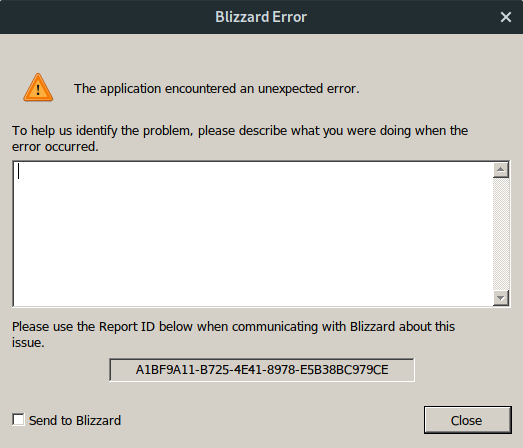
Is it even a crash (one where this wine window popus up) or does the game just close?
doitsujin
on 14 May 2019
I experienced similar crashing on Battlefield V. Solved it by deleting .dkvk-cache file in game dir from previous version. There was some fixed related to shader compiling i believe, maybe some old shaders somehow is invalid?
@OmegaOmega Acording you your log file you're loading old shaders from old cache file. Maybe just move it instead of deleting. You may want to keep it if that turns out not to be the problem here.
 halvors
on 14 May 2019
halvors
on 14 May 2019
@doitsujin I believe it is a crash, I'm sending the screenshot
Ok, took me a while, but I managed to make apitrace work. Sorta.
There are 2 "Overwatches" executables in the Overwatch folder. One directly boots into the game (Overwatch.exe), but I'm not sure if it even uses DXVK due to being way slower and showing an incorrect resolution. I tried configuring Lutris to use this executable instead, but it crashed immediately.
The other one, "Overwatch Launcher.exe", just logs to the Battle.net launcher, that actually worked. I tried to use the same profile on Lutris with the first exec
After following actually @halvors advice, both executables took longer to crash than before! That's a vicory, I guess... I managed to actually reach in the tutorial area in the first executable!
But, most importantly, I finally understood how I should use apitrace.
I managed to produce a trace of "Overwatch.exe" using the apitrace x64, but I could'n produce one "Overwatch Launcher.exe". I did copied the input from the terminal and attached to this message. It may be useless, though, since the Battle.net Launcher is a x86 executable, and I had to use the appropriate apitrace executable, and I don't know if it plays nice with the game itself, a x64 executable.
 OmegaOmega
on 14 May 2019
OmegaOmega
on 14 May 2019
Overwatch cannot be traced with apitrace. The file you uploaded is pretty much empty.
Anyway, the screenshot is also not very useful since that's from the game itself. The game really doesn't allow any debugging, which is a known issue, but that it catches even crashes is especially annoying. I won't be able to help you with this, especially since the game seems to work fine for most people so it's going to be hard to find someone who has a) debugging skills and b) can reproduce the problem.
doitsujin
on 14 May 2019
Do you have confirmations of people running this fine on DXVK 1.2 as well? Asking because of my issue with the old shader cache causing crashes on other games like Battlefield V on 1.2 but not on earlier versions. Was there a change that may have done that?
halvors
on 14 May 2019
Yes, including a video someone made.
Was there a change that may have done that?
It shouldn't really crash, but there were some changes to the whole state cache thing, so maybe some things have gone wrong there? No idea.
doitsujin
on 14 May 2019
No problems on my side with Wine 4.6, DXVK 1.2, GTX 1050 Ti, nVidia 430.09 driver and old shader cache.
 arzardk
on 15 May 2019
arzardk
on 15 May 2019
Anyway, the screenshot is also not very useful since that's from the game itself. The game really doesn't allow any debugging, which is a known issue, but that it catches even crashes is especially annoying. I won't be able to help you with this, especially since the game seems to work fine for most people so it's going to be hard to find someone who has a) debugging skills and b) can reproduce the problem.
I know, and I'm sorry I can't provide you with anything else. After like 2 fresh Manjaro installs, I give up, at least for now. Thanks, everyone
OmegaOmega
on 16 May 2019
@OmegaOmega make sure you have nvidia-utils and lib32-nvidia-utils, as well as all the dependencies listed there : https://github.com/lutris/lutris/wiki/Game:-Blizzard-App.
 Askannz
on 16 May 2019
Askannz
on 16 May 2019
I... don't really know how to really say this, but... I reinstalled Manjaro again and it... just worked.
I didn't really do anything different, just reinstalled everything, followed every tutorial in the Lutris wiki again, used the same script I used before, even installed Manjaro in the same HDD, with the exact same pendrive. I was willilng to try Overwatch one last time and it worked. Flawlessly. I really don't know what to say, besides thanking everybody here, specially doitsujin for the great work.
I guess third Manjaro install was the charm. Huh
OmegaOmega
on 16 May 2019
if you are using lutris then you need wine provided by distribution since their runtime is not sufficient as refferenced on https://github.com/lutris/lutris/issues/2103#issuecomment-488887375 maybe you installed wine after the reinstallation?
Might be also a case of halted wineserver for game running in background probably invoking wineserver -k9 or killing said process would resolve it (had this issue before).
I reinstalled Manjaro
Linux is not inconsistent => Never reinstall linux!!, fix the issue instead or it will be present again.
 Kreyren
on 18 May 2019
Kreyren
on 18 May 2019
I reinstalled Manjaro
Linux is not inconsistent => Never reinstall linux!!, fix the issue instead or it will be present again.
If you tag the "update while installing" option, it could be a slight variance between installations given they do not happen back-to-back the same day i guess :)
 SveSop
on 19 May 2019
SveSop
on 19 May 2019
Related issues
 AuroransSolis
·
3Comments
AuroransSolis
·
3Comments
 knuxyl
·
5Comments
knuxyl
·
5Comments
 fls2018
·
4Comments
fls2018
·
4Comments
 jekstrand
·
5Comments
jekstrand
·
5Comments
 linuxwrper
·
4Comments
linuxwrper
·
4Comments