Dxvk: Resident Evil 2 remake is too dark with DXVK 1.0
RESIDENT EVIL 2 / BIOHAZARD RE:2 (883710) worked fine with DXVK 0.96 but with DXVK 1.0 the image is very, very dark in-game. It reverts back to normal if I downgrade DXVK.

Software information
RESIDENT EVIL 2 / BIOHAZARD RE:2
https://store.steampowered.com/app/883710/
System information
- GPU: Nvidia GTX 1060 6GB
- Driver: 415.27
- Wine version: Proton 3.16-8 beta
- DXVK version: 1.0
Log files
 SergeyLatyshev
All 24 comments
Still works fine on my RX 480. Please bisect the issue if you think this is a DXVK regression.
Please keep in mind that there is a game bug causing the image to be too dark on some systems when running above 60 FPS.
 doitsujin
on 9 Mar 2019
doitsujin
on 9 Mar 2019
I don't have 60 FPS. What is "bisect the issue"?
SergeyLatyshev
on 9 Mar 2019
https://git-scm.com/docs/git-bisect
In any case, I cannot reproduce the problem.
doitsujin
on 9 Mar 2019
So, what should I do with 'git bisect'?
SergeyLatyshev
on 9 Mar 2019
You need to bisect it and test different versions of DXVK.
 L-as
on 9 Mar 2019
L-as
on 9 Mar 2019
So, I have to compile them? I tried to compile DXVK once and failed. Are there compiled builds between 0.96 and 1.0 available? I would test them.
SergeyLatyshev
on 9 Mar 2019
Are you using the dxvk version that is shipped with proton or have you tried dxvk by placing it next to the game? Just to eliminate proton in this equation.
 Riesi
on 9 Mar 2019
Riesi
on 9 Mar 2019
Both. It started glitching when I tried DXVK 1.0 almost two weeks ago. I had Proton 3.16-6 or 3.16-7 back then. I've been using 0.96 since that. But now Proton got updated, got DXVK 1.0, and that happened again. If I replace Proton's DXVK with v0.96, the game works fine.
SergeyLatyshev
on 9 Mar 2019
You could try setting d3d11.relaxedBarriers = False in the config file.
Although that doesn't really explain why it works fine with 1.0 for most people.
doitsujin
on 9 Mar 2019
I have bisected the issue and found https://github.com/doitsujin/dxvk/commit/915091b76b2de06d04a4de0b050001b8e7c88169 to be the breaking point. Reverting it fixes the issue on both RE2 and DMC5.
 Tk-Glitch
on 9 Mar 2019
Tk-Glitch
on 9 Mar 2019
Should be fixed as of 032625882990ae843cbdcd526f3c72087ab31888.
I don't know why using shift instructions (even arithmetic shifts, which should be equal to signed division) breaks on Nvidia, but it does, and this commit works around the issue. Thanks to @Tk-Glitch for testing.
doitsujin
on 9 Mar 2019
I can confirm I have the same issue as reported on a NVIDIA GTX 980 with latest Proton.
 mindinsomnia
on 10 Mar 2019
mindinsomnia
on 10 Mar 2019
Yes, everyone on Nvidia has this issue, just read the comment above for a fix.
doitsujin
on 10 Mar 2019
I've identified the compiler bug, and it is already fixed in the most recent Vulkan developer driver at https://developer.nvidia.com/vulkan-driver. It should be fixed in our next mainline driver release as well.
 jeffbolznv
on 13 Mar 2019
jeffbolznv
on 13 Mar 2019
arithmetic shifts, which should be equal to signed division
Arithmetic shift of negatives is not equal to division. Division rounds to zero, shift rounds to negative infinity.
 Lastique
on 16 Mar 2019
Lastique
on 16 Mar 2019
The numbers in question are guaranteed to be a multiple of 4 (and technically also guaranteed to be non-negative).
doitsujin
on 16 Mar 2019
@jeffbolznv I do not think you fixed it (in windows). See https://www.nvidia.com/en-us/geforce/forums/game-ready-drivers/13/333239/devil-may-cry-vresident-evil-2-biohazard-re2-brig/2341397/
Really, you should not play with llvm codebase if you do not know what you are doing ;)
In devil may cry 5:
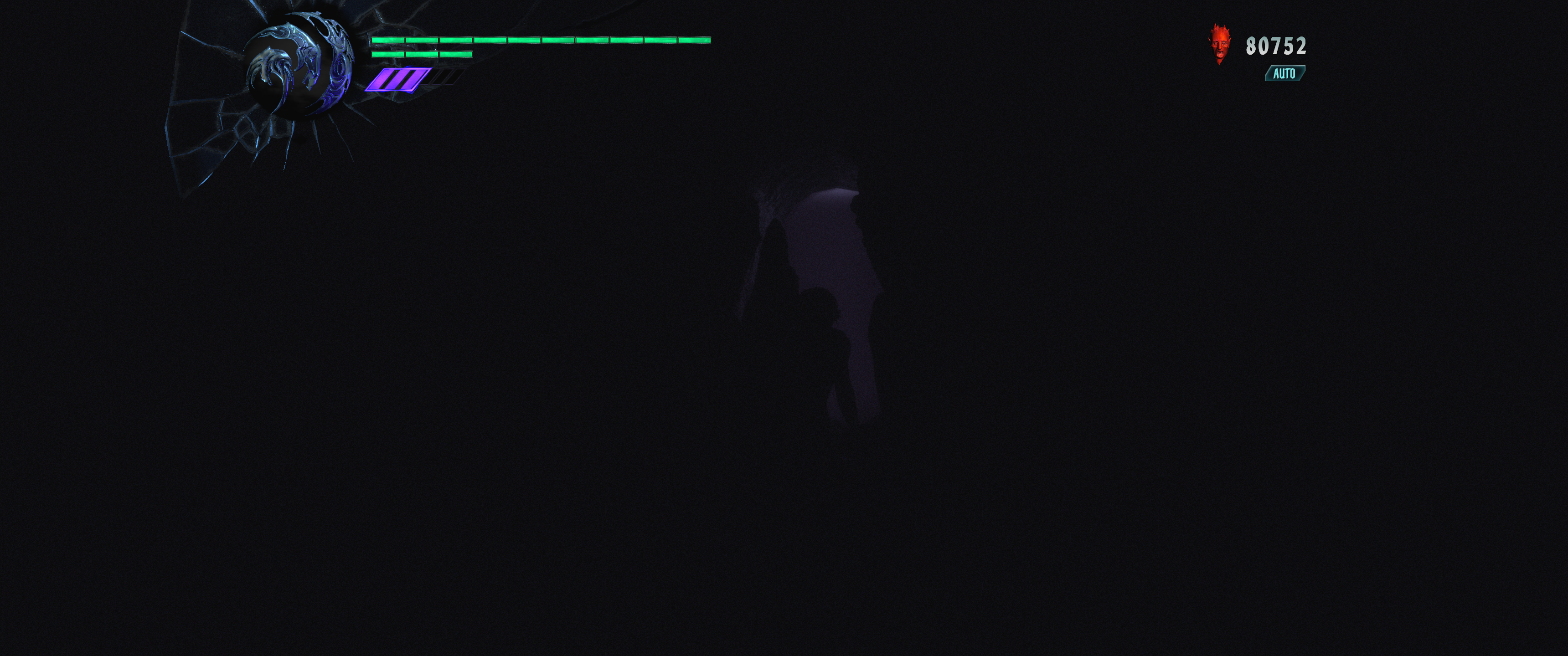
 ValZapod
on 17 Dec 2019
ValZapod
on 17 Dec 2019
Wasn't this found to be a game bug when running at low frame rates anyway?
doitsujin
on 17 Dec 2019
Low? Is 100 Hz low? I do not think so. And I have 2080 Ti, so you know, framerate is good. Also, it is only in Dirèctx 11 (directx 12 is good) and I am pretty sure it shader compiler nvidia bug...
ValZapod
on 17 Dec 2019
Well I'm sorry that I wasn't able to guess your hardware and framerate based on absolutely no information whatsoever...
doitsujin
on 18 Dec 2019
@doitsujin You are only working with Linux Directx, right)) I was asking that to Nvidia guy because bug is in Windows...
ValZapod
on 18 Dec 2019
The bugfix I made was only in the Vulkan SPIR-V compiler and had something to do with shared memory ordering. It's possible the DX compiler could have a similar issue, but it would be in a different part of the code base. But it's also likely it could be something completely different.
jeffbolznv
on 19 Dec 2019
Was that a genuine driver bug though? The game is known to rely on undefined behaviour wrt workgroup shared memory, which has also caued issues with RADV in the past.
doitsujin
on 20 Dec 2019
I don't actually know. The change I made was for a different app, where it was fixing a legitimate compiler bug, and the same fix also fixed this bug. So we never debugged this particular shader in detail.
jeffbolznv
on 20 Dec 2019
Related issues
 jekstrand
·
4Comments
jekstrand
·
4Comments
 ghost
·
5Comments
ghost
·
5Comments
 fls2018
·
4Comments
fls2018
·
4Comments
 yusdacra
·
4Comments
yusdacra
·
4Comments
 SzDavidHUN
·
3Comments
SzDavidHUN
·
3Comments
Most helpful comment
I've identified the compiler bug, and it is already fixed in the most recent Vulkan developer driver at https://developer.nvidia.com/vulkan-driver. It should be fixed in our next mainline driver release as well.