This is the place where such drops happens: https://witcher3map.com/t/#6/37.047/98.492/w=37.594,96.969
Most of the time GPU load in game is 99%, but in this place it starting to fall to 0% periodically. This depends on a view angle, while staying in front of the door :
- strait ahead - fps drops are rare
- a bit left - significant fps drops
- opposed side - less fps drops again
Software information
The Witcher 3: Wild Hunt (Steam, 292030)
Settings:
- mixed Low/Middle, HBAO+ enabled
- 1920x1080 windowed
- KDE, kwin compositor enabled
System information
- GPU: Nvidia GeForce GTX 750 Ti
- Driver: 396.54.09
- Wine version: Proton 3.16
- DXVK version: winelib 0.91+/0.92+
Apitrace file(s)
- will do, if it really needed
here is the save file instead: witcher3-dxvk-fps-drops.zip
Log files
- d3d11.log: witcher3_d3d11.log
- dxgi.log: witcher3_dxgi.log
- vulkanlog.txt: vulkanlog.txt.zip (the game crashed soon while I taking this log, but anyway)
 pchome
All 26 comments
And this doesn't happen on Windows/wined3d?
Also,
KDE, kwin compositor enabled
Please disable it. Kwin is known to cause major stuttering issues.
 doitsujin
on 12 Nov 2018
doitsujin
on 12 Nov 2018
I can't test this on Windows, but I'll try wined3d.
pchome
on 12 Nov 2018
Just tested this (can't load your save, but I just fast-travelled there). Can't reproduce, using 720p/windowed I'm getting 90-110 FPS consistently.
Maybe you're just running out of VRAM?
doitsujin
on 12 Nov 2018
wined3d: the game is a slide-show, GPU usage about 30%, so I can't tell for sure.
Kwin is known to cause major stuttering issues.
Kwin compositor is fine for me, I'm using it in combination with some other Nvidia-specific settings, as a replacement for Vsync (e.g. Vsync disabled in-game, Kwin/USLEEP/ForceCompositionPipeline enabled) -- no tearing/more smooth. But I'll double check if this will have any effect on this issue.
Maybe you're just running out of VRAM?
Probably yes, because DXVK hud almost all the time shows >2Gb mem usage, as well as gpu monitoring tool (shows VRAM is full). Despite this I have ~30fps in other locations, no such noticeable drops ever happened. I'll try to check 720/windowed later.
Currently I'm blaming multiple effects in this place, like : looking through the door, you can see the candle (fire), wind blowing(trees), fog, spoons ... But I don't noticed any big drops when in fog, or near fire, and so on.
pchome
on 12 Nov 2018
esync: disabled
custom nvapi: disabled
Kwin compositor: disabled
HBAO+: disabled/enabled - no difference
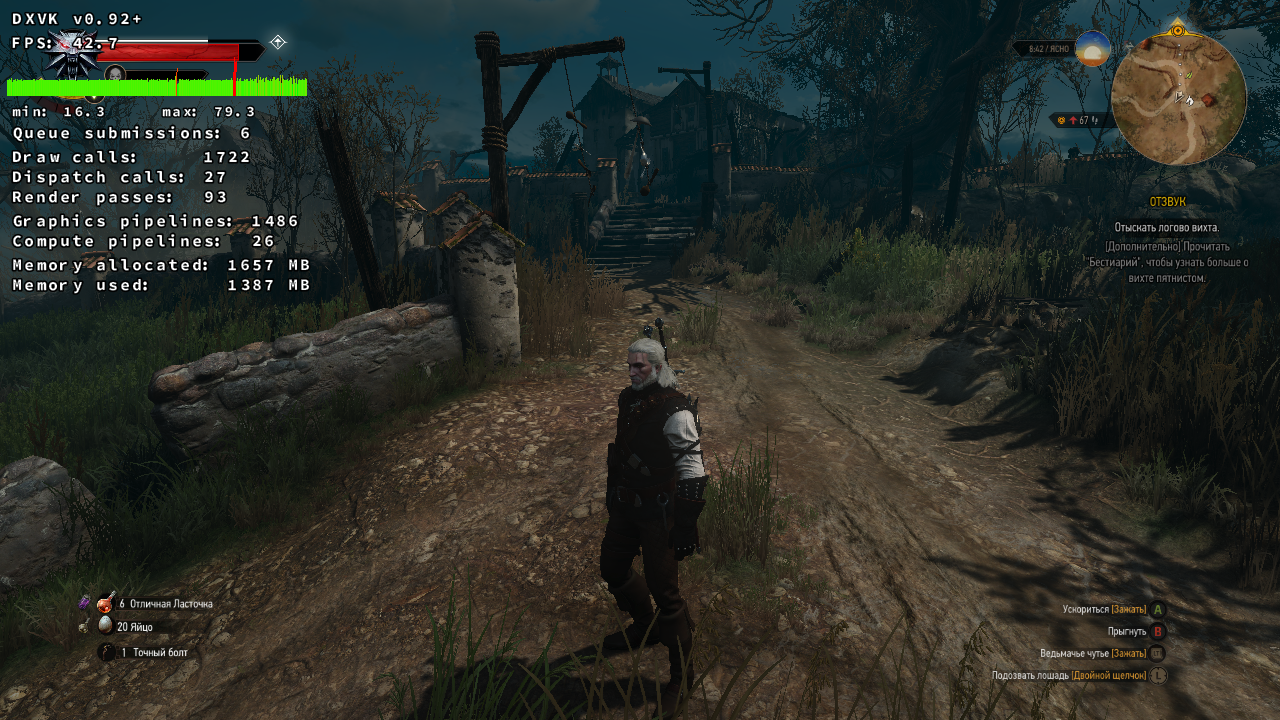
Resolution: 1280x720/windowed
Issue is still there, the only change -- is 40+ fps, due to lower resolution.


pchome
on 12 Nov 2018
No idea what's up then, can't reproduce the problem.
doitsujin
on 12 Nov 2018
Are you running a non-default kernel by any chance? People have had similar issues in the past when using PDS (and I personally have bad experience with MuQSS).
doitsujin
on 12 Nov 2018
Nothing changed when I:
- dropping Nvidia/DXVK caches
- using Proton's native DXVK: v0.90-10-g60a03a2
- dxgi.syncInterval = 2
- fps 30
- max GPU usage 78%
- drops to 0% when in mentioned point
- renaming
APEX_ClothingGPU_x64.dll
Are you running a non-default kernel by any chance?
I'm on Gentoo, so yes.
$ zcat /proc/config.gz | grep -E 'SCHED|PDS|QSS|CPU_FREQ|MQ'
EDIT: output moved to https://gist.github.com/pchome/20ffabaaf4f8a13105ce4c7e3949c1d4
pchome
on 12 Nov 2018
ForceCompositionPipeline enabled
This option caused huge FPS drops(and stutters) in Diablo III and Kingdom Come: Deliverance for me. Turn this option off and you'll see the difference.
 arzardk
on 12 Nov 2018
arzardk
on 12 Nov 2018
Modern games running in wine can suffer from priority inversion, especially when using MuQSS or running with SCHED_ISO (supported by MuQSS, i.e. by using Feral's GameMode). I think this is because wine doesn't implement setting priorities, and games use that a lot to adjust their inner scheduling. The CFQ scheduler from Linux does a pretty good job at detecting what thread needs to run next but MuQSS is much more simple (and thus _can_ out-perform CFQ but often doesn't detect what needs to run next). My own wine-proton branch seems to fix this: it implements setting priorities and CPU core hinting. This game runs smooth even under SCHED_ISO then. I'm soon going to push a new version of it rebased to wine-3.20. I can report back here if interested.
Aside from this, I too can only recommend to disable the compositor (Proton 3.16 should automatically do this when switching the game to fullscreen), and also do not force full composition pipeline: Its purpose is NOT what you think. It's just some sort of compositor with vsync built in. Its purpose is to apply scaling and rotation to screen output through the GPU. It's not some vsync-anti-stutter-magic tool. Applying the wrong tool to a problem can only make it worse in many cases. Also, there's nothing like "native GPU vsync acceleration" what is mentioned by some articles on the internet regarding "force full composition pipeline". If it was this magic tool, Nvidia would have turned it on by default. But it isn't: It uses extra GPU resources and interacts with vsync in a way that applications cannot notice.
Also, forcing usleep will steal away CPU resources from the game and reduce resource usage in multithreading. It may have very varying impact on different games. You could just unset it and the Nvidia driver will automatically decide what's best to use.
My updated wine-proton branch will include a readme file with tips for improving game experience with TW3.
PS: From my own tests in the past, renaming APEX_ClothingGPU_x64.dll does nothing. But that may depend on your GPU model.
 kakra
on 13 Nov 2018
kakra
on 13 Nov 2018
@pchome Can you try replace https://github.com/doitsujin/dxvk/blob/master/src/util/sync/sync_spinlock.h#L26 with EnterCriticalSection/LeaveCriticalSection or pthread_mutex_lock/pthread_mutex_unlock?
I think following scenario is possible:
Sleep(0) according to the windows doc says
A value of zero causes the thread to relinquish the remainder of its time slice to any other thread that is ready to run. If there are no other threads ready to run, the function returns immediately, and the thread continues execution.
So it's telling system: hey, I give up my current processor quant.
On linux different behaviour is possible depending on scheduler. Also not sure if wine do something special.
So if we are unlucky and scheduler have other threads to run, I think it's possible that dxvk can sleep in Sleep(0) up to ~10ms processor quant. And it's heavily dependent on system/scheduler/game etc and hard to reproduce.
 lieff
on 13 Nov 2018
lieff
on 13 Nov 2018
@kakra
Its purpose is NOT what you think.
:confused:
First of all: I don't ask you, people, to teach me how to gain more fps and tune my system. The only thing I may ask you -- is to test mentioned location on an Nvidia GPU.
Explanation:
- I know what are those options for, I'm informed about all impacts, and I'm using them by my own weal
- I don't care about higher FPS, ~30fps is fine for me, while I'm using controller. Settings like 1920x1080x60fps are almost unreachable for GTX 750 Ti in modern games, but I don't want to play with 640x480x60fps and minimal settings.
I can set almost everything to Ultra in TW3 and still be near 30fps with enabled compositor. I can't see any reason for me to use small resolution, Low settings and reach 50fps with tearing.
Settings:
- CPU governor: conservative / GPU mode: adaptive -- almost always enabled, do have effect on overall FPS, I do have custom scripts to set both to performance, but I don't really care to trigger them every time
- USLEEP used to smooth CPU usage, prevents stuttering on CPU-bound scenarios, do have effect on overall FPS
Option "ForceCompositionPipeline" "true"-- for tearless desktop, do have effect on overall FPS- Vsync is disabled in Nvidia Settings, prev option does the job and Kwin compositor (while do have effect on overall FPS) is mostly used for windowed games, just to smooth things w/ effects (like notifications)
- DXVK
dxgi.syncInterval=1option used to limit fps (in-game limiter disabled) and to give more load to GPU at the same time
pchome
on 13 Nov 2018
@lieff
Ok, I'll try.
pchome
on 13 Nov 2018
@pchome I think the point here is that you cannot expect support for highly exotic configurations such as yours.
Any performance testing should be conducted using a more or less default kernel with regards to task scheduling, default graphics driver settings (yes, that includes disabling ForceCompositionPipeline), disabled compositor and the performance CPU governor as mentioned here.
What CPU do you have by the way? I do get severe stuttering when forcing the game to run on two threads, but realistically, any somewhat modern CPU with 4 or more threads should handle the game just fine.
doitsujin
on 13 Nov 2018
@pchome I didn't try to teach you how to gain more fps, I just wanted to point out the many problems and impact your setup can have, with an explanation why that happens. BTW: I don't have tearing at all despite using kwin and NOT forcing full composition pipeline. If I turn vsync off in-game, I get very visible tearing (walking across the screen every 1-2 seconds).
Also, I provided a suggestion how the game could work better WITH your setup when using my Proton branch because I was experiencing similar issues. This was not a performance tuning advice. Actually, my efforts into Proton are not about maximizing the fps but minimizing frame time fluctuations while maintaining good fps - thus reducing possibility of tearing and stuttering. It was developed under CK kernel with SCHED_ISO applied to the games - so mostly your setup except your GPU settings which I personally experienced, more often than not, bad behavior with. And the general assumptions/explanations of some of these "tuning advices" are also simply not true.
Also, Proton 3.16+ should automatically disable the kwin compositor when switching to fullscreen. That is the only way for the game to get proper control over vsync and run without tearing.
@lieff Your comment is interesting, I'll look into it.
kakra
on 13 Nov 2018
@doitsujin
I can't say it's "exotic configuration", rather "tuned defaults". And I already tested w/ all possible "suspects" disabled.
Also, this issue is not like I have -10/-20fps in this location, but like an anomaly. While GPU usage is constant 99% in other locations, in mentioned one it looks like 99/0/60/99/0/50/0/... .
So, 17fps on first screenshot -- is the good shot, the real drops is down to 5-6fps. And the red strokes on the graph looks even worse, when I'm not trying to use a screenshot tool, and the game not auto-paused when loosing focus. GPU monitoring looks like "bar code" (not like solid bar).
That's why I reported this issue, because IMHO such things should not happen (-10/-20fps while GPU load is constant 99% -- is ok).
What CPU do you have by the way?
x86_64 AMD Athlon(tm) II X3 435 Processor -- 3 core, 2.9GHz
pchome
on 13 Nov 2018
@kakra
NOT forcing full composition pipeline.
Again, no one spoke about "full composition pipeline"
pchome
on 13 Nov 2018
x86_64 AMD Athlon(tm) II X3 435 Processor -- 3 core, 2.9GHz
Jesus, that CPU doesn't even remotely meet the minimum requirements for Witcher 3, which list a Phenom II X4 940, and that's for Windows. Factor in the additional CPU overhead you get on Linux and you'd probably want an X6 for the game to run smoothly.
I can reproduce the problem when simulating a 3C/3T CPU, but the same thing happens with wined3d in those circumstances, so this is not exclusive to DXVK. This seems to persist on 2C/4T configurations to a lesser degree but goes away on 4C/4T. Not sure what's going on there, but it doesn't seem to happen inside dxvk code to begin with, so there's nothing I can do about it.
So yeah, throwing better hardware at the game should solve your issue, poor performance is to be expected when running so far below the minimum requirements.
doitsujin
on 13 Nov 2018
Jesus, that CPU doesn't even remotely meet the minimum requirements for Witcher 3
This doesn't mean I can't play The Witcher 3, as well as other modern games.
As I said before: I can set everything to Ultra (except texture quality, for 2GB VRAM) and the game still playable using DXVK. And GPU/CPU load still will not even reach 100% (e.g. w/ 30fps limit).
Not sure what's going on there, but it doesn't seem to happen inside dxvk code to begin with, so there's nothing I can do about it.
Good, I just want all bugs to be fixed (It's not my issue. It was my for a 5 minutes, while I was in that area.).
pchome
on 13 Nov 2018
This doesn't mean I can't play The Witcher 3, as well as other modern games.
It does however mean that you're on your own when you experience performance issues such as this one. For me this kind of report is effectively a waste of time, especially since you didn't mention in the opening post that you're running this game on underpowered hardware.
doitsujin
on 13 Nov 2018
@pchome
@kakra
NOT forcing full composition pipeline.
Again, no one spoke about "full composition pipeline"
It doesn't mean much difference if you're playing in native resolution anyway... Actually, Proton always works in native resolution of the Xserver and scales the render surface up to the resolution - thus it happens for DXVK, too.
kakra
on 13 Nov 2018
@kakra
1920x1080 is not my deskop's native resolution.
pchome
on 13 Nov 2018
@pchome
@kakra
1920x1080 is not my deskop's native resolution.
Windowed mode is native resolution in terms of the composition pipeline.
kakra
on 13 Nov 2018
@lieff
@pchome Can you try replace https://github.com/doitsujin/dxvk/blob/master/src/util/sync/sync_spinlock.h#L26 with EnterCriticalSection/LeaveCriticalSection or pthread_mutex_lock/pthread_mutex_unlock?
I think following scenario is possible:
Sleep(0) according to the windows doc saysA value of zero causes the thread to relinquish the remainder of its time slice to any other thread that is ready to run. If there are no other threads ready to run, the function returns immediately, and the thread continues execution.
So it's telling system: hey, I give up my current processor quant.
On linux different behaviour is possible depending on scheduler. Also not sure if wine do something special.
In Wine, Sleep() calls SleepEx(), which in turn calls NtDelayExecution(). If the timeout is 0, it immediately returns after calling NtYieldExecution(). So we have some overhead because multiple stacks are setup.
I'm now going to try to shortcut this: Calling SwitchToThread() and only if that didn't yield, go the other route to prevent deadlocks. SwitchToThread() calls NtYieldExecution() directly. I'm not sure if the fallback is really needed. Calling Sleep(0) was the only way in Windows XP to yield, exactly this task can be done with SwitchToThread() since then. I don't know if DXVK is supposed to be compatible with XP...
NtYieldExecution() in turn just calls sched_yield() from glibc, or if that doesn't exist it returns with error code STATUS_NO_YIELD_PERFORMED. So my change should be semantically identical. Calling Sleep() falls back to calling select() in Linux which should yield then. Wine doesn't check the result of sched_yield() which can be a bug in non-Linux implementations.
So if we are unlucky and scheduler have other threads to run, I think it's possible that dxvk can sleep in Sleep(0) up to ~10ms processor quant. And it's heavily dependent on system/scheduler/game etc and hard to reproduce.
sched_yield() moves a thread to the end of the execution queue of threads with the same static priority. This will work different depending on whether you run with SCHED_ISO or don't. If the thread is the only thread with the highest priority, it will continue to run so we would start busy looping here if DXVK runs with too high priority (the wine-staging patchset could be an issue here).
The man page says that using sched_yield() when your thread isn't running with static priorities (read: SCHED_OTHER, the default, uses dynamic priorities), then your application design is broken. So I wonder if wine or DXVK should really do what they do here... Since wine-vanilla doesn't use static priorities, by means of the man page, it is broken by design. Hmm, any comments? In the end, DXVK only uses the Windows API and thus wine may be wrong.
BTW: That wine code is 14 years old... It may very well not being documented by that time how application design is broken if you use sched_yield() without static priorities. I wonder what the alternative would be...
kakra
on 13 Nov 2018
So, wine do not do anything special, sched_yield() is pretty much equivalent. And I fear if Sleep(0) thread _may_ sleep long time, even after lock become available.
On the other hand pthreads uses futex() and when lock become available, kernel woke up waiting threads.
lieff
on 13 Nov 2018
Wine and Windows differ in that sched_yield() can switch to "any" thread while Sleep(0) switches only to another thread on the same CPU that is runnable with a higher priority. Since wine threads usually do not run with static priority, the behavior is different. Behavior of sched_yield() with SCHED_OTHER processes is nondeterministic. But to relax your fears: Wine won't sleep any quants if the parameter is 0, it just has some overhead of 3-4 stack allocations when using Sleep().
I switched to SwitchToThread() now but it makes no noticeable difference. But removing the yield completely can cause audio drop-outs and increases GPU-bound of SOTTR from 2% to 9% here, again no visible change in fps. So it's better to go with the lower GPU-bound value, you don't need to think about it.
I experimented with changing NtYieldExecution() to use Linux sleep(0) - I noticed no difference. But in terms of the man page of sched_yield() it is probably more correct to use sleep(0). In glibc, this is a no-op, it just returns. From that perspective, sched_yield() would at least be more correct when wine threads run with static priority. An advanced patch will now check if the thread is SCHED_OTHER and act appropriate. Let's see how this behaves by testing for a while.
kakra
on 13 Nov 2018
Related issues
 torokati44
·
4Comments
torokati44
·
4Comments
 ghost
·
5Comments
ghost
·
5Comments
 index-0
·
3Comments
index-0
·
3Comments
 jekstrand
·
4Comments
jekstrand
·
4Comments
 ThePiggyBanks
·
5Comments
ThePiggyBanks
·
5Comments
Most helpful comment
Modern games running in wine can suffer from priority inversion, especially when using MuQSS or running with SCHED_ISO (supported by MuQSS, i.e. by using Feral's GameMode). I think this is because wine doesn't implement setting priorities, and games use that a lot to adjust their inner scheduling. The CFQ scheduler from Linux does a pretty good job at detecting what thread needs to run next but MuQSS is much more simple (and thus _can_ out-perform CFQ but often doesn't detect what needs to run next). My own wine-proton branch seems to fix this: it implements setting priorities and CPU core hinting. This game runs smooth even under SCHED_ISO then. I'm soon going to push a new version of it rebased to wine-3.20. I can report back here if interested.
Aside from this, I too can only recommend to disable the compositor (Proton 3.16 should automatically do this when switching the game to fullscreen), and also do not force full composition pipeline: Its purpose is NOT what you think. It's just some sort of compositor with vsync built in. Its purpose is to apply scaling and rotation to screen output through the GPU. It's not some vsync-anti-stutter-magic tool. Applying the wrong tool to a problem can only make it worse in many cases. Also, there's nothing like "native GPU vsync acceleration" what is mentioned by some articles on the internet regarding "force full composition pipeline". If it was this magic tool, Nvidia would have turned it on by default. But it isn't: It uses extra GPU resources and interacts with vsync in a way that applications cannot notice.
Also, forcing usleep will steal away CPU resources from the game and reduce resource usage in multithreading. It may have very varying impact on different games. You could just unset it and the Nvidia driver will automatically decide what's best to use.
My updated wine-proton branch will include a readme file with tips for improving game experience with TW3.
PS: From my own tests in the past, renaming APEX_ClothingGPU_x64.dll does nothing. But that may depend on your GPU model.