some stuff has incorrect colors like this one, this is supposed to be blood but it is purple.
Software information
opensuse 15.1
linux 4.16.16

System information
- GPU: rx460
- Driver: mesa 18.2.3
- Wine version: 3.17
- DXVK version: master git
 Macribit
All 33 comments
Please record and upload an apitrace and don't just ignore that section of the issue template. I can't debug your issue without it.
 doitsujin
on 30 Oct 2018
doitsujin
on 30 Oct 2018
I don't know how to debug it's a 32 bit installation, the apitrace binary from jrfonseca doesn't work. I tried compiling apitrace but it doesn't generate a exe file. I need to look this more carefully.
Macribit
on 30 Oct 2018
ok I see now there are some files to download from dropbox.
Macribit
on 30 Oct 2018
with apitrace it crashes it that suppose to happen? can't get past the loading screen.
LANoire_d3d11.log
LANoire_dxgi.log
Apitrace
LANoire.1.zip
Macribit
on 30 Oct 2018
new trace it crashes
LANoire.2.zip
Macribit
on 30 Oct 2018
Well, that's completely useless then.
doitsujin
on 31 Oct 2018
this is fixed with llvm 8 latest svn.
Macribit
on 31 Oct 2018
I'm using llvm 8 svn revision 345xxx. I think the fix hasn't been backported to other versions ¿maybe this is the patch https://reviews.llvm.org/D53160? not sure just guessing here.
Macribit
on 31 Oct 2018
yaay another game that runs flawless goes to the list. I love free software.
Macribit
on 31 Oct 2018
Thanks for reporting back. LLVM bugs are particularly annoying because of the release cycle, I have my doubt that it'll get fixed in a point release.
doitsujin
on 31 Oct 2018
I'm using svn revision 345610 to be precise (llvm 8.0.0)
Macribit
on 31 Oct 2018
Thanks for reporting back. LLVM bugs are particularly annoying because of the release cycle, I have my doubt that it'll get fixed in a point release.
thanks for the tip . Maybe I should build the full stack with a reverse patch, but for now I'll just keep and eye on this, let's hope it will get fixed in a point release
(building the full stack mesa/clang/llvm is really time consuming)
Macribit
on 31 Oct 2018
@doitsujin some of these bugs can have a workaround in mesa. it would be nice to raise the issue to mesa devs.
 libcg
on 31 Oct 2018
libcg
on 31 Oct 2018
the bug is also affected by lighting and perspective, in the night stuff will look purple but on daylight it will look pink. And looking closer or distant can trigger the bug on/off.
Macribit
on 31 Oct 2018
Sorry for hijacking this issue, but how did you get it to run in wine?
 ah-
on 31 Oct 2018
ah-
on 31 Oct 2018
Sorry for hijacking this issue, but how did you get it to run in wine?
You need to set a 32 bit prefix install dotnet35sp1 with winetricks. Then install DirectX 9 but without winetricks because the game requires directx query driver executable, but you don't want it to override the wine system libraries in wine config, then install d3dx9_43 and d3dx9_42 dll with winetricks. Download the game with steam but remove or rename all the 3rd components (executables) that install when you first start the game except the Rockstart social club.(in the game folder 3rd components folder something similar it's called)
Macribit
on 31 Oct 2018
if you are not using steam then u need to install rockstar social club, download it from the rockstar site, just make sure that when u launch the game for the first time it doesn't install dotnet again because if it does you will have to start all over again an install dot net 3.5 sp1 through winetricks again.
Macribit
on 31 Oct 2018
maybe on the weekend I can check if the bug is present on bionic beaver with padoka repo.
This is opensuse 15.1 with this repo https://build.opensuse.org/package/show/home:khnazile:video
on the repo the llvm svn revision before this was 344705, and the bug was still present. So I'm not sure if it is the patch I say because it was introduced in revision 344698.
Macribit
on 31 Oct 2018
hmm no this is not solved it improved a lot but still looking funky.
here's a similiar picture now blood looks a brown greenish

but now if I look from a different angle it looks ok

the roof looks greenish also

but now if I look from a different angle it looks ok also
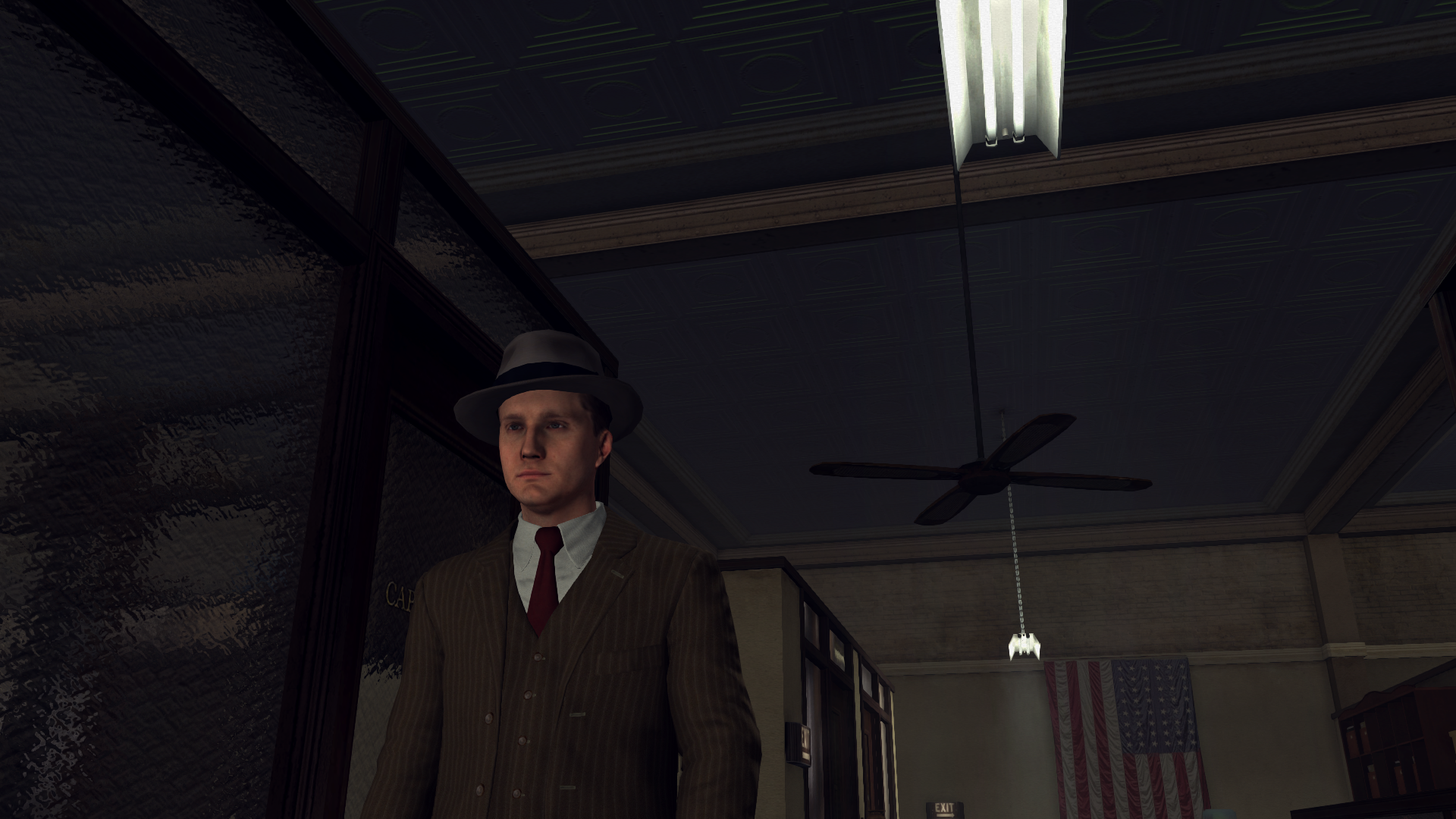
so it improved before it was a lot more funkier, it's not fixed, but something changed surely.
Macribit
on 1 Nov 2018
I swear I didn't see that problems before and I played a whole chapter to be sure. Just updated my system maybe it's something else that's triggering this?? not sure.
Macribit
on 1 Nov 2018
now if I crank textures, lighting and LOD to maximum this is what happens
roof looks the same from different perspectives (I think it still looks funky, not sure though)

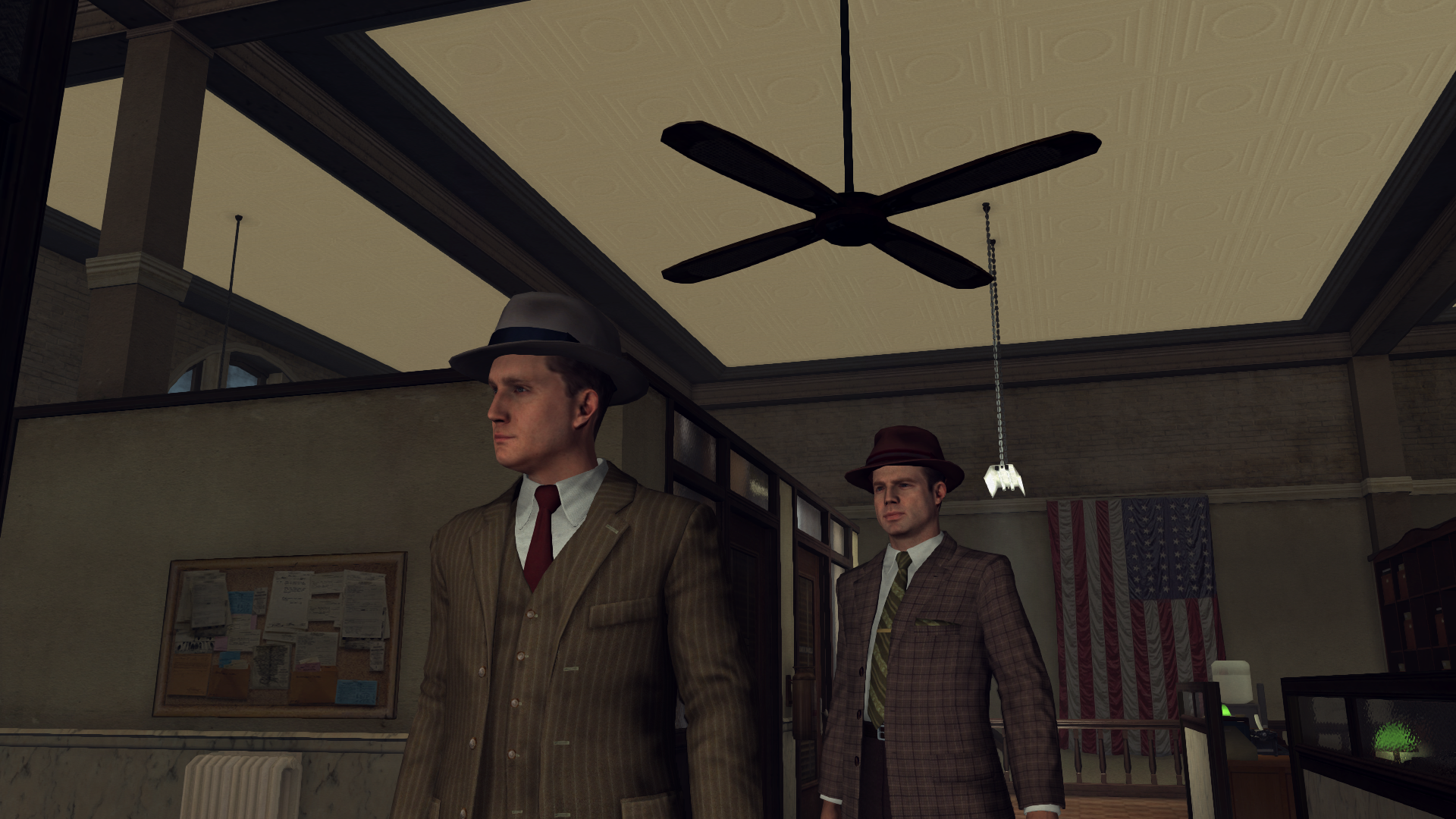
and blood looks different than before, and it looks the same when changing perspective, but again I'm not sure this is the correct color, but still imho is an improvement . At least is not some weird florescent color.

so maybe @libcg is right and this can be avoided by some mesa setting/override.
Macribit
on 1 Nov 2018
ok I think I've nailed it. I want to document this not only because someone else will find it useful but also because I was beggining to think I'm crazy,LOL (I swear at one point it was fixed)
this are the screenshots with
winetricks glsl=disabled
the roof looks ok from different perspectives


blood looks ok also


liquors shelf usually is really badly rendered also, now it' s ok

Macribit
on 3 Nov 2018
so I spend the whole day trying to reproduce the bug on ubuntu bionic beaver, but I can´t get steam to connect to the network I give up on ubuntu, for now.
Now I fired the game again on opensuse without touching anything and again it's bugged. So it seems that some software (maybe radv?) is producing sometimes good rendering and sometimes bad rendering, it doesn't matter what you do. So I was not crazy lol. Once in a while it produces correct rendering.
Macribit
on 4 Nov 2018
tried with amdvlk open driver and the bug is there. Not a radv issue. Reopening this.
Macribit
on 4 Nov 2018
I won't be able to debug this.
doitsujin
on 4 Nov 2018
ok no problem, maybe it's get fixed accidentally someday, or maybe apitrace stops crashing.
here's a screenshot with DirectX 9 for reference, this how the liquor shelf it supposed to look
w/DX11 it never look 100% correct it seems

Macribit
on 4 Nov 2018
I would like to reproduce the issue but can't get the game to run on Wine.
Did you do anything special (winetricks, 32bit or 64bit prefix, staging?) to make it work?
 K0bin
on 4 Nov 2018
K0bin
on 4 Nov 2018
in a clean 32 bit prefix .
1- install dotnet35sp1 w/winetricks.
2- install directx 9 with the executable not with winetricks.
3- Install d3d9_43 and 42 dll with winetricks
4- install rockstar social club
5- remove everything from the 3rd components folder and launch.
also you probably need Mesa 18.2 or higher.
You need to install dotnet35sp1 in a clean prefix if you install it on top of another dotnet it won't work.
I tested with several wine version 3.15,3.17,3.18. I think that with 3.19 it doesn't work.
Macribit
on 4 Nov 2018
No luck getting a trace for this.
Callstack Information:
 0x4D430003 Cant get line (dxgitrace)
 0x4D430003 Cant get line (dxgitrace)
 0x4D430003 Cant get line (lanoire)
 0x4D430003 Cant get line (lanoire)
 0x4D430003 Cant get line (lanoire)
 0x4D430003 Cant get line (lanoire)
 0x4D430003 Cant get line (lanoire)
 0x4D430003 Cant get line (lanoire)
 0x4D430003 Cant get line (lanoire)
 0x4D430003 Cant get line (lanoire)
 0x4D430003 Cant get line (kernel32)
 0x4D430003 Cant get line (kernel32)
 0x4D430003 Cant get line (kernel32)
Also tried my other method but renaming apitrace.exe to LANoire.exe causes the launcher to stop opening.
 AccountOneOff
on 6 Nov 2018
AccountOneOff
on 6 Nov 2018
No luck getting a trace for this.
Callstack Information:
 0x4D430003 Cant get line (dxgitrace)
 0x4D430003 Cant get line (dxgitrace)
 0x4D430003 Cant get line (lanoire)
 0x4D430003 Cant get line (lanoire)
 0x4D430003 Cant get line (lanoire)
 0x4D430003 Cant get line (lanoire)
 0x4D430003 Cant get line (lanoire)
 0x4D430003 Cant get line (lanoire)
 0x4D430003 Cant get line (lanoire)
 0x4D430003 Cant get line (lanoire)
 0x4D430003 Cant get line (kernel32)
 0x4D430003 Cant get line (kernel32)
 0x4D430003 Cant get line (kernel32)
Also tried my other method but renaming apitrace.exe to LANoire.exe causes the launcher to stop opening.
same happens to me. Does a windows os apitrace helps??
Macribit
on 6 Nov 2018
Got an apitrace from someone else, looking at this right now.
doitsujin
on 7 Nov 2018
Should be fixed with latest master. The issue was that the game does not initialize all its textures correctly and some contained undefined data as a result.
doitsujin
on 7 Nov 2018
can confirm fixed in master. Thank you very much!
Macribit
on 7 Nov 2018
Related issues
 ghost
·
5Comments
ghost
·
5Comments
 knuxyl
·
5Comments
knuxyl
·
5Comments
 jekstrand
·
5Comments
jekstrand
·
5Comments
 Ahmed-E-86
·
4Comments
Ahmed-E-86
·
4Comments
 index-0
·
3Comments
index-0
·
3Comments
Most helpful comment
Should be fixed with latest
master. The issue was that the game does not initialize all its textures correctly and some contained undefined data as a result.