Some games may lock up the GPU when using the RADV Vulkan driver on AMD cards, which results in a frozen system. Unless this is caused by an obvious DXVK bug (i.e. there are Vulkan validation errors when VK_INSTANCE_LAYERS=VK_LAYER_LUNARG_standard_validation is set), please do not open a new issue if you encounter one of these hangs.
Instead, please comment on this thread and:
- Important: Test the game with latest mesa-git and llvm-svn!
- Provide information about the game, including the settings used, and your GPU
- Provide information on how to reproduce the issue, including an apitrace if possible
- If possible, provide a hang report, see instructions below.
Creating a hang report
In order to obtain a hang report from RADV for a specific game, set the RADV_DEBUG environment variable and redirect stderr and stdout to a file as follows:
export RADV_TRACE_FILE=/***/radv-trace.txt
export RADV_DEBUG=allbos,syncshaders,vmfaults
export WINEDEBUG=-all
wine game.exe 2>&1 | tee hang_report.txt
For games which launch themselves through Steam, modifying the launch options may be necessary.
Important: Please make sure that you have spirv-tools installed and that the spirv-dis executable is in your PATH.
 doitsujin
All 171 comments
Witcher 3
GPU: RX 560 4GB (mesa-git , llvm-svn, dxvk-git 20180410.1fb22a6)
Settings: High presets, disabled vsync.
How to reproduce: In the beginning of the game, after Geralt wakes up from the dream and they are about to hit the road they smell ghouls. When either me or Vesemir hits the ghoul GPU hangs, not at the exact moment of hit, but soon after it. I've been able to reproduce it several times, every time my GPU hangs when i fight the ghouls.
Logs
hang report
d3d11_log
dxgi_log
My saves and in-game settings: The Witcher 3.tar.gz
 sierkov-bot
on 10 Apr 2018
sierkov-bot
on 10 Apr 2018
@rserkov : to avoid this in the log:
sh: umr: command not found
You can build umr debugger from here.
 shmerl
on 11 Apr 2018
shmerl
on 11 Apr 2018
@shmerl i just skimmed through the log since i don't understand much of what it says. Should i redo hang report with umr installed?
sierkov-bot
on 11 Apr 2018
@rserkov Not sure if umr provides all that much useful information, although it wouldn't hurt. Looks like you don't have spirv-tools installed though, getting the SPIR-V disassembly would be rather important to see if there is maybe something wrong with the shaders.
doitsujin
on 11 Apr 2018
@doitsujin redid with spirv-tools and umr installed, hang report. Please let me know if there is anything else i can do to help.
sierkov-bot
on 11 Apr 2018
Is it really a hang or a screen freeze, can you type blind into a console login and password then reboot (ie. ctrl+f1).
I have encounter a system hand/freeze with my 1080ti but discovered it was not a hang but a unrecoverable screen freeze that which you can still type during and reboot via a terminal console.
 jarrard
on 11 Apr 2018
jarrard
on 11 Apr 2018
@jarrard on AMD, this freeze of the screen after a while goes into complete suspension of the system.
 sr-tream
on 12 Apr 2018
sr-tream
on 12 Apr 2018
Assassin's Creed III
GPU: RX 560 4GB (mesa-git , llvm-5.0.1, dxvk-r952.adb1789). Same issue with llvm-git.
Settings: Normal Settings, VSync disabled
How to reproduce: I'm in Boston and if i enable the Eagle Vision, the game crash and the system hangs. Need to hard reboot. The system can hangs after to play for a long time.
Logs
hang report
d3d11_log
dxgi_log
 Odelpasso
on 12 Apr 2018
Odelpasso
on 12 Apr 2018
Star Trek Online
GPU: RX 570 8GB
mesa: git @ 6a519a157b5fe5d449444c04a0429e8a24546e9c
llvm: svn @ 330092 (commit 319534 reverted)
dxvk: git @ 31ed6e5cd34a9b3fb46d19f975f2ba21e56493be
Settings: Defaults
How to reproduce:
cd /path/to/Star\ Trek\ Online_en/Star\ Trek\ Online/Live
wine x64/GameClient.exe -Locale English -server 208.95.186.11
GPU hangs while loading login screen
Logs:
hang_report.txt
radv-trace.txt
GameClient_d3d11.log
GameClient_dxgi.log
apitrace:
STO.dxvk.trace
STO.win7.trace
Unfortunately I can't get a trace with wined3d. This trace was made with dxvk+amdvlk (which does not hang here), when replayed with RADV it hangs as normal.
Added additional apitrace from Windows 7.
 Nerellus
on 15 Apr 2018
Nerellus
on 15 Apr 2018
Okay, straight outta https://github.com/doitsujin/dxvk/issues/193, eh? :)
Here's the hang report: hang_report.txt
I ran as mentioned in the how-to (I ran TheCrew.exe from UPlay's game directory), with spirv-tools installed. I compiled {lib32-,}llvm-svn_r330096 with that amdgpu thing reverted & {lib32-,}mesa-git_101626.6a519a157b.
The only visual change was that with all that RADV debugging enabled I could see the chat thingie rendering, though everything else remained the same - there's a static image, background sounds and that's it.
Here's the output of running the game with only DXVK_DEBUG_LAYERS=1 set: consolelog.txt
DXVK version used: https://github.com/doitsujin/dxvk/commit/98b8d410168e526dba6fe1950df111a631e6a8de
 mradermaxlol
on 15 Apr 2018
mradermaxlol
on 15 Apr 2018
Overwatch hangs on llvm 6.0.0, 5.0/5.0.1/5.0.2 can be used
 GloriousEggroll
on 19 Apr 2018
GloriousEggroll
on 19 Apr 2018
Confirming Overwatch hangs on llvm 6.0.0 as well as on llvm 7.0.0-svn with mesa-git.
 tdjb
on 19 Apr 2018
tdjb
on 19 Apr 2018
Maybe will be better if we make also issues on mesa and llvm bug trackers and put links here?
In my opinion, if GPU hangs it driver problem.
 stalkerg
on 26 Apr 2018
stalkerg
on 26 Apr 2018
Event[0]
The game hangs in the first loading screen after the intro.
mesa: 18.1 (96ed371)
llvm: 7.0 (331148)
dxvk: 4c298d4
GPU: RX 570
event0_d3d11.log
event0_dxgi.log
event0-hang_report.txt
event0-radv-trace.txt
Apitrace
EDIT 7th of june: Event[0] still hangs with the hellblade mesa workaround. I've added an apitrace to reproduce the hang.
 exolyte
on 1 May 2018
exolyte
on 1 May 2018
Overwatch
Seems easier to reproduce the hang with graphics set to absolute maximum when using RADV_DEBUG. Happens on low settings as well.
GPU: RX580
Hang report
Nothing worth mentioning in _d3d11 and _dxgi logs, but here they are anyway.
 AsuMagic
on 7 May 2018
AsuMagic
on 7 May 2018
You guys having hangs should monitor your GPU temperatures while playing with either a overlay or a log to txt method. I believe some radeon cards will start to crash above 85c
jarrard
on 8 May 2018
Sapphire cards are cooled pretty well, they never reach such high temperature for me, even on 100% load (and I do monitor it, you can run something like Ksysguard in parallel, it has neat hardware monitor features where you can add any sensor to show a dynamic graph). But I didn't have GPU hangs either so far with dxvk.
Is there a way to test a hang with TW3? I can try some save and check if it's a temperature issue or not.
shmerl
on 8 May 2018
Example (99% GPU load with dxvk / The Witcher 3, 1920x1200 Sapphire Pulse Vega 56):

It maxes out around at 74°C for me.
shmerl
on 8 May 2018
Yeah looks ok, you can also run 3dmark on max for 3-4 runs to ensure its solid. Assuming the latest 3dmark stresses the GPU's enough.
jarrard
on 8 May 2018
I think cooling is OK. Would be interesting to confirm if hangs are not cooling related.
shmerl
on 8 May 2018
@jarrard Please don't spread the idea that any of this is caused by overheating GPUs. That's complete nonsense. I opened this meta-issue because I know for a fact that these problems are reproducible and are generally caused by either LLVM bugs or sometimes DXVK bugs.
doitsujin
on 8 May 2018
I've been playing TW3 for hours without a hang (on the first released version - not the up to date one, because I haven't updated it yet and TW3 is no-DRM so I didn't bother) - it didn't really get over 75°C and that's not a problem. The hang happens reproducibly on OW on low, capped fps, so it's definitively not an issue.
AsuMagic
on 8 May 2018
The witcher 3
The more FPS in the game, the less likely the system will hang. with RADV_DEBUG I get 1 fps and the game does not hang at all.
When FPS 60 everything hangs from one dog bite
I can't attach gpu hang, becaus system is not freezed with low fps
sr-tream
on 8 May 2018
@sr-tream I noticed the same thing with OW. Try to bump your settings to maximum and somehow making it render to 4k or 8k or whatever to maximize gpu usage, I guess.
AsuMagic
on 8 May 2018
@doitsujin:
I know for a fact that these problems are reproducible and are generally caused by either LLVM bugs or sometimes DXVK bugs.
Are those bugs reported to llvm? I.e. is there a chance they'll be fixed in next release?
shmerl
on 8 May 2018
@AsuMagic with 13fps hang is present.
Hanging is only visible during fights
sr-tream
on 8 May 2018
Are those bugs reported to llvm?
I cannot report bugs to LLVM directly. I can only report issues to some of the RADV developers and hope they eventually figure out what's wrong on the LLVM side of things.
doitsujin
on 8 May 2018
Overwatch again, maximum graphics (still hangs on low), RX580, this time with a proper radv-trace:
- hang_report.txt http://wyvup.com/?c=A2OEEJJ
- radv-trace.txt http://wyvup.com/?c=A20Fsub
- overwatch_d3d11.log http://wyvup.com/?c=A2LcCA3
- overwatch_dxgi.log http://wyvup.com/?c=A2TcTQF
AsuMagic
on 10 May 2018
@doitsujin
Using DXVK, the game hasn't any rendering distortions, but after a few seconds of playing the game, Assassin's Creed Unity totally crashes/hangs up my system. After that, the only thing I can do is hard reboot. Unfortunately, I absolutely could not write down the apitrace using DXVK because here does not appear the *.trace file. I assume that this is due to the strict binding of all games of Ubisoft to Uplay.
Using WineD3D, the game has heavy rendering distortions because of which I can hardly see anything in the game, and after a few seconds of playing the game crashes. Unfortunately, I absolutely could not write down the apitrace using WineD3D because here does not appear the *.trace file.
In addition, I tried to write down the apitrace on the MS Windows, but there does not appear the *.trace file too.
Software information
Assassin's Creed Unity, minimal graphics settings used.
System information
- OS: Arch Linux
- GPU: AMD Radeon HD 7770
- Driver: today's latest Mesa-git + amdgpu kernel driver
- Wine version: today's latest Wine-git + Staging-git patchset
- DXVK version: a39b9cb
Apitrace file(s)
- Unfortunately I could not write it down.
Log files
Terminal output
 Kerrung
on 23 May 2018
Kerrung
on 23 May 2018
Which bug reports on the mesa or llvm bugtracker are related to this?
 BlauerHunger
on 28 May 2018
BlauerHunger
on 28 May 2018
It can be on llvm bug tracker.
shmerl
on 28 May 2018
Witcher3 don't hanging anymore with DXVK 0.53 and DXVK_USE_PIPECOMPILER=1
(sorry for bad english)
 alexzzd
on 30 May 2018
alexzzd
on 30 May 2018
@alexzzd just so you know: you don't have to write "sorry for bad english" in your messages, it's fine - a LOT of english-speaking users on the internet are not native english speakers :)
 Yardanico
on 30 May 2018
Yardanico
on 30 May 2018
Frostpunk doesn't hang anymore either so it seems like there have been some bugfixes recently on the LLVM side of things. Then again, I never experienced a single hang in The Witcher 3.
@abba Far Cry 5 being red is an unrelated bug that also affects Nvidia, but only happens under extremely weird conditions, where just moving code around can either fix or trigger the issue when DXVK is compiled with certain compilers. @ZeroFault tried to help debug it but as of right now, we don't understand this issue at all.
doitsujin
on 30 May 2018
I've never had hangs in TW3 too for the reference. But I haven't played it extensively besides a few tests here and there.
shmerl
on 30 May 2018
Final Fantasy XIV
The game hangs when loading into the game, only when the real-time reflections setting is on.
mesa-git: b9fb2c266a
llvm-svn: 333555
dxvk: 621aed5
gpu: RX 570
apitrace: https://mega.nz/#!vMthmATI!q8wARC8A9cv6TDmk4iyF4CMPwClTDLuSF9mtpMF2J_k
ffxiv_d3dretrace_d3d11.log
ffxiv_d3dretrace_dxgi.log
ffxiv_hang_report.txt
ffxiv_radv_trace.txt
exolyte
on 1 Jun 2018
Can you guys try this patch https://patchwork.freedesktop.org/patch/226715/ ?
It fixes a GPU hang with "Seven: The Days Long Gone", at least. Note that it doesn't fix the GPU hang with Hellblade (but I have something locally that helps, not quite ready yet).
Thanks!
 hakzsam
on 1 Jun 2018
hakzsam
on 1 Jun 2018
Someone reported me that "Assassin's Creed III" is also fixed with that patch.
hakzsam
on 1 Jun 2018
@hakzsam
Can you guys try this patch https://patchwork.freedesktop.org/patch/226715/ ?
It fixes a GPU hang with "Seven: The Days Long Gone", at least. Note that it doesn't fix the GPU hang > with Hellblade (but I have something locally that helps, not quite ready yet).
Thanks!
I just tried your patch and it totally fixes this GPU hang it Assassin's Creed Unity!
Thank you and @doitsujin very much! My issue is now closed!
Kerrung
on 1 Jun 2018
@hakzsam fixes the Star Trek Online hang as well. Thanks. :smiley:
Nerellus
on 1 Jun 2018
Unfortunately, Star Trek Online still hangs the GPU for me with the patch :(
@portentum What settings do you use for STO? Also what GPU do you have?
 beniwtv
on 1 Jun 2018
beniwtv
on 1 Jun 2018
@hakzsam GTA V hang is fixed ! (Tested with LLVM 6.0.1, LLVM 7 still hangs)
 ghost
on 1 Jun 2018
ghost
on 1 Jun 2018
@beniwtv I'm using a RX 570 8GB.
Settings album / Gameprefs.Pref
wine-staging git 8df70b8 + vulkan 1.1 patches [[1](https://github.com/roderickc/wine-vulkan/commit/f1dbc18d84c52f0bc12463fbd3141a3f334431ae.patch)] [[2](https://github.com/roderickc/wine-vulkan/commit/3d57a65e98c380291cd2d704604052ff8d35243e.patch)]
llvm 7 svn r333673 + hakzsam's patch
mesa git f00fcfb + doitsujin and hakzsam's patches [[1](https://bugs.freedesktop.org/show_bug.cgi?id=106687)] [[2](https://patchwork.freedesktop.org/patch/226715/)]
dxvk git 9ff17b0
update:
I dropped all of the patches I mention above except hakzsam's fix for the hang and the game still works. So you can disregard the wine, llvm patches, and doitsujin's mesa patch.
Nerellus
on 2 Jun 2018
Wish us NVIDIA users could get a hang fix sorted out for that KCD tavern crash bug :(
jarrard
on 2 Jun 2018
@beniwtv what GPU?
hakzsam
on 2 Jun 2018
@hakzsam RX 480 8GB reference card, using Mesa-Git from yesterday with only your patch. LLVM 6.0.0. I was thinking it might be that LLVM version. Should I try with LLVM-git?
beniwtv
on 2 Jun 2018
@hakzsam thank you so much for your patch! It is realy works great for me!
But when it will be upstreamed?
Regards.
Kerrung
on 2 Jun 2018
@spinozaure
GTA V hang is fixed ! (Tested with LLVM 6.0.1, LLVM 7 still hangs)
But I haven't GPU hangs with this patch and with LLVM 7.

Kerrung
on 2 Jun 2018
Tested GTA V (Steam) with Mesa 18.1.1 (+ patch from this thread) & LLVM 6.0.0 & dxvk @ https://github.com/doitsujin/dxvk/commit/217399926d1c44d8c2532de62579bf9b23fa9adc on my R7 370 (amdgpu driver), works good. There's some incorrect rendering, though, looks like the shadows are messed up.
mradermaxlol
on 3 Jun 2018
@mradermaxlol same here and when I set shader quality to high or very high, the game crashes as soon as game play starts.
 lodriguez
on 3 Jun 2018
lodriguez
on 3 Jun 2018
@horstderheld yup. Also, setting shadows to Very High makes the framerate drop to 5-6 frames or so, though it's 60+ with High. Guess it's an issue as well :)
mradermaxlol
on 3 Jun 2018
Fix pushed https://cgit.freedesktop.org/mesa/mesa/commit/?id=06d3c65098097675a34035da3043a71061fad17b
Apparently, mesa 18.0.5 is the last 18.0 release, so you will have to wait for mesa 18.1.2 or use mesa-git.
Next step is to fix the GPU hang with Hellblade, which might also affect a bunch of games.
hakzsam
on 4 Jun 2018
Can you try this workaround https://bugs.freedesktop.org/attachment.cgi?id=140068 ? That should fix GPU hangs with, at least:
- Hellblade
- Vampyr
- FFXIV
- Tekken 7
Let me know if that works for you, thanks!
hakzsam
on 7 Jun 2018
The new Hellblade fix has eliminated GPU hangs for me in Redout! Doitsuijin showed me the patch on Discord before it was posted here which is why this reply is so fast.
I'm using Mesa 18.1.1 / LLVM 6 with both patches applied.
 jerbmega
on 7 Jun 2018
jerbmega
on 7 Jun 2018
Can confirm ffxiv has been fixed, event[0] still hangs. I've added an apitrace to my original event[0] report.
exolyte
on 7 Jun 2018
@jerbear64 I was not aware of any GPU hangs with Redout, but that's cool. :)
@exolyte Okay, I will have a look.
hakzsam
on 7 Jun 2018
Here's a new patch that fixes a rendering issue with Banished (as usual this might fix more than that).
https://patchwork.freedesktop.org/patch/228364/
hakzsam
on 8 Jun 2018
Both patches have been pushed! Please, update your mesa and let me know if you still have problems with RADV (except event[0] because I'm aware of). Thanks!
hakzsam
on 9 Jun 2018
So after compiling Mesa-GIT today, STO no longer freezes for me, huge thanks @hakzsam you're awesome!
beniwtv
on 11 Jun 2018
I'm seeing a game freeze on startup with Divinity: Original Sin 2 -- this wasn't happening several weeks ago, but I can't seem to nail down what exactly changed between now and then.
During loading the progress bar simply stops and the game must be killed via alt+tab/control-c or force quit.
RX 480
wine-staging 3.9-3.10
llvm 7 svn 334364
mesa git @ 135e4d434f
dxvk 5.1+ up to 48e0b6d68453b8c24ab27fabaf99237bd2e6a6dd from git
This hang doesn't happen when running without dxvk or frustratingly when running with RADV_DEBUG=vmfaults and RADV_TRACE_FILE set (although this kills the performance)
When I try to generate an api trace without dxvk, I end up with a trace, but it also seems to crash at some point with an access violation that doesn't happen if I run without tracing:
apitrace: warning: caught exception 0xc0000005
apitrace: flushing trace
Let me know if there's more details I can provide.
 ledbettj
on 13 Jun 2018
ledbettj
on 13 Jun 2018
Cuisine Royale hangs GPU when entering map. Game is currently free till 25th.
 TestMode1
on 18 Jun 2018
TestMode1
on 18 Jun 2018
@TestMode1 GPU, Mesa+LLVM version?
doitsujin
on 18 Jun 2018
HD7750, 18.1.2, LLVM 6
TestMode1
on 18 Jun 2018
Please test whether this still happens with latest mesa-git and LLVM 7.
doitsujin
on 18 Jun 2018
Thanks. Somehow vulkan-radeon was still at 18.1.1. 18.1.2 fixes that issue.
TestMode1
on 18 Jun 2018
Final Fantasy XIV
GPU: RX560
tested with:
- wine 3.10
- dxvk 0.54 and f519a0f
- mesa 18.1.2 (LLVM 6.0)
- mesa-git a678f40 (LLVM-svn 334974)
While the hangs when loading into the game have been fixed by mesa commit 135e4d43 and the game can be played fine for hours, there are specific areas which still reliably trigger a GPU hang when using DXVK + RADV. The attached apitrace hung my maching while replaying at least once, although it does not reliably seem to do so. Please tell me if i can provide additional information.
 Oschowa
on 19 Jun 2018
Oschowa
on 19 Jun 2018
I'm seeing a game freeze on startup with Divinity: Original Sin 2 -- this wasn't happening several weeks ago, but I can't seem to nail down what exactly changed between now and then ...
I actually discovered this only happens when running wine under Gnome with Wayland/XWayland. Game works fine under Gnome / Xorg.
ledbettj
on 23 Jun 2018
Should this bug still occur with Mesa 18.1.2 and LLVM 6.0.0? I am experiencing the GPU hang in GTA V, during the very first scene in the intro where you have to move to the guard (literally a few seconds into the story mode).
Edit: Also, what do you guys define as a GPU hang? My screen goes completely black, but my numlock/capslock are still working, signifying that the computer itself hasn't crashed. But after a few more seconds that also completely dies down and the computer is completely frozen. Is that what is being talked about here, or am I running into an unrelated issue that should have its own issue opened?
 Mushoz
on 28 Jun 2018
Mushoz
on 28 Jun 2018
@Mushoz what you describe is exactly what we are talking about here.
LLVM 6.0 does have some additional issues with GPU hangs which have been fixed in LLVM-svn, so it might be worth testing that. GTA V does not hang on my end, although it only works with Shader Quality set to "Normal".
doitsujin
on 28 Jun 2018
In that case I will patiently wait for a new version of Mesa/LLVM. I am not comfortable enough yet to compile my own drivers (recently switched to Linux), so I rely on the version in Arch's repository. Good to know it's been fixed in a future update though!
Mushoz
on 28 Jun 2018
Hi, bug #445 is resolved after upgrading to Mesa 18.1.3.
 ziabice
on 1 Jul 2018
ziabice
on 1 Jul 2018
I experienced GPU hang in Elex, but I used libllvm 6.0.0. I'll try with latest svn.
shmerl
on 2 Jul 2018
Just tested Elex with llvm trunk - no hangs so far.
OpenGL renderer string: Radeon RX Vega (VEGA10, DRM 3.25.0, 4.17.0-trunk-amd64, LLVM 7.0.0)
OpenGL core profile version string: 4.5 (Core Profile) Mesa 18.2.0-devel (git-4819da2301)
OpenGL core profile shading language version string: 4.50
Vulkan Instance Version: 1.1.73
...
Presentable Surfaces:
=====================
GPU id       : 0 (AMD RADV VEGA10 (LLVM 7.0.0))
Surface type : VK_KHR_xcb_surface
Formats:                count = 2
        B8G8R8A8_SRGB
        B8G8R8A8_UNORM
Present Modes:          count = 3
        IMMEDIATE_KHR
        MAILBOX_KHR
        FIFO_KHR
LLVM 6 is broken with Nier as well, that's a known issue - better to use LLVM 7.
doitsujin
on 3 Jul 2018
Just got another hang in Elex, this time using llvm 7, though much later in the game (when activating jetpack for the first time).
Max settings / SMAA T2x.
shmerl
on 3 Jul 2018
There was supposedly some kernel variable that could trigger GPU reset in case of hangs (amdgpu_gpu_reset?). Was it removed at some point? I can't find it in /sys/kernel/debug/dri/0.
shmerl
on 3 Jul 2018
It would be amdgpu.gpu_recovery=1 on the kernel command line. It's disabled by default though, because it does not work on non-virtual gpu's. You can see all possible parameters and their current value for any given kernel module via /sys/module/$MODULE/parameters/*
Oschowa
on 3 Jul 2018
That's may be something different. There for sure was amdgpu_gpu_reset added to debugfs (/sys/kernel/debug) before. See here.
I.e. in case of the hang, if you could access the system over ssh which is often the case, you could do something like:
cat /sys/kernel/debug/dri/0/amdgpu_gpu_reset
And it would trigger GPU reset. I don't see it for Vega.
shmerl
on 3 Jul 2018
OK, I figured. amd_gpu_reset debugfs entry was renamed to amd_gpu_recover indeed.
See here and here. And to trigger it manually, you probably need to do:
sudo cat /sys/kernel/debug/dri/0/amdgpu_gpu_recover
I'll try that next time with radv hang.
@Oschowa: why doesn't it work with non virtual GPUs though?
shmerl
on 4 Jul 2018
Because the implementation seems to be incomplete doesn't work correctly on real hardware. In my experience it never manages to get the gpu back into a useable state and you have to hard reboot anyways, thus it is disabled by default.
Oschowa
on 4 Jul 2018
I caused a hang in Elex now with that jetpack, then ssh'ed remotely and triggered GPU recover. It didn't let me restart display manager (restart was hanging), but I manged to systemctl reboot successfully, which didn't work before! So at least hard reboot was avoided.
shmerl
on 4 Jul 2018
@hakzsam, @doitsujin: If it will help, here is a save which can trigger freeze in Elex. Just activate a jetpack (double space) facing that tunnel in front, and the game will freeze.
elex_save_jetpack_freeze.zip
shmerl
on 4 Jul 2018
@shmerl does REISUB work (without resetting the GPU)?
https://en.wikipedia.org/wiki/Magic_SysRq_key
 baka0815
on 4 Jul 2018
baka0815
on 4 Jul 2018
I think I tried that - keyboard is frozen as well, so it doesn't work. It doesn't even react on NumLock.
shmerl
on 4 Jul 2018
Just tested En Garde (free itch.io game that's using Unreal Engine) and it's also causing a hang in some places.
shmerl
on 4 Jul 2018
Is there a bug report open somewhere on Mesa's bug tracker or should we create a new report over there? As far as I understand it's a Mesa bug, and not a dxvk bug. And hence discussing it over here probably isn't going to result in a fix. Just a side note: Are the other people having issues also using a Vega graphics card? Or are there also people with other cards that still have issues with the latest Mesa driver (18.1.3)? Maybe it's a Vega exclusive only?
Mushoz
on 4 Jul 2018
Not all hangs are exclusive to Vega, ffxiv hangs in certain areas on Polaris with latest mesa + llvm.
Oschowa
on 4 Jul 2018
I have Vega 56, so it's not limited to Polaris. It's more likely bugs in llvm, not Mesa though.
For amdgpu backend in llvm, see:
shmerl
on 4 Jul 2018
REISUB does work, you just have to enable it on your distro if it doesn't do it already.
Numlock doesn't work anymore because Xorg is in charge of it and is waiting for a GPU command to complete, but the R is for taking back control of the keyboard.
^ note that this is my understanding of it, I could be wrong on the details, but I know it works.
AsuMagic
on 5 Jul 2018
Debian sets /proc/sys/kernel/sysrq to 438, so it should work besides for e and i I suppose according to this. I'll give it a try again.
shmerl
on 5 Jul 2018
I set it to 502, and now it seems to work. Not sure how to check if sync + r/o mount succeeded though. It's a good method in such cases to preserve the filesystem from messing up.
shmerl
on 5 Jul 2018
@shmerl i'd just stare at the disk activity LED.
AsuMagic
on 5 Jul 2018
@shmerl I tried your Elex jetpack save file. It's running fine on my setup, no freezes. I'm running llvm-git and mesa-git from today on Polaris 10.
 edmondo
on 7 Jul 2018
edmondo
on 7 Jul 2018
@edmondo: Interesting. The freeze happens when you are faced in certain direction with jetpack active. And for me it happens on Vega.
shmerl
on 8 Jul 2018
You need another person with Vega to help test this. There are differences between polaris and vega in the driver that can give rise to unique issues per GPU architecture.
jarrard
on 8 Jul 2018
I have Vega 64, but I don't have Elex. Is there any way I can help verify I have the same issue? FYI I am experiencing occasional freezing in GTA V.
Mushoz
on 8 Jul 2018
@Mushoz: It can he hard to reproduce specific conditions like that, unless it's already very clear what the problem is.
shmerl
on 8 Jul 2018
The same problem with "Evil within 1". Game loading,but after introductory video game freezing the system on 2 second of game. While on the distortion screen of the image (all small details in small black squares). It looks like a jamb of the driver, but I did not find a similar bug in the tracker.
p.s. sorry for my english
 nickfaces
on 9 Jul 2018
nickfaces
on 9 Jul 2018
@nickfaces GPU? Driver version? LLVM version?
doitsujin
on 9 Jul 2018
RX 580
Mesa-git
LLVM 7-svn
DXVK 0.61
nickfaces
on 9 Jul 2018
@shmerl I'm not able to reproduce the hang with Elex on Vega while playing around with the jetpack. Is this consistent for you?
hakzsam
on 10 Jul 2018
@hakzsam: It happens only in certain combination, specifically when facing the exit out of that room (tunnel above) with jetpack on.
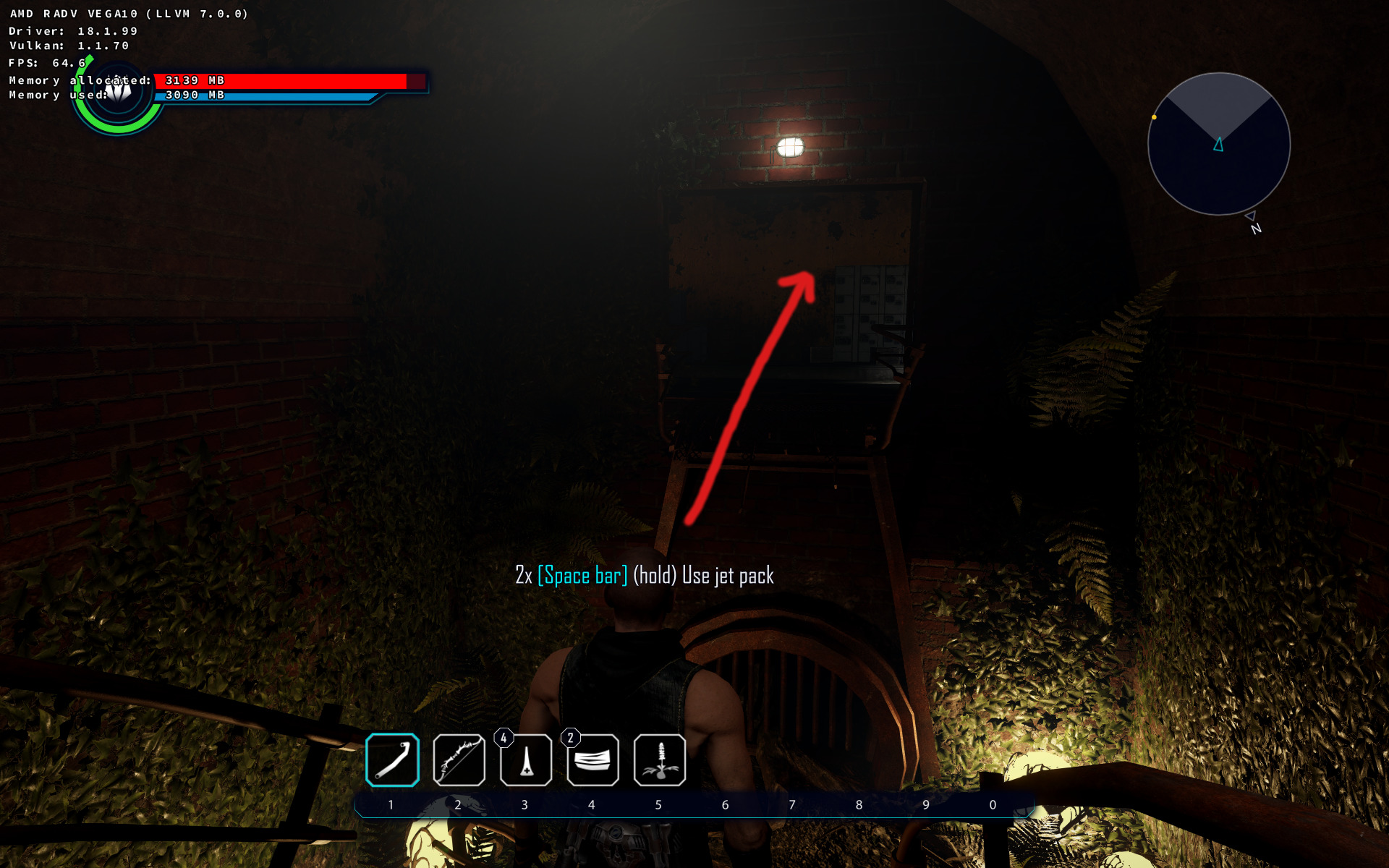
I managed to pass that place without the freeze one time. So may be try flying around that room looking in different directions.
I'll give it another try using more recent nightly llvm / Mesa master a bit later.
shmerl
on 10 Jul 2018
@shmerl I definitely can't reproduce the problem.
hakzsam
on 10 Jul 2018
Just rebuilt Mesa with most recent llvm nightly, and tested with wine master + dxvk master. No freeze anymore! So may be it was some temporary llvm regression? My previous test was using llvm nightly as well from that time.
shmerl
on 10 Jul 2018
Could be, or a random GPU hang that is hard to reproduce... The former would be better. :-)
hakzsam
on 10 Jul 2018
Though, next time please add the sha1 of all components that you build manually (or the revision number for SVN). That way I can use the same versions as you, thanks!
hakzsam
on 10 Jul 2018
@hakzsam If you want a GPU hang, I have one reproducible on my system, and is very peculiar.
Install something with PlayOnLinux, then when the client is trying to search for executables to link to your wine prefix, the system hangs.
This happens also when you select a prefix, then "Configure", then "Create a new shortcut for this virtual unit".
I've found this in my logs:
lug 07 10:55:19 accipigna kernel: amdgpu 0000:01:00.0: GPU fault detected: 147 0x04a08402
lug 07 10:55:19 accipigna kernel: amdgpu 0000:01:00.0:   VM_CONTEXT1_PROTECTION_FAULT_ADDR   0x00503094
lug 07 10:55:19 accipigna kernel: amdgpu 0000:01:00.0:   VM_CONTEXT1_PROTECTION_FAULT_STATUS 0x0A084002
lug 07 10:55:19 accipigna kernel: amdgpu 0000:01:00.0: VM fault (0x02, vmid 5) at page 5255316, read from 'TC7' (0x54433700) (132)
lug 07 10:55:19 accipigna kernel: amdgpu 0000:01:00.0: GPU fault detected: 147 0x03f8c402
lug 07 10:55:19 accipigna kernel: amdgpu 0000:01:00.0:   VM_CONTEXT1_PROTECTION_FAULT_ADDR   0x00000000
lug 07 10:55:19 accipigna kernel: amdgpu 0000:01:00.0:   VM_CONTEXT1_PROTECTION_FAULT_STATUS 0x0A084002
lug 07 10:55:19 accipigna kernel: amdgpu 0000:01:00.0: VM fault (0x02, vmid 5) at page 0, read from 'TC7' (0x54433700) (132)
lug 07 10:55:19 accipigna kernel: amdgpu 0000:01:00.0: GPU fault detected: 147 0x06a88402
lug 07 10:55:19 accipigna kernel: amdgpu 0000:01:00.0:   VM_CONTEXT1_PROTECTION_FAULT_ADDR   0x00A3F480
lug 07 10:55:19 accipigna kernel: amdgpu 0000:01:00.0:   VM_CONTEXT1_PROTECTION_FAULT_STATUS 0x0A048002
lug 07 10:55:19 accipigna kernel: amdgpu 0000:01:00.0: VM fault (0x02, vmid 5) at page 10744960, read from 'TC4' (0x54433400) (72)
lug 07 10:55:29 accipigna kernel: [drm:amdgpu_job_timedout [amdgpu]] *ERROR* ring gfx timeout, last signaled seq=6593, last emitted seq=6595
lug 07 10:55:29 accipigna kernel: [drm] IP block:gfx_v8_0 is hung!
lug 07 10:55:29 accipigna kernel: [drm] GPU recovery disabled.
lug 07 10:55:39 accipigna plasmashell[1223]: Time engine Clock skew signaled
My system specs are:
System:    Host: accipigna Kernel: 4.16.18-1-MANJARO x86_64 bits: 64 Desktop: KDE Plasma 5.13.2
           Distro: Manjaro Linux 17.1.11 Hakoila
CPU:       Topology: Quad Core model: AMD A10-7850K Radeon R7 12 Compute Cores 4C+8G bits: 64 type: MCP
           L2 cache: 2048 KiB
           Speed: 1693 MHz min/max: 1700/3700 MHz Core speeds (MHz): 1: 1696 2: 1695 3: 1696 4: 1697
Graphics:  Card-1: Advanced Micro Devices [AMD/ATI] Ellesmere [Radeon RX 470/480/570/570X/580/580X]
           driver: amdgpu v: kernel
           Display: x11 server: X.Org 1.19.6 driver: ati,modesetting unloaded: amdgpu,fbdev,radeon,vesa
           resolution: 1920x1080~60Hz
           OpenGL: renderer: Radeon RX 580 Series (POLARIS10 DRM 3.23.0 4.16.18-1-MANJARO LLVM 6.0.0)
           v: 4.5 Mesa 18.1.3
I'm actually using KDE, with the Breeze-Dark Theme, for both Gtk and Qt applications.
The pecurial part is that games run perfectly: I played Elex for 4 hours the same day I discovered the problem...
ziabice
on 10 Jul 2018
That's not related to dxvk though.
shmerl
on 10 Jul 2018
@exolyte Are you still able to reproduce the hang with event[0] by replaying the trace on your system?
hakzsam
on 11 Jul 2018
@hakzsam I cannot reproduce the hang with the trace and the game itself seems to work without hanging as well 👍
Mesa: 4a67ce8
Llvm: 336509
exolyte
on 11 Jul 2018
@AsuMagic @GloriousEggroll @tdjb I've been playing Overwatch for a couple of hours and apparently it does not hang anymore with llvm 7 and mesa-git. (I've only tried it with high settings).
GPU: RX 580
DXVK 0.63
 JorgeMoya41
on 5 Aug 2018
JorgeMoya41
on 5 Aug 2018
Added Yakuza 0 to the list of games that still hang; happens during an unskippable story event a long time after the game allows you to save, so this is a game breaker that is basically impossible to debug. The hang also happens with wined3d.
doitsujin
on 9 Aug 2018
Why Quantum Break is in the list of games that are affected by GPU hangs? Last time I tried, it didn't hang.
hakzsam
on 21 Aug 2018
I'm getting hangs randomly on GTA V. Sometimes hours into playing, and I can't even access a tty. Sound continues playing for a short while and then stops. Vega 56 with this copr on Fedora: https://copr.fedorainfracloud.org/coprs/che/mesa/
LLVM: 8.0.0-0.1.r340674
Mesa: 18.3.0-0.12.git081395e
Kernel: 4.17.17-200
This is perhaps not a fault of DXVK, my logs state:
[drm] No hardware hang detected. Did some blocks stall?
[drm:amdgpu_job_timedout [amdgpu]] ERROR ring gfx timeout...
Will the hang report metod work with this sort of lock up?
 alexwalkerinfo
on 26 Aug 2018
alexwalkerinfo
on 26 Aug 2018
@alexwalkerinfo: your kernel / mesa / llvm configuration would be good to know.
shmerl
on 26 Aug 2018
I'm having trouble getting traces with Steam Play/Proton. Including vmfaults in RADV_DEBUG casues Steam to launch a process (gameoverlay.so?) for what seems to be every frame, causing the game to run at 1-2 fps.
(All the overlays are turned off in Steam FWIW)
I have regular hangs in Quake Champions and Carmageddon Max Damage with a R9 285/Tonga using 18.2.0~rc4. Still working on confirming the hangs with current svn and git builds of LLVM/Mesa.
 whizse
on 28 Aug 2018
whizse
on 28 Aug 2018
Using the unstable padoka ppa and kernel 4.18.5-041805-generic I experience GPU hangs when playing Doom via Proton for about 30m, I'll try timing it next evening.
glxinfo:
Extended renderer info (GLX_MESA_query_renderer):
Vendor: X.Org (0x1002)
Device: Radeon RX Vega (VEGA10, DRM 3.26.0, 4.18.5-041805-generic, LLVM 8.0.
0) (0x687f)
Version: 18.3.0
Accelerated: yes
Video memory: 8176MB
Unified memory: no
Preferred profile: core (0x1)
Max core profile version: 4.5
Max compat profile version: 4.4
Max GLES1 profile version: 1.1
Max GLES[23] profile version: 3.2
edit1:
after ~25m of gameplay the GPU driver froze, sound is still playing, can access system by ssh
dmesg shows:
[aug30 21:10] [drm:amdgpu_job_timedout [amdgpu]] ERROR ring gfx timeout, last signaled seq=8328960, last emitted seq=8328962
[ +0,000004] [drm] GPU recovery disabled.
Any way to reset the GPU?
edit2: switched to xfce from default gnome DE, no crashes yet.
edit3: crashed shortly after typing above
 zaggynl
on 30 Aug 2018
zaggynl
on 30 Aug 2018
I have hangs on Quake Champions after finding a team deathmatch when the
other champions are supposed to show up in the waiting room.
this seems to be related to the champion "scalebearer". the simplest way
to reproduce is to go into customization from the main menu, then click
champions at the bottom and select scalebearer. you are now locked out of
the game as every time the game starts and tries to render scalebearer's
model it will hang
the problem is, I can't seem to reproduce the hang with syncashaders
in RADV_DEBUG. vmfaults slows the game down to like 1fps, but even if i take that
off and leave syncshaders and allbos, the game just runs fine although
the shader stutters seem worse.
I guess for now I'll play with syncshaders
here's the radv trace and wine log with RADV_DEBUG=allbos,vmfaults,
which is the only way I can get it to hang:
- radv-trace: https://gist.githubusercontent.com/Francesco149/f57bcb85a559d0961759eb4ff7cf648d/raw/d8bee4fb27a29f2eba096138876b39254c77be1a/radv-trace.txt
wine log (proper gpu hang report starts at line 10698):
https://gist.githubusercontent.com/Francesco149/7460c480c9a52862ffccf178f28a7650/raw/3658811835b2e3d955b6310ce6261a36f9b6ab96/steam-611500.logos: arch linux x86_64
- gpu: r9 270x (pitcairn)
- kernel: 4.18.5-arch1-1-ARCH
the kernel has amdgpu.si_support=1 amdgpu.cik_support=1 and
I'm running mesa-git and llvm-svm
$ glxinfo | grep -i devel
OpenGL core profile version string: 4.5 (Core Profile) Mesa 18.3.0-devel (git-2c1f249f2b)
OpenGL version string: 4.5 (Compatibility Profile) Mesa 18.3.0-devel (git-2c1f249f2b)
OpenGL ES profile version string: OpenGL ES 3.2 Mesa 18.3.0-devel (git-2c1f249f2b)
$ glxinfo | grep -i pitcairn
    Device: AMD Radeon(TM) HD 8800 Series (PITCAIRN, DRM 3.26.0, 4.18.5-arch1-1-ARCH, LLVM 8.0.0) (0x6810)
OpenGL renderer string: AMD Radeon(TM) HD 8800 Series (PITCAIRN, DRM 3.26.0, 4.18.5-arch1-1-ARCH, LLVM 8.0.0)
another weird thing I've noticed is that vulkaninfo reports llvm 6.0.1 even
though glxinfo correctly reports llvm 8
$ vulkaninfo | grep -i pitcairn
WARNING: radv is not a conformant vulkan implementation, testing use only.
                GPU id       : 0 (AMD RADV PITCAIRN (LLVM 6.0.1))
                GPU id       : 0 (AMD RADV PITCAIRN (LLVM 6.0.1))
                GPU id       : 0 (AMD RADV PITCAIRN (LLVM 6.0.1))
                GPU id       : 0 (AMD RADV PITCAIRN (LLVM 6.0.1))
                GPU id       : 0 (AMD RADV PITCAIRN (LLVM 6.0.1))
                GPU id       : 0 (AMD RADV PITCAIRN (LLVM 6.0.1))
                GPU id       : 0 (AMD RADV PITCAIRN (LLVM 6.0.1))
                GPU id       : 0 (AMD RADV PITCAIRN (LLVM 6.0.1))
GPU id       : 0 (AMD RADV PITCAIRN (LLVM 6.0.1))
                        AMD RADV PITCAIRN (LLVM 6.0.1) (ID: 0)
        deviceName     = AMD RADV PITCAIRN (LLVM 6.0.1)
by the way, for anyone who wants to debug with proton on the native steam
client, set launch options to LD_PRELOAD="" PROTON_LOG=1 DXVK_DEBUG_LAYERS=1 RADV_TRACE_FILE=~/radv-trace.txt RADV_DEBUG=allbos,syncshaders,vmfaults %command%
PROTON_LOG=1 will log wine output to ~/steam-<game id>.log
the LD_PRELOAD is a workaround for gameoverlayrenderer spam in the logs
another nice thing is adding amdgpu.gpu_recovery=1 to your kernel
boot line so you don't have to hard reboot every time amdgpu hangs
 Francesco149
on 4 Sep 2018
Francesco149
on 4 Sep 2018
@Francesco149 install vulkan-radeon-git and lib32-vulkan-radeon-git
 libcg
on 5 Sep 2018
libcg
on 5 Sep 2018
@libcg thank you, I totally forgot about that. the issue seems to be fixed so far even without syncshaders, nice!
Francesco149
on 5 Sep 2018
I've been having this issue with Path of Exile. It worked a couple of mesa versions ago (or kernel versions), either way, after a few months away from playing, it suddenly doesn't work anymore. It used to run close to flawlessly, with only slight microstutter in intense situations.
It starts loading, but as soon as the main menu is supposed to appear, the gpu hangs.
$uname -r
4.18.7-arch1-1-ARCH`

$glxinfo | grep Mesa

client glx vendor string: Mesa Project and SGI
OpenGL core profile version string: 4.5 (Core Profile) Mesa 18.3.0-devel (git-d4bf954fe6)
OpenGL version string: 4.5 (Compatibility Profile) Mesa 18.3.0-devel (git-d4bf954fe6)
OpenGL ES profile version string: OpenGL ES 3.2 Mesa 18.3.0-devel (git-d4bf954fe6)```

$vulkaninfo | grep VEGA

ERROR: [Loader Message] Code 0 : /usr/lib32/libvulkan_radeon.so: wrong ELF class: ELFCLASS32
        GPU id       : 0 (AMD RADV VEGA10 (LLVM 8.0.0))
        GPU id       : 0 (AMD RADV VEGA10 (LLVM 8.0.0))
        GPU id       : 0 (AMD RADV VEGA10 (LLVM 8.0.0))
        GPU id       : 0 (AMD RADV VEGA10 (LLVM 8.0.0))
        GPU id       : 0 (AMD RADV VEGA10 (LLVM 8.0.0))
        GPU id       : 0 (AMD RADV VEGA10 (LLVM 8.0.0))
        GPU id       : 0 (AMD RADV VEGA10 (LLVM 8.0.0))
        GPU id       : 0 (AMD RADV VEGA10 (LLVM 8.0.0))
        GPU id       : 0 (AMD RADV VEGA10 (LLVM 8.0.0))
GPU id       : 0 (AMD RADV VEGA10 (LLVM 8.0.0))
            AMD RADV VEGA10 (LLVM 8.0.0) (ID: 0)
    deviceName     = AMD RADV VEGA10 (LLVM 8.0.0)
Running the game with wine-esync 3.15 and dxvk 0.71 with vars
DXVK_LOG_LEVEL=warn
VK_INSTANCE_LAYERS=VK_LAYER_LUNARG_standard_validation
RADV_DEBUG=allbos,syncshaders,vmfaults
Tried with and without all of the above env-vars; same error.
hang_report2.txt
PathOfExile_x64_dxgi.log
radv-trace.txt
Specs:
Ryzen 1800X
Vega 64
 grahnen
on 14 Sep 2018
grahnen
on 14 Sep 2018
@grahnen Path of Exile is known to be broken at the moment. This is not specific to RADV, and was caused by a game update. Thanks for making the hang report though, I'll take a look.
doitsujin
on 14 Sep 2018
@doitsujin Ah, that's too bad. It seems to work with wined3d though. Except the age-old issues of no minimap + low framerate.
Edit: Got it to work with wined3d yesterday. I have no idea how I did it so I cant reproduce.
grahnen
on 14 Sep 2018
Would an apitrace be useful for the GPU hang issues in Yakuza 0? I've found a place where the issue occurs that is close enough to a save point that an apitrace should be viable.
 aqxa1
on 28 Sep 2018
aqxa1
on 28 Sep 2018
Yes, that should work. It would probably be best to record it on a system where it doesn't hang though.
doitsujin
on 28 Sep 2018
Okay, I've uploaded a trace here, run on a Windows system. At the end of the trace, I lingered at the place where it would cause a GPU crash with RADV.
aqxa1
on 29 Sep 2018
Thanks. I can reproduce the hang, below are the RADV trace file and hang report, can't find anything suspicious in the hanging shaders though.
doitsujin
on 29 Sep 2018
I'm getting hangs randomly on GTA V. Sometimes hours into playing, and I can't even access a tty. Sound continues playing for a short while and then stops. Vega 56 with this copr on Fedora: https://copr.fedorainfracloud.org/coprs/che/mesa/
LLVM: 8.0.0-0.1.r340674
Mesa: 18.3.0-0.12.git081395e
Kernel: 4.17.17-200This is perhaps not a fault of DXVK, my logs state:
[drm] No hardware hang detected. Did some blocks stall?
[drm:amdgpu_job_timedout [amdgpu]] _ERROR_ ring gfx timeout...Will the hang report metod work with this sort of lock up?
@alexwalkerinfo I have a pretty similar GPU hang when running GTA V as well on my Antergos system (Vega 64, LLVM 7, Mesa 18.2.1, Kernel 4.18.11).
@doitsujin Have the fixes for GTA V made it into the above LLVM, Mesa, and kernel versions?
Here are my journalctl logs:
Oct 03 18:26:18 benxiao-arch01 kernel: [drm:gfx_v9_0_priv_reg_irq [amdgpu]] *ERROR* Illegal register access in command stream
Oct 03 18:26:18 benxiao-arch01 kernel: [drm] GPU recovery disabled.
Oct 03 18:26:29 benxiao-arch01 kernel: [drm:amdgpu_job_timedout [amdgpu]] *ERROR* ring gfx timeout, last signaled seq=973179, last emitted seq=973181
Oct 03 18:26:29 benxiao-arch01 kernel: [drm] GPU recovery disabled.
This causes X to be completely unresponsive. I can sometimes still SSH in though and do stuff, but I can't reboot or shutdown the machine. It would just get stuck and I can only ctrl-c out of it.
 urbenlegend
on 4 Oct 2018
urbenlegend
on 4 Oct 2018
Just thought I'd add that Yakuza 0 doesn't have the hard lockups when using the amdvlk driver and appears to work well otherwise. There's a dual GPU issue so I can't use it with my main card yet, but single GPU users should be fine.
aqxa1
on 7 Oct 2018
This patch should fix GPU hangs with Yakuza https://patchwork.freedesktop.org/patch/255519/
Maybe that also fixes The Evil Within 1.
hakzsam
on 9 Oct 2018
@harksam I can confirm that the patch works around the problem with Yakuza 0.
aqxa1
on 10 Oct 2018
@hakzsam I tried the v2 patch from here and it doesn't appear to workaround the bug. I had earlier tried to implement Marek's suggestion myself, even by forcing PARTIAL_VS_WAVE_ON unconditionally, and it still didn't help.
aqxa1
on 11 Oct 2018
@thirdeyefunction v2 works for me on Polaris. On the other hand, AMDVLK consistently hangs on my system. Which GPU do you use?
doitsujin
on 11 Oct 2018
@doitsujin Vega 56. I do have a Polaris 12 card (Rx 550) as well, so I'll test on that too.
aqxa1
on 11 Oct 2018
Okay, Polaris 12 does not crash with the v2 patch. For the AMDVLK case, I actually can't say if it works properly there with the Vega 56, since the other bug I mentioned makes it really difficult to test (short of rearranging my system at a hardware level).
aqxa1
on 11 Oct 2018
@thirdeyefunction I can confirm that Vega hangs with v1. Just sent an updated workaround. I don't like it but I think correctness is more important than performance, at least for now. https://patchwork.freedesktop.org/patch/256048/
hakzsam
on 11 Oct 2018
@hakzsam Vega 56 actually doesn't hang with the v1 patch for me, just v2. But I'll try the new one.
EDIT: I see you probably meant v2 as the new patch looks to be essentially the same as v1.
EDIT 2: New patch works fine, and (like v1) doesn't seem to significantly impact performance with Yakuza 0. I guess the performance impact might be seen with other games.
aqxa1
on 11 Oct 2018
@thirdeyefunction Yeah, the new one is just an updated patch, mostly the same as v1. Thanks for confirming!
hakzsam
on 11 Oct 2018
Can you guys try this patch https://patchwork.freedesktop.org/patch/256437/ ? It removes an old workaround that fixed GPU hangs with Hellblade, FFXIV, Tekken 7 and Vampyr. I tested Hellblade with LLVM 6, 7 and master, no hangs so far. I would like to be sure it doesn't re-introduce GPU hangs before pushing! :)
hakzsam
on 12 Oct 2018
@AsuMagic did you ever fix your hang in Overwatch?
 L-as
on 18 Oct 2018
L-as
on 18 Oct 2018
@hakzsam I can try it tomorrow for a few games, but while your patch seems to have fixed The Evil within, I've discovered there's a hang early on in Dead Rising (literally less than 5 minutes into a new game) that acts a similar way, but your patch doesn't seem to affect. I also used to get a repeatable hang in Ace Combat Assault Horizon, and Slime Rancher (though that one was far less repeatable) which I can check tomorrow with your patches.
 dlove67
on 5 Nov 2018
dlove67
on 5 Nov 2018
@doitsujin As I mentioned in my comment last night, I'm receiving a hang in Dead Rising. This takes place after starting a new game, then moving up to the ghost guy to start a cutscene. It hangs 100% of the time for me when doing this.
I'm using a Vega64 with mesa git (and with @hakzsam's patch applied to fix hangs in the evil within, however there are no differences from vanilla wine on the hang)
Below I've attached the log from proton, as well as the radv-trace (it's 35MB so I had to post a google drive link)
steam-543460.log
radv-trace.txt
If it helps, the lines from around the freeze in journalctl are:
Nov 05 17:41:18 Ayase kernel: gmc_v9_0_process_interrupt: 98 callbacks suppressed
Nov 05 17:41:18 Ayase kernel: amdgpu 0000:45:00.0: [gfxhub] VMC page fault (src_id:0 ring:155 vmid:6 pasid:32786, for process deadrising4.exe pid 13746 thread deadrising4.exe pid 13793
)
Nov 05 17:41:18 Ayase kernel: amdgpu 0000:45:00.0: at address 0x00008000e943b000 from 27
Nov 05 17:41:18 Ayase kernel: amdgpu 0000:45:00.0: VM_L2_PROTECTION_FAULT_STATUS:0x00601536
Nov 05 17:41:28 Ayase kernel: [drm:amdgpu_job_timedout [amdgpu]] ERROR ring gfx timeout, signaled seq=248912, emitted seq=248914
dlove67
on 6 Nov 2018
Also appears to affect World of Final Fantasy.
_System:_
Linux arcade 4.20.0-rc1-651022382c7f #1 SMP PREEMPT Sun Nov 18 05:47:30 GMT 2018 x86_64 GNU/Linux (DRM-Next Patches)
OpenGL renderer string: Radeon RX Vega (VEGA10, DRM 3.27.0, 4.20.0-rc1-651022382c7f, LLVM 8.0.0)
OpenGL core profile version string: 4.5 (Core Profile) Mesa 19.0.0-devel (git-c2e3d0f163)
_Kernel output:_
[Sun Nov 18 15:19:42 2018] amdgpu 0000:03:00.0: [gfxhub] VMC page fault (src_id:0 ring:187 vmid:2 pasid:32769, for process WOFF.exe pid 896 thread WOFF.exe pid 896)
[Sun Nov 18 15:19:42 2018] amdgpu 0000:03:00.0:   in page starting at address 0x000080014003c000 from 27
[Sun Nov 18 15:19:42 2018] amdgpu 0000:03:00.0: VM_L2_PROTECTION_FAULT_STATUS:0x002C0176
[Sun Nov 18 15:19:52 2018] [drm:amdgpu_job_timedout [amdgpu]] *ERROR* ring gfx timeout, signaled seq=1897, emitted seq=1899
_Logs:_
WOFF_d3d11.log
WOFF_dxgi.log
hang_report.txt
radv-trace.txt
 Enverex
on 18 Nov 2018
Enverex
on 18 Nov 2018
Also Elder Scrolls Online.
This seemed to get stuck loading the game. Normally it loads then hangs, but with the requested debug options enabled it just seemed to load forever. Gave it 10 minutes and it just kept loading and had to eventually kill it. Unfortunately it didn't seem to create a radv-trace.txt file (despite the console output claiming that it would) so not sure how useful this one will be.
Additionally this only seems to happen with the 4.21 kernel with DRM-Next patches from Freedesktop, so I'm not sure if it's really worth considering. The crash doesn't happen on kernel 4.19. That or it's a heads up on an issue that will materialise when that kernel is released.
Kernel output:
[Sun Nov 18 22:38:09 2018] amdgpu 0000:03:00.0: [gfxhub] VMC page fault (src_id:0 ring:187 vmid:2 pasid:32769, for process eso64.exe pid 923 thread eso64.exe pid 923)
[Sun Nov 18 22:38:09 2018] amdgpu 0000:03:00.0:   in page starting at address 0x000080014003c000 from 27
[Sun Nov 18 22:38:09 2018] amdgpu 0000:03:00.0: VM_L2_PROTECTION_FAULT_STATUS:0x002C0177
[Sun Nov 18 22:38:09 2018] amdgpu 0000:03:00.0: [gfxhub] VMC page fault (src_id:0 ring:187 vmid:2 pasid:32769, for process eso64.exe pid 923 thread eso64.exe pid 923)
[Sun Nov 18 22:38:09 2018] amdgpu 0000:03:00.0:   in page starting at address 0x000080014003e000 from 27
[Sun Nov 18 22:38:09 2018] amdgpu 0000:03:00.0: VM_L2_PROTECTION_FAULT_STATUS:0x00000000
[Sun Nov 18 22:38:09 2018] amdgpu 0000:03:00.0: [gfxhub] VMC page fault (src_id:0 ring:187 vmid:2 pasid:32769, for process eso64.exe pid 923 thread eso64.exe pid 923)
[Sun Nov 18 22:38:09 2018] amdgpu 0000:03:00.0:   in page starting at address 0x000080014003d000 from 27
[Sun Nov 18 22:38:09 2018] amdgpu 0000:03:00.0: VM_L2_PROTECTION_FAULT_STATUS:0x00000000
[Sun Nov 18 22:38:09 2018] amdgpu 0000:03:00.0: [gfxhub] VMC page fault (src_id:0 ring:187 vmid:2 pasid:32769, for process eso64.exe pid 923 thread eso64.exe pid 923)
[Sun Nov 18 22:38:09 2018] amdgpu 0000:03:00.0:   in page starting at address 0x000080014003f000 from 27
[Sun Nov 18 22:38:09 2018] amdgpu 0000:03:00.0: VM_L2_PROTECTION_FAULT_STATUS:0x00000000
[Sun Nov 18 22:38:09 2018] amdgpu 0000:03:00.0: [gfxhub] VMC page fault (src_id:0 ring:187 vmid:2 pasid:32769, for process eso64.exe pid 923 thread eso64.exe pid 923)
[Sun Nov 18 22:38:09 2018] amdgpu 0000:03:00.0:   in page starting at address 0x0000800140032000 from 27
[Sun Nov 18 22:38:09 2018] amdgpu 0000:03:00.0: VM_L2_PROTECTION_FAULT_STATUS:0x00000000
[Sun Nov 18 22:38:09 2018] amdgpu 0000:03:00.0: [gfxhub] VMC page fault (src_id:0 ring:187 vmid:2 pasid:32769, for process eso64.exe pid 923 thread eso64.exe pid 923)
[Sun Nov 18 22:38:09 2018] amdgpu 0000:03:00.0:   in page starting at address 0x0000800140030000 from 27
[Sun Nov 18 22:38:09 2018] amdgpu 0000:03:00.0: VM_L2_PROTECTION_FAULT_STATUS:0x00000000
[Sun Nov 18 22:38:09 2018] amdgpu 0000:03:00.0: [gfxhub] VMC page fault (src_id:0 ring:187 vmid:2 pasid:32769, for process eso64.exe pid 923 thread eso64.exe pid 923)
[Sun Nov 18 22:38:09 2018] amdgpu 0000:03:00.0:   in page starting at address 0x0000800140033000 from 27
[Sun Nov 18 22:38:09 2018] amdgpu 0000:03:00.0: VM_L2_PROTECTION_FAULT_STATUS:0x00000000
[Sun Nov 18 22:38:09 2018] amdgpu 0000:03:00.0: [gfxhub] VMC page fault (src_id:0 ring:187 vmid:2 pasid:32769, for process eso64.exe pid 923 thread eso64.exe pid 923)
[Sun Nov 18 22:38:09 2018] amdgpu 0000:03:00.0:   in page starting at address 0x0000800140031000 from 27
[Sun Nov 18 22:38:09 2018] amdgpu 0000:03:00.0: VM_L2_PROTECTION_FAULT_STATUS:0x00000000
[Sun Nov 18 22:38:09 2018] amdgpu 0000:03:00.0: [gfxhub] VMC page fault (src_id:0 ring:187 vmid:2 pasid:32769, for process eso64.exe pid 923 thread eso64.exe pid 923)
[Sun Nov 18 22:38:09 2018] amdgpu 0000:03:00.0:   in page starting at address 0x000080014003c000 from 27
[Sun Nov 18 22:38:09 2018] amdgpu 0000:03:00.0: VM_L2_PROTECTION_FAULT_STATUS:0x00000000
[Sun Nov 18 22:38:09 2018] amdgpu 0000:03:00.0: [gfxhub] VMC page fault (src_id:0 ring:187 vmid:2 pasid:32769, for process eso64.exe pid 923 thread eso64.exe pid 923)
[Sun Nov 18 22:38:09 2018] amdgpu 0000:03:00.0:   in page starting at address 0x000080014003e000 from 27
[Sun Nov 18 22:38:09 2018] amdgpu 0000:03:00.0: VM_L2_PROTECTION_FAULT_STATUS:0x00000000
@Enverex can you try to record an apitrace that reproduces the hang in ESO and/or WoFF?
DRM-Next is known to occationally cause regressions.
doitsujin
on 19 Nov 2018
It looks like both of those are caused by DRM-Next, not just the one as I originally thought. Would you still like traces or is it just worth disregarding them for now?
Enverex
on 19 Nov 2018
Also Elder Scrolls Online.
The game did work fine some time ago when it was free: https://www.youtube.com/watch?v=Vq9jZqbitbY&t=296s
 debiangamer
on 21 Nov 2018
debiangamer
on 21 Nov 2018
As mentioned, the issue only happens on DRM-Next, so unless you're running that, you won't have issues.
Enverex
on 21 Nov 2018
Hi,
First off I want to apologize, if this is not the right thread, as I've tested multiple drivers including RADV therefore this seemed the best thread to discuss my issue.
Currently running Ubuntu 18.04.1 and trying to get AMD RADV working with my R9 280X. I got it working with a couple of games, others however simply do not start and throw me a page fault on read/write access. I've setup the games through Lutris, i.e. Origin with DVXK support and Uplay with DVXK support.
The games not working are:
- ANNO 2205 (I tried disabling cache as decribed in #686 without any success)
- AC: Origins
- A Way Out
The games that are working are:
- Battlefield V
- Fifa 19
- The Lord of the Rings Online
- AC: Black Flag
I tried the AMDVLK as well as the AMDGPU-PRO and the Mesa (AMD RADV) drivers. Getting the same error again and again. To my current knowledge this has to be an issue with my driver setup, since a friend using an NVIDIA can start at least one game ("A Way Out") without any problems using Lutris.
Also when issuing vulkaninfo for the Device Names it spits out two devices (although I only have one gpu).
max@guybrush:~ $ vulkaninfo | less | grep deviceName
WARNING: radv is not a conformant vulkan implementation, testing use only.
    deviceName     = AMD RADV TAHITI (LLVM 7.0.0)
    deviceName     = AMD Radeon HD 7900 Series
When enabling devinfo in my DVXK_HUD it shows be that the latter of the two is used, so I tried filtering by the device name to use the RADV one, but when setting DXVK_FILTER_DEVICE_NAME="AMD RADV TAHITI (LLVM 7.0.0)" it tells me that there is no adapter found and when an application then starts no devinfo is given, so it does not seem to filter the devices correctly.
Do these games not working because of the same DRM-next error? But why do they work on other gpus then? Shouldn't they be blocked too, if it's a DRM related issue?
Any help is highly appreciated.
 macskay
on 22 Nov 2018
macskay
on 22 Nov 2018
@macskay Those are probably not driver issues, AC:Origins is known not to work due to its DRM. Not sure about the other two, but A Way Out may require some tinkering with wine.
doitsujin
on 22 Nov 2018
@doitsujin Well yeah, AC:Origins I figured in the meantime, ANNO 2205 however seems to work fine with Caching disabled as stated in #686 and the wine configuration for "A Way Out" is equal to the one my friend has in Lutris. I copied his settings.
// Edit:
OK, the strangest thing just happened. My friend and I decided to switch gpus, as his seems to be working. When installing the NVIDIA nothing changed. I uninstalled all AMD drivers, installed the NVIDIAs but the problem still persisted. When switching back to AMD and reinstall AMD drivers the game "A Way Out" successfully started and we could even play in a lobby together (with the drawback, the game has a yellowish-shader but oh well). So the game does start now. Haven't tried any of the others, but it seems to be very odd nevertheless. I haven't reinstalled the game, just the drivers (for the 20th time or so)
macskay
on 22 Nov 2018
Another game with GPU hangs on Vega is Sunset Overdrive. They appear to be random, rather than at a particular location, and occur once an hour or so:
[16034.889009] amdgpu 0000:0d:00.0: [gfxhub] VMC page fault (src_id:0 ring:56 vmid:2 pasid:32775, for process Sunset.exe pid 1152 thread Sunset.exe pid 1152
)
[16034.889011] amdgpu 0000:0d:00.0: at address 0x00008001a71ba000 from 27
[16034.889013] amdgpu 0000:0d:00.0: VM_L2_PROTECTION_FAULT_STATUS:0x002C0070
[16034.889046] amdgpu 0000:0d:00.0: [gfxhub] VMC page fault (src_id:0 ring:56 vmid:2 pasid:32775, for process Sunset.exe pid 1152 thread Sunset.exe pid 1152
)
[16034.889049] amdgpu 0000:0d:00.0: at address 0x00008001a71ba000 from 27
[16034.889050] amdgpu 0000:0d:00.0: VM_L2_PROTECTION_FAULT_STATUS:0x002C0070
[16053.544256] amdgpu 0000:0d:00.0: [gfxhub] VMC page fault (src_id:0 ring:24 vmid:2 pasid:32775, for process Sunset.exe pid 1152 thread Sunset.exe pid 1152
)
[16053.544260] amdgpu 0000:0d:00.0: at address 0x00008001a71ba000 from 27
[16053.544261] amdgpu 0000:0d:00.0: VM_L2_PROTECTION_FAULT_STATUS:0x00201030
[16063.554337] [drm:amdgpu_job_timedout [amdgpu]] ERROR ring gfx timeout, signaled seq=4097909, emitted seq=4097911
[16063.554339] [drm] GPU recovery disabled.
AMDVLK doesn't seem to work with the game so I can't test there.
I should also note that the Yakuza 0 workaround isn't in mesa-git yet (because it could cause performance issues) so I'm not sure I'd consider it fixed yet, at least for Vega.
aqxa1
on 28 Nov 2018
@Enverex try building the latest amd-staging-drm-next kernel, I had a lot of hangs with dxvk, if you are on arch check this out https://aur.archlinux.org/packages/linux-amd-staging-drm-next-git/
I haven't got any issues, I built the kernel a few days ago.
 gort818
on 30 Nov 2018
gort818
on 30 Nov 2018
"linux-drm-next-git" was the one I originally tried (that had far, far more issues than the stock kernel). The stock kernel actually seems fine with DXVK from what I've seen (at least in everything I've tried so far or that had issues before), it was just DRM-Next that had issues.
Enverex
on 30 Nov 2018
I have not had any issues with the stock kernel and dxvk either, but I wanted the drm-next for fixes eg. increasing the power limit. I also seem to get better performance. I had the exact same hangs a few weeks ago. But now running great .
gort818
on 30 Nov 2018
In that case I'll compile and switch to that kernel then report back.
Enverex
on 30 Nov 2018
Yakuza 0 Vega hangs are now fixed in mesa git, so no need to patch now.
aqxa1
on 14 Dec 2018
Yes, and that also fixes The Evil Within.
hakzsam
on 14 Dec 2018
Anyone experiencing driver crash in Endless Space 2?
Game has a free weekend right now.
Using WINE3D11 will not cause the crash.
I don't have mesa-git or llvm-svn. Only Mesa 18.3.1 and LLVM 7.0.1. So I did not want to open the bug report since it might be fixed on newer Mesa or LLVM
RX 480 card
 igo95862
on 25 Jan 2019
igo95862
on 25 Jan 2019
Space Engineers is causing GPU hangs. It's something about the terrain that does it - playing in space works fine for hours at a time, but starting a new game on a planet hangs in a minute or two.
The game's pretty unstable overall and crashes quite a bit, but it still shouldn't be able to hang the GPU.
Ryzen 2700X
Vega 64
llvm-9.0.0_356367
mesa-19.0_g493b3ada9b1
kernel 5.0.1
wine-staging 4.4 from https://github.com/lutris/wine
DXVK 1.0.1
Graphics settings: 3840x2160, medium detail
spaceengineers-crash-2.txt with WINEDEBUG=-all
 zurohki
on 23 Mar 2019
zurohki
on 23 Mar 2019
Ace Combat: Assault Horizon reliably crashes for me after loading the first mission. It plays 5 seconds work of the cutscene and then freezes the entire system.
Ryzen 2700X
Vega 64
LLVM 7.0
Mesa 19.0.0
Kernel 5.0.3
Proton 3.16-8
urbenlegend
on 24 Mar 2019
@urbenlegend
LLVM 7.0
That's a pretty old version of LLVM, and I seem to remember LLVM being partially responsible for some GPU hangs. You might want to try LLVM 8 or 9 (and use a version of Mesa compiled with it).
aqxa1
on 25 Mar 2019
@thirdeyefunction @urbenlegend
I've got a similar build:
Threadripper 1950X
Vega 64
LLVM 8.0/9.0
Mesa 19.0.0
Kernel 5.0
Proton 3.16-8
And I've gotten the same error. I haven't tried in a week or two so I can see if any recent LLVM git updates corrected it, but it's definitely not just LLVM7.0 that's affected here.
dlove67
on 25 Mar 2019
According to PCGW and the Steam Store the system requirements suggest that the game only supports D3D9. Is this correct or is there an optional D3D11 mode? If it's D3D9 only, then RADV (and DXVK) is unrelated to this issue.
Or are you referring to Ace Combat 7: Skies Unknown?
aqxa1
on 27 Mar 2019
@thirdeyefunction Well, if I enable PROTON_USE_WINED3D, the game won't even launch so I am assuming it is using DXVK in some capacity. And no it is not Ace Combat 7, it is Assault Horizon.
urbenlegend
on 27 Mar 2019
Can you please fill bug reports directly here https://bugs.freedesktop.org (under Drivers/Vulkan/Radeon) ?
hakzsam
on 28 Mar 2019
I posted about mine over at https://bugs.freedesktop.org/show_bug.cgi?id=110291
zurohki
on 28 Apr 2019
The release notes of 1.3 say that AMD RADV uses early-discards instead of discards via VK_EXT_shader_demote_to_helper_invocation, what's the difference, are early discards better? And also it says it only works with ACO instead of LLVM backend, is there a bug related to that and can I test it with LLVM somehow anyway?
 Sur3
on 2 Aug 2019
Sur3
on 2 Aug 2019
@Sur3 VK_EXT_shader_demote_to_helper_invocation is only implemented in ACO currently. Early discards are buggy (i.e. cause GPU hangs in certain games) on LLVM, but you use it anyways with
dxvk.useEarlyDiscard = True
in dxvk.conf
Oschowa
on 2 Aug 2019
I'm trying to debug Warframe with this, but adding
RADV_TRACE_FILE=/***/radv-trace.txt
RADV_DEBUG=allbos,syncshaders,vmfaults
to the launch options causes the game to spam child processes sh -c dmesg a million times over and basically never finishing the loading process. The hang_report.txt is filled with
ERROR: ld.so: object '.../.steam/ubuntu12_32/gameoverlayrenderer.so' from LD_PRELOAD cannot be preloaded (wrong ELF class: ELFCLASS32): ignored.
i7-5930K
AMD TAHITI 7950
LLVM 9.0 (oibaf)
Mesa 19.3 (oibaf)
Kernel 5.3 (ubuntu bionic-proposed)
Proton 4.17.2 (GloriousEggroll)
Lunarg vulkan sdk or 1.1.70 ubuntu libvulkan1
P.S. Happens also on older software (Mesa 19.0.8, Kernel 5.0, Proton 4.2.9, LLVM 8.0 etc..) as well as amdvlk instead of mesa-vulkan-drivers.
The lock ups are completely random, can happen several hours or a couple minutes in, be it on a pause screen or in the middle of an epilepsy-inducing fight. GPU temps are below 70 when the system locks up and cycles half a second of sound through the speakers, even Magic SysRq doesn't work.
Is there any other way to debug this issue?
 Commaster
on 19 Oct 2019
Commaster
on 19 Oct 2019
Hi, this looks like a powerplay issue. I also experiences the same problem with random lockup on a Vega 64.
There seems to be patch being submitted to mesa to correct this. See this thread
https://bugs.freedesktop.org/show_bug.cgi?id=109955
Work around is to limit memory clock to state 1,2,3
If you want someone to apply your changes in bug report no. 110777 to the kernel for testing, I can so but will not be to it until this weekend.
As a side note, I've had great success manually limiting the memory clock to level 1,2,3 on my Vega 64. I've played over 7 hours of Stellaris without a crash.
echo "manual" > /sys/class/drm/card0/device/power_dpm_force_performance_level
echo "1 2 3" > /sys/class/drm/card0/device/pp_dpm_mclk
 Fatmice
on 15 Nov 2019
Fatmice
on 15 Nov 2019
Related issues
 knuxyl
·
5Comments
knuxyl
·
5Comments
 artivision
·
4Comments
artivision
·
4Comments
 SzDavidHUN
·
3Comments
SzDavidHUN
·
3Comments
 index-0
·
3Comments
index-0
·
3Comments
 mozo78
·
5Comments
mozo78
·
5Comments
Most helpful comment
Can you guys try this patch https://patchwork.freedesktop.org/patch/226715/ ?
It fixes a GPU hang with "Seven: The Days Long Gone", at least. Note that it doesn't fix the GPU hang with Hellblade (but I have something locally that helps, not quite ready yet).
Thanks!