Dxvk: Game-breaking rendering issues in The Witness
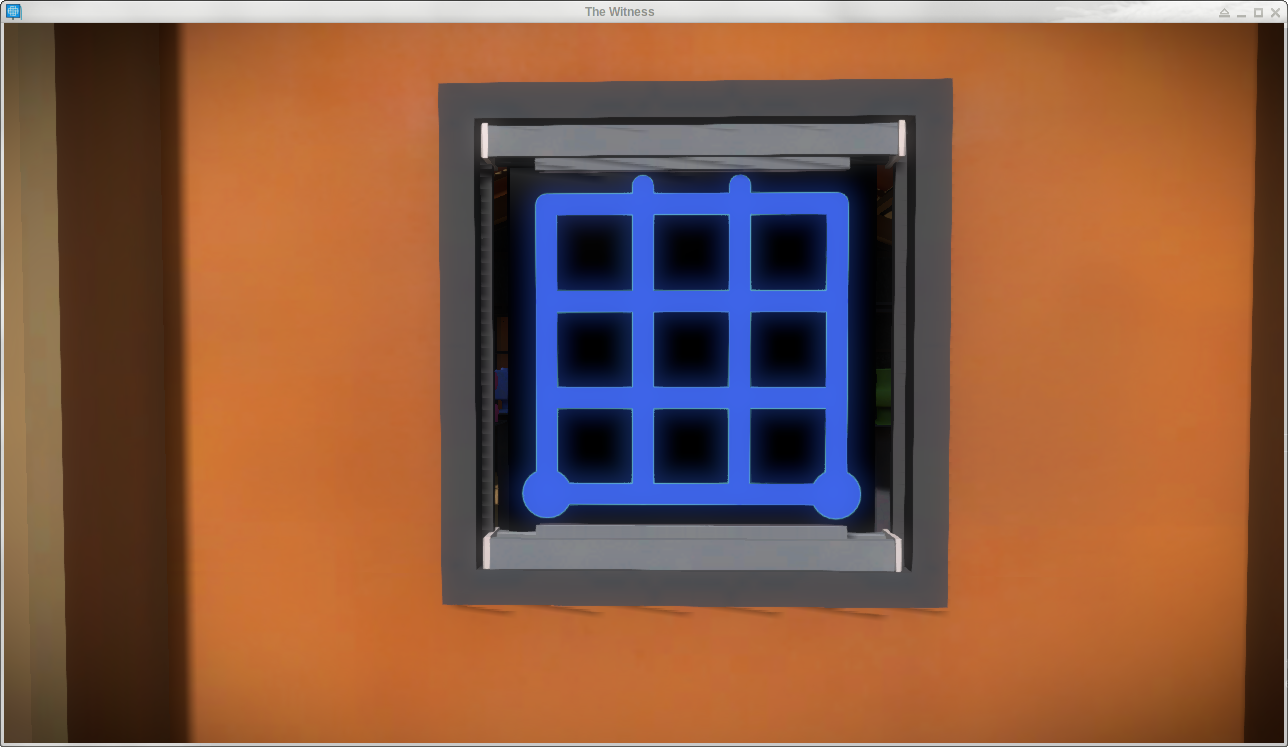
Some puzzles in The Witness simply do not appear when using dxvk, whereas they appear when using the OpenGL wined3d backend.
I did no try dxvk master since my binary version seemed close enough from master.
Let me know if I can provide any more info; I am familiar with Linux and can compile stuff if needed.
Thanks !
With dxvk:

With opengl-based wined3d:

Software information
- Game: The Witness (SteamID 210970)
- Settings: low graphics quality, but still broken on medium/high
System information
- GPU: Intel UHD Graphics 620 (Kabylake GT2)
- Driver: 18.2.1
- Wine version: Proton 3.16 (shipped by steam)
- DXVK version: 0.90-8-g6558b27 (shipped by steam)
- OS: NixOS unstable
Apitrace file(s)
- Trace of loading the game in front of a broken puzzle and quitting: https://vrac.nadrieril.fr/witness64_d3d11.trace.xz
Log files
- d3d11.log: http://dpaste.com/30JAED7.txt
- dxgi.log: http://dpaste.com/1CX11V0.txt
 Nadrieril
All 26 comments
I didn't experience this bug playing the game, although I'm using RADV with a RX Vega 56.. Possibly a driver specific bug?
Also, I just went back to the same area and I can't look through the door since I've already solved and opened that puzzle, but the puzzle is still showing visible on the back of the door and no other puzzles are invisible.
 LeJimster
on 21 Oct 2018
LeJimster
on 21 Oct 2018
I tried this game back in February, and the puzzles did render. I was using NVIDIA 390 at the time w/ a GTX 960. This is probably a driver bug.
 Guy1524
on 21 Oct 2018
Guy1524
on 21 Oct 2018
ANV is really not well tested in terms of DXVK since so few people are on Intel Gpu's. I think you should open a bug report for Mesa also.
 Leopard1907
on 22 Oct 2018
Leopard1907
on 22 Oct 2018
Ah, so is it that the driver does not understand certain instructions ? Could dxvk work around that somehow or is it not its job ? I will try to compile latest mesa in case the bug is fixed there.
Nadrieril
on 22 Oct 2018
If you consider that game works ok with DXVK on Nvidia and AMD ; that shows DXVK is doing it's job correctly. Sounds like a driver issue.
However , not every time it is like that.
Probably , you will end up opening a bug report on Mesa if it is not fixed with latest Mesa.
Leopard1907
on 22 Oct 2018
Thanks for posting an apitrace. This still renders fine on RADV, so this seems to be ANV-specific, and it might be worth filing a Mesa bug.
There also seems to be a bit of a game bug in that it binds an incorrect image view somewhere, but that's not related to the missing object.
 doitsujin
on 22 Oct 2018
doitsujin
on 22 Oct 2018
Hmm, I'm not quite sure what to do with latest mesa. Do I need to recompile Proton/wine with it ? Or only dxvk ? Or do something system-wide ? I am not very familiar with how graphics works. If it's a driver issue I assume I mayb need to recompile a kernel module ?
Nadrieril
on 24 Oct 2018
Mesa, Intel anv vulkan driver and llvm are what you need the latest versions of. I'm not familiar with nixOS so I don't know if there are repositories or bleeding edge packages already built for this distro.
Otherwise you will have to compile the drivers yourself.
I would start by submitting a bug report here: https://bugs.freedesktop.org/buglist.cgi?component=Drivers%2FVulkan%2Fintel&product=Mesa&resolution=---
To be clear these are all graphics system drivers and aren't related to steam,proton or dxvk.
LeJimster
on 24 Oct 2018
This might be StreamOutput-related. You need to test with latest Mesa.
 saboya
on 24 Oct 2018
saboya
on 24 Oct 2018
The game doesn't use stream output and has been working more or less fine for ages.
doitsujin
on 24 Oct 2018
I am using Gentoo, which is at mesa version 18.2.4 (the currently latest) and the problem is visible there as well.
Some insights I got while playing:
- the transparent objects are not visible, but it seems like all transparent objects are missing, including the coloured glass in the bunker / greenhouse
- you can play the invisible puzzles, if you know what you have to do, you just don't see them
Has someone filed a bug with mesa? I could not find one
 roever
on 12 Nov 2018
roever
on 12 Nov 2018
I've updated to current mesa (git repo), ... right now it looks like this. The plates are visible, but they are black instead of transparent and coloured. Better, but still not right
roever
on 13 Nov 2018
submitted a bug with mesa
roever
on 13 Nov 2018
Hi, I'll duplicate my findings here:
The culprit is incorrect usage of dual source blending.
commit 00fc56a68d21d7aa91b95f0eaacba59a96c466f5 (HEAD -> master)
Author: Danylo Piliaiev danylo.piliaiev@gmail.com
Date: Fri Jul 20 12:54:42 2018 +0300anv: Disable dual source blending when shader doesn't support it on gen8+ Dual source blending behaviour is undefined when shader doesn't have second color output. "If SRC1 is included in a src/dst blend factor and a DualSource RT Write message is not used, results are UNDEFINED. (This reflects the same restriction in DX APIs, where undefined results are produced if “o1” is not written by a PS – there are no default values defined)." Dismissing fragment in such situation leads to a hang on gen8+ if depth test in enabled. Since blending cannot be gracefully fixed in such case and the result is undefined - blending is simply disabled. v2 (Jason Ekstrand): - Apply the workaround to each individual entry - Emit a warning through debug_report Signed-off-by: Danylo Piliaiev <[email protected]> Reviewed-by: Jason Ekstrand <[email protected]> Reviewed-by: Kenneth Graunke <[email protected]>
After this commit blending is disabled when rendering with incorrect dual source blending setup. I can see the error in logs and relevant draw call in RenderDoc. (Also the same commit exists for OpenGL)

The verdict - not a mesa's bug, most likely it's a game's bug.
When I made that commit I though I was fixing some esoteric issue and now it's a second game in a month which exhibits it.
 werman
on 16 Nov 2018
werman
on 16 Nov 2018
I don't think it's the game's bug so much as a D3D vs. Vulkan difference. With Vulkan and OpenGL, you do dual-src blending by writing both outputs to location 0 but with index 0 and 1 specified. In D3D, you just write to locations 0 and 1. Likely, a fairly small change is required in the DXVK shader compiler.
 jekstrand
on 16 Nov 2018
jekstrand
on 16 Nov 2018
@jekstrand thanks for the correction! Now I see in the shader:
Output Location=1 float4* o1;
Output Location=0 float4* o0;
Looks like what you have described.
werman
on 16 Nov 2018
Meh, dual-source blending is actually big issue since I can't tell at compile time whether a shader is going to be used with dual-src blending or not. Not sure what to do about that at this point.
doitsujin
on 16 Nov 2018
It wouldn't be terribly difficult to work around in the driver because we do have that information at pipeline creation time. I don't like that as a solution, obviously, but we could.
I think the easiest thing to allow DXVK to do the right thing would be a tiny SPIR-V extension to allow you to use specialization constants for Location and Index. Of course, you could also do a "specialization" yourself by keeping track of the byte offset where the location and index are in the SPIR-V and whacking them right before pipeline creation but that's gross.
jekstrand
on 16 Nov 2018
I think patching the SPIR-V in DXVK is the best solution, but it's not trivial in this case. I'm actually doing that anyway because binding indices are also not known in advance.
Is it legal to use the Index decoration even when dual-source blending is not going to be used? Right now I'm not emitting that at all.
doitsujin
on 16 Nov 2018
Should be able to as long as it's zero:
For the purposes of interface matching: variables declared without a
Componentdecoration are considered to have aComponentdecoration of zero, and variables declared without anIndexdecoration are considered to have anIndexdecoration of zero.
jekstrand
on 16 Nov 2018
I implemented the shader patching as an incredibly disgusting hack in the dual-src-blend branch.
According to Renderdoc it should work for the pipeline in question, please let me know if that actually fixes the problem.
Update: Here's a DXVK build in case anyone needs it:
dxvk-witness.tar.gz
doitsujin
on 16 Nov 2018
As far as I can tell this seems to fix this issue. It also fixes all remaining "visual only" problems that I was aware of. E.g., the obsidian columns didn't show the environmental puzzles, and solving an environmental puzzle didn't show the sparks. All this shows properly now.
Thanks
roever
on 18 Nov 2018
Thanks for reporting back, I'll try to re-implement that fix in a reasonably clean way for the next release.
doitsujin
on 18 Nov 2018
I can confirm this works for me ! Thanks a lot !
Nadrieril
on 18 Nov 2018
Fixed pushed to master.
doitsujin
on 19 Nov 2018
For anyone coming to this after discovering missing transparency in the game - go to the steam settings for the game and force the use of a different "steam play compatability tool".
I saw missing transparency with 3.7-8 but 4.11-11 worked fine.
 PriceChild
on 22 Dec 2019
PriceChild
on 22 Dec 2019
Related issues
 7oxicshadow
·
3Comments
7oxicshadow
·
3Comments
 artivision
·
4Comments
jekstrand
·
4Comments
artivision
·
4Comments
jekstrand
·
4Comments
 linuxwrper
·
4Comments
linuxwrper
·
4Comments
 Ahmed-E-86
·
4Comments
Ahmed-E-86
·
4Comments
Most helpful comment
As far as I can tell this seems to fix this issue. It also fixes all remaining "visual only" problems that I was aware of. E.g., the obsidian columns didn't show the environmental puzzles, and solving an environmental puzzle didn't show the sparks. All this shows properly now.
Thanks