With the Vulkan 1.1.88 spec update including the new VK_EXT_transform_feedback extension, DXVK can finally support Stream Output, which has been a big issue for a number of games (see #135).
Prerequisites
All of the following are required in order for Stream Output to work. If any of these requirements are not met, you will see log messages indicating that Stream Output support is not present.
Please make sure that your setup is working correctly before reporting bugs.
Note: Proton 3.16 already includes the required patches for Wine and DXVK, so you will only need to update your Vulkan driver in order to use it with Proton.
DXVK
DXVK enables Stream Output support starting with release v0.90.
Drivers
You will need a driver which implements the VK_EXT_transform_feedback extension:
- AMD: RADV supports the extension in Mesa 18.3.
- Intel: A patch series for the ANV driver is available here.
- Nvidia: Mainline driver version 415.22 supports the extension.
Wine
Wine 3.18 and earlier versions need to be patched in order to expose the extension to DXVK:
https://source.winehq.org/patches/data/152604
Note: Current development builds no longer require this patch. On Arch Linux, you may use wine-tkg-git.
Screenshot
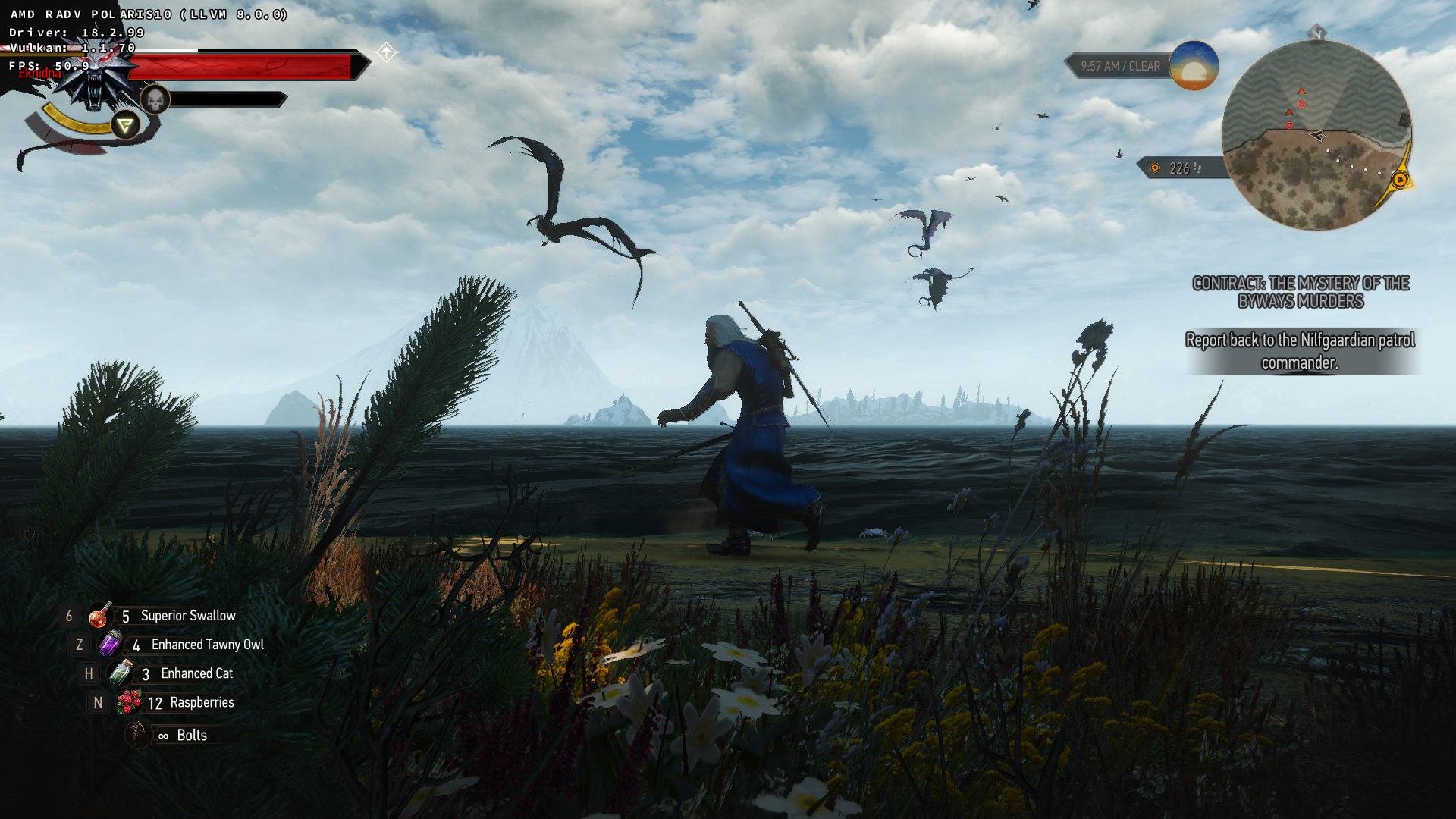
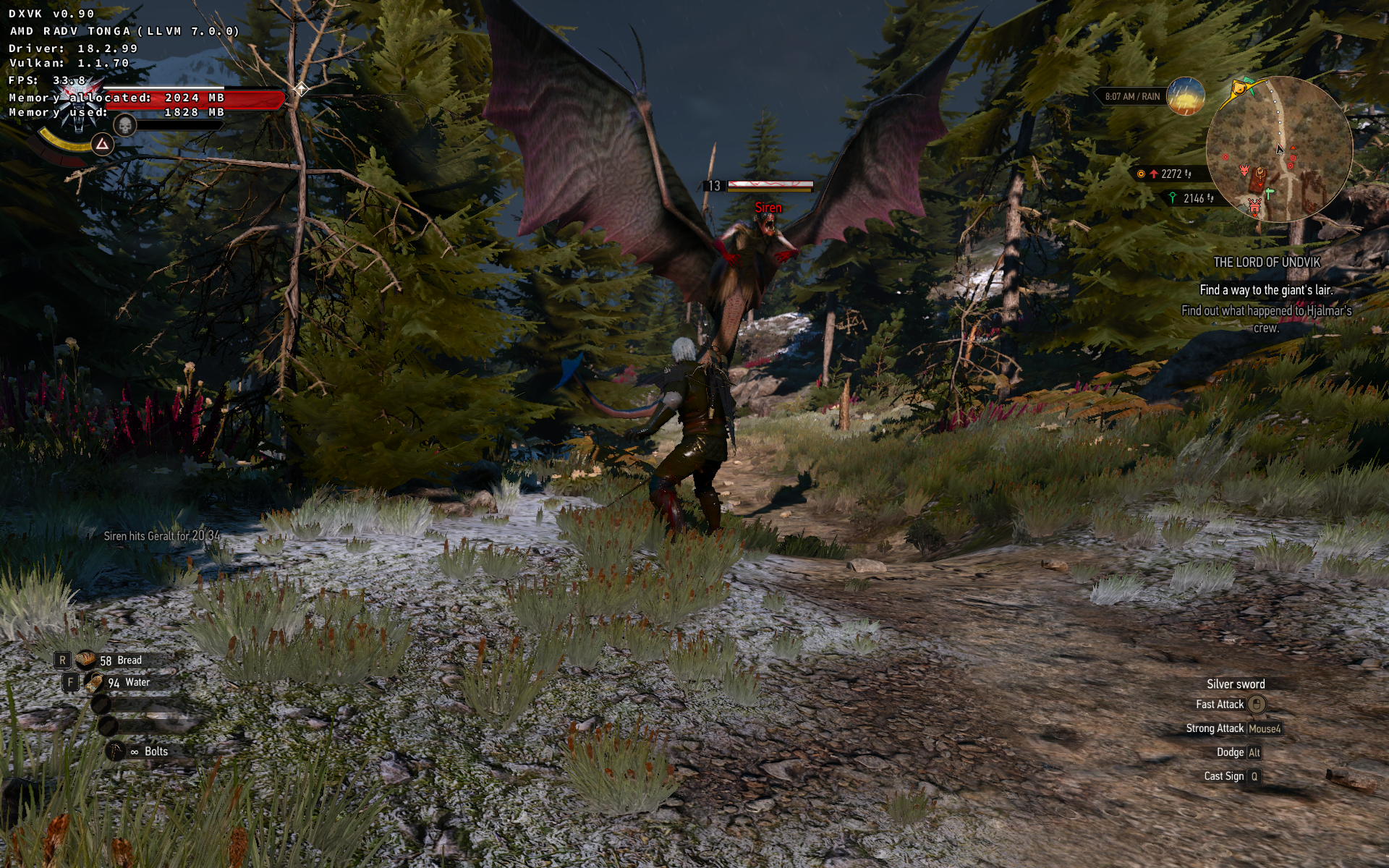
Witcher 3: Geralt fighting the previously problematic Sirerens, with Hairworks enabled.
 doitsujin
All 89 comments
That's GREAT news!!!
 mozo78
on 13 Oct 2018
mozo78
on 13 Oct 2018
Wow! I think the time to ditch the Windows partition has come. But I'll wait for the final version of Wine and Nvidia drivers with support, anyone know the ETA for those?
 pedrofleck
on 13 Oct 2018
pedrofleck
on 13 Oct 2018
Wine should hopefully come with updated winevulkan in the next release (3.19, probably in two weeks). Not sure when official (non-beta) drivers will land, might still take a while.
doitsujin
on 13 Oct 2018
That's great!
(The link in the release notes ([...], see this issue for details) is incorrect and leads to the release page with # 695 appended. )
 MinIsMin
on 13 Oct 2018
MinIsMin
on 13 Oct 2018
Fixed the link, thanks for the heads-up.
doitsujin
on 13 Oct 2018
@doitsujin Brilliant work, THANK YOU!!! and to everyone involved into making this happen.
If anyone needs, I have uploaded a pre-patched version of Wine 3.18 with the Stream Output.
Wine 3.18 Source: https://drive.google.com/file/d/1SPFB71dZCejKVLxwIrkGaBQiyStPd9eb
Pre-compiled Build with StreamOutput (using Debian 9.5): https://drive.google.com/file/d/1Eoaydn1XbwK0UWpn8swZ7DKcdrF1Ybxy
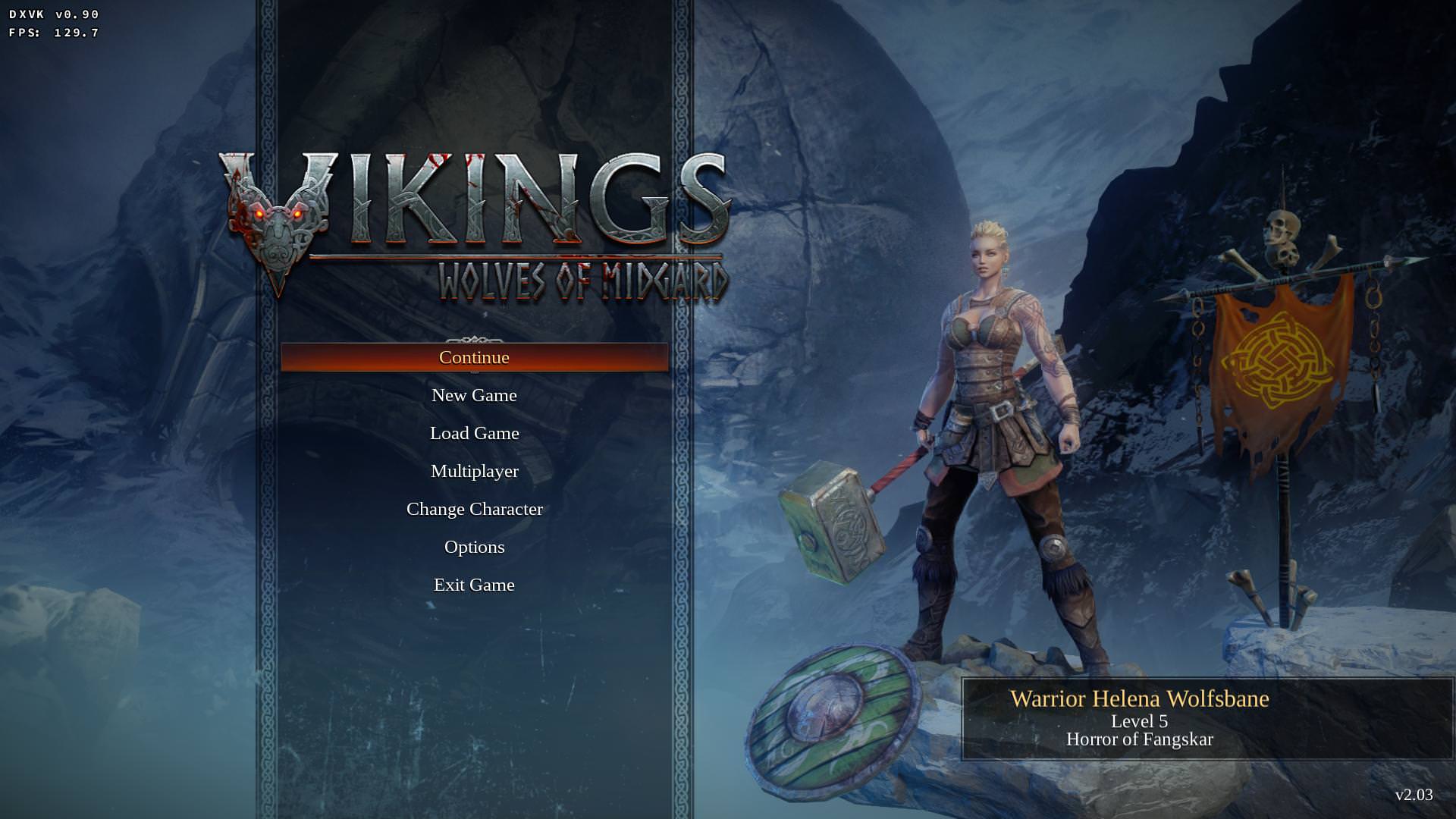
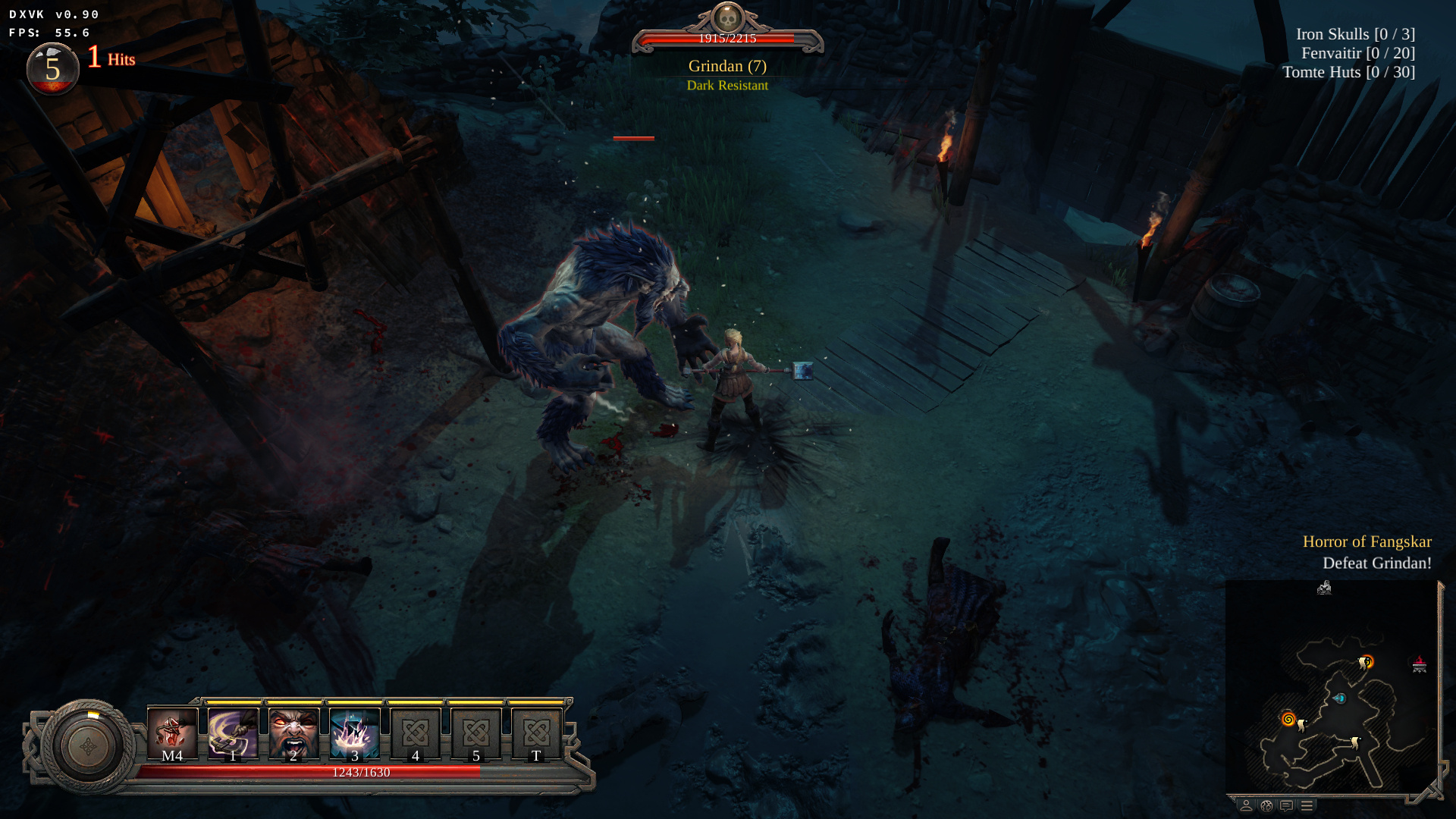
I haven't tried Witcher 3 yet however here's 2 screenshots of Vikings: Wolves of Midgard with DXVK, the main character and all enemies didn't render at all previously.
 jrugia
on 13 Oct 2018
jrugia
on 13 Oct 2018
Oooooooooooohh, boy!
 mtst-vladzin
on 13 Oct 2018
mtst-vladzin
on 13 Oct 2018
Huge thanks for this !!!
Can't wait to get home and try it on the Witcher.
 asoltesz
on 13 Oct 2018
asoltesz
on 13 Oct 2018
I suppose https://github.com/doitsujin/dxvk/blob/8630ee235a7a97c0ad87af2703b3c06bfd8e475e/src/util/config/config.cpp#L45 isn't needed anymore or am I missing something?
MinIsMin
on 13 Oct 2018
Nvidia: Use the Vulkan beta version 396.54.09.
How about those on 410.XX already? Either downgrade to the 396 beta or wait for one to be released for 410.xx?
 C0rn3j
on 13 Oct 2018
C0rn3j
on 13 Oct 2018
@MinIsMin The option is still used for users who don't have a driver/wine version with Transform Feedback support.
@C0rn3j The 396 beta driver is currently the only one which implements the extension. But it also has performance improvements which have not yet landed in the main branch, so it might be worth checking out either way (unless you have a Turing GPU).
doitsujin
on 13 Oct 2018
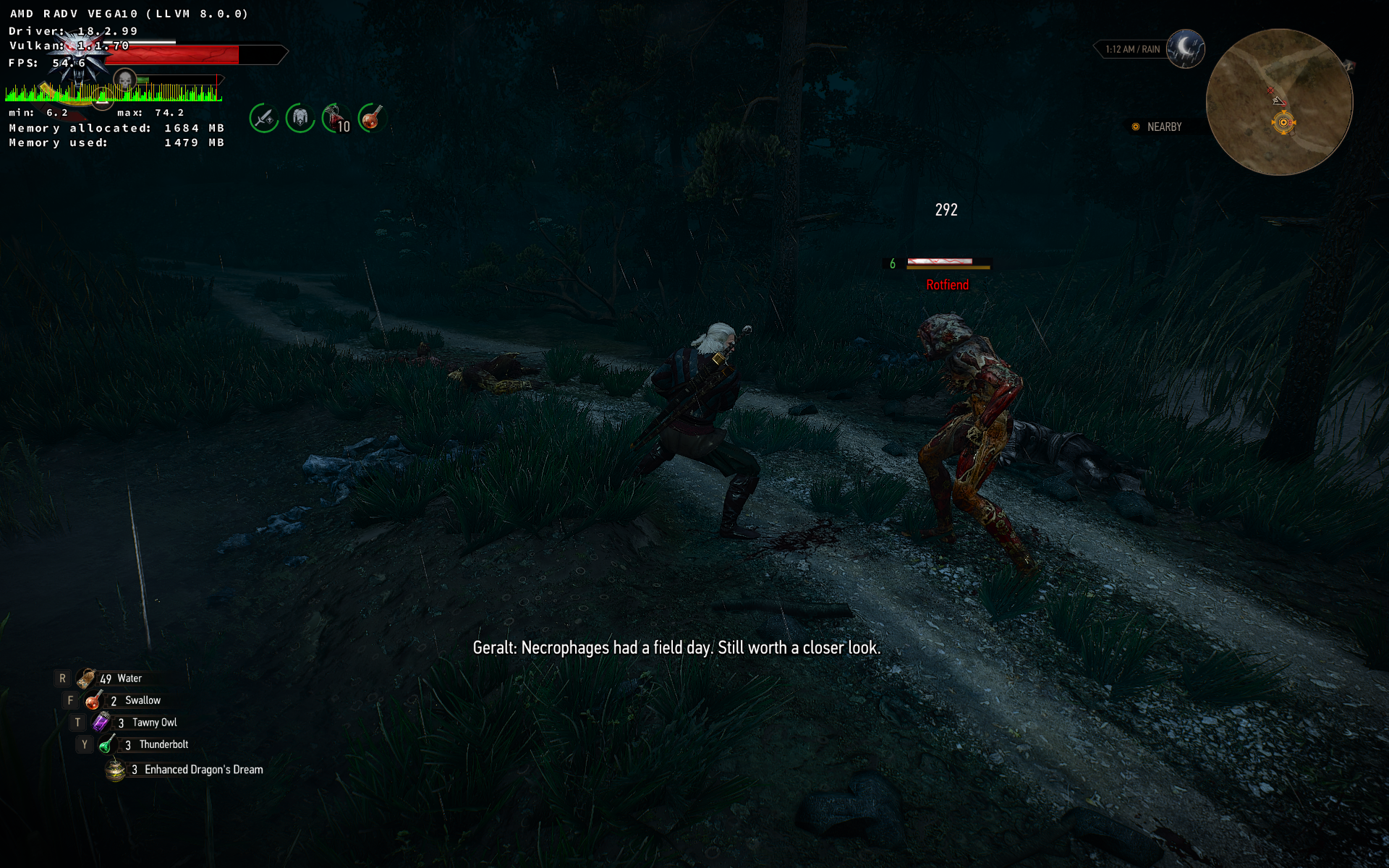
Rotfiends working in TW3:
 shmerl
on 14 Oct 2018
shmerl
on 14 Oct 2018
Giana Sisters : Twisted Dreams crashes with RADV driver with transform feedback enabled (required by the game). Previous versions of DXVK (0.80 and 0.81 tested) work, but with broken output. The feature is working correctly on my system since I can successfully run Witcher 3 with correctly rendered rotfiends and hairworks.
Here's the error:
SPIR-V parsing FAILED:
In file ../mesa-9999/src/compiler/spirv/vtn_variables.c:1952
base_val->value_type == vtn_value_type_pointer
1244 bytes into the SPIR-V binary
 aqxa1
on 14 Oct 2018
aqxa1
on 14 Oct 2018
Might be a bug in my shader compiler, I'll have to take a look at it.
doitsujin
on 14 Oct 2018
Very nice to see this done!
 dhewg
on 14 Oct 2018
dhewg
on 14 Oct 2018
Hurrah! Hurrah! HURRAH! News of the year. :) THANK YOU!
 dimgel
on 14 Oct 2018
dimgel
on 14 Oct 2018
@doitsujin Brilliant work, THANK YOU!!! and to everyone involved into making this happen.
If anyone needs, I have uploaded a pre-patched version of Wine 3.18 with the Stream Output.
Wine 3.18 Source: https://drive.google.com/file/d/1SPFB71dZCejKVLxwIrkGaBQiyStPd9eb
Pre-compiled Build with StreamOutput (using Debian 9.5): https://drive.google.com/file/d/1Eoaydn1XbwK0UWpn8swZ7DKcdrF1Ybxy
I haven't tried Witcher 3 yet however here's 2 screenshots of Vikings: Wolves of Midgard with DXVK, the main character and all enemies didn't render at all previously.
Sorry but your game is on linux for what try this game with dxvk ?
 liberodark
on 14 Oct 2018
liberodark
on 14 Oct 2018
@liberodark Because it's a test case for Stream Output? Please don't start any off-topic Linux Native vs Wine discussions.
I'm quite glad to hear that it works as expected for the most part.
doitsujin
on 14 Oct 2018
I feel confused everytime someone talk about technical stuff, so I need to ask some questions if you excuse me:
1- How to apply a patch to Wine manually?
2- What Mesa version that support VK_EXT_transform_feedback extension?
3- Does esync-staging-ppa-3.18 in Lutris have this patch?
 Ahmed-E-86
on 14 Oct 2018
Ahmed-E-86
on 14 Oct 2018
1- Like any other patch. Google has all the answers for that.
2- Devel, with some added patches that aren't yet merged in master.
3- Yes.
 Tk-Glitch
on 14 Oct 2018
Tk-Glitch
on 14 Oct 2018
@liberodark
Sorry but your game is on linux for what try this game with dxvk ?
Just to keep to keep it short - the Linux version is not available on GOG.
jrugia
on 14 Oct 2018
@ahmed-elsayed2017
I feel confused everytime someone talk about technical stuff, so I need to ask some questions if you excuse me:
1- How to apply a patch to Wine manually?
You really need to be a bit trusted with source code and compiling. Not the easiest task at first, you will need to invest some time, but if you have fun with it, you will feel better after that ;)
- First you need the wine 3.18 source code. I usually use the git source (git clone ...).
- Then you apply the patch to the source code for example with git apply ...
- Then you configure, compile and hope everything is fine (it will not). Fix, repeat until it's successful.
- And then you test your work and sometimes it even runs
 edmondo
on 14 Oct 2018
edmondo
on 14 Oct 2018
Sorry but your game is on linux for what try this game with dxvk ?
Also, because GOG users have no access to Linux version, it's Steam only. GOG sells only Windows version, and Kalypso don't want to release Linux version there without explaining the reason. So Wine+dxvk is a reasonable use case.
shmerl
on 14 Oct 2018
THIS is just awesome! Thank you @doitsujin and everyone who helped to make this possible!
 tbe
on 14 Oct 2018
tbe
on 14 Oct 2018
Stream Output seems to be working properly with the GOG version of The Witcher 3 on an AMD RX580 8GB, Kubuntu 18.04 x64 (KDE Plasma 5.13).
Manually built Wine prefix with:
- DXVK 0.90 release
- RADV via Mesa 8.3 (current master branch + the referenced patch series applied manually (only patches 02 - 15, the first is already applied on master) + local mesa build+install).
- Jrugia's pre-built Win 3.18 with the StreamOutput patches (https://drive.google.com/file/d/1Eoaydn1XbwK0UWpn8swZ7DKcdrF1Ybxy).
I tested on Skellige (lot of sirens and ekhidnas).
The game also seems to be faster by ~5-10% but that may be because I have updated from an older DXVK version (0.42).
asoltesz
on 15 Oct 2018
I installed mesa-git 18.3 from AUR (it took 9 hours to compile), and it updated mesa+vulkan-radeon+vulkan-intel, then I updated vulkan-icd-loader to the latest version I found 1.1.85+2969+5abee6173-1, then I installed esync-staging-ppa-3.18 that contains the latest patches, but DXVK_HUD shows Vulkan version 1.0.68! What did I do wrong?!
Ahmed-E-86
on 15 Oct 2018
Don't know, please post your full DXVK logs.
Also, there's no way that compiling mesa-git takes 9 hours, except maybe if you did it on a first-gen Raspberry Pi. Any modern desktop CPU can do it in a few minutes, so I'm not sure what exactly you compiled there.
And please ignore the Vulkan version. It means absolutely nothing, and you don't need to update the ICD loader.
doitsujin
on 15 Oct 2018
witcher3_d3d11.log
witcher3_dxgi.log
I went to the sea looking for Sirens, but it is still invisible for me.
Ahmed-E-86
on 15 Oct 2018
You haven't said your graphics stack, but AUR mesa-git doesn't have any of the patches added. They haven't been pulled to master yet, you have to add a prepare() section to the PKGBUILD that applies the relevant patches.
 HanFox
on 15 Oct 2018
HanFox
on 15 Oct 2018
I don't know how to do that. I will wait for the next update from Mesa that contains these patches.
Ahmed-E-86
on 15 Oct 2018
@doitsujin I asked about the time it took me to compile Mesa-git on Manjaro forum, and someone there told me: "Sounds about right.", so I guess it is ok.
Ahmed-E-86
on 15 Oct 2018
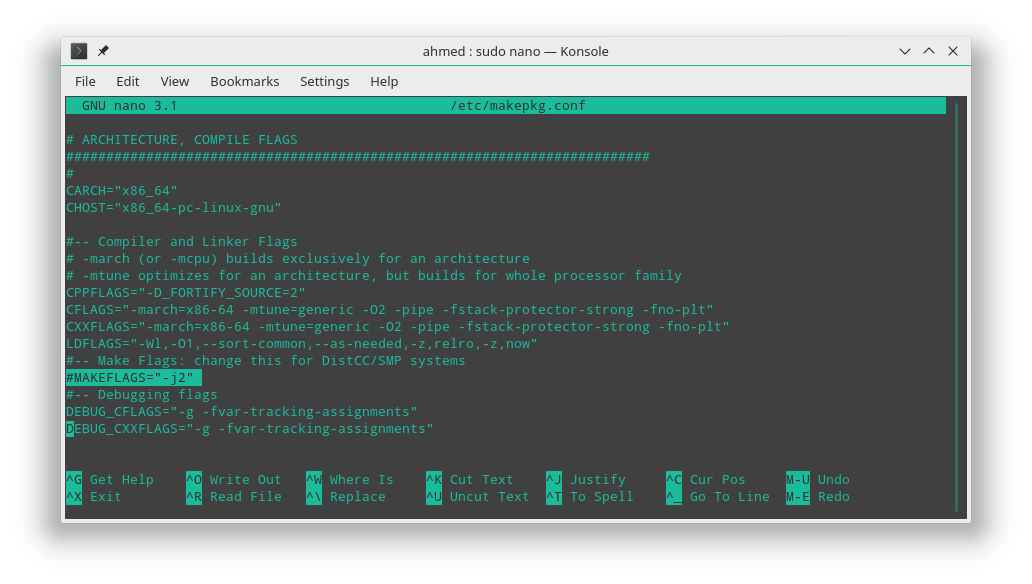
@ahmed-elsayed2017 modify your /etc/makepkg.conf file to have your system use all your CPU during build by adding a -j
#-- Make Flags: change this for DistCC/SMP systems
MAKEFLAGS="-j12"
 maugre
on 15 Oct 2018
maugre
on 15 Oct 2018
Not sure what the hell the Manjaro package is doing then, my local Mesa build completes in 101 seconds on my Ryzen 2700X.
But yeah, if you don't want to mess around with patches, better wait for them to get merged into the master branch. I think some of them are already in (updated Vulkan headers etc.), which makes applying them manually even harder.
doitsujin
on 15 Oct 2018
@maugre
What is the right value for my CPU?
I use Intel core I5 4200M
Ahmed-E-86
on 15 Oct 2018
@ahmed-elsayed2017

C0rn3j
on 15 Oct 2018
I think some of them are already in (updated Vulkan headers etc.), which makes applying them manually even harder.
Just apply patches 2-15 for radv for now, skip the first one.
shmerl
on 15 Oct 2018
@C0rn3j
It doesn't give accurate answer but I will try j8 and see how much CPU usage will be during compiling.
Ahmed-E-86
on 15 Oct 2018
@ahmed-elsayed2017 By the way, you don't want to enable too many concurrent make jobs if you do not have enough memory, keep that in mind. It may hit swap hard, especially on llvm compilation.
 Bfgeshka
on 15 Oct 2018
Bfgeshka
on 15 Oct 2018
EDIT: There's an AUR package someone else made here: https://aur.archlinux.org/packages/mesa-transform-feedback-git/
It's no different than the text below besides it doing it all automatically.
I don't know how helpful I'm really being doing this (as if you can't edit the file yourself, you probably shouldn't trust an idiot on the internet giving you a random file with the ability to break your PC...), but for Arch Linux users using RADV here's the mesa PKGBUILD I used: PKGBUILD
You need to download it and save it to a folder, you also need the patch files 2-15 from here saved in the same folder and you need the LICENSE file from the AUR also saved in that folder.
Open a terminal/console in the folder and run makepkg -i
This will either work for you, or it won't. I shan't help you debug it if it doesn't, or if your PC explodes. You've been warned...
HanFox
on 15 Oct 2018
@ahmed-elsayed2017 https://ark.intel.com/products/76348/Intel-Core-i5-4200M-Processor-3M-Cache-up-to-3-10-GHz-
# of Cores 2
# of Threads 4
Looks like its a dual-core w/hyperthreading. So, you should be using -j4 or -j5 (if plenty of ram, go for -j5).
 SveSop
on 15 Oct 2018
SveSop
on 15 Oct 2018
@doitsujin I also see Józef Kucia has added a patch to wine:
https://source.winehq.org/patches/data/152604
winevulkan: Update vk.xml to 1.1.88.
This seems to implement the winevulkan-transform-feedback.patch (+ more) i think.
SveSop
on 15 Oct 2018
I replaced the custom patch in the original post with a link to the official wine patch.
doitsujin
on 15 Oct 2018
@ahmed-elsayed2017 https://ark.intel.com/products/76348/Intel-Core-i5-4200M-Processor-3M-Cache-up-to-3-10-GHz-
# of Cores 2
# of Threads 4
Looks like its a dual-core w/hyperthreading. So, you should be using -j4 or -j5 (if plenty of ram, go for -j5).
I used -j8 to compile lib32-mesa-git and it took 4.5 hours (half the time was before). Cpu usage didn't exceed 30%. I will try -j12 next time to see if it will increase cpu usage and being stable at the same time.
Ahmed-E-86
on 15 Oct 2018
@ahmed-elsayed2017 the "-j" option sets how many threads you use. It is not really beneficial to use "too many", or else one would just pop "-j100" and compile very fast...
You can easily try different settings, but afaik you will only loose time compiling with too many threads. Discussion about having "thread +1" vs "threads" - ie. for YOU "-j4" vs "-j5" is up to debate, and kind of non-conclusive :)
To check how many cores your Linux install have found, you can do:
lscpu
The output for ME with a i7-8700K 6cores+6threads is:
Architecture:        x86_64
CPU op-mode(s):      32-bit, 64-bit
Byte Order:          Little Endian
CPU(s):              12
On-line CPU(s) list: 0-11
Thread(s) per core:  2
Core(s) per socket:  6
Socket(s):           1
NUMA node(s):        1
Vendor ID:           GenuineIntel
CPU family:          6
Model:               158
Model name:          Intel(R) Core(TM) i7-8700K CPU @ 3.70GHz
Here you see i have 12 cpu's, listed as 2 threads per core, and 6 cores per socket.. with 1 socket, and that is correct based on my model.
I use "-j12" when i compile... but have not benchmarked if i could earn a millisec or two from doing "-j13" :)
SveSop
on 15 Oct 2018
Wine has landed Vulkan patches with VK_EXT_transform_feedback upstream, so no need to patch it manually anymore, just build Wine master. It should be available in Wine 3.19 release and on.
shmerl
on 16 Oct 2018
Does this work with winelib versions or no? It might be unrelated, but when I use a winelib build(which at this point is 6 commits ahead of the release), the victory screens in Overwatch are blacked out. Works fine using the normal release. Admittedly this could be a result of one of the 6 commits to master since the .90 release but I figured I would mention this.
 Sukid
on 17 Oct 2018
Sukid
on 17 Oct 2018
If there's a regression, please bisect it. I haven't heard any complaints about Overwatch with 0.90 though.
doitsujin
on 17 Oct 2018
For ArchLinux there is now an extended version of the mesa-git makepkg which includes the RADV patches.
 elovin
on 17 Oct 2018
elovin
on 17 Oct 2018
@Sukid I cant get World of Warcraft to launch at all with a winelib build. Tested building winelib with dxvk-0.81, dxvk-0.90 and 629587bedd92ef645afc7818445960530179599d
Possibly totally unrelated, but given they both are Blizzard games...
SveSop
on 17 Oct 2018
@SveSop this thread is for discussion of stream output support in DXVK
 Guy1524
on 17 Oct 2018
Guy1524
on 17 Oct 2018
The Vulkan-Headers and Vulkan-Loader repos are not yet updated to 1.1.88. How do you compile dxvk-0.90 with transform feedback support?
 llyzs
on 18 Oct 2018
llyzs
on 18 Oct 2018
You don't have to compile DXVK yourself, just use release build 0.90. You'll need to compile Wine though.
 K0bin
on 18 Oct 2018
K0bin
on 18 Oct 2018
Compiling dxvk yourself doesn't need vulkan dev package at 1.1.88.
shmerl
on 18 Oct 2018
The only thing you need to compile yourself will be your graphics drivers. Try pulling down the mesa3d repo, apply the patches provided by the OP, build the drivers, then you can verify the header is there with vulkaninfo | grep VK_EXT_t and you should see the transform feedback extension. Unless you link your new drivers to /usr/lib youll have to prefix vulkaninfo with the LD_LIBRARY_PATH, LIBGL_DRIVERS_PATH, and EGL_DRIVERS_PATH environment variables.
OR
you can just wait a while for the patches to be merged and distributed
 minionprocyk
on 18 Oct 2018
minionprocyk
on 18 Oct 2018
Unless you link your new drivers to /usr/lib youll have to prefix vulkaninfo with the LD_LIBRARY_PATH, LIBGL_DRIVERS_PATH, and EGL_DRIVERS_PATH environment variables.
You can use Vulkan ICD file for that. I.e. for custom mesa, I'm using something like:
VK_ICD_FILENAMES=/opt/mesa-master/x86_64/radeon_icd.x86_64.json vulkaninfo
For OpenGL you need other variables like above indeed.
shmerl
on 18 Oct 2018
Oh. That's way more badass. Seems like the default for ubuntu 18 is /usr/local/share/vulkan/icd.d
The more you know.
minionprocyk
on 18 Oct 2018
@minionprocyk /usr/local/share/vulkan/icd.d doesn't even exist on Ubuntu by default.
/usr/local is for stuff installed via make install, it's common thing for all build systems to put it there by default. Being Ubuntu or not has nothing to do with it.
 mati865
on 18 Oct 2018
mati865
on 18 Oct 2018
@mati865 Sorry I thought it was obvious this was from a build since we're talking about compiling graphics drivers.
Being Ubuntu or not has nothing to do with it.
good to know. I'm not very savy with differences across distros so I generally state the distro I work with.
minionprocyk
on 19 Oct 2018
thx for reply and have bugs on mores unity games kill to collect and necropolis !
If you have any idea to fix that on proton or this bug is only or proton ?
Best Regards
liberodark
on 20 Oct 2018
@doitsujin Do you know if Mesa is going to release VK_EXT_transform_feedback patches in the next stable release 18.2.4?
Ahmed-E-86
on 24 Oct 2018
Not until tests are complete and passing.
https://patchwork.freedesktop.org/series/50969/
This series adds support for the new VK_EXT_transform_feedback extension.
As far as I know, everything works but it's still all a bit experimental as
we don't have very good tests yet. CTS tests are in-progress and we hope
to have decent testing soon. We likely won't be landing them in master
until we get better testing as the testing is currently really sketchy.
I hope they'll merge it in time before 18.3 though.
shmerl
on 24 Oct 2018
18.2.x releases are no feature updates anyway, so no.
doitsujin
on 24 Oct 2018
Not until tests are complete and passing.
https://patchwork.freedesktop.org/series/50969/
This series adds support for the new VK_EXT_transform_feedback extension.
As far as I know, everything works but it's still all a bit experimental as
we don't have very good tests yet. CTS tests are in-progress and we hope
to have decent testing soon. We likely won't be landing them in master
until we get better testing as the testing is currently really sketchy.I hope they'll merge it in time before 18.3 though.
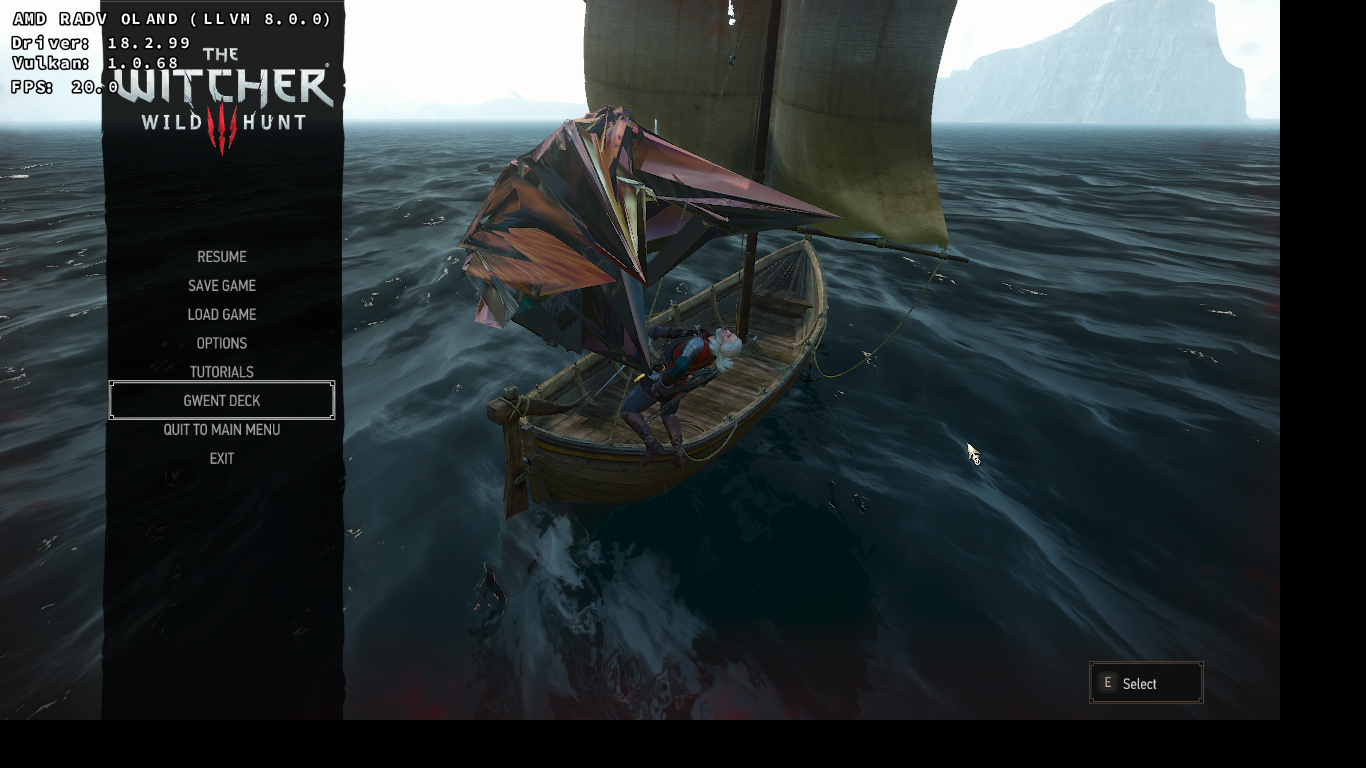
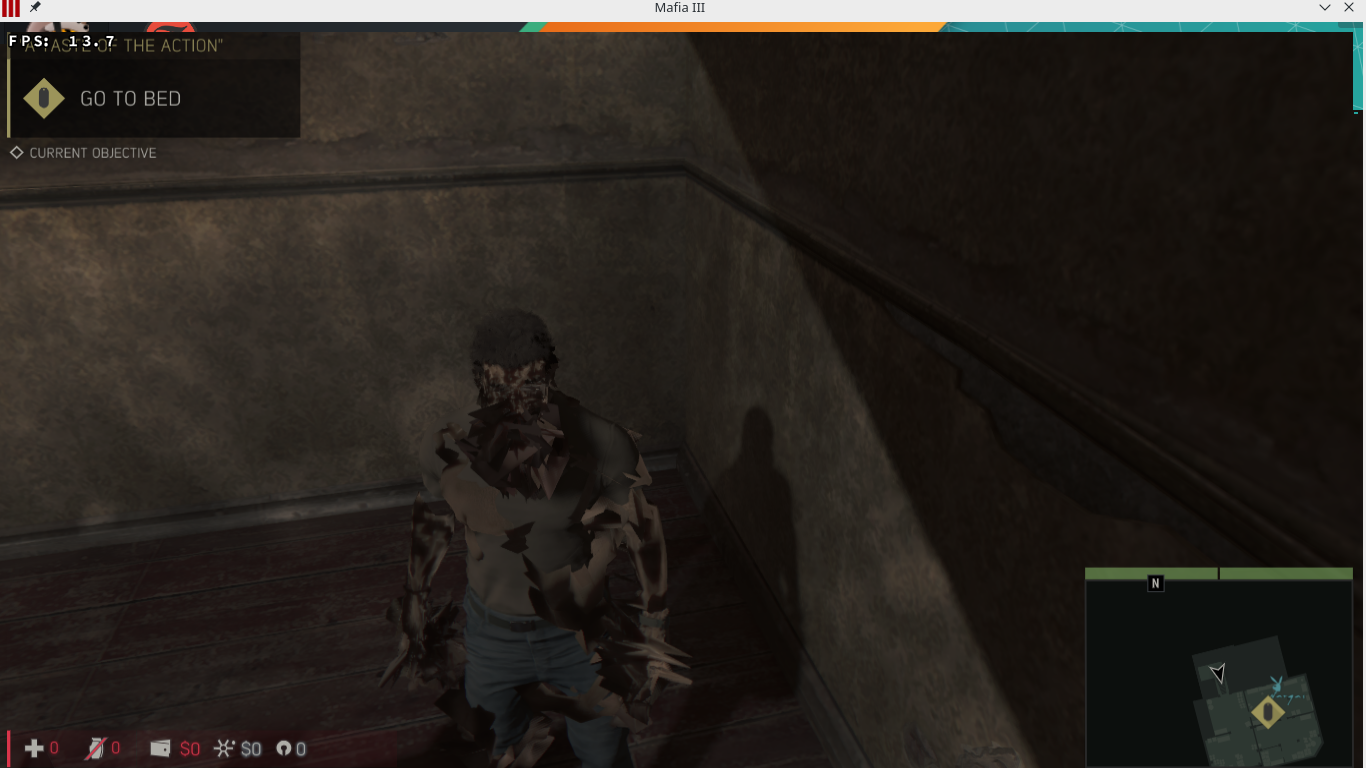
I hope that too, because it doesn't work well right now on my AMD card
Ahmed-E-86
on 24 Oct 2018
Update: RADV just landed Transform Feedback support in mesa-git. No more manual patching required!
doitsujin
on 29 Oct 2018
Great! So it will be available in 18.3.
shmerl
on 29 Oct 2018
Just got around to installing the 396.54.09 driver.
This patch also fixes non-rendering characters in Furi, awesome!
C0rn3j
on 29 Oct 2018
I play quake champions and have just discovered that not only am I using the wrong NVIDIA driver version (410.73) but I am also using the wrong Vulkan driver (1.1.82) version but since moving to Wine 3.19 staging Quake champions now works perfectly without any crashes with Sorlag or any maps that were known to cause problems.
I can only assume that the game needs to be told that the extension is available without actually using it? Either way it will keep me playing until the NVIDIA drivers are updated officially :D
 7oxicshadow
on 29 Oct 2018
7oxicshadow
on 29 Oct 2018
@7oxicshadow Not entirely sure how nVidia does its versioning, but i guess 410.73 have vulkan 1.1.82, while the 396.54.09 has 1.1.85... However, from the LunarG site, the needed VK_EXT_transform_feedback for stream output came with 1.1.88?
You can check the apiversion with: vulkaninfo | grep -i apiversion, and if you have the extension: vulkaninfo | grep -i vulkaninfo | grep -i apiversion
With 396.54.09 it reads:
apiVersion     = 0x401055  (1.1.85)
VK_EXT_transform_feedback           : extension revision  1
Guess the extension is kinda "retro-fitted" to work with the latest vulkan beta-driver from nVidia, since it in theory should be apiVersion 1.1.88 ?
SveSop
on 30 Oct 2018
Just ignore the Vulkan version, it doesn't mean much. The extension had been in development for several months anyway.
doitsujin
on 30 Oct 2018
@SveSop where you had:
You can check the apiversion with: vulkaninfo | grep -i apiversion, and if you have the extension: vulkaninfo | grep -i vulkaninfo | grep -i apiversion
Did you mean:
vulkaninfo | grep -i apiversion && vulkaninfo | grep -i VK_EXT_transform_feedback
 enrique556
on 9 Nov 2018
enrique556
on 9 Nov 2018
Yeah, double grep "vulkaninfo" thingy was a typo :) Thx for clearing that up @enrique556
SveSop
on 9 Nov 2018
FYI. Found this on nVidia forums, hope it's useful:
https://devtalk.nvidia.com/default/topic/1044231/linux/which-driver-to-use-long-short/post/5297592/#5297592
 dcraig327
on 22 Nov 2018
dcraig327
on 22 Nov 2018
Interesting note from the changelog for 410.x driver:
Removed support for the VK_NV_glsl_shader Vulkan extension.
This extension was added before the Vulkan ecosystem had mature
SPIR-V compilers and tools. Now that the SPIR-V compilers and
tools have advanced, Vulkan developers are encouraged to use SPIR-V
instead of GLSL.
Perhaps something to plan for @doitsujin ? I see references to this in various places...
SveSop
on 22 Nov 2018
I see references to this in various places..
Where? I never used that extension.
doitsujin
on 22 Nov 2018
Possibly not USED for anything, so it could probably just stay quietly in /include/vulkan/vulkan_core.h
#define VK_NV_glsl_shader 1
#define VK_NV_GLSL_SHADER_SPEC_VERSION    1
#define VK_NV_GLSL_SHADER_EXTENSION_NAME  "VK_NV_glsl_shader"
And i see now its vulkan include files, and not "your" files i guess :)
SveSop
on 22 Nov 2018
Yeah, those will disappear when I update the headers the next time.
doitsujin
on 22 Nov 2018
How do I get the right nvidia driver version on arch? I can't find it in the repos.
 florensie
on 29 Nov 2018
florensie
on 29 Nov 2018
415.18.02 can be installed via aur/nvidia-vulkan or aur/nvidia-vulkan-dkms (you need linux-headers for this one assuming you use vanilla kernel)
Although 396.54.09 is seemingly the 'best' version to use with DXVK for reasons listed right below. I guess you could go through AUR and manually downgrade the PKGBUILDs if you insist on having that one?
https://www.phoronix.com/scan.php?page=news_item&px=NVIDIA-415.18.02-Linux-Released
C0rn3j
on 29 Nov 2018
415.18.02 is known to break all Unity Engine games on Wine, so if you have any of those, it's better to stay away from it. I'm not going to recommend it until this issue is sorted out.
doitsujin
on 29 Nov 2018
I hope they don't make any new games with Unity Engine because all Unity games that I tried so far have problems with controllers and I have to use steam to config controllers to act as mouse and keyboard.
Ahmed-E-86
on 29 Nov 2018
If you mean via WINE then you may have some luck with https://github.com/kozec/dumbxinputemu and sc-controller. A bit OT though.
C0rn3j
on 29 Nov 2018
I tried SC controller yesterday, and it isn't good with mouse emulation at all.
Games that don't work well with controllers work well with mouse+keyboard emulation. That is why Dumb xinput Emulator wont fix these games.
Ahmed-E-86
on 29 Nov 2018
@ahmed-elsayed2017 Found this little snippit on the changelog for 4.19.6 kernel:
commit fb87a92b43961c89bf4a115d8a700885d8959cb1
Author: Rodrigo Rivas Costa <[email protected]>
Date:   Sun Oct 14 19:36:43 2018 +0200

    HID: steam: remove input device when a hid client is running.

    commit 385a4886778f6d6e61eff1d4d295af332d7130e1 upstream.

    Previously, when a HID client such as the Steam Client was running, this
    driver disabled its input device to avoid doubling the input events.

    While it worked mostly fine, some games got confused by the idle gamepad,
    and switched to two player mode, or asked the user to choose which gamepad
    to use. Other games just crashed, probably a bug in Unity [1].

    With this commit, when a HID client starts, the input device is removed;
    when the HID client ends the input device is recreated.

    [1]: https://github.com/ValveSoftware/steam-for-linux/issues/5645

    Signed-off-by: Rodrigo Rivas Costa <[email protected]>
    Signed-off-by: Jiri Kosina <[email protected]>
    Cc: Pierre-Loup Griffais <[email protected]>
    Signed-off-by: Greg Kroah-Hartman <[email protected]>
Possibly something interesting?
SveSop
on 1 Dec 2018
I use Kernel 4.19.4. I didn't get this kernel update yet.
Ahmed-E-86
on 1 Dec 2018
@doitsujin
Looks like 415.18.04 has a fix for Unity games crashing. Might be worth it to update the wiki if true (don't have an Nvidia system I can test on right now).
https://www.phoronix.com/scan.php?page=news_item&px=NVIDIA-415.18.04-Linux-Driver
C0rn3j
on 3 Dec 2018
@C0rn3j Thanks, I'm aware of it and will test it later, will update the wiki if it runs well.
doitsujin
on 3 Dec 2018
Status update:
- RADV and Nvidia support this extension in their mainline drivers now (see Wiki)
- Intel doesn't yet, but patches are available.
- AMDVLK will probably support this quite soon as well.
doitsujin
on 7 Dec 2018
@doitsujin Your post says 418.22 but I believe it's supposed to be 415.22.
florensie
on 8 Dec 2018
Right, thanks.
doitsujin
on 8 Dec 2018
Related issues
7oxicshadow
·
3Comments
Ahmed-E-86
·
4Comments
 yusdacra
·
4Comments
yusdacra
·
4Comments
 jekstrand
·
4Comments
jekstrand
·
4Comments
 t14462
·
4Comments
t14462
·
4Comments
Most helpful comment
Update: RADV just landed Transform Feedback support in mesa-git. No more manual patching required!