Ds4windows: DS4 rotating screen issues with several games
Hi. I'm not sure if this issue has been raised before, but have just recently encountered.
While playing Final Fantasy XII: The Zodiac Age, the camera seems to rotate to the left constantly. I assume this has something to do with the game reading two inputs.
Things I've tried:
- Checked "Use DInput only" <-- did not work
- Tried emulating Dualshock 4 instead of Xbox 360 <-- did not work
- Running the game through Steam with: <-- this works
- Playstation Configuration Support - checked
- Xbox Configuration Support - checked
- Generic Gamepad Configuration - checked
- all other -- unchecked
Note that the controller is working perfectly with other games.
I would like to try if simulating only X360 input at a time and disable DInput instead however, this option is not available.
Thanks!
 chestermw
All 13 comments
Need to set a dead zone for LS and RS. Probably need to lower or remove the anti-dead zones for LS and RS as well depending on the game.
 Ryochan7
on 29 May 2020
Ryochan7
on 29 May 2020
I tried playing around with the dead zones and anti-dead zones to no avail.
What I find amusing is it even unbinding the left direction RS, the camera still rotates.
chestermw
on 29 May 2020
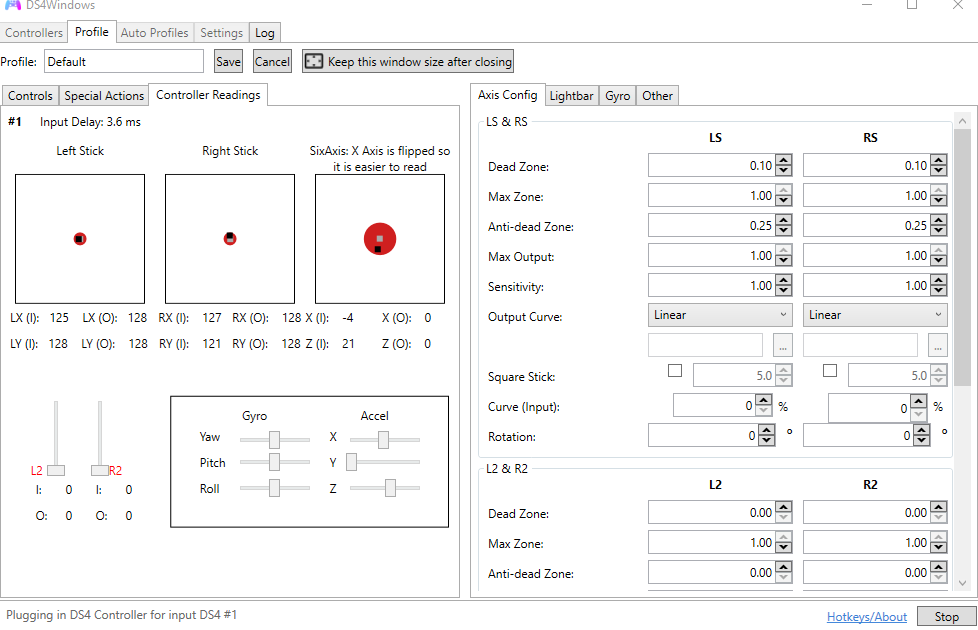
Can you post an image of your controller readings with the controller sitting motionless? Here are mine:
 chadohaver
on 30 May 2020
chadohaver
on 30 May 2020
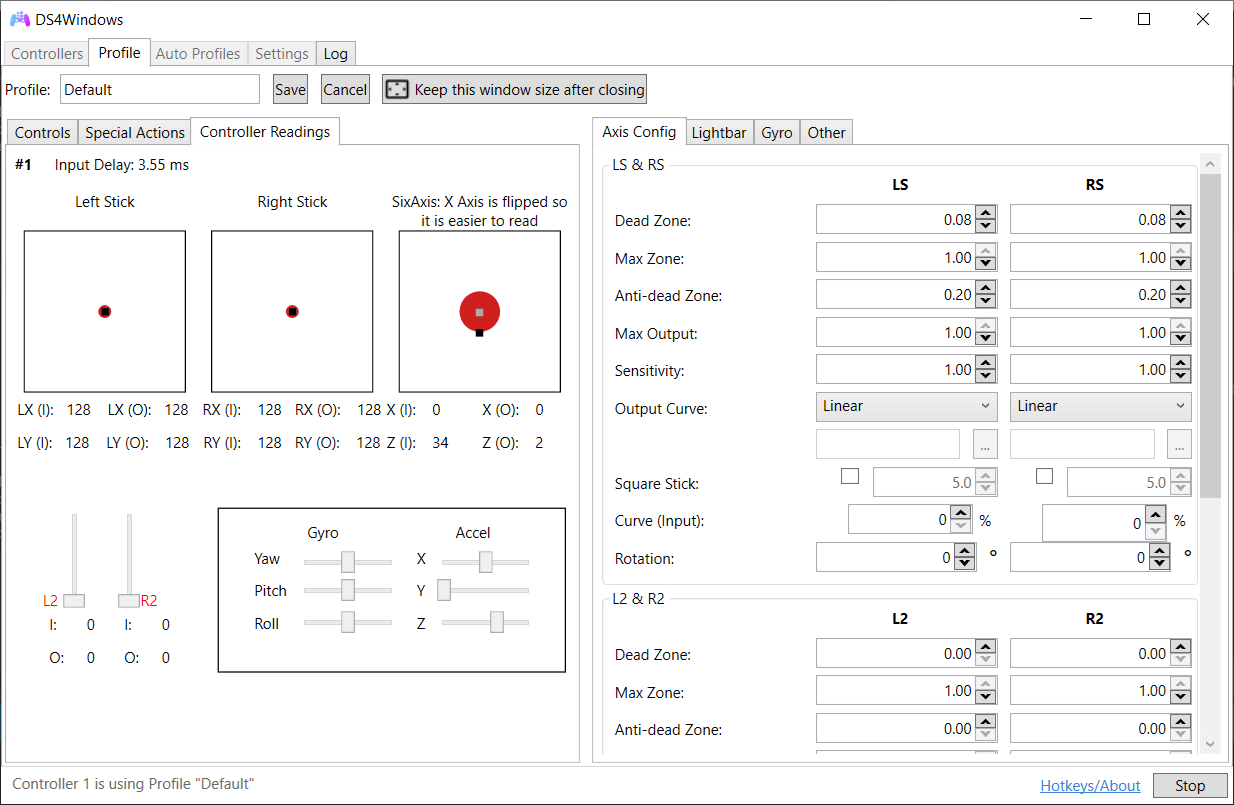
here's mine using the default profile
chestermw
on 30 May 2020
Strange. Everything there suggests that the camera rotation is not due to any erroneous input into the emulator.
Just to clarify, is it just that one game that you're having issues with? The topic title says "several games", but in your original post you only identify the issues in FF XII, and you go on to say it works perfectly with other games.
chadohaver
on 30 May 2020
Aside from keyboard + mouse, do you have any other input devices plugged in? Do you see any other input devices in your FF XII settings that could be causing the rotation?
chadohaver
on 30 May 2020
I'll try to help you troubleshoot in the thread, but from what I've seen it looks like an issue isolated to FF, and probably unrelated to your DS4 and the emulator. If you use a search term like "FFXII camera rotating" you'll find some posts where users identified another input device they had plugged in as the source. Also, a user on this thread suggests it was caused by their v-sync settings.
https://steamcommunity.com/app/595520/discussions/0/1769259642872171657/
chadohaver
on 30 May 2020
Hi chadohaver,
sorry for the confusion, the reason why I said several games were when I try to figure out a solution to this issue, I found out that it also happens with Dark Souls (and other game pointed by other people) for other users for which found a workaround (https://www.youtube.com/watch?v=eLFmqih2S3A&t0). This workaround seems to work in combination with ds4windows. Thus, wondering if steam was somehow able to isolate the controllers/controls (i don't know what I'm talking about) and perhaps this solution can be implemented at ds4windows app level or at least by profile level.
I have also tried the v-sync solution to no avail.
Thank you for helping me troubleshoot.
chestermw
on 30 May 2020
In 99.98% cases the issue really is deadzone (=the deadzone set in DS4Windows profile is not big enough for the specific gamepad. There are hardware differences). Some apps like steam or the old Jay2Kings version of DS4Windows has a built-in deadzone value, so that's why those may work a bit differently. This Ryochan7 version of DS4Windows allows to set zero deadzone because in some scenarios it is useful, but some games see unwanted drifting in LS/RS/Gyro if the deadzone is too small.
https://github.com/Ryochan7/DS4Windows/wiki/Settings#axis-zone-mapping
To test this "deadzone" theory try these settings in DS4Windows profile:
- Set zero to anti-deadzone in LS/RS/Gyro or what ever analog axies you use. Or in all of these just in case.
- Set 0.30 or even 0.50 value to deadzone in LS/RS/gyro axies. Yes, this is usually "too big" deadzone but this is just to test the theory. If the game works after this then you can start tweaking the deadzone down to see where the break-even point is. We cannot give you "the best value" because each gamepad hardware is a different case.
And few more pointers:
- Do NOT check "Use DInput Only" option because then DS4Windows ignores profile tweaks and uses the DS4 gamepad in "pass through" mode.
- Do NOT check "Flush HID" option.
If the deadzone theory didn't work then the remaining percentage from 100% is "double input" issue (ie. "Hide DS4 Controller" option not checked in DS4Windows or it doesn't work in your PC).
https://github.com/Ryochan7/DS4Windows/wiki/Exclusive-Mode-(Hide-DS4-Controller-config-option)-tips-and-issues
Please provide the logfile content because it should tell if you have enabled the "Hide DS4 Controller" option or if it doesn't work. If you cannot get the hide option (=exclusive mode) to work then HidGuardian tool usually solves all these "double gamepad" issues (see the link above).
 mika-n
on 30 May 2020
mika-n
on 30 May 2020
It reeks of double input issue though. FF12 PC is apparently compatible with both dinput and xinput. Many people on Steam had gamepad problems with this port. The old built-in exclusive mode might not be enough and HidGuardian is probably required.
 Ryusennin
on 30 May 2020
Ryusennin
on 30 May 2020
In 99.98% cases the issue really is deadzone (=the deadzone set in DS4Windows profile is not big enough for the specific gamepad. There are hardware differences). Some apps like steam or the old Jay2Kings version of DS4Windows has a built-in deadzone value, so that's why those may work a bit differently. This Ryochan7 version of DS4Windows allows to set zero deadzone because in some scenarios it is useful, but some games see unwanted drifting in LS/RS/Gyro if the deadzone is too small.
https://github.com/Ryochan7/DS4Windows/wiki/Settings#axis-zone-mappingTo test this "deadzone" theory try these settings in DS4Windows profile:
- Set zero to anti-deadzone in LS/RS/Gyro or what ever analog axies you use. Or in all of these just in case.
- Set 0.30 or even 0.50 value to deadzone in LS/RS/gyro axies. Yes, this is usually "too big" deadzone but this is just to test the theory. If the game works after this then you can start tweaking the deadzone down to see where the break-even point is. We cannot give you "the best value" because each gamepad hardware is a different case.
And few more pointers:
- Do NOT check "Use DInput Only" option because then DS4Windows ignores profile tweaks and uses the DS4 gamepad in "pass through" mode.
- Do NOT check "Flush HID" option.
If the deadzone theory didn't work then the remaining percentage from 100% is "double input" issue (ie. "Hide DS4 Controller" option not checked in DS4Windows or it doesn't work in your PC).
https://github.com/Ryochan7/DS4Windows/wiki/Exclusive-Mode-(Hide-DS4-Controller-config-option)-tips-and-issuesPlease provide the logfile content because it should tell if you have enabled the "Hide DS4 Controller" option or if it doesn't work. If you cannot get the hide option (=exclusive mode) to work then HidGuardian tool usually solves all these "double gamepad" issues (see the link above).
Thanks for helping me troubleshoot. Ultimately, I went on to install HIDGuardian and this had solved the problem (even without steam). I guess it is really is double-gamepad being detected issue.
chestermw
on 30 May 2020
It reeks of double input issue though. FF12 PC is apparently compatible with both dinput and xinput. Many people on Steam had gamepad problems with this port. The old built-in exclusive mode might not be enough and HidGuardian is probably required.
Thank you for elaborating on the technical side. I think the most permanent solution is to use HidGuardian as you suggest.
chestermw
on 30 May 2020
If virtual devices could be skipped and some more recent changes were added in the vanilla driver then I would agree.
Ryochan7
on 30 May 2020
Related issues
 Darthagnon
·
4Comments
Darthagnon
·
4Comments
 zardini123
·
7Comments
zardini123
·
7Comments
 OSRAGAMER
·
8Comments
OSRAGAMER
·
8Comments
 pralima87
·
4Comments
pralima87
·
4Comments
 Okami23
·
6Comments
Okami23
·
6Comments