Ds4windows: Changelog on the update window
Hi,
it would be nice to have a changelog window when asking to update, which would fetch Github release notes. This would greatly enhance the update experience allowing the user to know when and if to update at that precise moment.
I'll attempt to create a PR when I'll find some time. In the meanwhile, I'll leave this Issue open to allow anyone to tackle this.
Thank you in advance,
Julian
 julianxhokaxhiu
All 25 comments
This has been talked about before but I decided against it. The main reason was that I was afraid to add another assembly reference to the project; was thinking about using JSON format for such a file. With the upcoming 2.0 update, something like this might be doable. I would need to figure out if any special formatting would be desired.
 Ryochan7
on 23 Dec 2019
Ryochan7
on 23 Dec 2019
Maybe simply showing URL link pointing to Github releases web page and instructing people to click the url link to see "What's new and changed"? Or button click to open default browser to a specific URL link (a bit like how custom BezierCurve web editor html page is bind to a button in a profile editor).
I would recommend this simple solution because it would be easy for both devs and users to maintain and read through the releases web page to see changes in ALL previous releases (maybe the current version in a workstation is several releases older, so the complete change list is a combination of several release notes).
 mika-n
on 23 Dec 2019
mika-n
on 23 Dec 2019
I'd rather prefer to have a window like on WinSCP than a link to click. I mean, it's totally another user experience. You can't even compare them. If an update window is propted, the user should be informed at its maximum what is going on and why should it choose between yes or no.
Thanks @Ryochan7, in case you need help just let me know. As I'm currently focused on another project, I'll not be able in a short time to come up with a PR here, but I'll be happy to jump here from time to time to help, if required.
julianxhokaxhiu
on 23 Dec 2019
Finally got around to looking into the Newtonsoft.Json package. The typical set Specific Version to False flag is enough to get .NET to behave like I want. That package is now linked as a dependency. I have needed to look into that package anyway since any future mapper will likely export profiles to a JSON file. Getting JSON support was seriously the biggest hurdle to incorporating any type of Changelog.
Not going to worry about formatting too much. Might just render the log as simple text even if it is written using Markdown syntax. To minimize problems, I guess the main remote Changelog will be in one file with each locale specified as its own object.
Ryochan7
on 3 Apr 2020
That's great! Even a simple text would be great. For instance, something like this would look AMAZING! Although baby steps, getting simple text would just be enough as a start :)
julianxhokaxhiu
on 3 Apr 2020
Working on a second draft of the file format that will be used. Here is what I have in mind right now; the structure will probably stay the same but I might add more fields. Log text and editors note will be specified as an array of strings since JSON does not really have an easy way to support multi-line strings.
{
  "latest_version": "2.1",
  "updated_at": "2020-04-17T22:48:21+0000",
  "changelog": {
    "versions": [
      {
        "version_str": "2.1",
        "base_header": "Version 2.1",
        "release_date": "2020-04-17T22:48:21+0000",
        "locales": [
          {
            "code": "en",
            "header": "Version 2.1",
            "log_text": ["Placeholder text"],
            "editors_note": ["Working on it"],
            "updated_at": "2020-04-17T22:48:21+0000"
          },
          {
            "code": "jp",
            "header": "Version 2.1",
            "log_text": ["Placeholder text"],
            "editors_note": [],
            "updated_at": "2020-04-17T22:48:21+0000"
          }
        ]
      }
    ]
  }
}
Currently testing using Atom for editing the JSON file. It also has a package to minify the JSON text. DS4Windows will likely pull a minified version.
Newtonsoft Json.NET makes converting a JSON string to an object instance very easy.
Ryochan7
on 18 Apr 2020
If you want to ease the multiline string support you could start from a YAML syntax, which is a JSON superset, then load it as you would normally do with json files with Newtonsoft JSON.NET ( eg. https://dotnetfiddle.net/FV5uWU )
julianxhokaxhiu
on 18 Apr 2020
I was mainly concerned with the base file that would be edited by contributors. Having to convert a YAML file to a JSON file after each major edit might be more of a hassle than using the array of strings. No matter what, I want DS4Windows to use a minified JSON file when retrieving the information. It wouldn't matter in the final minified file if there is a long string with a bunch of newline characters in it.
Ryochan7
on 18 Apr 2020
YAML is a pretty common file nowadays to be edited, and you don't have to to convert it. You just load it :) I'm not sure though how you are going to implement the whole thing so all I can suggest is looking at this at a later stage, once the whole feature will have a shape.
julianxhokaxhiu
on 19 Apr 2020
Looks like the Markdown.XAML package will likely be used to translate the text. Seems to work fine so log_text can be written with Markdown syntax and render in the app with the appropriate XAML markup.
Ryochan7
on 19 Apr 2020

Ryochan7
on 20 Apr 2020
Possibility to see the currently installed version tag and the whole history between the latest one and the installed version?
Seeing only the latest change log may not tell the whole story if the installed version is few steps behind already
But in other ways the new update GUI looks good.
mika-n
on 20 Apr 2020
Hadn't though about iterating over the list that way; I was just thinking about listing the last (n) number of entries. People aren't going to see this list prior to version 2.1 so that is why only an entry for version 2.1 exists.
Ryochan7
on 20 Apr 2020
Indeed, showing N number of latest "What's new" version logs is a simple and good enough solution to show "complete changelog" for most cases.
mika-n
on 20 Apr 2020
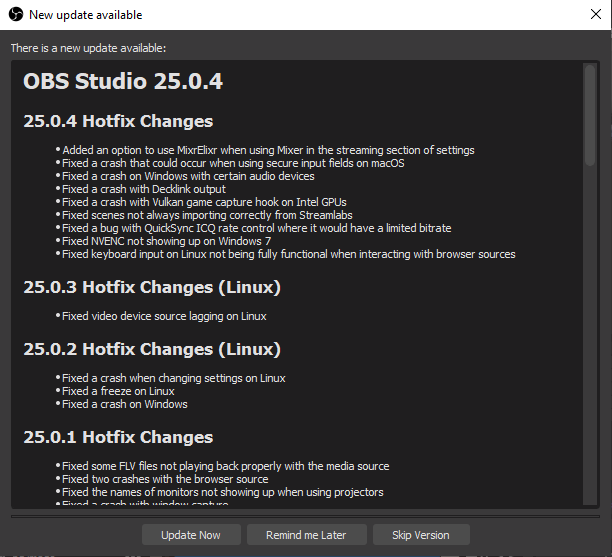
Been using OBS as a baseline
Ryochan7
on 20 Apr 2020
Might be a bit early but I have just pushed the changes to the main jay branch.
Ryochan7
on 21 Apr 2020
Since the RichTextBox control allows remote image loading, it is time to flood the Changelog with memes. :smile:
Ryochan7
on 23 Apr 2020
julianxhokaxhiu
on 23 Apr 2020
Now the application version number is encoded an an uint in the code. Now the application will only display Changelog entries for DS4Windows versions newer than the currently running instance.
I opted to use the Qt standard for encoding the version number which should be good enough. Thought about using a 64 bit integer but I don't think I need that large of a range. ProductPrivatePart will not be taken into account as it is not used currently. I can only ever see myself using that number if nightly builds were made publicly available. It would not be applicable for this portion either way.
ProductMajorPart is 16 bits (max 65535)
ProductMinorPart is 8 bits (max 255)
ProductBuildPart is 8 bits (max 255)
Ryochan7
on 27 Apr 2020
Guess is more than enough, though personally speaking I'm bumping a lot the minor part, while major is usually if I rewrite the overall code ( breaking change with previous iterations ).
Maybe on your case 255 is enough but I would go for 16 + 16 + 8 ( you usually don't produce 255 bugfix releases ).
Just my two cents :)
julianxhokaxhiu
on 27 Apr 2020
According to the docs, the MS standard uses 16 bits for each part making the combined value a 64 bit integer.
Qt represents the value as a 32 bit integer and I am more used to that standard. If nothing else, it would be more like 8 + 16 + 8 as major versions would be few and far between. Don't plan on even hitting a DS4Windows 3.0 release so a large range for the major part is not really needed. Hopefully I will get a new project out at some point.
Ryochan7
on 27 Apr 2020
Make sense then, 8 + 16 + 8 makes more sense to me!
julianxhokaxhiu
on 27 Apr 2020
Just tried out the MS standard and found out the JSON cannot represent a 64 bit integer directly using the number type. Looks like it can only support up to a 53 bit integer.
https://tqdev.com/2016-javascript-cannot-handle-64-bit-integers
A string has to be used to represent the 64 bit version in the JSON file. The value will have to be converted to an ulong in the C# code.
Ryochan7
on 28 Apr 2020
There is a workaround for that ( at least speaking about your library choice ): https://stackoverflow.com/a/37192747
TL-DR; Wrap your integer with quotes and make it a string. Parse it on the other side, and you get "native" BigInt support.
julianxhokaxhiu
on 28 Apr 2020
Didn't know that about workaround. Using that would have gotten rid of the EventHandler instances for updating the backend ulong numbers.
Not sure if I will keep it but I ended up just converting the individual parts to a JSON object. The associated C# class will then be responsible for converting that info to a ulong.
Ryochan7
on 28 Apr 2020
Related issues
 pralima87
·
6Comments
pralima87
·
6Comments
 OSRAGAMER
·
8Comments
pralima87
·
8Comments
OSRAGAMER
·
8Comments
pralima87
·
8Comments
 Darthagnon
·
4Comments
Darthagnon
·
4Comments
 dovahkiin98
·
6Comments
dovahkiin98
·
6Comments